Authentec Drivers

Not sure what to tell you. Did you restart after appliying the new drivers?
 

My Computer

Computer Manufacturer/Model Number
MPC Transport T2500 Laptop
OS
Windows 7 x64 (RTM via MSDN)
CPU
Intel Core 2 Duo T9300 (2.5 GHz)
Motherboard
MPC
Memory
4 GB SODIMMS (System Max)
Graphics Card(s)
nVidia 8600M GS 256MB
Sound Card
Realtek On-Board
Monitor(s) Displays
15.4" LCD with a Dell 2005FPW 20" attached
Screen Resolution
1680x1050 (15.4") and 1680x1050 (20")
Hard Drives
Toshiba 2.5" 320 GB 7200 RPM
Not sure what to tell you. Did you restart after appliying the new drivers?

Yes. I wonder if the drivers are not compatible with some other part of my laptop. Could that cause a problem?
 

My Computer

Computer Manufacturer/Model Number
ASUS M70Vm-C1
OS
Windows 7 Ultimate 64 bit
CPU
Intel T9400
Memory
4GB
Graphics Card(s)
Nvidia 9600 GM
Monitor(s) Displays
17" WUXGA
Hard Drives
(2) 500GB 7200Rpm Seagate
It is an Asus M70Vm-C1. I know I can still use the finger print reader to log into my dual boot under Vista 32, just not my W7 64.
 

My Computer

Computer Manufacturer/Model Number
ASUS M70Vm-C1
OS
Windows 7 Ultimate 64 bit
CPU
Intel T9400
Memory
4GB
Graphics Card(s)
Nvidia 9600 GM
Monitor(s) Displays
17" WUXGA
Hard Drives
(2) 500GB 7200Rpm Seagate
I assume you enrolled your account. I believe that if you manage the first time it enrolls, but just incase, check if there is an enrollment option.
 

My Computer

Computer Manufacturer/Model Number
MPC Transport T2500 Laptop
OS
Windows 7 x64 (RTM via MSDN)
CPU
Intel Core 2 Duo T9300 (2.5 GHz)
Motherboard
MPC
Memory
4 GB SODIMMS (System Max)
Graphics Card(s)
nVidia 8600M GS 256MB
Sound Card
Realtek On-Board
Monitor(s) Displays
15.4" LCD with a Dell 2005FPW 20" attached
Screen Resolution
1680x1050 (15.4") and 1680x1050 (20")
Hard Drives
Toshiba 2.5" 320 GB 7200 RPM
I assume you enrolled your account. I believe that if you manage the first time it enrolls, but just incase, check if there is an enrollment option.

It was saying I was already enrolled. I erased the data and re-enrolled, now it will scan..HURRAY!! I'm going to reboot and see if it works, wish me luck. :eek:
 

My Computer

Computer Manufacturer/Model Number
ASUS M70Vm-C1
OS
Windows 7 Ultimate 64 bit
CPU
Intel T9400
Memory
4GB
Graphics Card(s)
Nvidia 9600 GM
Monitor(s) Displays
17" WUXGA
Hard Drives
(2) 500GB 7200Rpm Seagate
well it didn't work, same error as before saying I have no authenticated prints enrolled, even though I do.
 

My Computer

Computer Manufacturer/Model Number
ASUS M70Vm-C1
OS
Windows 7 Ultimate 64 bit
CPU
Intel T9400
Memory
4GB
Graphics Card(s)
Nvidia 9600 GM
Monitor(s) Displays
17" WUXGA
Hard Drives
(2) 500GB 7200Rpm Seagate
Well it works within windows 7. Went into manage your fingerprint data, and it let me log into TrueSuite with my fingerprints, but I still can't use it to log into Windows 7. Damn.
 

My Computer

Computer Manufacturer/Model Number
ASUS M70Vm-C1
OS
Windows 7 Ultimate 64 bit
CPU
Intel T9400
Memory
4GB
Graphics Card(s)
Nvidia 9600 GM
Monitor(s) Displays
17" WUXGA
Hard Drives
(2) 500GB 7200Rpm Seagate
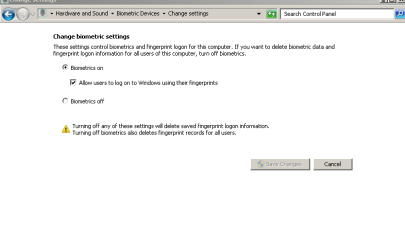
Check biometric setting (Start button "biometric" enter) on the left go to change biometric settings.
 

My Computer

Computer Manufacturer/Model Number
MPC Transport T2500 Laptop
OS
Windows 7 x64 (RTM via MSDN)
CPU
Intel Core 2 Duo T9300 (2.5 GHz)
Motherboard
MPC
Memory
4 GB SODIMMS (System Max)
Graphics Card(s)
nVidia 8600M GS 256MB
Sound Card
Realtek On-Board
Monitor(s) Displays
15.4" LCD with a Dell 2005FPW 20" attached
Screen Resolution
1680x1050 (15.4") and 1680x1050 (20")
Hard Drives
Toshiba 2.5" 320 GB 7200 RPM
This is what I have set.
 

Attachments

  • CaptureBsettings.PNG
    CaptureBsettings.PNG
    7.1 KB · Views: 60

My Computer

Computer Manufacturer/Model Number
ASUS M70Vm-C1
OS
Windows 7 Ultimate 64 bit
CPU
Intel T9400
Memory
4GB
Graphics Card(s)
Nvidia 9600 GM
Monitor(s) Displays
17" WUXGA
Hard Drives
(2) 500GB 7200Rpm Seagate
you should be good to go.
 

My Computer

Computer Manufacturer/Model Number
MPC Transport T2500 Laptop
OS
Windows 7 x64 (RTM via MSDN)
CPU
Intel Core 2 Duo T9300 (2.5 GHz)
Motherboard
MPC
Memory
4 GB SODIMMS (System Max)
Graphics Card(s)
nVidia 8600M GS 256MB
Sound Card
Realtek On-Board
Monitor(s) Displays
15.4" LCD with a Dell 2005FPW 20" attached
Screen Resolution
1680x1050 (15.4") and 1680x1050 (20")
Hard Drives
Toshiba 2.5" 320 GB 7200 RPM
You posted this earlier:

You can find the log in

C:\Program Files\WIN7TS\logging\TrueSuite.EnumWindowsUses.log

I just replaced the password with asterixes. This does effect how the program works.

PhreePhly"
I can't find that. How can I see if I have this? This looks like this might be my problem.
 

My Computer

Computer Manufacturer/Model Number
ASUS M70Vm-C1
OS
Windows 7 Ultimate 64 bit
CPU
Intel T9400
Memory
4GB
Graphics Card(s)
Nvidia 9600 GM
Monitor(s) Displays
17" WUXGA
Hard Drives
(2) 500GB 7200Rpm Seagate
It's like when I'm logging into windows initially, the scanner doesn't know where to look for the stored prints. I think it is looking for a file that doesn't exist or it is going to the wrong place. When I scan my prints, it has to make a file for them. Do you know what it would be named? If I could find that, and know the string for where the scanner is looking for the print data, I could change it to look in the right place.
 

My Computer

Computer Manufacturer/Model Number
ASUS M70Vm-C1
OS
Windows 7 Ultimate 64 bit
CPU
Intel T9400
Memory
4GB
Graphics Card(s)
Nvidia 9600 GM
Monitor(s) Displays
17" WUXGA
Hard Drives
(2) 500GB 7200Rpm Seagate
You posted this earlier:

You can find the log in

C:\Program Files\WIN7TS\logging\TrueSuite.EnumWindowsUses.log

I just replaced the password with asterixes. This does effect how the program works.

PhreePhly"
I can't find that. How can I see if I have this? This looks like this might be my problem.

That was a much earlier version of TrueSuite. They changed that.
 

My Computer

Computer Manufacturer/Model Number
MPC Transport T2500 Laptop
OS
Windows 7 x64 (RTM via MSDN)
CPU
Intel Core 2 Duo T9300 (2.5 GHz)
Motherboard
MPC
Memory
4 GB SODIMMS (System Max)
Graphics Card(s)
nVidia 8600M GS 256MB
Sound Card
Realtek On-Board
Monitor(s) Displays
15.4" LCD with a Dell 2005FPW 20" attached
Screen Resolution
1680x1050 (15.4") and 1680x1050 (20")
Hard Drives
Toshiba 2.5" 320 GB 7200 RPM
You posted this earlier:

You can find the log in

C:\Program Files\WIN7TS\logging\TrueSuite.EnumWindowsUses.log

I just replaced the password with asterixes. This does effect how the program works.

PhreePhly"
I can't find that. How can I see if I have this? This looks like this might be my problem.

That was a much earlier version of TrueSuite. They changed that.
Well that answers why I couldn't find it.
 

My Computer

Computer Manufacturer/Model Number
ASUS M70Vm-C1
OS
Windows 7 Ultimate 64 bit
CPU
Intel T9400
Memory
4GB
Graphics Card(s)
Nvidia 9600 GM
Monitor(s) Displays
17" WUXGA
Hard Drives
(2) 500GB 7200Rpm Seagate
It's like when I'm logging into windows initially, the scanner doesn't know where to look for the stored prints. I think it is looking for a file that doesn't exist or it is going to the wrong place. When I scan my prints, it has to make a file for them. Do you know what it would be named? If I could find that, and know the string for where the scanner is looking for the print data, I could change it to look in the right place.

I have no idea. Those types of files are well protected, because they are security files. It would not be easy to alter any paths for logging information.
 

My Computer

Computer Manufacturer/Model Number
MPC Transport T2500 Laptop
OS
Windows 7 x64 (RTM via MSDN)
CPU
Intel Core 2 Duo T9300 (2.5 GHz)
Motherboard
MPC
Memory
4 GB SODIMMS (System Max)
Graphics Card(s)
nVidia 8600M GS 256MB
Sound Card
Realtek On-Board
Monitor(s) Displays
15.4" LCD with a Dell 2005FPW 20" attached
Screen Resolution
1680x1050 (15.4") and 1680x1050 (20")
Hard Drives
Toshiba 2.5" 320 GB 7200 RPM
It's like when I'm logging into windows initially, the scanner doesn't know where to look for the stored prints. I think it is looking for a file that doesn't exist or it is going to the wrong place. When I scan my prints, it has to make a file for them. Do you know what it would be named? If I could find that, and know the string for where the scanner is looking for the print data, I could change it to look in the right place.

I have no idea. Those types of files are well protected, because they are security files. It would not be easy to alter any paths for logging information.

Well I guess I'm just screwed then. I appreciate all your help, just wish it had worked. :(
 

My Computer

Computer Manufacturer/Model Number
ASUS M70Vm-C1
OS
Windows 7 Ultimate 64 bit
CPU
Intel T9400
Memory
4GB
Graphics Card(s)
Nvidia 9600 GM
Monitor(s) Displays
17" WUXGA
Hard Drives
(2) 500GB 7200Rpm Seagate
This is a drastic option, but what about just wiping your drive and re-installing Win7? Save you data, favorites, etc, and re-install Win7. There is definitely an incompatibility somewhere in your setup, and finding it would be tough.

You said you are dual-booting Vista x32. Is there a particular reason for that? Is it for a specific app that doesn't run in Win 7? It could be that the dual boot is affecting the login. TrueSuite alters GINA, with is one of the first windows components to load during the boot sequence. GINA is responsible for secure login.
 

My Computer

Computer Manufacturer/Model Number
MPC Transport T2500 Laptop
OS
Windows 7 x64 (RTM via MSDN)
CPU
Intel Core 2 Duo T9300 (2.5 GHz)
Motherboard
MPC
Memory
4 GB SODIMMS (System Max)
Graphics Card(s)
nVidia 8600M GS 256MB
Sound Card
Realtek On-Board
Monitor(s) Displays
15.4" LCD with a Dell 2005FPW 20" attached
Screen Resolution
1680x1050 (15.4") and 1680x1050 (20")
Hard Drives
Toshiba 2.5" 320 GB 7200 RPM
This is a drastic option, but what about just wiping your drive and re-installing Win7? Save you data, favorites, etc, and re-install Win7. There is definitely an incompatibility somewhere in your setup, and finding it would be tough.

You said you are dual-booting Vista x32. Is there a particular reason for that? Is it for a specific app that doesn't run in Win 7? It could be that the dual boot is affecting the login. TrueSuite alters GINA, with is one of the first windows components to load during the boot sequence. GINA is responsible for secure login.
I kept the Vista 32 bit because I had some programs that weren't 64 bit compatible. When I installed W7 64, it was a clean install on a new HDD, my laptop has two 500GB drives and I was changing to 7200 RPM Seagates, so the W7 64 is on its own HDD.
 

My Computer

Computer Manufacturer/Model Number
ASUS M70Vm-C1
OS
Windows 7 Ultimate 64 bit
CPU
Intel T9400
Memory
4GB
Graphics Card(s)
Nvidia 9600 GM
Monitor(s) Displays
17" WUXGA
Hard Drives
(2) 500GB 7200Rpm Seagate
Well, if it were me, i would just re-install the OS. I have an external drive that I can copy my entire laptop drive info to (so it's backed up), then perform a fresh OS install. That new install should automatically install the newest AuthenTec drivers, clean user profiles, etc.
 

My Computer

Computer Manufacturer/Model Number
MPC Transport T2500 Laptop
OS
Windows 7 x64 (RTM via MSDN)
CPU
Intel Core 2 Duo T9300 (2.5 GHz)
Motherboard
MPC
Memory
4 GB SODIMMS (System Max)
Graphics Card(s)
nVidia 8600M GS 256MB
Sound Card
Realtek On-Board
Monitor(s) Displays
15.4" LCD with a Dell 2005FPW 20" attached
Screen Resolution
1680x1050 (15.4") and 1680x1050 (20")
Hard Drives
Toshiba 2.5" 320 GB 7200 RPM
Well, if it were me, i would just re-install the OS. I have an external drive that I can copy my entire laptop drive info to (so it's backed up), then perform a fresh OS install. That new install should automatically install the newest AuthenTec drivers, clean user profiles, etc.
I guess I could, but i have only had W7 64 for 1.5 months. Would have thought it would have found all the newest drivers then.
 

My Computer

Computer Manufacturer/Model Number
ASUS M70Vm-C1
OS
Windows 7 Ultimate 64 bit
CPU
Intel T9400
Memory
4GB
Graphics Card(s)
Nvidia 9600 GM
Monitor(s) Displays
17" WUXGA
Hard Drives
(2) 500GB 7200Rpm Seagate
Back
Top