Auto download of emails

RonBin79

New member
Member
VIP
Local time
6:19 PM
Messages
311
Location
West Sussex
When I first installed and started using Microsoft Outlook 2010 a couple of months ago, on opening Outlook all the emails in my Inbox at my provider came tumbling in now they don't. If I want my emails, I have to go to "Send and Receive all accounts"

For someunknown reason, my emails are no longer downloading automatically. Can anyone advise how to rectify this problem please?

Regards,

RonBin79:cry:
 

My Computer My Computer

At a glance

Windows Seven PremiumIntel Core i5-23008GB1GB ATI Raedon HD 5450
Computer Manufacturer/Model Number
Dell XP8300
OS
Windows Seven Premium
CPU
Intel Core i5-2300
Motherboard
Unknown
Memory
8GB
Graphics Card(s)
1GB ATI Raedon HD 5450
Sound Card
Integrated 7.1 with THX TrueStudio
Monitor(s) Displays
Dell 17"
Hard Drives
1 Terrabyte Serial ATA
Case
Dell (Metal)
Cooling
None
Keyboard
Dell
Mouse
Dell Laser
Internet Speed
2.8Gb

My Computer My Computer

At a glance

Windows 7 Home Premium 64bitIntel(R) Core(TM) i3-2120 CPU @ 3.30GHz3.00 GB(1) Intel(R) HD Graphics (2) VNC Mirror Driver
Computer type
PC/Desktop
Computer Manufacturer/Model Number
Packard Bell
OS
Windows 7 Home Premium 64bit
CPU
Intel(R) Core(TM) i3-2120 CPU @ 3.30GHz
Motherboard
Packard Bell IPISB-AG
Memory
3.00 GB
Graphics Card(s)
(1) Intel(R) HD Graphics (2) VNC Mirror Driver
Sound Card
Realtek High Definition Audio
Monitor(s) Displays
AIO LCD
Screen Resolution
1920 x 1080
Hard Drives
WDC WD10EADX-22TDHB0 ATA Device
Fixed hard disk media
4 partitions
931.51 GB
Keyboard
Wireless
Mouse
Wireless
Antivirus
Microsoft Security Essentials
Browser
IE; Firefox
Other Info
Also:
Samsung N220 Plus Netbook - Windows 7 Home
HP laptop
iPad 5
Irene,

Sad to say that the link you provided aplies to Outlook 2007. There are no "Tools" in Outlook 2010, well at least I can't see any but I do like your banner, especially the flag of St George, far better than stars and quarter moons...
 

My Computer My Computer

At a glance

Windows Seven PremiumIntel Core i5-23008GB1GB ATI Raedon HD 5450
Computer Manufacturer/Model Number
Dell XP8300
OS
Windows Seven Premium
CPU
Intel Core i5-2300
Motherboard
Unknown
Memory
8GB
Graphics Card(s)
1GB ATI Raedon HD 5450
Sound Card
Integrated 7.1 with THX TrueStudio
Monitor(s) Displays
Dell 17"
Hard Drives
1 Terrabyte Serial ATA
Case
Dell (Metal)
Cooling
None
Keyboard
Dell
Mouse
Dell Laser
Internet Speed
2.8Gb
Sad to say that the link you provided aplies to Outlook 2007. There are no "Tools" in Outlook 2010
Sorry, RonBin79, try the action below:
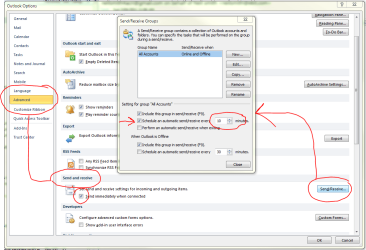
Open Outlook 2010, press and hold Ctrl + Alt + S and change the timing under the option ‘Schedule an automatic send/receive every’.
Click on Close to apply the settings and then restart Outlook

well at least I can't see any but I do like your banner, especially the flag of St George
Thanks Ronbin79. :D

irenec.gif
 

My Computer My Computer

At a glance

Windows 7 Home Premium 64bitIntel(R) Core(TM) i3-2120 CPU @ 3.30GHz3.00 GB(1) Intel(R) HD Graphics (2) VNC Mirror Driver
Computer type
PC/Desktop
Computer Manufacturer/Model Number
Packard Bell
OS
Windows 7 Home Premium 64bit
CPU
Intel(R) Core(TM) i3-2120 CPU @ 3.30GHz
Motherboard
Packard Bell IPISB-AG
Memory
3.00 GB
Graphics Card(s)
(1) Intel(R) HD Graphics (2) VNC Mirror Driver
Sound Card
Realtek High Definition Audio
Monitor(s) Displays
AIO LCD
Screen Resolution
1920 x 1080
Hard Drives
WDC WD10EADX-22TDHB0 ATA Device
Fixed hard disk media
4 partitions
931.51 GB
Keyboard
Wireless
Mouse
Wireless
Antivirus
Microsoft Security Essentials
Browser
IE; Firefox
Other Info
Also:
Samsung N220 Plus Netbook - Windows 7 Home
HP laptop
iPad 5
Hi,

In Outlook 2010 its basically the same as 2007 (as per Irene's reply). See this image from Outlook 2010.

Just saw Irene's shortcut - thats takes you to the same panel as shown below.

Regards,
Golden
 

Attachments

  • Capture.PNG
    Capture.PNG
    53.3 KB · Views: 16

My Computer My Computer

At a glance

Windows 10 Pro x64 ; Xubuntu x64Intel i7 860 @ 2.80 GHz O/C'ed to 4.0GHz16GB Corsair Vengance DDR3 @ 661 MHz Dual Cha...EVGA NVidia GTX 560 1024MB
Computer type
PC/Desktop
Computer Manufacturer/Model Number
Golden Mk. I.4
OS
Windows 10 Pro x64 ; Xubuntu x64
CPU
Intel i7 860 @ 2.80 GHz O/C'ed to 4.0GHz
Motherboard
Gigabyte P55A-UD3R Rev.1. Award BIOS F13
Memory
16GB Corsair Vengance DDR3 @ 661 MHz Dual Channel (9-9-9-24)
Graphics Card(s)
EVGA NVidia GTX 560 1024MB
Sound Card
Realtek Integrated
Monitor(s) Displays
Dual Samsung SyncMaster 2494HS
Screen Resolution
1920*1080 and 1920*1080
Hard Drives
1*Samsung 840 EVO 120GB SSD;
1*OCZ Vertex 2 60GB SSD;
2*Samsung F3 SpinPoint 1TB in RAID0;
1*Samsung F1 SpinPoint 1TB;
2*Western Digital 1TB External USB 3.0
1*Western Digital 500GB External USB 3.0
1*Seagate 500GB External USB 2.0
PSU
Thermaltake ToughPower QFan 750W
Case
Thermaltake Element S VK60001W2Z
Cooling
Corsair H60 Water Cooling, 2*230mm and 2*80mm case fans
Keyboard
Logitech G110
Mouse
Logitech MX518
Back
Top