
You are using an out of date browser. It may not display this or other websites correctly.
You should upgrade or use an alternative browser.
You should upgrade or use an alternative browser.
Auto-hide cursor?
- Thread starter hexagram
- Start date

- Local time
- 10:01 AM
- Messages
- 716
I am using ICONOID.
It is now listed as Win7 32 bit compatible.
It is not fully compatible with Win7 64 bit but the HIDE functions (the reason I like it) work fine.
You can read more at:
http://www.sillysot.com/
For the 64 bit issues follow this thread:
http://www.sevenforums.com/software/10233-iconoid-64-bit-install-problem.html
It is now listed as Win7 32 bit compatible.
It is not fully compatible with Win7 64 bit but the HIDE functions (the reason I like it) work fine.
You can read more at:
http://www.sillysot.com/
For the 64 bit issues follow this thread:
http://www.sevenforums.com/software/10233-iconoid-64-bit-install-problem.html
My Computer
- OS
- XP Pro & Vista Home Premium (x86); Windows Ultimate 7600 x64 Retail
- Local time
- 10:01 AM
- Messages
- 716
Thanks, but I didn't mean the desktop icons.
I was referring to the "mouse cursor" (pointer)
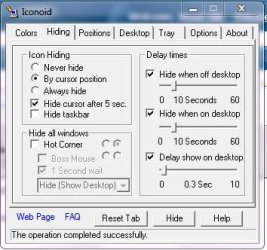
The application includes an option to hide the mouse cursor, the taskbar, the icons or any combination thereof....
My Computer
- OS
- XP Pro & Vista Home Premium (x86); Windows Ultimate 7600 x64 Retail
- Local time
- 10:01 AM
- Messages
- 716
It doesn't hide the cursor for me after checking the box for some reason... I'm using 32-bit RTM (7600)
Hmmm......
Are you leaving the cursor parked on an open Window or on the desktop? It will not hide it if it is parked on a Window (assumption is you are trying to do something).
Otherwise ensure that the "Hide by cursor position" box is checked and that the Delay Time boxes are checked and the time is set appropriately. It is a timed delay which starts when cursor movement stops. The cursor wiill disappear 5 seconds after that.
Are you looking for something like a single Hotkey - Mouse On/Off assignment? I will check my archives.
My Computer
- OS
- XP Pro & Vista Home Premium (x86); Windows Ultimate 7600 x64 Retail
- Local time
- 10:01 AM
- Messages
- 716
It's checked and I'm not leaving the cursor on any windows. Just the clean desktop.
I'm not looking for hiding with hot-key, I just want the mouse cursor to disappear after a certain amount of time.
Well, I have no explanation. It is woking for me with Win7 v7232 x64 bit. I check the boxes as shown, park the cursor on the desktop and 5 seconds after the icons/taskbar disappear the curso disappears.
Which version of Win7 are you running? Edit: Never Mind..... now I really don't understand why its not working.
My Computer
- OS
- XP Pro & Vista Home Premium (x86); Windows Ultimate 7600 x64 Retail
- Local time
- 10:01 AM
- Messages
- 716
My Computer
- OS
- XP Pro & Vista Home Premium (x86); Windows Ultimate 7600 x64 Retail
- Local time
- 10:01 AM
- Messages
- 716
settings are identical
Well Hexagram, I am stumped as to what the difference is except that I am running 64 bit 7232.
I have used the app in XP and Vista 32 bit for years.
In 5 or so days I will clean install the 64 bit Ultimate from Technet. Maybe there is something in the post 7232 version that is different.
Just for future reference what video card are you running?
My Computer
- OS
- XP Pro & Vista Home Premium (x86); Windows Ultimate 7600 x64 Retail

Similar threads
- Replies
- 0
- Views
- 3K


- Replies
- 2
- Views
- 8K
