
Automatic Driver Installation

AGlobalThreatsK

Computer Technician
Power User
Local time
4:14 PM
Messages
137
Just like Vista, I cannot seem to find any way to stop the automatic driver installation. I love how when I uninstall a driver/device in XP, on reboot it pops up asking me what to do. Vista and 7 on the other hand, take it upon themselves to reinstall Microsoft drivers on reboot no matter what I do. I've searched online and yielded no results, and searched here and didn't find anything either (Key words yield many results). Ideally I would prefer Vista/7 to just IGNORE the new device, so I can install the new one/update it myself. But if that can't be done, I'd at least like to be able to STOP the automatic driver installation. Please help :(

Theres gotta be some way, even if I have to edit something or add registry keys, I just want to stop the automatic microsoft driver installation.
 

My Computer

Computer Manufacturer/Model Number
Gateway P7801
OS
7 x64 + XP Pro x86
CPU
Undervolted T9900 3.06 GHz Core2Duo
Memory
4GB DDR3 1066MHz
Graphics Card(s)
NVIDIA 9800M GTS 1GB DDR3 1066 MHz
Monitor(s) Displays
17" WUXGA
Screen Resolution
1920x1200
Hard Drives
32GB Patriot V2 SSD w/ Hyperfast
PSU
9-cell Lithium Ion
Keyboard
Logitech Classic
Mouse
Logitech MX310
Internet Speed
slow AT&T
Other Info
Nlited XP x86 (540MB C:) locked with EWF
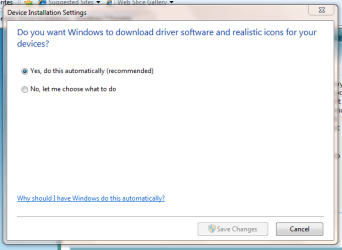
This might help.

If you type 'Device' in the start menu & click Change device installation settings.
Capture.PNG
 

My Computer

Computer Manufacturer/Model Number
Compaq Desktop
OS
Windows 7 Ultimate x64
CPU
AMD Sempron Dual Core
Memory
3GB
Graphics Card(s)
NVIDIA GeForce 6150SE nForce 430
Screen Resolution
1024x768
Hard Drives
150GB Sata
Thanks, I actually changed that before you posted but haven't changed any hardware since then (So I wasn't sure if that actually fixed it). If thats the fix then thank you very much! The device shortcut is nice too I didn't know about that.
 

My Computer

Computer Manufacturer/Model Number
Gateway P7801
OS
7 x64 + XP Pro x86
CPU
Undervolted T9900 3.06 GHz Core2Duo
Memory
4GB DDR3 1066MHz
Graphics Card(s)
NVIDIA 9800M GTS 1GB DDR3 1066 MHz
Monitor(s) Displays
17" WUXGA
Screen Resolution
1920x1200
Hard Drives
32GB Patriot V2 SSD w/ Hyperfast
PSU
9-cell Lithium Ion
Keyboard
Logitech Classic
Mouse
Logitech MX310
Internet Speed
slow AT&T
Other Info
Nlited XP x86 (540MB C:) locked with EWF
Nope that was not it, changed my video card and 7 installed a microsoft driver. I hate this damn auto-installation.
 

My Computer

Computer Manufacturer/Model Number
Gateway P7801
OS
7 x64 + XP Pro x86
CPU
Undervolted T9900 3.06 GHz Core2Duo
Memory
4GB DDR3 1066MHz
Graphics Card(s)
NVIDIA 9800M GTS 1GB DDR3 1066 MHz
Monitor(s) Displays
17" WUXGA
Screen Resolution
1920x1200
Hard Drives
32GB Patriot V2 SSD w/ Hyperfast
PSU
9-cell Lithium Ion
Keyboard
Logitech Classic
Mouse
Logitech MX310
Internet Speed
slow AT&T
Other Info
Nlited XP x86 (540MB C:) locked with EWF
It's a shame there's no way to change the default location to search for drivers in the group policy editor, or even to turn it off all together. I'll keep looking :p
 

My Computer

Computer Manufacturer/Model Number
Compaq Desktop
OS
Windows 7 Ultimate x64
CPU
AMD Sempron Dual Core
Memory
3GB
Graphics Card(s)
NVIDIA GeForce 6150SE nForce 430
Screen Resolution
1024x768
Hard Drives
150GB Sata
I believe that setting only works for downloading drivers or not.

The drivers already onboard are the ones she likes to keep installing.

If you can find the offenders in here, you can move them somewhere 7 won't look.

\Windows\System32\DriverStore\FileRepository
 

My Computers

System One System Two

  • Computer type
    PC/Desktop
    OS
    7 X64
    CPU
    i5 8400
    Motherboard
    gigabyte b365m ds3h
    Memory
    2x8gb 3200mhz
    Hard Drives
    various
    PSU
    pure power 11 400w cm
    Case
    Coolermaster
    Cooling
    cryorig m9i
  • Computer type
    PC/Desktop
    OS
    7x64
    CPU
    g5400
    Motherboard
    ga b365m ds3h
    Memory
    8gb ddr4 2400
    PSU
    xfx pro 450w
Yea theres 4 nv_disp folders in there

Kind of ridiculous if theres no option to disable this for vista or 7.
 

My Computer

Computer Manufacturer/Model Number
Gateway P7801
OS
7 x64 + XP Pro x86
CPU
Undervolted T9900 3.06 GHz Core2Duo
Memory
4GB DDR3 1066MHz
Graphics Card(s)
NVIDIA 9800M GTS 1GB DDR3 1066 MHz
Monitor(s) Displays
17" WUXGA
Screen Resolution
1920x1200
Hard Drives
32GB Patriot V2 SSD w/ Hyperfast
PSU
9-cell Lithium Ion
Keyboard
Logitech Classic
Mouse
Logitech MX310
Internet Speed
slow AT&T
Other Info
Nlited XP x86 (540MB C:) locked with EWF
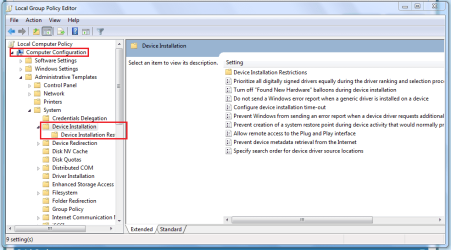
Just as a thought, could any of these be of any use in the Group Policy Editor?
Capture.PNG
 

My Computer

Computer Manufacturer/Model Number
Compaq Desktop
OS
Windows 7 Ultimate x64
CPU
AMD Sempron Dual Core
Memory
3GB
Graphics Card(s)
NVIDIA GeForce 6150SE nForce 430
Screen Resolution
1024x768
Hard Drives
150GB Sata
Nice find, I see a couple things in the Device Installation Restrictions key for prevention, although it looks like its not going to be as simple and easy as XP. The new hardware wizard popup was so perfect..
 

My Computer

Computer Manufacturer/Model Number
Gateway P7801
OS
7 x64 + XP Pro x86
CPU
Undervolted T9900 3.06 GHz Core2Duo
Memory
4GB DDR3 1066MHz
Graphics Card(s)
NVIDIA 9800M GTS 1GB DDR3 1066 MHz
Monitor(s) Displays
17" WUXGA
Screen Resolution
1920x1200
Hard Drives
32GB Patriot V2 SSD w/ Hyperfast
PSU
9-cell Lithium Ion
Keyboard
Logitech Classic
Mouse
Logitech MX310
Internet Speed
slow AT&T
Other Info
Nlited XP x86 (540MB C:) locked with EWF
Very True, if i knew more about the Group Policy Editor then i'd be able to explain more :p
 

My Computer

Computer Manufacturer/Model Number
Compaq Desktop
OS
Windows 7 Ultimate x64
CPU
AMD Sempron Dual Core
Memory
3GB
Graphics Card(s)
NVIDIA GeForce 6150SE nForce 430
Screen Resolution
1024x768
Hard Drives
150GB Sata
That seemed to be all for device installation, I didn't see much regarding "drivers" unless that is what they're talking about. Some of the options even said the listed devices will uninstall on next reboot, so I assume that means you can't even install drivers? The "Specify Driver Source Search Order" just lets you decide if/when to search Windows Update for drivers, it doesn't have any option for anything besides Windows Update.
 

My Computer

Computer Manufacturer/Model Number
Gateway P7801
OS
7 x64 + XP Pro x86
CPU
Undervolted T9900 3.06 GHz Core2Duo
Memory
4GB DDR3 1066MHz
Graphics Card(s)
NVIDIA 9800M GTS 1GB DDR3 1066 MHz
Monitor(s) Displays
17" WUXGA
Screen Resolution
1920x1200
Hard Drives
32GB Patriot V2 SSD w/ Hyperfast
PSU
9-cell Lithium Ion
Keyboard
Logitech Classic
Mouse
Logitech MX310
Internet Speed
slow AT&T
Other Info
Nlited XP x86 (540MB C:) locked with EWF
You'll have to take them out of there - then uninstall the driverrs - reinstall your preferred ones.
 

My Computers

System One System Two

  • Computer type
    PC/Desktop
    OS
    7 X64
    CPU
    i5 8400
    Motherboard
    gigabyte b365m ds3h
    Memory
    2x8gb 3200mhz
    Hard Drives
    various
    PSU
    pure power 11 400w cm
    Case
    Coolermaster
    Cooling
    cryorig m9i
  • Computer type
    PC/Desktop
    OS
    7x64
    CPU
    g5400
    Motherboard
    ga b365m ds3h
    Memory
    8gb ddr4 2400
    PSU
    xfx pro 450w
You'll have to take them out of there - then uninstall the driverrs - reinstall your preferred ones.

Thanks for the info, I'll definitely give that a shot next time I install specific drivers.
 

My Computer

Computer Manufacturer/Model Number
Gateway P7801
OS
7 x64 + XP Pro x86
CPU
Undervolted T9900 3.06 GHz Core2Duo
Memory
4GB DDR3 1066MHz
Graphics Card(s)
NVIDIA 9800M GTS 1GB DDR3 1066 MHz
Monitor(s) Displays
17" WUXGA
Screen Resolution
1920x1200
Hard Drives
32GB Patriot V2 SSD w/ Hyperfast
PSU
9-cell Lithium Ion
Keyboard
Logitech Classic
Mouse
Logitech MX310
Internet Speed
slow AT&T
Other Info
Nlited XP x86 (540MB C:) locked with EWF
I had to disable this feature, it was a real pain even in vista I had to disable this.

Its a great feature if it works out, but windows kept installing updated drivers in this case for my video card, the problem was the newest drivers created havoc with my games and video viewing.

I was able to disengage the function and install manually the needed drivers without any hassle.
 

My Computer

OS
Windows 7 Ultimate x64
Yes I'm dealing with this problem mainly with video cards as well (In Vista and 7).

How did you disable it?
 

My Computer

Computer Manufacturer/Model Number
Gateway P7801
OS
7 x64 + XP Pro x86
CPU
Undervolted T9900 3.06 GHz Core2Duo
Memory
4GB DDR3 1066MHz
Graphics Card(s)
NVIDIA 9800M GTS 1GB DDR3 1066 MHz
Monitor(s) Displays
17" WUXGA
Screen Resolution
1920x1200
Hard Drives
32GB Patriot V2 SSD w/ Hyperfast
PSU
9-cell Lithium Ion
Keyboard
Logitech Classic
Mouse
Logitech MX310
Internet Speed
slow AT&T
Other Info
Nlited XP x86 (540MB C:) locked with EWF

My Computer

Computer Manufacturer/Model Number
Gateway P7801
OS
7 x64 + XP Pro x86
CPU
Undervolted T9900 3.06 GHz Core2Duo
Memory
4GB DDR3 1066MHz
Graphics Card(s)
NVIDIA 9800M GTS 1GB DDR3 1066 MHz
Monitor(s) Displays
17" WUXGA
Screen Resolution
1920x1200
Hard Drives
32GB Patriot V2 SSD w/ Hyperfast
PSU
9-cell Lithium Ion
Keyboard
Logitech Classic
Mouse
Logitech MX310
Internet Speed
slow AT&T
Other Info
Nlited XP x86 (540MB C:) locked with EWF
Friend, if you hate this feature install XP with an antique graphic card that has in-box XP driver and you will see XP does the same **** as Vista/7. If you are having driver problems with graphic cards just do this (it will clean off ATi/Nvidia's graphics driver off windows, so it can't install the driver automatically :) ):
STEP 1
Get Driver Cleaner from: Guru3D - Driver Sweeper

STEP 2
Install it, go to safe mode, lauch driver sweeper, If you are using Nvidia/ATi graphics card and having problems with it, check the Nvidia/ATi graphics checkbox, analyse, clean, reboot, now windows won't install its in-box driver...

STEP 3
Install a driver version that you want...

PS: This program saved my life for like 4 times with other people's computer that just won't boot up...
 

My Computer

Computer Manufacturer/Model Number
Custom
OS
Windows 7 32-bit; no 64 coz its a P4 478
CPU
Pentium 4 3.00 GHZ HT Socket 478 :(
Motherboard
MSI PM8M-V
Memory
1 GB Kingston DDR-400
Graphics Card(s)
HIS X1650 PRO AGP :(
Sound Card
Intergrated Realtek AC'97
Monitor(s) Displays
17" CRT :(
Screen Resolution
Native: 1027*768 MAX: 1280*1024 :(
Hard Drives
80 GB Maxtor
500 GB Seagate (7200.11)(T.T its now RMA)
Vista/7 still installs a default driver, even in safe mode. I've been using driver sweeper for a while, you must also clean the physx drivers for nvidia. I'm going to try SIW2's idea next time I need to change anything.

I don't use antique video cards, XP never installs any driver for anything I use, unless it's a simple usb device. I always get the new hardware installation wizard asking me what to do. I guess Microsoft just put many, many more drivers preloaded in their newer operating systems, with no way to simply disable the auto-installations.
 

My Computer

Computer Manufacturer/Model Number
Gateway P7801
OS
7 x64 + XP Pro x86
CPU
Undervolted T9900 3.06 GHz Core2Duo
Memory
4GB DDR3 1066MHz
Graphics Card(s)
NVIDIA 9800M GTS 1GB DDR3 1066 MHz
Monitor(s) Displays
17" WUXGA
Screen Resolution
1920x1200
Hard Drives
32GB Patriot V2 SSD w/ Hyperfast
PSU
9-cell Lithium Ion
Keyboard
Logitech Classic
Mouse
Logitech MX310
Internet Speed
slow AT&T
Other Info
Nlited XP x86 (540MB C:) locked with EWF

My Computer

OS
Windows 7 Ultimate x64
okay but if you use driver sweeper with my instructions, it will remove the in-built Windows driver(that has been haunting you). That way it will go on9 and search for a driver from Windows update (so disconnect your internet to avoid the auto update from haunting you now... then right click computer>Properties>Advanced System Settings>Hardware>Device Instaltaion Settings>No,let me choose...>Never install driver>Save Settings, now you can go online, get the driver YOU want and install it.

PS: its actually nice to have all the drivers you need built in the OS, but not when it doesn't work...:(

Driver sweeper worked for me when Nvidia graphic driver installation screws up :shock:... then I clean them off form safe mode and try a re-install.:D

REMEMBER: Driver sweeper is like a tool which removes every SINGLE trace [ALMOST] of a driver whether its a Windows in-built driver of an updated driver....

EDIT: Hmmm something seems wrong, but did you try the LATEST driver sweeper & what is the hardware thats causing the issue??? BAsically SIW2's idea is removing the in-built Windows' driver manually... driver sweeper will do that automatically... i think....
 
Last edited:

My Computer

Computer Manufacturer/Model Number
Custom
OS
Windows 7 32-bit; no 64 coz its a P4 478
CPU
Pentium 4 3.00 GHZ HT Socket 478 :(
Motherboard
MSI PM8M-V
Memory
1 GB Kingston DDR-400
Graphics Card(s)
HIS X1650 PRO AGP :(
Sound Card
Intergrated Realtek AC'97
Monitor(s) Displays
17" CRT :(
Screen Resolution
Native: 1027*768 MAX: 1280*1024 :(
Hard Drives
80 GB Maxtor
500 GB Seagate (7200.11)(T.T its now RMA)
Back
Top