
- Local time
- 7:48 AM
- Messages
- 137
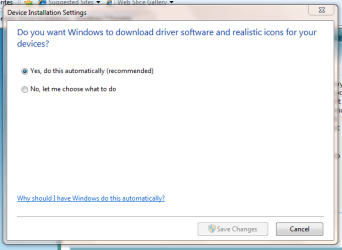
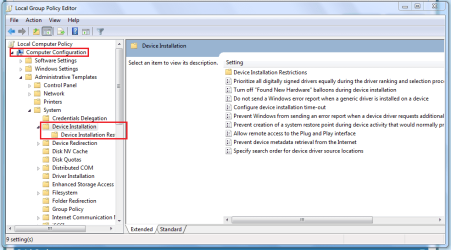
Just like Vista, I cannot seem to find any way to stop the automatic driver installation. I love how when I uninstall a driver/device in XP, on reboot it pops up asking me what to do. Vista and 7 on the other hand, take it upon themselves to reinstall Microsoft drivers on reboot no matter what I do. I've searched online and yielded no results, and searched here and didn't find anything either (Key words yield many results). Ideally I would prefer Vista/7 to just IGNORE the new device, so I can install the new one/update it myself. But if that can't be done, I'd at least like to be able to STOP the automatic driver installation. Please help 
Theres gotta be some way, even if I have to edit something or add registry keys, I just want to stop the automatic microsoft driver installation.
Theres gotta be some way, even if I have to edit something or add registry keys, I just want to stop the automatic microsoft driver installation.
My Computer
- Computer Manufacturer/Model Number
- Gateway P7801
- OS
- 7 x64 + XP Pro x86
- CPU
- Undervolted T9900 3.06 GHz Core2Duo
- Memory
- 4GB DDR3 1066MHz
- Graphics Card(s)
- NVIDIA 9800M GTS 1GB DDR3 1066 MHz
- Monitor(s) Displays
- 17" WUXGA
- Screen Resolution
- 1920x1200
- Hard Drives
- 32GB Patriot V2 SSD w/ Hyperfast
- PSU
- 9-cell Lithium Ion
- Keyboard
- Logitech Classic
- Mouse
- Logitech MX310
- Internet Speed
- slow AT&T
- Other Info
- Nlited XP x86 (540MB C:) locked with EWF



 ):
):


