
AutoPlay - Enable or Disable

How to Enable or Disable AutoPlay for Drives in Vista, Widows 7, and Windows 8

   Information
AutoPlay lets you choose an action for different kinds of media when you plug in a device, insert media, or receive content from another person using Tap and Send (Windows 8). You can set AutoPlay to open different kinds of content, such as photos, music, and video on different kinds of media, such as drives, CDs, or DVDs. For example, you can use AutoPlay to select an app that will automatically open photos on a removable drive when you plug it into your PC. With AutoPlay, you don't have to open the same app or reselect preferences every time you plug in a certain device.


This tutorial will show you how to enable or disable AutoPlay for either all drives or CD/DVD and removable media drives for all or specific users in Vista, Windows 7, and Windows 8.

You must be logged in as an administrator to be able to do the steps in this tutorial.

   Note
When a CD/DVD disc is inserted or a USB drive is connected to your system, Windows looks in the root directory of the new disc or drive for a file named autorun.inf. If found, Windows executes the instructions (keys) in that file.

For more about: Autorun vs Autoplay – What’s the Difference?

Since Windows 7, Vista, and XP, two important changes were made to help improve security:

NOTE: For more on this, see: AutoRun changes in Windows 7 - Security Research & Defense - Site Home - TechNet Blogs

  1. AutoPlay will no longer support the AutoRun functionality for non-optical removable media. In other words, AutoPlay will still work for CD/DVDs but it will no longer work for USB drives. For example, if an infected USB drive is inserted on a machine then the AutoRun task will not be displayed. This will block the increasing social engineer threat highlighted in the SIR. The dialogs below highlight the difference that users will see after this change. Before the change, the malware is leveraging AutoRun (box in red) to confuse the user. After the change, AutoRun will no longer work, so the AutoPlay options are safe.
  2. A dialog change was done to clarify that the program being executed is running from external media.
By default in Windows 7, Vista, and XP now, the only [Autorun] keys available for USB/removable drives are below. The rest of the keys are ignored.
  • label - This key is responsible for displaying a custom name (label) for a CD/DVD or USB drive in Computer when a CD/DVD is inserted or a USB drive is connected.
  • icon - This key is responsible for displaying a custom icon for a CD/DVD or USB drive in Computer when a CD/DVD is inserted or a USB drive is connected.
EXAMPLE: AutoPlay pop-up
NOTE: These are just examples of the AutoPlay pop-up dialog that you will see when you connect say a USB flash drive or a DVD. The options you have in the AutoPlay window will depend on what you connected or inserted, and what action you have selected for it in the AutoPlay settings below.
Example.jpg


OPTION ONE

Enable or Disable AutoPlay using a REG File Download


NOTE: This option affects all users on the computer.
1. Do step 2, 3, or 4 below for what you would like to do.

2. To Enable AutoPlay
NOTE: This is the default setting.
A) If not already, you'll need to turn On AutoPlay in Windows 7 or Windows 8.

B) Click/tap on the Download button below to download the file below, and go to step 5 below.
Enable_AutoPlay.reg

Download


3. To Disable AutoPlay for All Drives
A) Click/tap on the Download button below to download the file below, and go to step 5 below.
Disable_AutoPlay_for_All_Drives.reg

Download


4. To Disable AutoPlay for CD/DVD and Removable Media Drives for Only Current User
A) If not already, you'll need to turn On AutoPlay in Windows 7 or Windows 8.

B) Click/tap on the Download button below to download the file below, and go to step 5 below.
Disable_AutoPlay_for_Removable_Media_Drives.reg

Download


5. Save the .reg file to the desktop.

6. Double click/tap on the downloaded .reg file to merge it.

7. Click/tap on Run, Yes (UAC-Windows 7/8) or Continue (UAC-Vista), Yes, and OK when prompted.

8. When done, you can delete the downloaded .reg file if you like.

9. Log off and log on, or restart the computer to fully apply.


OPTION TWO

Enable or Disable AutoPlay in the Local Group Policy Editor


1. Open the all users, specific users or groups, or all users except administrators Local Group Policy Editor for how you want this policy to be applied.

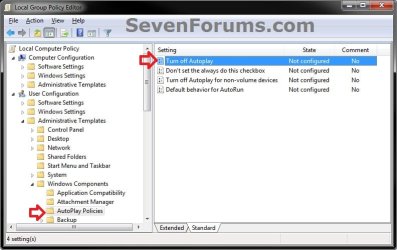
2. In the left pane, click/tap on to expand User Configuration, Administrative Templates, Windows Components, and AutoPlay Policies. (see screenshot below)
GPEDIT-1.jpg
3. In the right pane, double click/tap on Turn off Autoplay, and click/tap on Edit. (see screenshot above)

4. Do step 5, 6, or 7 below for what you would like to do.

5. To Enable AutoPlay
A) If not already, you'll need to turn On AutoPlay in Windows 7 or Windows 8.

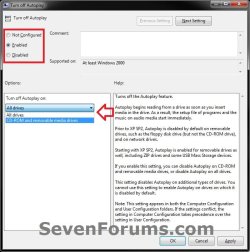
B) Select (dot) either Not Configured or Disabled, and go to step 8 below. (see screenshot below step 8)
NOTE: Not Configured is the default setting.
6. To Disable AutoPlay for All Drives
A) Select (dot) Enabled, and select All drives in the "Options" drop down menu, and go to step 8 below. (see screenshot below step 8)
7. To Disable AutoPlay Only for CD/DVD and Removable Media Drives
A) If not already, you'll need to turn On AutoPlay in Windows 7 or Windows 8.

B) Select (dot) Enabled, and select CD-ROM and removable media drives in the "Options" drop down menu, and go to step 8 below.(see screenshot below step 8)
8. Click/tap on OK. (see screenshot below)
GPEDIT-2.jpg
9. Close the Local Group Policy Editor window.
That's it,
Shawn


Attachments

Last edited:
what is the difference here and control panel > Autoplay
 

My Computer

OS
Windows 7 Pro 64bit SP1
Hello Sonshi,

They both affect the same settings, but this tutorial will allow you to enable or disable these items in AutoPlay to allow or prevent all or specific users from being able to set these items from the Control Panel -> AutoPlay.
 

My Computer

Computer type
PC/Desktop
Computer Manufacturer/Model Number
Self built custom
OS
64-bit Windows 11 Pro for Workstations
CPU
Intel i7-8700K OC'd to 5 GHz
Motherboard
ASUS ROG Maximus XI Formula Z390
Memory
64 GB (4x16GB) G.SKILL TridentZ RGB DDR4 3600 MHz
Graphics Card(s)
ASUS ROG-STRIX-GTX1080TI-O11G-GAMING
Sound Card
Integrated
Monitor(s) Displays
2 x Samsung Odyssey G7 27"
Screen Resolution
2560x1440
Hard Drives
1TB Samsung 990 PRO M.2,
4TB Samsung 990 PRO PRO M.2,
TerraMaster F8 SSD Plus NAS
PSU
Seasonic Prime Titanium 850W
Case
Thermaltake Core P3
Cooling
Corsair Hydro H115i
Keyboard
Logitech wireless K800
Mouse
Logitech MX Master 4
Internet Speed
2 Gb/s Download and 100 Mb/s Upload
Antivirus
Malwarebyte Anti-Malware Premium
Browser
Google Chrome
Other Info
Logitech Z625 speaker system,
Logitech BRIO 4K Pro webcam,
HP Color LaserJet Pro MFP M477fdn,
APC SMART-UPS RT 1000 XL - SURT1000XLI,
Galaxy S23 Plus phone
hi thanks!
but is there a way to disable only the autoplay for hard disk usb?

greetings
 

My Computer

Computer type
PC/Desktop
OS
windows 7 ultimate 64bit

My Computer

Computer type
PC/Desktop
Computer Manufacturer/Model Number
Self built custom
OS
64-bit Windows 11 Pro for Workstations
CPU
Intel i7-8700K OC'd to 5 GHz
Motherboard
ASUS ROG Maximus XI Formula Z390
Memory
64 GB (4x16GB) G.SKILL TridentZ RGB DDR4 3600 MHz
Graphics Card(s)
ASUS ROG-STRIX-GTX1080TI-O11G-GAMING
Sound Card
Integrated
Monitor(s) Displays
2 x Samsung Odyssey G7 27"
Screen Resolution
2560x1440
Hard Drives
1TB Samsung 990 PRO M.2,
4TB Samsung 990 PRO PRO M.2,
TerraMaster F8 SSD Plus NAS
PSU
Seasonic Prime Titanium 850W
Case
Thermaltake Core P3
Cooling
Corsair Hydro H115i
Keyboard
Logitech wireless K800
Mouse
Logitech MX Master 4
Internet Speed
2 Gb/s Download and 100 Mb/s Upload
Antivirus
Malwarebyte Anti-Malware Premium
Browser
Google Chrome
Other Info
Logitech Z625 speaker system,
Logitech BRIO 4K Pro webcam,
HP Color LaserJet Pro MFP M477fdn,
APC SMART-UPS RT 1000 XL - SURT1000XLI,
Galaxy S23 Plus phone
Hello drugo,

You might check in your AutoPlay settings while the USB drive is connected to see of there may be a "Removable drive" option listed to set AutoPlay to "Take no action" for it.

http://www.sevenforums.com/tutorials/174838-autoplay-turn-off.html

Hope this helps, :)
Shawn
hi shawn
do you mean when i turn on my usb hard disk? i have no option to turn off autoplay
in control panel -> autoplay i have a list about dvd and cd not usb the hard disks

is there a utility like xp to disable autorun for some devices letters?

thanks
 

My Computer

Computer type
PC/Desktop
OS
windows 7 ultimate 64bit

My Computer

Computer type
PC/Desktop
Computer Manufacturer/Model Number
Self built custom
OS
64-bit Windows 11 Pro for Workstations
CPU
Intel i7-8700K OC'd to 5 GHz
Motherboard
ASUS ROG Maximus XI Formula Z390
Memory
64 GB (4x16GB) G.SKILL TridentZ RGB DDR4 3600 MHz
Graphics Card(s)
ASUS ROG-STRIX-GTX1080TI-O11G-GAMING
Sound Card
Integrated
Monitor(s) Displays
2 x Samsung Odyssey G7 27"
Screen Resolution
2560x1440
Hard Drives
1TB Samsung 990 PRO M.2,
4TB Samsung 990 PRO PRO M.2,
TerraMaster F8 SSD Plus NAS
PSU
Seasonic Prime Titanium 850W
Case
Thermaltake Core P3
Cooling
Corsair Hydro H115i
Keyboard
Logitech wireless K800
Mouse
Logitech MX Master 4
Internet Speed
2 Gb/s Download and 100 Mb/s Upload
Antivirus
Malwarebyte Anti-Malware Premium
Browser
Google Chrome
Other Info
Logitech Z625 speaker system,
Logitech BRIO 4K Pro webcam,
HP Color LaserJet Pro MFP M477fdn,
APC SMART-UPS RT 1000 XL - SURT1000XLI,
Galaxy S23 Plus phone
Sorry Sean if this has been answered, but just to clarify:

Is there any benefit to disabling Autoplay or autorun from a security standpoint? Will disabling one or the other, or both be beneficial? Or will the Win7 built in security prompt suffice?
 

My Computer

Computer type
PC/Desktop
Computer Manufacturer/Model Number
Custom Asus Build
OS
Microsoft Windows 8.1 Pro 64-bit
CPU
Intel(R) Core(TM) i3-4130 CPU @ 3.40GHz
Motherboard
B85M-E
Memory
8.00 GB
Graphics Card(s)
None
Sound Card
Realtek High Definition Audio
Monitor(s) Displays
Asus 23.6" Monitor
Screen Resolution
1920 x 1080 x 32 bits (4294967296 colors) @ 60 Hz
Hard Drives
INTEL SSDSC2BW180A4
Samsung SSD 840 PRO Series
PSU
Seasonic S12II-380Bronze
Case
Lian Li
Cooling
Fan, Passive
Keyboard
Logitech K120
Mouse
Microsoft Touch Mouse
Internet Speed
4ms Ping, 19.0 Mbps Download, 19.0 Mbps Upload
Antivirus
Eset Endpoint
Browser
Internet Explorer, Chrome
Hey Dusty,

Autorun has already been disabled for everything except DVDs in Windows 7, so not much to worry about there.

For better security, you could have AutoPlay set to "Ask me everytime" if you prefer to keep AutoPlay enabled. This way nothing will just automatically open.

Hope this helps. :)
 

My Computer

Computer type
PC/Desktop
Computer Manufacturer/Model Number
Self built custom
OS
64-bit Windows 11 Pro for Workstations
CPU
Intel i7-8700K OC'd to 5 GHz
Motherboard
ASUS ROG Maximus XI Formula Z390
Memory
64 GB (4x16GB) G.SKILL TridentZ RGB DDR4 3600 MHz
Graphics Card(s)
ASUS ROG-STRIX-GTX1080TI-O11G-GAMING
Sound Card
Integrated
Monitor(s) Displays
2 x Samsung Odyssey G7 27"
Screen Resolution
2560x1440
Hard Drives
1TB Samsung 990 PRO M.2,
4TB Samsung 990 PRO PRO M.2,
TerraMaster F8 SSD Plus NAS
PSU
Seasonic Prime Titanium 850W
Case
Thermaltake Core P3
Cooling
Corsair Hydro H115i
Keyboard
Logitech wireless K800
Mouse
Logitech MX Master 4
Internet Speed
2 Gb/s Download and 100 Mb/s Upload
Antivirus
Malwarebyte Anti-Malware Premium
Browser
Google Chrome
Other Info
Logitech Z625 speaker system,
Logitech BRIO 4K Pro webcam,
HP Color LaserJet Pro MFP M477fdn,
APC SMART-UPS RT 1000 XL - SURT1000XLI,
Galaxy S23 Plus phone
Thanks!
 

My Computer

Computer type
PC/Desktop
Computer Manufacturer/Model Number
Custom Asus Build
OS
Microsoft Windows 8.1 Pro 64-bit
CPU
Intel(R) Core(TM) i3-4130 CPU @ 3.40GHz
Motherboard
B85M-E
Memory
8.00 GB
Graphics Card(s)
None
Sound Card
Realtek High Definition Audio
Monitor(s) Displays
Asus 23.6" Monitor
Screen Resolution
1920 x 1080 x 32 bits (4294967296 colors) @ 60 Hz
Hard Drives
INTEL SSDSC2BW180A4
Samsung SSD 840 PRO Series
PSU
Seasonic S12II-380Bronze
Case
Lian Li
Cooling
Fan, Passive
Keyboard
Logitech K120
Mouse
Microsoft Touch Mouse
Internet Speed
4ms Ping, 19.0 Mbps Download, 19.0 Mbps Upload
Antivirus
Eset Endpoint
Browser
Internet Explorer, Chrome
You're welcome. :)
 

My Computer

Computer type
PC/Desktop
Computer Manufacturer/Model Number
Self built custom
OS
64-bit Windows 11 Pro for Workstations
CPU
Intel i7-8700K OC'd to 5 GHz
Motherboard
ASUS ROG Maximus XI Formula Z390
Memory
64 GB (4x16GB) G.SKILL TridentZ RGB DDR4 3600 MHz
Graphics Card(s)
ASUS ROG-STRIX-GTX1080TI-O11G-GAMING
Sound Card
Integrated
Monitor(s) Displays
2 x Samsung Odyssey G7 27"
Screen Resolution
2560x1440
Hard Drives
1TB Samsung 990 PRO M.2,
4TB Samsung 990 PRO PRO M.2,
TerraMaster F8 SSD Plus NAS
PSU
Seasonic Prime Titanium 850W
Case
Thermaltake Core P3
Cooling
Corsair Hydro H115i
Keyboard
Logitech wireless K800
Mouse
Logitech MX Master 4
Internet Speed
2 Gb/s Download and 100 Mb/s Upload
Antivirus
Malwarebyte Anti-Malware Premium
Browser
Google Chrome
Other Info
Logitech Z625 speaker system,
Logitech BRIO 4K Pro webcam,
HP Color LaserJet Pro MFP M477fdn,
APC SMART-UPS RT 1000 XL - SURT1000XLI,
Galaxy S23 Plus phone
i am still confused
plz tell
is it enough to disable autorun
or
i have to disable autoplay along with it
becoz half of the antivirus have a option in tools menu (like kaspersky) to disable autorun only

so is there any risk leaving autoplay enable..??
 

My Computer

Computer type
Laptop
Computer Manufacturer/Model Number
Dell
OS
Windows 7 Ultimate 32bit

My Computer

Computer type
PC/Desktop
Computer Manufacturer/Model Number
Self built custom
OS
64-bit Windows 11 Pro for Workstations
CPU
Intel i7-8700K OC'd to 5 GHz
Motherboard
ASUS ROG Maximus XI Formula Z390
Memory
64 GB (4x16GB) G.SKILL TridentZ RGB DDR4 3600 MHz
Graphics Card(s)
ASUS ROG-STRIX-GTX1080TI-O11G-GAMING
Sound Card
Integrated
Monitor(s) Displays
2 x Samsung Odyssey G7 27"
Screen Resolution
2560x1440
Hard Drives
1TB Samsung 990 PRO M.2,
4TB Samsung 990 PRO PRO M.2,
TerraMaster F8 SSD Plus NAS
PSU
Seasonic Prime Titanium 850W
Case
Thermaltake Core P3
Cooling
Corsair Hydro H115i
Keyboard
Logitech wireless K800
Mouse
Logitech MX Master 4
Internet Speed
2 Gb/s Download and 100 Mb/s Upload
Antivirus
Malwarebyte Anti-Malware Premium
Browser
Google Chrome
Other Info
Logitech Z625 speaker system,
Logitech BRIO 4K Pro webcam,
HP Color LaserJet Pro MFP M477fdn,
APC SMART-UPS RT 1000 XL - SURT1000XLI,
Galaxy S23 Plus phone
How do I disable AutoPlay for USB devices but leave it enabled for DVD drive?
 

My Computer

Computer type
PC/Desktop
Computer Manufacturer/Model Number
Custom Build
OS
Windows 10 Pro x64
CPU
AMD FX-8350
Motherboard
Gigabyte 970A-UD3P
Memory
Kingston Hyperx 2x8GB
Graphics Card(s)
MSI GeForce GTX 1060 6GB
Monitor(s) Displays
Dell U2415
Screen Resolution
1920x1200
Hard Drives
Kingston HyperX 3K 120GB (OS)
Samsung 850 EVO 250GB
Hitachi Deskstar 4TB
PSU
EVGA SuperNOVA 650 G2
Case
Aerocool XPredator Black Edition
Cooling
Scythe Mugen 4
Keyboard
Razer Blackwidow Ultimate Stealth 2014
Mouse
Razer Naga Chroma
Internet Speed
100 Mbit/s
Antivirus
Comodo Internet Security Premium
Browser
Mozilla Firefox

My Computer

Computer type
PC/Desktop
Computer Manufacturer/Model Number
Self built custom
OS
64-bit Windows 11 Pro for Workstations
CPU
Intel i7-8700K OC'd to 5 GHz
Motherboard
ASUS ROG Maximus XI Formula Z390
Memory
64 GB (4x16GB) G.SKILL TridentZ RGB DDR4 3600 MHz
Graphics Card(s)
ASUS ROG-STRIX-GTX1080TI-O11G-GAMING
Sound Card
Integrated
Monitor(s) Displays
2 x Samsung Odyssey G7 27"
Screen Resolution
2560x1440
Hard Drives
1TB Samsung 990 PRO M.2,
4TB Samsung 990 PRO PRO M.2,
TerraMaster F8 SSD Plus NAS
PSU
Seasonic Prime Titanium 850W
Case
Thermaltake Core P3
Cooling
Corsair Hydro H115i
Keyboard
Logitech wireless K800
Mouse
Logitech MX Master 4
Internet Speed
2 Gb/s Download and 100 Mb/s Upload
Antivirus
Malwarebyte Anti-Malware Premium
Browser
Google Chrome
Other Info
Logitech Z625 speaker system,
Logitech BRIO 4K Pro webcam,
HP Color LaserJet Pro MFP M477fdn,
APC SMART-UPS RT 1000 XL - SURT1000XLI,
Galaxy S23 Plus phone
Well I meant all USB devices including USB flash drives and USB hard drives.
 

My Computer

Computer type
PC/Desktop
Computer Manufacturer/Model Number
Custom Build
OS
Windows 10 Pro x64
CPU
AMD FX-8350
Motherboard
Gigabyte 970A-UD3P
Memory
Kingston Hyperx 2x8GB
Graphics Card(s)
MSI GeForce GTX 1060 6GB
Monitor(s) Displays
Dell U2415
Screen Resolution
1920x1200
Hard Drives
Kingston HyperX 3K 120GB (OS)
Samsung 850 EVO 250GB
Hitachi Deskstar 4TB
PSU
EVGA SuperNOVA 650 G2
Case
Aerocool XPredator Black Edition
Cooling
Scythe Mugen 4
Keyboard
Razer Blackwidow Ultimate Stealth 2014
Mouse
Razer Naga Chroma
Internet Speed
100 Mbit/s
Antivirus
Comodo Internet Security Premium
Browser
Mozilla Firefox
You could turn them off in your AutoPlay settings, by selecting what action you want for them.
 

My Computer

Computer type
PC/Desktop
Computer Manufacturer/Model Number
Self built custom
OS
64-bit Windows 11 Pro for Workstations
CPU
Intel i7-8700K OC'd to 5 GHz
Motherboard
ASUS ROG Maximus XI Formula Z390
Memory
64 GB (4x16GB) G.SKILL TridentZ RGB DDR4 3600 MHz
Graphics Card(s)
ASUS ROG-STRIX-GTX1080TI-O11G-GAMING
Sound Card
Integrated
Monitor(s) Displays
2 x Samsung Odyssey G7 27"
Screen Resolution
2560x1440
Hard Drives
1TB Samsung 990 PRO M.2,
4TB Samsung 990 PRO PRO M.2,
TerraMaster F8 SSD Plus NAS
PSU
Seasonic Prime Titanium 850W
Case
Thermaltake Core P3
Cooling
Corsair Hydro H115i
Keyboard
Logitech wireless K800
Mouse
Logitech MX Master 4
Internet Speed
2 Gb/s Download and 100 Mb/s Upload
Antivirus
Malwarebyte Anti-Malware Premium
Browser
Google Chrome
Other Info
Logitech Z625 speaker system,
Logitech BRIO 4K Pro webcam,
HP Color LaserJet Pro MFP M477fdn,
APC SMART-UPS RT 1000 XL - SURT1000XLI,
Galaxy S23 Plus phone
I don't see anything USB related in AutoPlay settings. For now I disabled AutoPlay entirely and created a shortcut in quick launch bar for DVD drive.
 

My Computer

Computer type
PC/Desktop
Computer Manufacturer/Model Number
Custom Build
OS
Windows 10 Pro x64
CPU
AMD FX-8350
Motherboard
Gigabyte 970A-UD3P
Memory
Kingston Hyperx 2x8GB
Graphics Card(s)
MSI GeForce GTX 1060 6GB
Monitor(s) Displays
Dell U2415
Screen Resolution
1920x1200
Hard Drives
Kingston HyperX 3K 120GB (OS)
Samsung 850 EVO 250GB
Hitachi Deskstar 4TB
PSU
EVGA SuperNOVA 650 G2
Case
Aerocool XPredator Black Edition
Cooling
Scythe Mugen 4
Keyboard
Razer Blackwidow Ultimate Stealth 2014
Mouse
Razer Naga Chroma
Internet Speed
100 Mbit/s
Antivirus
Comodo Internet Security Premium
Browser
Mozilla Firefox
Usually when you have the USB devices connected, they may be listed under "Devices" in AutoPlay settings.
 

My Computer

Computer type
PC/Desktop
Computer Manufacturer/Model Number
Self built custom
OS
64-bit Windows 11 Pro for Workstations
CPU
Intel i7-8700K OC'd to 5 GHz
Motherboard
ASUS ROG Maximus XI Formula Z390
Memory
64 GB (4x16GB) G.SKILL TridentZ RGB DDR4 3600 MHz
Graphics Card(s)
ASUS ROG-STRIX-GTX1080TI-O11G-GAMING
Sound Card
Integrated
Monitor(s) Displays
2 x Samsung Odyssey G7 27"
Screen Resolution
2560x1440
Hard Drives
1TB Samsung 990 PRO M.2,
4TB Samsung 990 PRO PRO M.2,
TerraMaster F8 SSD Plus NAS
PSU
Seasonic Prime Titanium 850W
Case
Thermaltake Core P3
Cooling
Corsair Hydro H115i
Keyboard
Logitech wireless K800
Mouse
Logitech MX Master 4
Internet Speed
2 Gb/s Download and 100 Mb/s Upload
Antivirus
Malwarebyte Anti-Malware Premium
Browser
Google Chrome
Other Info
Logitech Z625 speaker system,
Logitech BRIO 4K Pro webcam,
HP Color LaserJet Pro MFP M477fdn,
APC SMART-UPS RT 1000 XL - SURT1000XLI,
Galaxy S23 Plus phone
There's only a camera and two phones that were connected before. My USB HDD or flash drives don't show there even when turned on.
 

My Computer

Computer type
PC/Desktop
Computer Manufacturer/Model Number
Custom Build
OS
Windows 10 Pro x64
CPU
AMD FX-8350
Motherboard
Gigabyte 970A-UD3P
Memory
Kingston Hyperx 2x8GB
Graphics Card(s)
MSI GeForce GTX 1060 6GB
Monitor(s) Displays
Dell U2415
Screen Resolution
1920x1200
Hard Drives
Kingston HyperX 3K 120GB (OS)
Samsung 850 EVO 250GB
Hitachi Deskstar 4TB
PSU
EVGA SuperNOVA 650 G2
Case
Aerocool XPredator Black Edition
Cooling
Scythe Mugen 4
Keyboard
Razer Blackwidow Ultimate Stealth 2014
Mouse
Razer Naga Chroma
Internet Speed
100 Mbit/s
Antivirus
Comodo Internet Security Premium
Browser
Mozilla Firefox
Back
Top