Hi,
Yesterday I spent the morning fiddling around with Windows a bit - I've been on W7 since not too long after it came out, and have never ever used "Restore Previous Version", so I decided to disable it using gpedit. Then, I noticed I'd got a virus (which had disabled my antivirus - hooray!) and so spent the afternoon fixing that.
The virus is gone now, no problem, but during either (a) the gpedit, (b) a result of the virus, or (c) a result of something else, my autorun icons have disappeared.
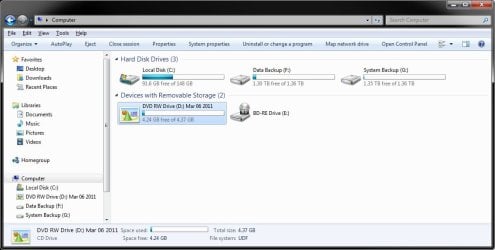
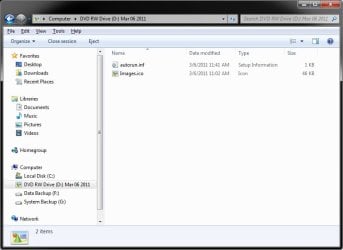
I have a USB external hard drive with an autorun.inf giving ICON=Samsung.exe and it's always worked wonderfully on Win 7. Now, it just has a standard hard drive icon. Likewise, ALL CDs and DVDs I put into my DVD drive just have the standard CD-in-drive icon, rather than their custom icons.
I know I can (and have) associate a custom icon with the external USB drive via the registry, so it has its icon back, but I'd like to have the DVD drive display the icons for the DVDs.
I have absolutely no idea what could have done this - I've spent the morning checking if I could have done anything silly in gpedit but can't see anything. Does anyone have any ideas?
Thanks,
Edit: I've tried doing simple things like resetting the icon cache, and no luck.
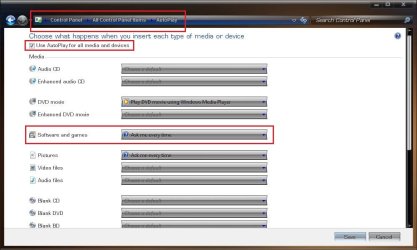
Also, it's clearly Autoplay related - when I put in a CD/DVD, the autorun window detects the drive as pictures (usually) and suggests I open them with Picasa or Import using Windows. It completely ignores the autorun.inf file, it seems.
Yesterday I spent the morning fiddling around with Windows a bit - I've been on W7 since not too long after it came out, and have never ever used "Restore Previous Version", so I decided to disable it using gpedit. Then, I noticed I'd got a virus (which had disabled my antivirus - hooray!) and so spent the afternoon fixing that.
The virus is gone now, no problem, but during either (a) the gpedit, (b) a result of the virus, or (c) a result of something else, my autorun icons have disappeared.
I have a USB external hard drive with an autorun.inf giving ICON=Samsung.exe and it's always worked wonderfully on Win 7. Now, it just has a standard hard drive icon. Likewise, ALL CDs and DVDs I put into my DVD drive just have the standard CD-in-drive icon, rather than their custom icons.
I know I can (and have) associate a custom icon with the external USB drive via the registry, so it has its icon back, but I'd like to have the DVD drive display the icons for the DVDs.
I have absolutely no idea what could have done this - I've spent the morning checking if I could have done anything silly in gpedit but can't see anything. Does anyone have any ideas?
Thanks,
Edit: I've tried doing simple things like resetting the icon cache, and no luck.
Also, it's clearly Autoplay related - when I put in a CD/DVD, the autorun window detects the drive as pictures (usually) and suggests I open them with Picasa or Import using Windows. It completely ignores the autorun.inf file, it seems.
Last edited:
My Computer
At a glance
Windows 7 Ultimate x64Intel Core 2 Duo SL9400 (1.86GHz)4 GB DDR2Intel GMA 4500MHD
- Computer Manufacturer/Model Number
- HP EliteBook 2530p
- OS
- Windows 7 Ultimate x64
- CPU
- Intel Core 2 Duo SL9400 (1.86GHz)
- Motherboard
- Intel GS45 Express
- Memory
- 4 GB DDR2
- Graphics Card(s)
- Intel GMA 4500MHD
- Monitor(s) Displays
- 1
- Screen Resolution
- 1280x800
- Hard Drives
- 1 120GB
- Mouse
- Touchpad, touchstick & Logitech wireless laser
- Internet Speed
- 100Mbit

 )
)