Autorun on USB drives

This is very old style, but works. This way a mounted Truecrypt volume is just a doubleclick further than with Autoplay.

Create run.bat in the USB stick root and edit this one line into it:

Code:
open=TrueCrypt\TrueCrypt.exe /q background /m rm /v "Data.tc"
This line expects that Truecrypt has been installed (as with the Traveler wizard) in the root in a 'Truecrypt' folder. Rename Data.tc according to the name of your encrypted volume.

Now as Windows 7 opens the 'Open to view files' option, choose that, then double click run.bat to open the Truecrypt password screen.

Even though I don't actually use this software, that's a good point. You'd probably want to create a batch file for unmounting the drive as well, so you can avoid opening up the program etc..
 

My Computer My Computer

Computer Manufacturer/Model Number
fakeasdf (c)
OS
Win 7 Pro x64 x 3, Win 7 Pro x86, Ubuntu 9.04
CPU
2 x C2D [email protected] Ghz, C2D [email protected] ghz, P4 @ 3.0 ghz,
Motherboard
GIGABYTE GA-EP35-DS3P LGA 775 Intel P35 ATX Dynamic Energy S
Memory
2x8 GB Corsair, 4GB Kingston, 2GB GSkill
Graphics Card(s)
ATI Radeon 4670 1 GB DDR3, 2600 Pro, 2400 Pro, Intel 965
Sound Card
I don't care... Connected using Optical on Media Center
Monitor(s) Displays
Panasonic Viera 50" Plasma, 2x 19"
Screen Resolution
1080P, 1280x1024's
Hard Drives
4 Terabytes
Case
Antec P182 Gun Metal Black
Internet Speed
20 Mbit U/D
Can the above autorunner.exe file be made to run on an x64 machine? I tried the above program, but it didn't seem to work when I inserted my USB drive. Only autoplay showed.
 

My Computer My Computer

OS
Windows 7
Can the above autorunner.exe file be made to run on an x64 machine? I tried the above program, but it didn't seem to work when I inserted my USB drive. Only autoplay showed.


It's built to run as x64 when in x64 environment, and x86 when in x86 environment. I just tested it on my x64 machine and it popped up the messagebox asking if I wanted to run the thing. It searches for autorun.inf in the usb drive and then asks. Post the contents of your autorun.inf file and I'll look into it...
 
Last edited:

My Computer My Computer

Computer Manufacturer/Model Number
fakeasdf (c)
OS
Win 7 Pro x64 x 3, Win 7 Pro x86, Ubuntu 9.04
CPU
2 x C2D [email protected] Ghz, C2D [email protected] ghz, P4 @ 3.0 ghz,
Motherboard
GIGABYTE GA-EP35-DS3P LGA 775 Intel P35 ATX Dynamic Energy S
Memory
2x8 GB Corsair, 4GB Kingston, 2GB GSkill
Graphics Card(s)
ATI Radeon 4670 1 GB DDR3, 2600 Pro, 2400 Pro, Intel 965
Sound Card
I don't care... Connected using Optical on Media Center
Monitor(s) Displays
Panasonic Viera 50" Plasma, 2x 19"
Screen Resolution
1080P, 1280x1024's
Hard Drives
4 Terabytes
Case
Antec P182 Gun Metal Black
Internet Speed
20 Mbit U/D
Thanks for looking into this for me! Here are the contents of my autorun.inf file:

[autorun]
label=TrueCrypt Traveler Disk
icon=TrueCrypt\TrueCrypt.exe
action=Mount TrueCrypt volume
open=TrueCrypt\TrueCrypt.exe /q background /e /c y /m rm /v "Truecrypt\Volume.tc"
shell\start=Start TrueCrypt Background Task
shell\start\command=TrueCrypt\TrueCrypt.exe
shell\dismount=Dismount all TrueCrypt volumes
shell\dismount\command=TrueCrypt\TrueCrypt.exe /q /d
 

My Computer My Computer

OS
Windows 7
Thanks for looking into this for me! Here are the contents of my autorun.inf file:

[autorun]
label=TrueCrypt Traveler Disk
icon=TrueCrypt\TrueCrypt.exe
action=Mount TrueCrypt volume
open=TrueCrypt\TrueCrypt.exe /q background /e /c y /m rm /v "Truecrypt\Volume.tc"
shell\start=Start TrueCrypt Background Task
shell\start\command=TrueCrypt\TrueCrypt.exe
shell\dismount=Dismount all TrueCrypt volumes
shell\dismount\command=TrueCrypt\TrueCrypt.exe /q /d


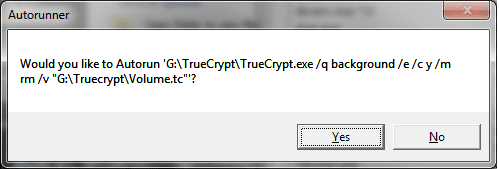
I just pasted that into my autorun.inf and it popped up the pop up, are you looking for the right thing? And I'm running 7 x64 Professional. Here's a pic of what it does...
 

Attachments

  • autorunner.png
    autorunner.png
    7.7 KB · Views: 62

My Computer My Computer

Computer Manufacturer/Model Number
fakeasdf (c)
OS
Win 7 Pro x64 x 3, Win 7 Pro x86, Ubuntu 9.04
CPU
2 x C2D [email protected] Ghz, C2D [email protected] ghz, P4 @ 3.0 ghz,
Motherboard
GIGABYTE GA-EP35-DS3P LGA 775 Intel P35 ATX Dynamic Energy S
Memory
2x8 GB Corsair, 4GB Kingston, 2GB GSkill
Graphics Card(s)
ATI Radeon 4670 1 GB DDR3, 2600 Pro, 2400 Pro, Intel 965
Sound Card
I don't care... Connected using Optical on Media Center
Monitor(s) Displays
Panasonic Viera 50" Plasma, 2x 19"
Screen Resolution
1080P, 1280x1024's
Hard Drives
4 Terabytes
Case
Antec P182 Gun Metal Black
Internet Speed
20 Mbit U/D
Unfortunately, I don't receive that window when I plug my USB drive into my computer. I only receive the autoplay window. I'm also running Windows 7 Pro.
 

My Computer My Computer

OS
Windows 7
I just want to make sure... the only thing I should need is the Autorunner.exe file that you attached to your 07-11-2009 post, right?
 

My Computer My Computer

OS
Windows 7
Yes... Is this a thumb drive, or an actual external USB drive... There's a possibility it show's up differently and my thing isn't checking it...

I'm specifically checking
if (drive.DriveType == DriveType.Removable)
which should include an external hard drive, but I'm not sure...
 

My Computer My Computer

Computer Manufacturer/Model Number
fakeasdf (c)
OS
Win 7 Pro x64 x 3, Win 7 Pro x86, Ubuntu 9.04
CPU
2 x C2D [email protected] Ghz, C2D [email protected] ghz, P4 @ 3.0 ghz,
Motherboard
GIGABYTE GA-EP35-DS3P LGA 775 Intel P35 ATX Dynamic Energy S
Memory
2x8 GB Corsair, 4GB Kingston, 2GB GSkill
Graphics Card(s)
ATI Radeon 4670 1 GB DDR3, 2600 Pro, 2400 Pro, Intel 965
Sound Card
I don't care... Connected using Optical on Media Center
Monitor(s) Displays
Panasonic Viera 50" Plasma, 2x 19"
Screen Resolution
1080P, 1280x1024's
Hard Drives
4 Terabytes
Case
Antec P182 Gun Metal Black
Internet Speed
20 Mbit U/D
Maybe this is the problem. I'm using a portable 30GB 2.5" mobile hard drive that I connect to my computer via USB.
 

My Computer My Computer

OS
Windows 7
Maybe this is the problem. I'm using a portable 30GB 2.5" mobile hard drive that I connect to my computer via USB.


I'll have to test it at home, I don't have an external with me at work... Kind of weird, I might be able to grab someone else' external...
 

My Computer My Computer

Computer Manufacturer/Model Number
fakeasdf (c)
OS
Win 7 Pro x64 x 3, Win 7 Pro x86, Ubuntu 9.04
CPU
2 x C2D [email protected] Ghz, C2D [email protected] ghz, P4 @ 3.0 ghz,
Motherboard
GIGABYTE GA-EP35-DS3P LGA 775 Intel P35 ATX Dynamic Energy S
Memory
2x8 GB Corsair, 4GB Kingston, 2GB GSkill
Graphics Card(s)
ATI Radeon 4670 1 GB DDR3, 2600 Pro, 2400 Pro, Intel 965
Sound Card
I don't care... Connected using Optical on Media Center
Monitor(s) Displays
Panasonic Viera 50" Plasma, 2x 19"
Screen Resolution
1080P, 1280x1024's
Hard Drives
4 Terabytes
Case
Antec P182 Gun Metal Black
Internet Speed
20 Mbit U/D
Fakeasdf, I'm wondering if you've had you a chance to check the Autorunner.exe program with an external hard drive. Thanks.
 

My Computer My Computer

OS
Windows 7
Sorry, the holidays came and I was busy entertaining guests... I'll check it sometime tonight and let ya know..
 

My Computer My Computer

Computer Manufacturer/Model Number
fakeasdf (c)
OS
Win 7 Pro x64 x 3, Win 7 Pro x86, Ubuntu 9.04
CPU
2 x C2D [email protected] Ghz, C2D [email protected] ghz, P4 @ 3.0 ghz,
Motherboard
GIGABYTE GA-EP35-DS3P LGA 775 Intel P35 ATX Dynamic Energy S
Memory
2x8 GB Corsair, 4GB Kingston, 2GB GSkill
Graphics Card(s)
ATI Radeon 4670 1 GB DDR3, 2600 Pro, 2400 Pro, Intel 965
Sound Card
I don't care... Connected using Optical on Media Center
Monitor(s) Displays
Panasonic Viera 50" Plasma, 2x 19"
Screen Resolution
1080P, 1280x1024's
Hard Drives
4 Terabytes
Case
Antec P182 Gun Metal Black
Internet Speed
20 Mbit U/D
Sorry, the holidays came and I was busy entertaining guests... I'll check it sometime tonight and let ya know..


Yeah, it turns out that the removable usb drives show up as fixed devices and not removable drives. I'll have it just check any attached drive that isn't a cd rom... Since someone might not want that, I'll leave the other exe...

Code:
using System;
using System.Collections.Generic;
using System.Linq;
using System.Windows.Forms;
using System.IO;
using Microsoft.Win32;


namespace Autorunner
{
    public class RegKeysAndDrives
    {
        public RegistryKey basekey;
        public String subkey;
        public String driveLetter;
        public RegKeysAndDrives(RegistryKey _basekey, String _subkey, String _driveLetter)
        {
            basekey = _basekey;
            subkey = _subkey;
            driveLetter = _driveLetter;
        }
    }

    static class Program
    {
        /// <summary>
        /// The main entry point for the application.
        /// </summary>
        /// 
        public static List<RegKeysAndDrives> toDelete;

        [STAThread]
        static void Main()
        {

            //keep track of drives we've already ran, Must compare strings, DriveInfo only compares using the Object
            List<String> haveRun = new List<String>();
            toDelete = new List<RegKeysAndDrives>();
            while (true)
            {
                //let's check every 2 seconds...  We don't want to slow down the machine!
                System.Threading.Thread.Sleep(2000);

                try
                {
                    //Get current drives
                    DriveInfo[] drives = DriveInfo.GetDrives();
                    List<DriveInfo> curDrives = new List<DriveInfo>(drives);

                    //remove any drives from haverun that don't exist anymore
                    for (int i = 0; i < haveRun.Count; i++)
                    {
                        if (DriveInfoContains(curDrives, haveRun[i]) == false)
                        {
                            for (int j = 0; j < toDelete.Count; j++)
                            {
                                if (toDelete[j].driveLetter == haveRun[i])
                                {
                                    try
                                    {
                                        toDelete[j].basekey.DeleteSubKeyTree(toDelete[j].subkey);
                                    }
                                    catch (Exception ex)
                                    {
                                        //subkey doesn't exist anymore :P
                                    }

                                    toDelete.RemoveAt(j);
                                    j--;
                                }
                            }
                            haveRun.RemoveAt(i);
                            i--;
                        }
                    }

                    //let's remove our haveRuns from drives, no point in checking them again...
                    for (int i = 0; i < curDrives.Count; i++)
                    {
                        if (haveRun.Contains(curDrives[i].RootDirectory.Name) == true)
                        {
                            curDrives.RemoveAt(i);
                            i--;
                        }
                    }


                    //Check any new Removable type drives, and run them...
                    foreach (DriveInfo drive in curDrives)
                    {
                        if (drive.DriveType != DriveType.CDRom)
                        {
                            if (drive.IsReady)
                            {
                                try
                                {
                                    AutoRunDrive(drive);
                                }
                                catch (Exception ex)
                                {
                                    //I don't care if it crashes trying to launch it, let's just let it go...
                                }
                                haveRun.Add(drive.RootDirectory.Name);
                            }
                        }
                    }
                }
                catch (Exception ex)
                {
                    //Let's not crash if something gets unplugged while we're accessing it...
                }
            }

        }

        private static bool DriveInfoContains(List<DriveInfo> curDrives, string haveRunDriveName)
        {
            foreach (DriveInfo di in curDrives)
            {
                if (di.RootDirectory.Name == haveRunDriveName)
                    return true;
            }
            return false;
        }

        private static void AutoRunDrive(DriveInfo drive)
        {
            bool doAutoRun = false;
            String root = drive.RootDirectory.Name;
            String autorun = root + "autorun.inf";
            if (File.Exists(autorun))
            {
                StreamReader sr = new StreamReader(autorun);
                while (!sr.EndOfStream)
                {
                    String line = sr.ReadLine();
                    if (line.ToLower().StartsWith("open"))
                    {
                        int idxEquals = line.IndexOf('=');
                        String toRun = root + line.Substring(idxEquals + 1);

                        //This isn't a good guess of where the args should be, but I don't care
                        int spaceArgs = toRun.IndexOf(' ');
                        String args = toRun.Substring(spaceArgs + 1);
                        args = FixArgs(args, root, toRun.ToLower().Contains("truecrypt"));
                        toRun = toRun.Substring(0, spaceArgs);
                        if (MessageBox.Show("Would you like to Autorun '" + toRun + " " + args + "'?", "Autorunner", MessageBoxButtons.YesNo) == DialogResult.Yes)
                        {
                            System.Diagnostics.Process.Start(toRun, args);
                            doAutoRun = true;
                        }
                    }
                    else if (doAutoRun && line.ToLower().StartsWith("shell"))
                    {
                        int equalidx = line.IndexOf("=");
                        String keyName;
                        String subkey;
                        String value;

                        if (equalidx == -1)
                            continue;

                        keyName = line.Substring(5, equalidx - 5);
                        value = line.Substring(equalidx + 1);

                        if (keyName.Contains("command"))
                        {
                            value = root + value;
                        }

                        RegistryKey baseKey = Registry.CurrentUser;
                        subkey = "Software\\Classes\\Drive\\shell" + keyName;
                        RegistryKey key = baseKey.CreateSubKey(subkey);
                        key.SetValue("", value);
                        toDelete.Add(new RegKeysAndDrives(baseKey, subkey, root));

                    }
                }
                sr.Close();
            }
        }

        private static string FixArgs(string args, string root, bool isTrueCrypt)
        {
            if (isTrueCrypt)
            {
                int idxv = args.IndexOf("/v");
                int idxfile = args.IndexOf("\"", idxv);
                return args.Substring(0, idxfile + 1) + root + args.Substring(idxfile + 1);
            }
            return args;

        }
    }
}

 

My Computer My Computer

Computer Manufacturer/Model Number
fakeasdf (c)
OS
Win 7 Pro x64 x 3, Win 7 Pro x86, Ubuntu 9.04
CPU
2 x C2D [email protected] Ghz, C2D [email protected] ghz, P4 @ 3.0 ghz,
Motherboard
GIGABYTE GA-EP35-DS3P LGA 775 Intel P35 ATX Dynamic Energy S
Memory
2x8 GB Corsair, 4GB Kingston, 2GB GSkill
Graphics Card(s)
ATI Radeon 4670 1 GB DDR3, 2600 Pro, 2400 Pro, Intel 965
Sound Card
I don't care... Connected using Optical on Media Center
Monitor(s) Displays
Panasonic Viera 50" Plasma, 2x 19"
Screen Resolution
1080P, 1280x1024's
Hard Drives
4 Terabytes
Case
Antec P182 Gun Metal Black
Internet Speed
20 Mbit U/D
Dismount

Hi,

There is any way to autodismount the volume previous to remove the USB, because it says the volume is in use.

Thanks, Ariel
 

My Computer My Computer

OS
Windows 7 Ultimate x64
CPU
Core 2 Duo Quad Core
Motherboard
ASUS
Memory
2 GB
Hard Drives
2 x SATA 2
Back
Top