
avast anti-virus

murphy25

New member
Power User
Local time
11:22 PM
Messages
179
i have used the free version for a good while now with whatever OS i have installed and never really had any problems but after an update earlier it went a bit nuts my memory usage stayed the same but it was using my cpu at 100% couldnt do anything it happened just after i started downloading the xp mode torrent from solar i think maybe it was updating as i started downloading (im not blaming solar for anything) so just in case i stopped the torrent deleted it went into appdata and removed all .torrent files as well exited utorrent and ran ccleaner plus the reg cleaner i have rebooted as well and i thought great everything started up and cpu usage was back to normal then after a minute or so cpu would go back to 100% its avast thats causing it because if i right click on the icon and stop protection cpu drops back down to normal which i had to do to open avast and try updating it did download a small update and install it and everything seems ok so i think it was a dodgy update from avast.
now the only problem i do have is i cant run a boot scan its shaded out(see pic) i did run a scan and it found nothing but am still unable to run a boot scan i am using the 7100 x64 if that makes any difference because i just checked a laptop i installed with x86 and the boot scan is not shaded out.
could someone who is running the 7100 x64 and avast home(the free one) just have a quick look and check if its shaded out please.
thanks
 

Attachments
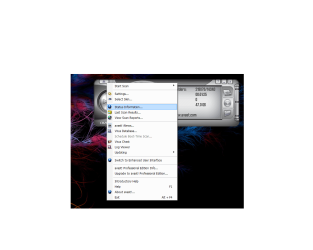
  • avast1.png
    avast1.png
    66.2 KB · Views: 154

My Computer

OS
windows7 7100 x64
CPU
amd athlon 64 3500+
Motherboard
asus a8n sli deluxe
Memory
2gb
Graphics Card(s)
nvidia 7800gt
Screen Resolution
1280x1024
Hello Murphy,

Unfortunately, the boot scan options only works when Avast is installed on a 32-bit OS. It's the same with the Pro version as well. :(
 

My Computer

Computer type
PC/Desktop
Computer Manufacturer/Model Number
Self built custom
OS
64-bit Windows 11 Pro for Workstations
CPU
Intel i7-8700K OC'd to 5 GHz
Motherboard
ASUS ROG Maximus XI Formula Z390
Memory
64 GB (4x16GB) G.SKILL TridentZ RGB DDR4 3600 MHz
Graphics Card(s)
ASUS ROG-STRIX-GTX1080TI-O11G-GAMING
Sound Card
Integrated
Monitor(s) Displays
2 x Samsung Odyssey G7 27"
Screen Resolution
2560x1440
Hard Drives
1TB Samsung 990 PRO M.2,
4TB Samsung 990 PRO PRO M.2,
TerraMaster F8 SSD Plus NAS
PSU
Seasonic Prime Titanium 850W
Case
Thermaltake Core P3
Cooling
Corsair Hydro H115i
Keyboard
Logitech wireless K800
Mouse
Logitech MX Master 4
Internet Speed
2 Gb/s Download and 100 Mb/s Upload
Antivirus
Malwarebyte Anti-Malware Premium
Browser
Google Chrome
Other Info
Logitech Z625 speaker system,
Logitech BRIO 4K Pro webcam,
HP Color LaserJet Pro MFP M477fdn,
APC SMART-UPS RT 1000 XL - SURT1000XLI,
Galaxy S23 Plus phone
Yep, same here, no boot scan. But I've never had any high cpu usage with it or with any updates. You might go to Avast in the Programs and Features list and click on it, choose repair install / reboot. Hopefully that would fix any problems if Avast is causing the high cpu usage.
 

My Computer

Computer type
PC/Desktop
Computer Manufacturer/Model Number
Airbot 2.0
OS
Windows 7 Ultimate x64 SP1
CPU
Core i7 920 (D0) @ 4Ghz, *26c idle *65c full load on air
Motherboard
Asus P6X58D Premium - Sata 6Gb/s - USB 3.0
Memory
12GB DDR3 Corsair Dominator -CMD12GX3M6A1600C8 at 1600MHz
Graphics Card(s)
Zotac Geforce GTX 770
Sound Card
ASUS Xonar D2X
Monitor(s) Displays
1 LG 24" Flatron W2453V-PF 1 Samsung 24" P2450H both 2ms RT
Screen Resolution
1920x1080@60hz
Hard Drives
1 Samsung 250GB 840 Evo SSD
1 OCZ Vertex2 180GB SSD
1 TB Samsung Spinpoint F1 7200RPM 32MB cache
2 500GB WD Caviar Blacks 7200RPM 32MB cache (WD5001AALS)

Pioneer DVD Burner DVR-S18M
PSU
Corsair HX1000W
Case
Cooler Master HAF 932
Cooling
Case Fans *3 230mm, *1 140mm/CPU - *Tuniq Tower 120 Extreme
Keyboard
Logitech Wireless MK700
Mouse
Logitech Wireless MK700
Internet Speed
DL 15 Mbps UL 0.98 Mbps
Antivirus
None
Browser
Firefox Nightly
Other Info
Processor-7.7 *RAM- 7.9 *Graphics-7.9 *Gaming Graphics- 7.9 *SSD- 7.8 W.E.I final score= 7.7
*Phone- LG Nexus 5
thanks guys i didnt realise about the boot scan as i have always used a 32bit OS,its ok this morning running fine.
i think what happened was i interupted an update that didnt fully install by disabling the resident scanner i was able to fire up avast and get it to update properly i then rebooted and everything seems fine again took me ages to figure it out that it was avast at first i thought i had picked up a bug:confused:
 

My Computer

OS
windows7 7100 x64
CPU
amd athlon 64 3500+
Motherboard
asus a8n sli deluxe
Memory
2gb
Graphics Card(s)
nvidia 7800gt
Screen Resolution
1280x1024
I'm happy to hear that it seems to be sorted out. :)
 

My Computer

Computer type
PC/Desktop
Computer Manufacturer/Model Number
Self built custom
OS
64-bit Windows 11 Pro for Workstations
CPU
Intel i7-8700K OC'd to 5 GHz
Motherboard
ASUS ROG Maximus XI Formula Z390
Memory
64 GB (4x16GB) G.SKILL TridentZ RGB DDR4 3600 MHz
Graphics Card(s)
ASUS ROG-STRIX-GTX1080TI-O11G-GAMING
Sound Card
Integrated
Monitor(s) Displays
2 x Samsung Odyssey G7 27"
Screen Resolution
2560x1440
Hard Drives
1TB Samsung 990 PRO M.2,
4TB Samsung 990 PRO PRO M.2,
TerraMaster F8 SSD Plus NAS
PSU
Seasonic Prime Titanium 850W
Case
Thermaltake Core P3
Cooling
Corsair Hydro H115i
Keyboard
Logitech wireless K800
Mouse
Logitech MX Master 4
Internet Speed
2 Gb/s Download and 100 Mb/s Upload
Antivirus
Malwarebyte Anti-Malware Premium
Browser
Google Chrome
Other Info
Logitech Z625 speaker system,
Logitech BRIO 4K Pro webcam,
HP Color LaserJet Pro MFP M477fdn,
APC SMART-UPS RT 1000 XL - SURT1000XLI,
Galaxy S23 Plus phone
The same thing happened to me as well Murphy. I had rebooted my PC before that very same torrent was finished downloading. After the reboot the torrent hung up nasty and Avast went nuts. I believe that the torrent became corrupted along the way somewhere that caused the problem. I'm only guessing though, I'm not really sure.

Killed the download, rebooted, deleted the folder and restarted the download a little later and had no problems. First time that ever happened to me though.
 

My Computer

Computer Manufacturer/Model Number
Custom Built
OS
Windows 7 Ultimate x64 RC1 (7100), Vista Ultimate x64 SP1
CPU
Intel Core i7 920
Motherboard
EVGA X58 3x SLI
Memory
Corsair Dominator 6GB DDR3 1600 8-8-8-24 T1
Graphics Card(s)
Dual EVGA GTX280 SLI
Sound Card
On board Realtek HD Audio
Monitor(s) Displays
BenQ V2400W 24" LCD Panel
Screen Resolution
1920x1200
Hard Drives
WD Velociraptor 300GB 10k RPM Sata
WD Caviar Black 1TB 7200 RPM Sata
PSU
Corsair 750TX
Case
Antec P182 Gun Metal finish
Cooling
Noctua NH-U12P SE1366
Keyboard
Microsoft Natural Ergo 4000
Mouse
Logitech LX7 Cordless Optical Mouse
Internet Speed
10MB Cable
Back
Top