

I've had 4 laptops in as many days come across my desk from customers lately with the same issue
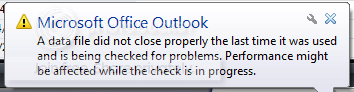
Is anyone else experiencing this problem.
This has all happened since the update to AVG 2011
Steps I've taken...
1. Used the scanpst program that comes with office (this fixes the errors found in the pst file, but Outlook 2007 continues to report that outlook didn't shut down properly and is going to check the pst every time outlook is run)
2. Made sure Outlook wasn't running in the task manager before restarting the machine.
3. Re-installed both Outlook and created a new pst and user
4. Disabled the email scanner in AVG options
5. Outlook won't let me remove the AVG add in from the trust centre options
The only way I can get Outlook to work properly is to do a AVG custom install and deselect the Outlook Email add in option. Problem is that sort of defeats the purpose of having AVG in the first place. I know the quick way is to just install another anti-virus but I was just wondering if anyone has come across a fix for this ?
Is anyone else experiencing this problem.
This has all happened since the update to AVG 2011
Steps I've taken...
1. Used the scanpst program that comes with office (this fixes the errors found in the pst file, but Outlook 2007 continues to report that outlook didn't shut down properly and is going to check the pst every time outlook is run)
2. Made sure Outlook wasn't running in the task manager before restarting the machine.
3. Re-installed both Outlook and created a new pst and user
4. Disabled the email scanner in AVG options
5. Outlook won't let me remove the AVG add in from the trust centre options
The only way I can get Outlook to work properly is to do a AVG custom install and deselect the Outlook Email add in option. Problem is that sort of defeats the purpose of having AVG in the first place. I know the quick way is to just install another anti-virus but I was just wondering if anyone has come across a fix for this ?
My Computer
- Computer type
- PC/Desktop
- Computer Manufacturer/Model Number
- Self Built
- OS
- Windows 7 Ultimate 64bit
- CPU
- AMD Phenom Quad core 9950 black edition
- Motherboard
- Gigabyte
- Memory
- 16Gb
- Graphics Card(s)
- 2x XFX Radeon 5850
- Sound Card
- PCI Express X-Fi Titanium / Logitech G35
- Monitor(s) Displays
- 2x HP 2410i
- Screen Resolution
- 1920x1080
- Hard Drives
- 2x 500Gb Seagate
1x 300Gb Seagate
1x 1Tb Seagate
2x 1Tb Hitatchi
- PSU
- Jean Tech Storm 700W
- Case
- Cooler Master COSMOS S
- Cooling
- Akasa Evo Blue Pro
- Keyboard
- Logitech G15
- Mouse
- Mad Catz M.M.O. 7
- Internet Speed
- 12mb


