AVI thumbnails on x64 Windows 7

haha for a moment I did too!! I remember all the grief i had with this same problem on 64bit vista and that was finally fixed with sharks codec pack.. for some reason his 7 pack doesn't fix it for me!

i'm at the point of giving up with this now... i've tried almost everything!
 

My Computer My Computer

Computer Manufacturer/Model Number
Corona
OS
Windows 7 x64
CPU
Pentium Dual Core E5200 2.5ghz
Motherboard
Gigabyte GA-73PVM-S2H
Memory
4GB
Graphics Card(s)
ATI Radeon HD 4670 w/
Monitor(s) Displays
2 x LG M198WA HD Widescreen 1440x900
Screen Resolution
2880*900
Hard Drives
1x Hitachi Deskstar 500GB
1x Hitachi Deskstar 1TB
PSU
Titan 650W Neon PSU
Cooling
CoolerMaster Hyper TX 2
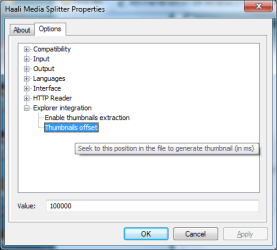
Found the issue. (At least on my system, probably for most people that have the K-Lite Codec Pack.)

See attached screenshot. When I upped this value and deleted "thumbs.db" files and refreshed video folders, I had legit thumbnails! (The value defaults to 0)
 

Attachments

  • Haali.png
    Haali.png
    13.5 KB · Views: 534

My Computer My Computer

Computer Manufacturer/Model Number
Fx X04c
OS
Windows 7 Build 7100 (x64)
CPU
AMD Phenom 9950 Black Edition
Motherboard
ASUS M3A78-EM
Memory
4GB (2x2GB) OCZ Reaper
Graphics Card(s)
Palit Nvidia GeForce 9800GT 512MB
Sound Card
Onboard from M3A78-EM
Monitor(s) Displays
LG L206W
Screen Resolution
1680x1050x32bpp
Hard Drives
2.8TB of storage across 3 HDDs.
PSU
450W RaidMax
Case
Custom black w/ bluelight/blacklight
Cooling
Forced air intake
Keyboard
Logitech G15 MKII
Mouse
Logitech G5 Gaming Laser Mouse
Internet Speed
15mb dn/1mb up
Other Info
Enough spare parts to build another couple Windows-7-capable machines.
you could be on to something here!

could you just give me a bit more info...

are you using 64bit? what codec pack are you using? is it 64bit? when you say delete thumbs.db - is that the same as doing a disk cleanup?

cheers!
 

My Computer My Computer

Computer Manufacturer/Model Number
Corona
OS
Windows 7 x64
CPU
Pentium Dual Core E5200 2.5ghz
Motherboard
Gigabyte GA-73PVM-S2H
Memory
4GB
Graphics Card(s)
ATI Radeon HD 4670 w/
Monitor(s) Displays
2 x LG M198WA HD Widescreen 1440x900
Screen Resolution
2880*900
Hard Drives
1x Hitachi Deskstar 500GB
1x Hitachi Deskstar 1TB
PSU
Titan 650W Neon PSU
Cooling
CoolerMaster Hyper TX 2
- K-Lite Codec Pack (any pack that uses Haali as a video splitter will work with this)
- 32 OR 64 bit.
- thumbs.db are system and hidden files created by Windows XP or newer with cached thumbnails in 'em; delete all the thumbs.db files you find.

EDIT - occasionally i'm seeing "enhthumbs_vista.db" files also marked as system and hidden, those can be deleted too.
 

My Computer My Computer

Computer Manufacturer/Model Number
Fx X04c
OS
Windows 7 Build 7100 (x64)
CPU
AMD Phenom 9950 Black Edition
Motherboard
ASUS M3A78-EM
Memory
4GB (2x2GB) OCZ Reaper
Graphics Card(s)
Palit Nvidia GeForce 9800GT 512MB
Sound Card
Onboard from M3A78-EM
Monitor(s) Displays
LG L206W
Screen Resolution
1680x1050x32bpp
Hard Drives
2.8TB of storage across 3 HDDs.
PSU
450W RaidMax
Case
Custom black w/ bluelight/blacklight
Cooling
Forced air intake
Keyboard
Logitech G15 MKII
Mouse
Logitech G5 Gaming Laser Mouse
Internet Speed
15mb dn/1mb up
Other Info
Enough spare parts to build another couple Windows-7-capable machines.
You all just need to install the win7 codec pack I mentioned earlier, it resolves the thumbnail issue.
 

My Computer My Computer

Computer Manufacturer/Model Number
self built
OS
Windows 7 Professional 64-bit
CPU
Intel E8400 3GHz
Motherboard
Intel DX48BT2
Memory
Kingston PC3-10700H 4Gb
Graphics Card(s)
XFX Radeon HD 5850 BlackEd.
Sound Card
Asus Xonar DG
Monitor(s) Displays
2x Samsung SM-T220HD 22"
Screen Resolution
1680x1050 on two monitors
Hard Drives
OCZ Vertex 2 120gb 3.5" (OS)
Seagate Momentus XT 500gb
Samsung F3 1Tb (games)
2x Samsung F1 1Tb
PSU
Thermaltake ToughPower 850w
Case
Thermaltake Armor
Cooling
Scythe Mugen II
Keyboard
Microsoft Comfort Curve USB
Mouse
Razer Diamondback 3G
Internet Speed
8128/443
Probably by already having that offset value set to something bigger than 0. It can be done on any codec pack.
 

My Computer My Computer

Computer Manufacturer/Model Number
Fx X04c
OS
Windows 7 Build 7100 (x64)
CPU
AMD Phenom 9950 Black Edition
Motherboard
ASUS M3A78-EM
Memory
4GB (2x2GB) OCZ Reaper
Graphics Card(s)
Palit Nvidia GeForce 9800GT 512MB
Sound Card
Onboard from M3A78-EM
Monitor(s) Displays
LG L206W
Screen Resolution
1680x1050x32bpp
Hard Drives
2.8TB of storage across 3 HDDs.
PSU
450W RaidMax
Case
Custom black w/ bluelight/blacklight
Cooling
Forced air intake
Keyboard
Logitech G15 MKII
Mouse
Logitech G5 Gaming Laser Mouse
Internet Speed
15mb dn/1mb up
Other Info
Enough spare parts to build another couple Windows-7-capable machines.
guys none of these fixes work... i have tried every codec pack (including the windows 7 one, i've change the offset in the haali options and that does nothing either

dstruck2k, in vista and later all thumbnails are stored in a central location within application data and can only be deleted via disk cleanup (or as far as i am aware, i couldnt delete them manually)

thanks for the suggestions tho guys, it looks like i'm gonna have to live with this problem!
 

My Computer My Computer

Computer Manufacturer/Model Number
Corona
OS
Windows 7 x64
CPU
Pentium Dual Core E5200 2.5ghz
Motherboard
Gigabyte GA-73PVM-S2H
Memory
4GB
Graphics Card(s)
ATI Radeon HD 4670 w/
Monitor(s) Displays
2 x LG M198WA HD Widescreen 1440x900
Screen Resolution
2880*900
Hard Drives
1x Hitachi Deskstar 500GB
1x Hitachi Deskstar 1TB
PSU
Titan 650W Neon PSU
Cooling
CoolerMaster Hyper TX 2
Found the issue. (At least on my system, probably for most people that have the K-Lite Codec Pack.)

See attached screenshot. When I upped this value and deleted "thumbs.db" files and refreshed video folders, I had legit thumbnails! (The value defaults to 0)

Does anyone know what registry keys are changed using this method? I'd prefer to do this manually via the registry as opposed to having to download and install a codec pack that I do not want or need (I current find Sharks Vista Codec Pack to be the best choice for Vista, and am using the default Windows 7 codecs atm...)
 

My Computer My Computer

Computer type
PC/Desktop
Computer Manufacturer/Model Number
Virtual Machine
OS
Windows 7 Professional 32-bit SP1
CPU
AMD A4/A6
Motherboard
Intel Corporation 440BX Desktop Reference Platform
Memory
3.00GB EDO
Graphics Card(s)
VMware SVGA 3D
Sound Card
High Definition Audio Device
Monitor(s) Displays
Generic Non-PnP Monitor on VMware SVGA 3D
Screen Resolution
1440x900
Hard Drives
1 x 60GB VMware Virtual SATA Hard Drive ATA Device
Antivirus
Kaspersky Total Security
the fix did not work for me so it may not be worth trying! there seems to be a serious problem with windows 7 and avi thumbnails on 64 bit
 

My Computer My Computer

Computer Manufacturer/Model Number
Corona
OS
Windows 7 x64
CPU
Pentium Dual Core E5200 2.5ghz
Motherboard
Gigabyte GA-73PVM-S2H
Memory
4GB
Graphics Card(s)
ATI Radeon HD 4670 w/
Monitor(s) Displays
2 x LG M198WA HD Widescreen 1440x900
Screen Resolution
2880*900
Hard Drives
1x Hitachi Deskstar 500GB
1x Hitachi Deskstar 1TB
PSU
Titan 650W Neon PSU
Cooling
CoolerMaster Hyper TX 2
Hi all ! me too , avi thumbnails seems to be generate at the begining of videos( second 00:00:00,so most are black ) , when I try to rename it with extension .mpg ,thumbnails are generate later ( 3, 4 seconds after begining) , but when I rename again as avi files, thumbnails become again black ,sommeone can explain me why ???
 
Last edited:

My Computer My Computer

OS
Windows 7 x64 buid 7229 Fr
If Haali video splitter is installed (click Start, type "Haali Media Splitter", press enter) go to the options tab, in the Explorer integration section there is a "Thumbnails offset" setting. This setting defaults to 0. I've set mine for 10000 ms (10 seconds) and I'm getting decent thumbs now.

Be sure to use Disk Cleanup to remove all cached thumbnail files after making the change.

PS - The setting doesn't seem to be stored in the registry... It's either encoded before storage, or saved to a file instead.
 

My Computer My Computer

Computer Manufacturer/Model Number
Fx X04c
OS
Windows 7 Build 7100 (x64)
CPU
AMD Phenom 9950 Black Edition
Motherboard
ASUS M3A78-EM
Memory
4GB (2x2GB) OCZ Reaper
Graphics Card(s)
Palit Nvidia GeForce 9800GT 512MB
Sound Card
Onboard from M3A78-EM
Monitor(s) Displays
LG L206W
Screen Resolution
1680x1050x32bpp
Hard Drives
2.8TB of storage across 3 HDDs.
PSU
450W RaidMax
Case
Custom black w/ bluelight/blacklight
Cooling
Forced air intake
Keyboard
Logitech G15 MKII
Mouse
Logitech G5 Gaming Laser Mouse
Internet Speed
15mb dn/1mb up
Other Info
Enough spare parts to build another couple Windows-7-capable machines.
If Haali video splitter is installed (click Start, type "Haali Media Splitter", press enter) go to the options tab, in the Explorer integration section there is a "Thumbnails offset" setting. This setting defaults to 0. I've set mine for 10000 ms (10 seconds) and I'm getting decent thumbs now.

Be sure to use Disk Cleanup to remove all cached thumbnail files after making the change.

PS - The setting doesn't seem to be stored in the registry... It's either encoded before storage, or saved to a file instead.
sorry but , i effectuate this settings and disk clean up too, but nothing change , i am on Windows 7 x 64 ... It seems Haali components doesn't work for avi files because most thumbnails are the first video picture and ffdshow is not used for render thumbnails because the systray icon does not appear when rendering .

see issue here :http://www.windows7taskforce.com/view/693

and : http://www.codecguide.com/faq_thumbnails.htm#item4

the only solution , I 've found : Acdsee , It seems generate thumbnails with ffdshow by a media plugin Apl with time setting .
 
Last edited:

My Computer My Computer

OS
Windows 7 x64 buid 7229 Fr
Back
Top