AVP 2010. Error "binkw32.dll"

polass47

New member
Local time
12:23 AM
Messages
22
Location
Lithuania
Hello,

after I installed Alien vs Predator (2010) I get this error:


Any suggestions how to solve this problem?
 

My Computer My Computer

At a glance

Windows 7 Enterprise x64Intel i3 2120 3.3ghzKingston HyperX DDR3 1600mhz 8GB Limited EditionGeForce 7600GT 256MB
OS
Windows 7 Enterprise x64
CPU
Intel i3 2120 3.3ghz
Motherboard
Asrock Fatal1ty Performance
Memory
Kingston HyperX DDR3 1600mhz 8GB Limited Edition
Graphics Card(s)
GeForce 7600GT 256MB
Sound Card
Creative Xtreme Gamer
Monitor(s) Displays
Samsung 943BW
Hard Drives
Samsung 1TB
PSU
Fortron 450W
Keyboard
Microsoft Ditigal Media
Mouse
Logitech G400

My Computer My Computer

At a glance

Windows 7 Home Premium (64-bit) *** Windows X...AMD Athlon Neo X2 1.6GHz *** Intel Core i7 Qu...4.00 GB *** 4.00 GBATI Radeon HD 3200, 384MB *** ATI Radeon HD 4...
Computer Manufacturer/Model Number
HP Pavilion dm3 (netbook) *** 27" iMac (Dual-Boot)
OS
Windows 7 Home Premium (64-bit) *** Windows XP SP3 (32-bit), OSX 10.6
CPU
AMD Athlon Neo X2 1.6GHz *** Intel Core i7 Quad Core 2.8GHz
Memory
4.00 GB *** 4.00 GB
Graphics Card(s)
ATI Radeon HD 3200, 384MB *** ATI Radeon HD 4850, 1GB
Sound Card
ATI High Definition Audio *** ATI High Definition Audio
Monitor(s) Displays
LG Flatron W2053TX
Screen Resolution
1600 x 900 (monitor), 1266 x 768 (laptop) *** 2560 x 1440
Hard Drives
300 GB SATA (internal), 500 GB HP SimpleSave (external) *** 1 TB SATA (internal), 160 GB LaCie (external)
Mouse
Logitech Cordless Optical Mouse for Notebooks
Internet Speed
Broadband
The problem has been solved :) I would like to delete this thread but don't know how...
 

My Computer My Computer

At a glance

Windows 7 Enterprise x64Intel i3 2120 3.3ghzKingston HyperX DDR3 1600mhz 8GB Limited EditionGeForce 7600GT 256MB
OS
Windows 7 Enterprise x64
CPU
Intel i3 2120 3.3ghz
Motherboard
Asrock Fatal1ty Performance
Memory
Kingston HyperX DDR3 1600mhz 8GB Limited Edition
Graphics Card(s)
GeForce 7600GT 256MB
Sound Card
Creative Xtreme Gamer
Monitor(s) Displays
Samsung 943BW
Hard Drives
Samsung 1TB
PSU
Fortron 450W
Keyboard
Microsoft Ditigal Media
Mouse
Logitech G400
So glad you found a solution! Don't worry about deleting the thread, someone will come along and mark it as 'Solved'... in fact, to make this thread more useful to other people in the future, would you mind posting briefly what solution ended up working for you? Feel free to copy and paste from somewhere else. Thanks!

Walker
Windows Outreach Team
 

My Computer My Computer

At a glance

Windows 7 Home Premium (64-bit) *** Windows X...AMD Athlon Neo X2 1.6GHz *** Intel Core i7 Qu...4.00 GB *** 4.00 GBATI Radeon HD 3200, 384MB *** ATI Radeon HD 4...
Computer Manufacturer/Model Number
HP Pavilion dm3 (netbook) *** 27" iMac (Dual-Boot)
OS
Windows 7 Home Premium (64-bit) *** Windows XP SP3 (32-bit), OSX 10.6
CPU
AMD Athlon Neo X2 1.6GHz *** Intel Core i7 Quad Core 2.8GHz
Memory
4.00 GB *** 4.00 GB
Graphics Card(s)
ATI Radeon HD 3200, 384MB *** ATI Radeon HD 4850, 1GB
Sound Card
ATI High Definition Audio *** ATI High Definition Audio
Monitor(s) Displays
LG Flatron W2053TX
Screen Resolution
1600 x 900 (monitor), 1266 x 768 (laptop) *** 2560 x 1440
Hard Drives
300 GB SATA (internal), 500 GB HP SimpleSave (external) *** 1 TB SATA (internal), 160 GB LaCie (external)
Mouse
Logitech Cordless Optical Mouse for Notebooks
Internet Speed
Broadband
I played this game on another pc and after playing some hours I realized that I even don't like the game that much so I decided to delete it on my pc :) other people may like it more, I'm not saying that this game was awful. It was just too much predictable, I mean the scenario. I felt too much arcade in it so I decided not to spend time on playing it.
 

My Computer My Computer

At a glance

Windows 7 Enterprise x64Intel i3 2120 3.3ghzKingston HyperX DDR3 1600mhz 8GB Limited EditionGeForce 7600GT 256MB
OS
Windows 7 Enterprise x64
CPU
Intel i3 2120 3.3ghz
Motherboard
Asrock Fatal1ty Performance
Memory
Kingston HyperX DDR3 1600mhz 8GB Limited Edition
Graphics Card(s)
GeForce 7600GT 256MB
Sound Card
Creative Xtreme Gamer
Monitor(s) Displays
Samsung 943BW
Hard Drives
Samsung 1TB
PSU
Fortron 450W
Keyboard
Microsoft Ditigal Media
Mouse
Logitech G400
Oh ok haha... well i suppose that's a solution of sorts! I played a few minutes of the MP demo, wasn't all that impressed either. Just felt like a visually updated version of the 1999 original.

Cheers,

Walker
Windows Outreach Team
 

My Computer My Computer

At a glance

Windows 7 Home Premium (64-bit) *** Windows X...AMD Athlon Neo X2 1.6GHz *** Intel Core i7 Qu...4.00 GB *** 4.00 GBATI Radeon HD 3200, 384MB *** ATI Radeon HD 4...
Computer Manufacturer/Model Number
HP Pavilion dm3 (netbook) *** 27" iMac (Dual-Boot)
OS
Windows 7 Home Premium (64-bit) *** Windows XP SP3 (32-bit), OSX 10.6
CPU
AMD Athlon Neo X2 1.6GHz *** Intel Core i7 Quad Core 2.8GHz
Memory
4.00 GB *** 4.00 GB
Graphics Card(s)
ATI Radeon HD 3200, 384MB *** ATI Radeon HD 4850, 1GB
Sound Card
ATI High Definition Audio *** ATI High Definition Audio
Monitor(s) Displays
LG Flatron W2053TX
Screen Resolution
1600 x 900 (monitor), 1266 x 768 (laptop) *** 2560 x 1440
Hard Drives
300 GB SATA (internal), 500 GB HP SimpleSave (external) *** 1 TB SATA (internal), 160 GB LaCie (external)
Mouse
Logitech Cordless Optical Mouse for Notebooks
Internet Speed
Broadband
in fact, to make this thread more useful to other people in the future, would you mind posting briefly what solution ended up working for you?

I played this game on another pc and after playing some hours I realized that I even don't like the game that much so I decided to delete it on my pc :)

So that was the 'solution' ? You tried it elsewhere?

It sounds like you had a dud d/l and a bad installation.


binkw32.dll should have been installed with the game itself.

Otherwise copying the binkw32.dll from another game that has that file, or downloading it off the net, directly into the games folder would have worked.


ie C:\Program Files\Aliens Vs Predator for x32

or

C:\Program Files (x86)\Aliens Vs Predator for x64
 

My Computer My Computer

At a glance

8 Pro x64i7 3770K 4.6GHz16GB G.Skill Trident X 2666mhzx2 EVGA 780 Ti Superclocked SLI
Computer type
PC/Desktop
Computer Manufacturer/Model Number
Systems by SmartEyeball
OS
8 Pro x64
CPU
i7 3770K 4.6GHz
Motherboard
ASUS P8Z77 WS
Memory
16GB G.Skill Trident X 2666mhz
Graphics Card(s)
x2 EVGA 780 Ti Superclocked SLI
Sound Card
SB X-FI Surround 5.1 PRO USB / ATH-AD900 Headphones
Monitor(s) Displays
x3 Dell U2410 / 58" Samsung
Screen Resolution
5760*1200/ 1920*1200
Hard Drives
2x Intel 520 240GB (RAID 0) * 2x WD Caviar Blacks 2TB (RAID 0) * 2TB WD Caviar Black * Sony Optirac DVD
PSU
Silverstone Strider Evolution 1200W
Case
Thermaltake Level 10 GT Snow Edition
Cooling
Noctua NH-D14
Keyboard
Topre Realforce // Ducky Shine MX Black // Filco Ninja TKL
Mouse
Thermaltake Theron (Highly Recommended) + Razer Imperator
Antivirus
MSE
Browser
IE, FF, WaterFox
Other Info
GT Extreme V2 Sim Racing Cockpit + 40" LCD and K/B Mouse stand ▼
Fanatec CSR Elite Wheel + Clubsport V1 Pedals + CSR shifter/7G-H ▼Saitek X52 Pro ▼ TrackIR 5 Pro
Buttkicker v2 Seat Rumbler with Dedicated 5.1 and Sub Woofer attached to frame ▼
=
Bloody Big Grin
in fact, to make this thread more useful to other people in the future, would you mind posting briefly what solution ended up working for you?

I played this game on another pc and after playing some hours I realized that I even don't like the game that much so I decided to delete it on my pc :)

So that was the 'solution' ? You tried it elsewhere?

It sounds like you had a dud d/l and a bad installation.


binkw32.dll should have been installed with the game itself.

Otherwise copying the binkw32.dll from another game that has that file, or downloading it off the net, directly into the games folder would have worked.


ie C:\Program Files\Aliens Vs Predator for x32

or

C:\Program Files (x86)\Aliens Vs Predator for x64

I tried to solve the problem by downloading binkw32.dll and leading instructions put it to C:\Windows\System32 folder. After that I got another error which I uploaded to imageshake to show here. I tried to search in google how to solve another error but with no results. Then I decided not to try any more. The fuss about game ate my nerves :)
 

My Computer My Computer

At a glance

Windows 7 Enterprise x64Intel i3 2120 3.3ghzKingston HyperX DDR3 1600mhz 8GB Limited EditionGeForce 7600GT 256MB
OS
Windows 7 Enterprise x64
CPU
Intel i3 2120 3.3ghz
Motherboard
Asrock Fatal1ty Performance
Memory
Kingston HyperX DDR3 1600mhz 8GB Limited Edition
Graphics Card(s)
GeForce 7600GT 256MB
Sound Card
Creative Xtreme Gamer
Monitor(s) Displays
Samsung 943BW
Hard Drives
Samsung 1TB
PSU
Fortron 450W
Keyboard
Microsoft Ditigal Media
Mouse
Logitech G400
Fair enough :)

Just delete the binkw32.dll that you put in the system32 folder and place it in the game folder if you want to try again.

This is the file from my AVP installation, just in case ;)

View attachment binkw32.zip
 

My Computer My Computer

At a glance

8 Pro x64i7 3770K 4.6GHz16GB G.Skill Trident X 2666mhzx2 EVGA 780 Ti Superclocked SLI
Computer type
PC/Desktop
Computer Manufacturer/Model Number
Systems by SmartEyeball
OS
8 Pro x64
CPU
i7 3770K 4.6GHz
Motherboard
ASUS P8Z77 WS
Memory
16GB G.Skill Trident X 2666mhz
Graphics Card(s)
x2 EVGA 780 Ti Superclocked SLI
Sound Card
SB X-FI Surround 5.1 PRO USB / ATH-AD900 Headphones
Monitor(s) Displays
x3 Dell U2410 / 58" Samsung
Screen Resolution
5760*1200/ 1920*1200
Hard Drives
2x Intel 520 240GB (RAID 0) * 2x WD Caviar Blacks 2TB (RAID 0) * 2TB WD Caviar Black * Sony Optirac DVD
PSU
Silverstone Strider Evolution 1200W
Case
Thermaltake Level 10 GT Snow Edition
Cooling
Noctua NH-D14
Keyboard
Topre Realforce // Ducky Shine MX Black // Filco Ninja TKL
Mouse
Thermaltake Theron (Highly Recommended) + Razer Imperator
Antivirus
MSE
Browser
IE, FF, WaterFox
Other Info
GT Extreme V2 Sim Racing Cockpit + 40" LCD and K/B Mouse stand ▼
Fanatec CSR Elite Wheel + Clubsport V1 Pedals + CSR shifter/7G-H ▼Saitek X52 Pro ▼ TrackIR 5 Pro
Buttkicker v2 Seat Rumbler with Dedicated 5.1 and Sub Woofer attached to frame ▼
=
Bloody Big Grin
Fair enough :)

Just delete the binkw32.dll that you put in the system32 folder and place it in the game folder if you want to try again.

This is the file from my AVP installation, just in case ;)

View attachment 55629

Thank you for reminding, I deleted binkw32.dll few minutes ago :). Thanks for offering bink32.dll too, but I have already uninstalled the game. Looks like age does its own job, the older I become the less games get me interested in. New pastime hobbies fascinate me, for example - music creation software and music creation itself of course :D.
 

My Computer My Computer

At a glance

Windows 7 Enterprise x64Intel i3 2120 3.3ghzKingston HyperX DDR3 1600mhz 8GB Limited EditionGeForce 7600GT 256MB
OS
Windows 7 Enterprise x64
CPU
Intel i3 2120 3.3ghz
Motherboard
Asrock Fatal1ty Performance
Memory
Kingston HyperX DDR3 1600mhz 8GB Limited Edition
Graphics Card(s)
GeForce 7600GT 256MB
Sound Card
Creative Xtreme Gamer
Monitor(s) Displays
Samsung 943BW
Hard Drives
Samsung 1TB
PSU
Fortron 450W
Keyboard
Microsoft Ditigal Media
Mouse
Logitech G400
Well guys, i am from Argentina and i have the same problem... i Solved it but when i launch the game, it appears the first "Century Fox" escene but the game get frizzed. Sory for my bad english but i hope someone will understand me and help me with my problem, Thx :D
 

My Computer My Computer

At a glance

Win 7
OS
Win 7
Some specs may help :)


However, AVP is currently buggy as hell.

Does it occur in both DX9 and DX10/11 modes (AVP.exe = DX9 / AVP_DX11.exe =DX10/DX11)

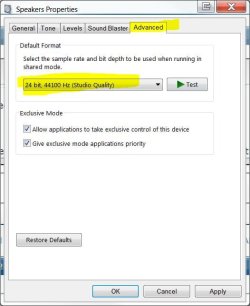
What sound settings is your video card currently set set to?


(right-click the sound icon in the taskbar Playback >right-click your device and select properties > Advanced Tab and then set it to 24 bit ,44100 hz )

Speaker properties.JPG

Other things to try:

Install the latest DirectX run times:

http://www.microsoft.com/downloads/details.aspx?familyid=0CEF8180-E94A-4F56-B157-5AB8109CB4F5&displaylang=en

If using an ATI card, roll back to CAT 9.12 / 9.12 Hotfix: (10.2 doesn't work :rolleyes:)

ATI Catalyst 9.12 hotfix Win 7 | Vista (32|64-bit) download from Guru3D.com
 

My Computer My Computer

At a glance

8 Pro x64i7 3770K 4.6GHz16GB G.Skill Trident X 2666mhzx2 EVGA 780 Ti Superclocked SLI
Computer type
PC/Desktop
Computer Manufacturer/Model Number
Systems by SmartEyeball
OS
8 Pro x64
CPU
i7 3770K 4.6GHz
Motherboard
ASUS P8Z77 WS
Memory
16GB G.Skill Trident X 2666mhz
Graphics Card(s)
x2 EVGA 780 Ti Superclocked SLI
Sound Card
SB X-FI Surround 5.1 PRO USB / ATH-AD900 Headphones
Monitor(s) Displays
x3 Dell U2410 / 58" Samsung
Screen Resolution
5760*1200/ 1920*1200
Hard Drives
2x Intel 520 240GB (RAID 0) * 2x WD Caviar Blacks 2TB (RAID 0) * 2TB WD Caviar Black * Sony Optirac DVD
PSU
Silverstone Strider Evolution 1200W
Case
Thermaltake Level 10 GT Snow Edition
Cooling
Noctua NH-D14
Keyboard
Topre Realforce // Ducky Shine MX Black // Filco Ninja TKL
Mouse
Thermaltake Theron (Highly Recommended) + Razer Imperator
Antivirus
MSE
Browser
IE, FF, WaterFox
Other Info
GT Extreme V2 Sim Racing Cockpit + 40" LCD and K/B Mouse stand ▼
Fanatec CSR Elite Wheel + Clubsport V1 Pedals + CSR shifter/7G-H ▼Saitek X52 Pro ▼ TrackIR 5 Pro
Buttkicker v2 Seat Rumbler with Dedicated 5.1 and Sub Woofer attached to frame ▼
=
Bloody Big Grin
Oh thx dude! <3 ya i solved the problem!. But i have one more question, one friend of mine have win xp, is there any other way to solve this problem? because he cant change his bits and Hz.. he has an onboard video card, i would be grateful if you help us :D
 

My Computer My Computer

At a glance

Win 7
OS
Win 7
It's been eons since I've used XP, but try lowering the sound hardware acceleration through dxdiag

(ALT+R to open the run cmd and type dxdiag.exe )
 

My Computer My Computer

At a glance

8 Pro x64i7 3770K 4.6GHz16GB G.Skill Trident X 2666mhzx2 EVGA 780 Ti Superclocked SLI
Computer type
PC/Desktop
Computer Manufacturer/Model Number
Systems by SmartEyeball
OS
8 Pro x64
CPU
i7 3770K 4.6GHz
Motherboard
ASUS P8Z77 WS
Memory
16GB G.Skill Trident X 2666mhz
Graphics Card(s)
x2 EVGA 780 Ti Superclocked SLI
Sound Card
SB X-FI Surround 5.1 PRO USB / ATH-AD900 Headphones
Monitor(s) Displays
x3 Dell U2410 / 58" Samsung
Screen Resolution
5760*1200/ 1920*1200
Hard Drives
2x Intel 520 240GB (RAID 0) * 2x WD Caviar Blacks 2TB (RAID 0) * 2TB WD Caviar Black * Sony Optirac DVD
PSU
Silverstone Strider Evolution 1200W
Case
Thermaltake Level 10 GT Snow Edition
Cooling
Noctua NH-D14
Keyboard
Topre Realforce // Ducky Shine MX Black // Filco Ninja TKL
Mouse
Thermaltake Theron (Highly Recommended) + Razer Imperator
Antivirus
MSE
Browser
IE, FF, WaterFox
Other Info
GT Extreme V2 Sim Racing Cockpit + 40" LCD and K/B Mouse stand ▼
Fanatec CSR Elite Wheel + Clubsport V1 Pedals + CSR shifter/7G-H ▼Saitek X52 Pro ▼ TrackIR 5 Pro
Buttkicker v2 Seat Rumbler with Dedicated 5.1 and Sub Woofer attached to frame ▼
=
Bloody Big Grin
I did what you say but nothing happened... Hmm here is a pic, i modified where it says "No hay aceleracion"

2co0ymb.jpg


Any answer? Thx :D

Again, sry for my english
 

My Computer My Computer

At a glance

Win 7
OS
Win 7
As I said, I haven't used XP in a long time so perhaps try this:

To set this, open your "Sounds and Audio Devices" window from within the Control Panel, then continue as follows:
"Audio" tab -> "Sound Playback" -> "Advanced" -> "Performance" -> "Audio Playback" ->

"Sample rate conversion" -> 'best'
◄ I don't remember what the other options are but try less than best.
 

My Computer My Computer

At a glance

8 Pro x64i7 3770K 4.6GHz16GB G.Skill Trident X 2666mhzx2 EVGA 780 Ti Superclocked SLI
Computer type
PC/Desktop
Computer Manufacturer/Model Number
Systems by SmartEyeball
OS
8 Pro x64
CPU
i7 3770K 4.6GHz
Motherboard
ASUS P8Z77 WS
Memory
16GB G.Skill Trident X 2666mhz
Graphics Card(s)
x2 EVGA 780 Ti Superclocked SLI
Sound Card
SB X-FI Surround 5.1 PRO USB / ATH-AD900 Headphones
Monitor(s) Displays
x3 Dell U2410 / 58" Samsung
Screen Resolution
5760*1200/ 1920*1200
Hard Drives
2x Intel 520 240GB (RAID 0) * 2x WD Caviar Blacks 2TB (RAID 0) * 2TB WD Caviar Black * Sony Optirac DVD
PSU
Silverstone Strider Evolution 1200W
Case
Thermaltake Level 10 GT Snow Edition
Cooling
Noctua NH-D14
Keyboard
Topre Realforce // Ducky Shine MX Black // Filco Ninja TKL
Mouse
Thermaltake Theron (Highly Recommended) + Razer Imperator
Antivirus
MSE
Browser
IE, FF, WaterFox
Other Info
GT Extreme V2 Sim Racing Cockpit + 40" LCD and K/B Mouse stand ▼
Fanatec CSR Elite Wheel + Clubsport V1 Pedals + CSR shifter/7G-H ▼Saitek X52 Pro ▼ TrackIR 5 Pro
Buttkicker v2 Seat Rumbler with Dedicated 5.1 and Sub Woofer attached to frame ▼
=
Bloody Big Grin
It didnt work D: but thx for your help! :D
 

My Computer My Computer

At a glance

Win 7
OS
Win 7
lol, You're welcome :)
 

My Computer My Computer

At a glance

8 Pro x64i7 3770K 4.6GHz16GB G.Skill Trident X 2666mhzx2 EVGA 780 Ti Superclocked SLI
Computer type
PC/Desktop
Computer Manufacturer/Model Number
Systems by SmartEyeball
OS
8 Pro x64
CPU
i7 3770K 4.6GHz
Motherboard
ASUS P8Z77 WS
Memory
16GB G.Skill Trident X 2666mhz
Graphics Card(s)
x2 EVGA 780 Ti Superclocked SLI
Sound Card
SB X-FI Surround 5.1 PRO USB / ATH-AD900 Headphones
Monitor(s) Displays
x3 Dell U2410 / 58" Samsung
Screen Resolution
5760*1200/ 1920*1200
Hard Drives
2x Intel 520 240GB (RAID 0) * 2x WD Caviar Blacks 2TB (RAID 0) * 2TB WD Caviar Black * Sony Optirac DVD
PSU
Silverstone Strider Evolution 1200W
Case
Thermaltake Level 10 GT Snow Edition
Cooling
Noctua NH-D14
Keyboard
Topre Realforce // Ducky Shine MX Black // Filco Ninja TKL
Mouse
Thermaltake Theron (Highly Recommended) + Razer Imperator
Antivirus
MSE
Browser
IE, FF, WaterFox
Other Info
GT Extreme V2 Sim Racing Cockpit + 40" LCD and K/B Mouse stand ▼
Fanatec CSR Elite Wheel + Clubsport V1 Pedals + CSR shifter/7G-H ▼Saitek X52 Pro ▼ TrackIR 5 Pro
Buttkicker v2 Seat Rumbler with Dedicated 5.1 and Sub Woofer attached to frame ▼
=
Bloody Big Grin
Thank you very much . I try and it work .
Thank again !
Thank YOU for creating an account to post this! And cheers smarteyeball for a successful fix :)

Walker
Windows Outreach Team
 

My Computer My Computer

At a glance

Windows 7 Home Premium (64-bit) *** Windows X...AMD Athlon Neo X2 1.6GHz *** Intel Core i7 Qu...4.00 GB *** 4.00 GBATI Radeon HD 3200, 384MB *** ATI Radeon HD 4...
Computer Manufacturer/Model Number
HP Pavilion dm3 (netbook) *** 27" iMac (Dual-Boot)
OS
Windows 7 Home Premium (64-bit) *** Windows XP SP3 (32-bit), OSX 10.6
CPU
AMD Athlon Neo X2 1.6GHz *** Intel Core i7 Quad Core 2.8GHz
Memory
4.00 GB *** 4.00 GB
Graphics Card(s)
ATI Radeon HD 3200, 384MB *** ATI Radeon HD 4850, 1GB
Sound Card
ATI High Definition Audio *** ATI High Definition Audio
Monitor(s) Displays
LG Flatron W2053TX
Screen Resolution
1600 x 900 (monitor), 1266 x 768 (laptop) *** 2560 x 1440
Hard Drives
300 GB SATA (internal), 500 GB HP SimpleSave (external) *** 1 TB SATA (internal), 160 GB LaCie (external)
Mouse
Logitech Cordless Optical Mouse for Notebooks
Internet Speed
Broadband
Back
Top