
Solved Back up 2 computers on 1 USB hard drive?

nodsirrah

New member
Member
Local time
3:23 AM
Messages
51
I have a home network. Win 7 Home Premium.
I have a desktop and laptop that I back up on separate USB hard drives. I need to use one of them for my Dish Network receiver and can't afford to buy another one.
Can I set up my computers to both use the network to back up to the same 1000 TB USB hard drive?
If so, I need very clear instructions as I am 80 years old and my brain is getting weak.:(
 
Last edited:

My Computer My Computer

Computer Manufacturer/Model Number
Dell 530S
OS
Windows 7 Home Premium 64 Bit
CPU
Processor Pentium(R) Dual-Core CPU E5800@ 3.20GHz, 3
Hello nodsirrah,

Yes, you sure could. The Windows Backup from each computer will have their own separate dated "computer name\Backup Set" folder at the root of the drive. :)
 

My Computer My Computer

Computer type
PC/Desktop
Computer Manufacturer/Model Number
Self built custom
OS
64-bit Windows 11 Pro for Workstations
CPU
Intel i7-8700K OC'd to 5 GHz
Motherboard
ASUS ROG Maximus XI Formula Z390
Memory
64 GB (4x16GB) G.SKILL TridentZ RGB DDR4 3600 MHz
Graphics Card(s)
ASUS ROG-STRIX-GTX1080TI-O11G-GAMING
Sound Card
Integrated
Monitor(s) Displays
2 x Samsung Odyssey G7 27"
Screen Resolution
2560x1440
Hard Drives
1TB Samsung 990 PRO M.2,
4TB Samsung 990 PRO PRO M.2,
TerraMaster F8 SSD Plus NAS
PSU
Seasonic Prime Titanium 850W
Case
Thermaltake Core P3
Cooling
Corsair Hydro H115i
Keyboard
Logitech wireless K800
Mouse
Logitech MX Master 4
Internet Speed
2 Gb/s Download and 100 Mb/s Upload
Antivirus
Malwarebyte Anti-Malware Premium
Browser
Google Chrome
Other Info
Logitech Z625 speaker system,
Logitech BRIO 4K Pro webcam,
HP Color LaserJet Pro MFP M477fdn,
APC SMART-UPS RT 1000 XL - SURT1000XLI,
Galaxy S23 Plus phone
Hi Brink,
My problem is I can see the Desktop C drive on the laptop, but even though the Desktop B drive (where I have the USB drive) is "Shared" I can't see it on the laptop.
 

My Computer My Computer

Computer Manufacturer/Model Number
Dell 530S
OS
Windows 7 Home Premium 64 Bit
CPU
Processor Pentium(R) Dual-Core CPU E5800@ 3.20GHz, 3
Do you have the desktop and laptop joined in a homegroup together?

When you set the drive to share, be sure that you set "Everyone" to have "Full control".
share-permissions.jpg
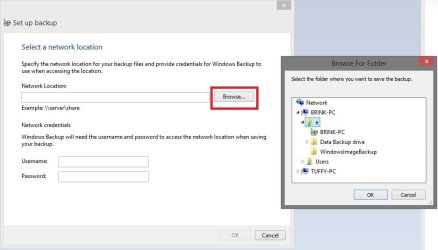
When you setup Windows Backup, you should then be able to "Browse" to select the network drive like below.
browse.jpg

To always see the network drive on the laptop in it's Computer window, you could: http://www.sevenforums.com/tutorials/49517-map-network-drive.html
 

My Computer My Computer

Computer type
PC/Desktop
Computer Manufacturer/Model Number
Self built custom
OS
64-bit Windows 11 Pro for Workstations
CPU
Intel i7-8700K OC'd to 5 GHz
Motherboard
ASUS ROG Maximus XI Formula Z390
Memory
64 GB (4x16GB) G.SKILL TridentZ RGB DDR4 3600 MHz
Graphics Card(s)
ASUS ROG-STRIX-GTX1080TI-O11G-GAMING
Sound Card
Integrated
Monitor(s) Displays
2 x Samsung Odyssey G7 27"
Screen Resolution
2560x1440
Hard Drives
1TB Samsung 990 PRO M.2,
4TB Samsung 990 PRO PRO M.2,
TerraMaster F8 SSD Plus NAS
PSU
Seasonic Prime Titanium 850W
Case
Thermaltake Core P3
Cooling
Corsair Hydro H115i
Keyboard
Logitech wireless K800
Mouse
Logitech MX Master 4
Internet Speed
2 Gb/s Download and 100 Mb/s Upload
Antivirus
Malwarebyte Anti-Malware Premium
Browser
Google Chrome
Other Info
Logitech Z625 speaker system,
Logitech BRIO 4K Pro webcam,
HP Color LaserJet Pro MFP M477fdn,
APC SMART-UPS RT 1000 XL - SURT1000XLI,
Galaxy S23 Plus phone
I set up the drive for Everyone and Full control, now I see the Desktop Backup drive on the Laptop in Network.
When I go to Backup on thew Laptop it only lets me select the Laptop Backup Drive and no Browse selection, if I unplug that Drive I get a red X.
I searched for Set Up Backup and don't get anything.
I get the feeling that Win 7 Home does not allow what I am attempting to do.
That is as far as my brain power will let me go.
Thanks for your valiant effort.
Don
 

My Computer My Computer

Computer Manufacturer/Model Number
Dell 530S
OS
Windows 7 Home Premium 64 Bit
CPU
Processor Pentium(R) Dual-Core CPU E5800@ 3.20GHz, 3
By the way, my Router does not have a USB port.
 

My Computer My Computer

Computer Manufacturer/Model Number
Dell 530S
OS
Windows 7 Home Premium 64 Bit
CPU
Processor Pentium(R) Dual-Core CPU E5800@ 3.20GHz, 3
Don,

Yep, I'm afraid that you using Windows 7 Home Premium is indeed the issue.

Only the Windows 7 Professional, Ultimate, and Enterprise editions can backup to a network location. :(

Since it is an external USB drive, you could connect it directly to the laptop's USB port to back it up to the USB though.
 

My Computer My Computer

Computer type
PC/Desktop
Computer Manufacturer/Model Number
Self built custom
OS
64-bit Windows 11 Pro for Workstations
CPU
Intel i7-8700K OC'd to 5 GHz
Motherboard
ASUS ROG Maximus XI Formula Z390
Memory
64 GB (4x16GB) G.SKILL TridentZ RGB DDR4 3600 MHz
Graphics Card(s)
ASUS ROG-STRIX-GTX1080TI-O11G-GAMING
Sound Card
Integrated
Monitor(s) Displays
2 x Samsung Odyssey G7 27"
Screen Resolution
2560x1440
Hard Drives
1TB Samsung 990 PRO M.2,
4TB Samsung 990 PRO PRO M.2,
TerraMaster F8 SSD Plus NAS
PSU
Seasonic Prime Titanium 850W
Case
Thermaltake Core P3
Cooling
Corsair Hydro H115i
Keyboard
Logitech wireless K800
Mouse
Logitech MX Master 4
Internet Speed
2 Gb/s Download and 100 Mb/s Upload
Antivirus
Malwarebyte Anti-Malware Premium
Browser
Google Chrome
Other Info
Logitech Z625 speaker system,
Logitech BRIO 4K Pro webcam,
HP Color LaserJet Pro MFP M477fdn,
APC SMART-UPS RT 1000 XL - SURT1000XLI,
Galaxy S23 Plus phone
Another thing to consider is that for creating system images using the Windows software as opposed to file/folder backups I think you will only be allowed to create one WindowsImageBackup folder. You can work around this but it can be a bit fiddly if you don't have 2 partitions.
In your case for images you can have a look at
Macrium Reflect FREE Edition - Information and download
It's free and great software. All you need do is create different folders for your different PCs.

As Brink points out you'll need to plug your USB HDD into the PC you want to image.
 

My Computer My Computer

Computer type
PC/Desktop
Computer Manufacturer/Model Number
Own build
OS
Windows 7x64 Home Premium SP1
CPU
Intel i7 2600k
Motherboard
ASUS P8Z68 Deluxe
Memory
G.Skill Ripjaws (DDR3-1600) 2x4GB
Graphics Card(s)
Nvidia GeForce GTS 450; Intel HD Graphics 3000(GT2+)
Monitor(s) Displays
Dell Ultrasharp IPS panel U2311H, Samsung SyncMaster P2350
Screen Resolution
1920x1080
Hard Drives
Samsung 850 Pro SSD 256GB, Samsung SSD 840 120GB, Seagates 1TB Barracuda ST31000528AS x2
PSU
Seasonic M12II 520W
Case
Lian Li Lancool PC-K60
Cooling
Case: 1x120mm, 3x140mm CPU: Hyper 212+
Keyboard
Logitech MK520 (wireless)
Mouse
Logitech MK520
Internet Speed
6-7 Mbps
Antivirus
Norton Security Premium, Malwarebytes on 2 (MSE on 3rd PC)
Browser
FireFox
Other Info
Audio: Logitech Z523 2.1
My advance apologies for being confused, it takes me a minute to decide which medicines to take when I wake up.:rolleyes:
Am I correct that there is no way to use the Network to back up both computers to the same USB drive at the same time?
I normally back up early Sunday mornings automatically, so if I want to use the same USB drive I will have to back up one computer on Sunday, plug the drive into the other computer and have it back up on another day.
I read the link to Macrium, and have to admit I don't understand what it can do for me that Win 7 Backup can't do, I'll chaulk that up to lack of knowledge on my part.
 

My Computer My Computer

Computer Manufacturer/Model Number
Dell 530S
OS
Windows 7 Home Premium 64 Bit
CPU
Processor Pentium(R) Dual-Core CPU E5800@ 3.20GHz, 3
No problem.

Windows 7 Home Premium doesn't allow you to backup to a network location using Windows Backup.

Macrium Reflect is just another option to use to back up if you wanted. You could use Macrium Reflect instead or both it and Windows Backup. Macrium Reflect is regarded as being more reliable.

Either option you choose, you would need to have the external USB drive physically connected to the computer you wanted to back up.

It's up to you for the backup schedule, but you could manually back them up whenever you like. This way when one is finished, you could connect the drive to the other PC and back it up as well.
 

My Computer My Computer

Computer type
PC/Desktop
Computer Manufacturer/Model Number
Self built custom
OS
64-bit Windows 11 Pro for Workstations
CPU
Intel i7-8700K OC'd to 5 GHz
Motherboard
ASUS ROG Maximus XI Formula Z390
Memory
64 GB (4x16GB) G.SKILL TridentZ RGB DDR4 3600 MHz
Graphics Card(s)
ASUS ROG-STRIX-GTX1080TI-O11G-GAMING
Sound Card
Integrated
Monitor(s) Displays
2 x Samsung Odyssey G7 27"
Screen Resolution
2560x1440
Hard Drives
1TB Samsung 990 PRO M.2,
4TB Samsung 990 PRO PRO M.2,
TerraMaster F8 SSD Plus NAS
PSU
Seasonic Prime Titanium 850W
Case
Thermaltake Core P3
Cooling
Corsair Hydro H115i
Keyboard
Logitech wireless K800
Mouse
Logitech MX Master 4
Internet Speed
2 Gb/s Download and 100 Mb/s Upload
Antivirus
Malwarebyte Anti-Malware Premium
Browser
Google Chrome
Other Info
Logitech Z625 speaker system,
Logitech BRIO 4K Pro webcam,
HP Color LaserJet Pro MFP M477fdn,
APC SMART-UPS RT 1000 XL - SURT1000XLI,
Galaxy S23 Plus phone
Hi Brink,
"It's up to you for the backup schedule, but you could manually back them up whenever you like. This way when one is finished, you could connect the drive to the other PC and back it up as well. "

Good suggestion, I will automatically back up the Desktop, switch cable and do the Laptop since it sits idle 90% of the time.

I appreciate your patience and hope your mind stays sharp during your Senior years.:D

Thanks,
Don
 

My Computer My Computer

Computer Manufacturer/Model Number
Dell 530S
OS
Windows 7 Home Premium 64 Bit
CPU
Processor Pentium(R) Dual-Core CPU E5800@ 3.20GHz, 3
You're most welcome Don. :)

I don't about that. My mind is already fuzzy at times. LOL :o
 

My Computer My Computer

Computer type
PC/Desktop
Computer Manufacturer/Model Number
Self built custom
OS
64-bit Windows 11 Pro for Workstations
CPU
Intel i7-8700K OC'd to 5 GHz
Motherboard
ASUS ROG Maximus XI Formula Z390
Memory
64 GB (4x16GB) G.SKILL TridentZ RGB DDR4 3600 MHz
Graphics Card(s)
ASUS ROG-STRIX-GTX1080TI-O11G-GAMING
Sound Card
Integrated
Monitor(s) Displays
2 x Samsung Odyssey G7 27"
Screen Resolution
2560x1440
Hard Drives
1TB Samsung 990 PRO M.2,
4TB Samsung 990 PRO PRO M.2,
TerraMaster F8 SSD Plus NAS
PSU
Seasonic Prime Titanium 850W
Case
Thermaltake Core P3
Cooling
Corsair Hydro H115i
Keyboard
Logitech wireless K800
Mouse
Logitech MX Master 4
Internet Speed
2 Gb/s Download and 100 Mb/s Upload
Antivirus
Malwarebyte Anti-Malware Premium
Browser
Google Chrome
Other Info
Logitech Z625 speaker system,
Logitech BRIO 4K Pro webcam,
HP Color LaserJet Pro MFP M477fdn,
APC SMART-UPS RT 1000 XL - SURT1000XLI,
Galaxy S23 Plus phone
Back
Top