Back up not completing

dennis7490

New member
Local time
6:07 PM
Messages
19
Hi,

I'm new here, and not very technically savvy, so bear with me.

I'm trying to back up my files on an external hard drive with 80 GB of space. I erased all previous back ups.

1 - for some reason there is still about 23 GB of space being taken up by ???? I don't know what.

2 - when i try to do a full back up it does not complete. I know i don't have 80 Gb of material on this computer, so why doesn't it complete.

Is there a "tutorial" i can go to that will guide me through the proper clearing of the info on the external hard drive, and then walk me through the proper way to back up all my files using windows 7?

thanks,

Dennis
 

My Computer

OS
windows 7
Hi,

I'm new here, and not very technically savvy, so bear with me.

I'm trying to back up my files on an external hard drive with 80 GB of space. I erased all previous back ups.

1 - for some reason there is still about 23 GB of space being taken up by ???? I don't know what.

2 - when i try to do a full back up it does not complete. I know i don't have 80 Gb of material on this computer, so why doesn't it complete.

Is there a "tutorial" i can go to that will guide me through the proper clearing of the info on the external hard drive, and then walk me through the proper way to back up all my files using windows 7?

thanks,

Dennis

Hi, if you've deleted all your stuff off of your external drive but there is still a lot of space being taken up, that would suggest to me that you need to empty the recycling bin.

Hopefully this will solve your problem.

To make a complete system image look at http://www.sevenforums.com/tutorials/615-backup-user-system-files.html
To restore that system image to your computer look at http://www.sevenforums.com/tutorials/675-system-image-recovery.html

You probably knew how to do both of these things but I thought I'd make sure.

I you have any questions feel free to ask.

Oli
 

My Computer

Computer Manufacturer/Model Number
Apple MacBook 5,1
OS
Windows 7 Profesional x86, Mac OS X 10.6 Snow Leopard
CPU
Intel Core 2 Duo 2.4Ghz
Memory
4GB DDR3
Graphics Card(s)
Nvidia 9400m
Monitor(s) Displays
13.3" Internal + 22" DVI + 21.5" USB
Screen Resolution
1280x800 + 1920x1080 + 1920x1080
Hard Drives
Internal SATA 2.5" 500GB (395GB Mac HFS+, 105GB Windows NTFS)
2.48TB RAID consisting of 5 disks (HFS+)
Case
Aluminium Unibody
Keyboard
Apple Late 2009 Wireless Keyboard (US)
Mouse
Apple Magic Mouse
Internet Speed
6.33Mb/s up. 0.36Mb/s down.
Other Info
Harman Kardon Soundsticks II Speakers
Thanks

Oli,

thanks. I'll give it a try.

Dennis
 

My Computer

OS
windows 7
If you want that external drive clean, then click "format" ;)
 

My Computer

Computer type
PC/Desktop
Computer Manufacturer/Model Number
Bruce ... somewhere in his 40's
OS
Windows 7 Ultimate 32bit SP1
CPU
Intel(R) Core(TM)2 Quad CPU @ 2.40GHz, 2400 MHz
Motherboard
INTEL/D975XBX2
Memory
4 GB
Graphics Card(s)
ATI Radeon HD 2600 Pro
Monitor(s) Displays
Samsung SyncMaster 914v
Screen Resolution
1280 x 1024
Hard Drives
2/500GB each ... ST3500630AS ATA Device.
One is not connected
PSU
Rocketfish 700 W
Case
G.Skill Gigabyte Chassis
Keyboard
Standard PS/2 Keyboard
Mouse
Microsoft PS/2 Mouse
Internet Speed
DSL
Antivirus
Avira Internet Security
Browser
IE 11
Other Info
ATI HDMI Audio
Oli,

did it! thanks. did not format it, but cleaned my recycle bin and got lots more space. then I did a system back-up and it worked.

NOW, I want to do a scheduled back-up that will add ONLY THE NEW STUFF to the system back-up. i tried to do this before, but it never took. Is it because my computer is in the sleeper mode? does my computer have to be on all the time? I schedule the back-up for 3 a.m.

thanks,

Dennis
 

My Computer

OS
windows 7
Hi, unfortunately the built in imaging software doesn't support incremental backups.

Yes your PC does have to be on at 3AM for it to work.

I will post later with a full solution.

Oli
 

My Computer

Computer Manufacturer/Model Number
Apple MacBook 5,1
OS
Windows 7 Profesional x86, Mac OS X 10.6 Snow Leopard
CPU
Intel Core 2 Duo 2.4Ghz
Memory
4GB DDR3
Graphics Card(s)
Nvidia 9400m
Monitor(s) Displays
13.3" Internal + 22" DVI + 21.5" USB
Screen Resolution
1280x800 + 1920x1080 + 1920x1080
Hard Drives
Internal SATA 2.5" 500GB (395GB Mac HFS+, 105GB Windows NTFS)
2.48TB RAID consisting of 5 disks (HFS+)
Case
Aluminium Unibody
Keyboard
Apple Late 2009 Wireless Keyboard (US)
Mouse
Apple Magic Mouse
Internet Speed
6.33Mb/s up. 0.36Mb/s down.
Other Info
Harman Kardon Soundsticks II Speakers
If you want to start doing incrimental backups I would recommend using a third party program such as Comodo backup (http://backup.comodo.com/, free).

Incremental backups add only changed and newly created files to your backup so it is much more space efficient and much faster than non incrimental backups.

If you have any questions please ask.

Oli
 

My Computer

Computer Manufacturer/Model Number
Apple MacBook 5,1
OS
Windows 7 Profesional x86, Mac OS X 10.6 Snow Leopard
CPU
Intel Core 2 Duo 2.4Ghz
Memory
4GB DDR3
Graphics Card(s)
Nvidia 9400m
Monitor(s) Displays
13.3" Internal + 22" DVI + 21.5" USB
Screen Resolution
1280x800 + 1920x1080 + 1920x1080
Hard Drives
Internal SATA 2.5" 500GB (395GB Mac HFS+, 105GB Windows NTFS)
2.48TB RAID consisting of 5 disks (HFS+)
Case
Aluminium Unibody
Keyboard
Apple Late 2009 Wireless Keyboard (US)
Mouse
Apple Magic Mouse
Internet Speed
6.33Mb/s up. 0.36Mb/s down.
Other Info
Harman Kardon Soundsticks II Speakers
comodo

Oli,

thanks. I went to Comodo and the free backup didn't take. Unless it's backing up someplace I can't see.

thanks,

Dennis
 

My Computer

OS
windows 7
If Comodo's not working for you try Freebyte Backup. (Freebyte Backup)

Its interface isn't as nice but it'll do the job.

Oli
 

My Computer

Computer Manufacturer/Model Number
Apple MacBook 5,1
OS
Windows 7 Profesional x86, Mac OS X 10.6 Snow Leopard
CPU
Intel Core 2 Duo 2.4Ghz
Memory
4GB DDR3
Graphics Card(s)
Nvidia 9400m
Monitor(s) Displays
13.3" Internal + 22" DVI + 21.5" USB
Screen Resolution
1280x800 + 1920x1080 + 1920x1080
Hard Drives
Internal SATA 2.5" 500GB (395GB Mac HFS+, 105GB Windows NTFS)
2.48TB RAID consisting of 5 disks (HFS+)
Case
Aluminium Unibody
Keyboard
Apple Late 2009 Wireless Keyboard (US)
Mouse
Apple Magic Mouse
Internet Speed
6.33Mb/s up. 0.36Mb/s down.
Other Info
Harman Kardon Soundsticks II Speakers
Oli,

thanks. Went to Freebyte and downloaded it. but then it pops up all this menu of choices. Which one do i choose?

NEW ISSUE: When i go to save a document in WORD it defaults to My documents, which is empty. My personal folders are kept in My documents Shortcut. How this happened I don't know, but I'm sure i did something foolish.

in any case, how can I get it so Word defaults to where my documents are kept?

Thanks,

Dennis
 

My Computer

OS
windows 7
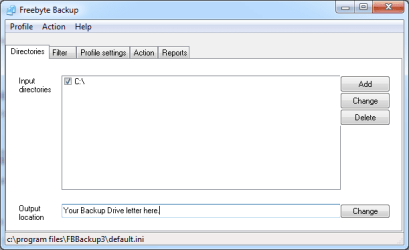
Please make sure Freebyte Backup is running.

InputOutput.PNG
Make sure the drives or folders you want to backup are set in 'Input Directories' as in the image next to the C:\.

Make sure your output drive is set correctly too.


Incremental.PNG
Please ensure the highlighted tick box is checked.

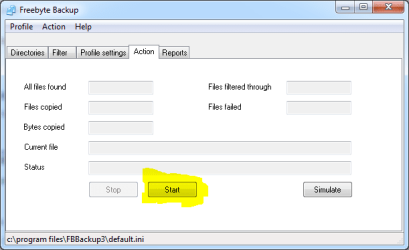
Go.PNG
Hit the start button as highlighted in the above picture.​

I hope this helps and is useful, if you have any queries please ask.

Oh and to make word do what you want it to do please go to Tools>Options>File Location/Save depending on the version.

I'm not sure on Word 2007 but I would imagine you have to find Options in the ribbon and then go to Save.

Oli
 

My Computer

Computer Manufacturer/Model Number
Apple MacBook 5,1
OS
Windows 7 Profesional x86, Mac OS X 10.6 Snow Leopard
CPU
Intel Core 2 Duo 2.4Ghz
Memory
4GB DDR3
Graphics Card(s)
Nvidia 9400m
Monitor(s) Displays
13.3" Internal + 22" DVI + 21.5" USB
Screen Resolution
1280x800 + 1920x1080 + 1920x1080
Hard Drives
Internal SATA 2.5" 500GB (395GB Mac HFS+, 105GB Windows NTFS)
2.48TB RAID consisting of 5 disks (HFS+)
Case
Aluminium Unibody
Keyboard
Apple Late 2009 Wireless Keyboard (US)
Mouse
Apple Magic Mouse
Internet Speed
6.33Mb/s up. 0.36Mb/s down.
Other Info
Harman Kardon Soundsticks II Speakers
Back
Top