Background won't recognize photo file

ADKR

New member
Local time
4:21 AM
Messages
10
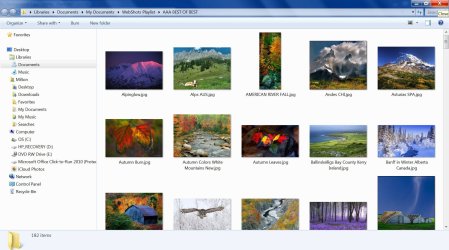
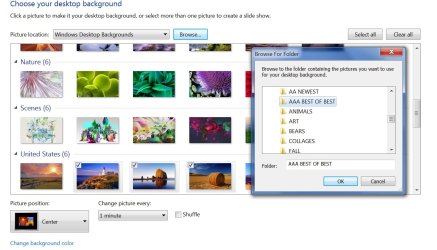
When I go to Control Panel, Personalization, Desktop Background, Picture Location, Browse... I go to a file where the photos I want to use are located and click on the folder. No photos show up. This is a new problem because I have used this file as Desktop Background for a long time. The file has the photos, but the only thing Desktop Background will recognize is Windows Desktop Backgrounds. I have attached screen shots of Desktop Background and the file of photos I want to use.
 

Attachments
  • Background 1.jpg
    Background 1.jpg
    115.6 KB · Views: 0
  • Best.jpg
    Best.jpg
    211.5 KB · Views: 5

My Computer

OS
Windows 7
Hi there .. Can you Select the picture then right click on it .. And set as background ?
 

My Computer

Computer Manufacturer/Model Number
W530-3630QM1
OS
windows 7 home 64bit
CPU
INTEL-CORE I7
Memory
16GB
Hard Drives
750GB
Browser
Chrome
Yes, I can do that. However, I want multiple pictures to rotate and that cannot happen in the Desktop Background because no pictures show up.
 

My Computer

OS
Windows 7
Try putting some pictures in a different location ...
 

My Computer

Computer Manufacturer/Model Number
W530-3630QM1
OS
windows 7 home 64bit
CPU
INTEL-CORE I7
Memory
16GB
Hard Drives
750GB
Browser
Chrome
after you set the folder you wish, clik the select all button. it will enable the slide show feature. You can then have the pix rotate in order or you may check the shuffle box.
 

My Computer

Computer type
PC/Desktop
Computer Manufacturer/Model Number
HP (HP-P6212F)
OS
Microsoft Windows 7 Home Premium 64-bit 7601 Multiprocessor Free Service Pack 1
CPU
Pentium(R) Dual-Core CPU E5300 @ 2.60GHz
Motherboard
PEGATRON CORPORATION Benicia
Memory
6.00 GB
Graphics Card(s)
Intel(R) G33/G31 Express Chipset Family
Sound Card
Realtek High Definition Audio
Monitor(s) Displays
24'' HP WS LCD
Screen Resolution
1920 x 1080 x 32 bits (4294967296 colors) @ 60 Hz
Hard Drives
(1) ATA Hitachi HDT72106 SCSI Disk Device (2) Generic- Compact Flash USB Device (3) Generic- MS/MS-Pro USB Device (4) Generic- SD/MMC USB Device (5) Generic- SM/xD-Picture USB Device (6) Verbatim STORE N GO USB Device
Keyboard
Logitech G510s
Mouse
Logitech Trackball M570
Antivirus
Microsoft Security Essentials / Malwarebytes
Browser
IE / Firefox / Chrome
I have tried putting the pictures in a different place to no avail. When I use "browse" none of the folders with pictures show pictures for the desktop background. I would use the "select all" button, but no pictures are there to select. The only pictures that show are the set from the Windows Desktop Background.
 

My Computer

OS
Windows 7
Back
Top