Backing-up takes too long.

thyde9337

New member
Member
Local time
2:35 AM
Messages
12
I have pruned my hard disk and archived a lot of my video files, this has left my C:drive storing 252 GB out of a total capacity of 1..15 TB. I have now backed up the C:drive to an external hard drive (I:) and the backup has a total volume of 452 GB. Incidentally, it took nearly 4 hours to carry out the backup even though there was already a previous system backup on that hard drive (I:). Why is the new backup so large and why did the process take so long?

I have carried out a search in the Forums but I have not found an article that answers my questions.

thyde9337

My System: Dell Studio XPS 8100, Intel Core 3.2 GHz processor. 6.0GB memory. 1.15 GB hard drive, 1.5 GB Toshiba external hard drive I, 1.0TB Toshiba external hard drive (J:.K:,L , 500 GB Iomega external hard drive (M. Dell 922 Scanner/Printer.
 
Last edited:

My Computer My Computer

Computer Manufacturer/Model Number
Dell Studio XPS 8100
OS
Windows 7 Home Premium
CPU
3.2 Ghz Intel Core i5 650
Motherboard
Dell Inc. 0T568R A00
Memory
6.0 GB
Graphics Card(s)
NVIDIA GEForce GTS 240
Monitor(s) Displays
Samsung SyncMaster HMDS906868
Hard Drives
C: 1.15 TB (int),
Toshiba 1.36 TB (ext),
Iomega 1.00GB (ext),
Iomega 500GB (ext)
Internet Speed
Download 20MB/sec
You're not backing up the Windows files, are you? Also, you may want to explore incremental backups.
 

My Computer My Computer

Computer Manufacturer/Model Number
Dell and Custom
OS
Systems 1 and 2: Windows 7 Enterprise x64, Win 8 Developer
CPU
System 1: i7 [email protected], System 2: AMD FX-4100 Zambezi 3.6G
Motherboard
System 1:Dell 06NWYK System 2: ASUS M5A97 AM3+
Memory
System 1: 8GB System 2: 8GB
Graphics Card(s)
System 1: ATI FirePro V4800 System 2: Radeon HD 6850
Sound Card
System 1: onboard System 2: onboard
Monitor(s) Displays
System1: Viewsonic HDMI 24"
Screen Resolution
System 1: 1920x1080 System 2: 1920x1080
Hard Drives
System 1: Mirrored .5B drives System 2: Seagate Barracuda ST1000DM003 1TB 7200 RPM 64MB Cache SATA 6.0Gb/s
Case
System 1: Dell System 2: Cooler Master
Internet Speed
10 MBPS
I have pruned my hard disk and archived a lot of my video files, this has left my C:drive storing 252 GB out of a total capacity of 1..15 TB. I have now backed up the C:drive to an external hard drive (I:) and the backup has a total volume of 452 GB. Incidentally, it took nearly 4 hours to carry out the backup even though there was already a previous system backup on that hard drive (I:). Why is the new backup so large and why did the process take so long?

I have carried out a search in the Forums but I have not found an article that answers my questions.

Hello thyde9337 and welcome to the Forum.

Did you do a sector by sector backup with no file compression? That could account for the time.
 

My Computer My Computer

Computer type
Laptop
Computer Manufacturer/Model Number
Sony Vaio VPCEB47GM Laptop
OS
Win 7 Pro 64-bit
CPU
Intel i5 2.4 Ghz
Memory
8GB DDR3
Graphics Card(s)
Intel HD 3000
Sound Card
IDT High Definition
Monitor(s) Displays
15.6 WGXA Anti-Glare LED
Screen Resolution
1280x800
Hard Drives
640Gb 7200rpm
Antivirus
MSE
Browser
Opera (primary) with IE9 backup
Setting backup compression to the highest level also increases the time factor immensely (without saving so much more space than on "normal" level).
 

My Computer My Computer

Computer Manufacturer/Model Number
HP m8000n
OS
Windows 7 Ultimate x86
CPU
DualCore AMD Athlon 64 X2, 2600 MHz 5200+
Motherboard
Asus M2N68-LA (Narra)
Memory
Samsung 2GB DDR2
Graphics Card(s)
Onboard NVIDIA GeForce 6150SE nForce 430
Sound Card
Onboard nVIDIA nForce 6100-430 (MCP61P)
Monitor(s) Displays
Westinghouse 19" LED
Screen Resolution
1280x1024
Hard Drives
SATA II Seagate Barracuda 500GB
USB II WD Elements 500GB
USB II WD My Book 1TB
USB II WD My Book 2TB
PSU
Stock (HP)
Case
Stock (HP)
Cooling
Stock
Keyboard
Logitech Classic KB 200
Mouse
Standard HP opticle USB mouse
Thanks Lemur & marsimar for your prompt replies. I used the Windows 7 backup routine for my system image no options were indicated apart from choosing the date and frequency of automatic backups. I have now discovered that I need to start the backup process before selecting which parts of the system to backup. This can be difficult because I have little idea of which parts of my system have changed since the last backup. I was hoping that the backup program would recognise and backup only the changed folders/files and ignore the others.

thyde9337
 

My Computer My Computer

Computer Manufacturer/Model Number
Dell Studio XPS 8100
OS
Windows 7 Home Premium
CPU
3.2 Ghz Intel Core i5 650
Motherboard
Dell Inc. 0T568R A00
Memory
6.0 GB
Graphics Card(s)
NVIDIA GEForce GTS 240
Monitor(s) Displays
Samsung SyncMaster HMDS906868
Hard Drives
C: 1.15 TB (int),
Toshiba 1.36 TB (ext),
Iomega 1.00GB (ext),
Iomega 500GB (ext)
Internet Speed
Download 20MB/sec
Thanks Lemur & marsimar for your prompt replies. I used the Windows 7 backup routine for my system image no options were indicated apart from choosing the date and frequency of automatic backups. I have now discovered that I need to start the backup process before selecting which parts of the system to backup. This can be difficult because I have little idea of which parts of my system have changed since the last backup. I was hoping that the backup program would recognise and backup only the changed folders/files and ignore the others.

thyde9337

Just for comparison, I've got a 500GB HD with about 280GB on it. Using the 7 imaging tool takes about 45 minutes if I let it update (overwrite) a previously made image. The initial image will always take the longest ... nothing for it to reference as to what's been changed.

A lot of forum members recommend another free imaging software called Macrium Reflect. They say it offers more user flexibility.

http://www.sevenforums.com/tutorials/73828-imaging-free-macrium.html
 

My Computer My Computer

Computer type
Laptop
Computer Manufacturer/Model Number
Sony Vaio VPCEB47GM Laptop
OS
Win 7 Pro 64-bit
CPU
Intel i5 2.4 Ghz
Memory
8GB DDR3
Graphics Card(s)
Intel HD 3000
Sound Card
IDT High Definition
Monitor(s) Displays
15.6 WGXA Anti-Glare LED
Screen Resolution
1280x800
Hard Drives
640Gb 7200rpm
Antivirus
MSE
Browser
Opera (primary) with IE9 backup
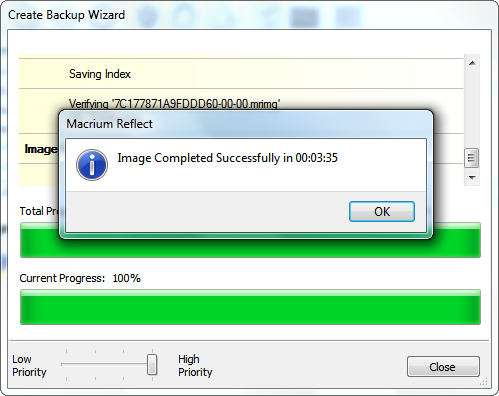
thyse9337- 4 hours is quite a long time for a backup. My C drive only has about 23 GB to back up, but it only takes 3 1/2 minutes using freeware Macrium Reflect and the 'medium' compression backup is only about 8 GB in size which is 1/3 the size of the Windows System Image 24 GB backups and can be mounted as a drive in Explorer so that files may be removed or added at the user's discretion...

335Backup8-18-2010.png


~Maxx~

LaCie100.png
 

My Computer My Computer

Computer Manufacturer/Model Number
HP HPE 270f
OS
Windows 7 x64 Home Premium
CPU
Intel Core i7 930 @ 2.8 Ghz Socket 1366 LGA
Motherboard
Pegatron Truckee v1.04E41
Memory
8 GB 1366 Mhz DDR3 (PC3-10700) RAM
Graphics Card(s)
ATI Radeon 5770 1 GB DDR5 RAM
Sound Card
Realtech High Definition
Monitor(s) Displays
32" Sony Bravia
Screen Resolution
1366 X 768
Hard Drives
Intel 25nm 120 GB Series 320 SSD HD Tune- 265 MBps Read/ 130 MBps Write

LaCie 1TB + 1TB RAID 0 eSATA Drive HD Tune- 160 MBps Read/ 90 MBps Write
Keyboard
Logitech Illuminated
Mouse
Logitech MX Revolution
Internet Speed
36.4 Mbps Maximum on a 37 Mbps Motorola SB501 Modem
Our School of Engineering image is the largest one I work with (Solidworks, CS5, 4 versions of Java). It takes about 3-4 hours to image to our network share using Zen10. The final image is about 30GB.
I also use Ghost to image to a USB, or for legacy images, or for the Mac guys. Image size is about 25GB for the same drive, taking about 60-90minutes.
It probably doesnt help you at the moment, but its another benchmark to go off.

Also, as SledgeDG mentions, using a higher compression will result in a smaller image filesize but at the cost of time.
When I get back to work in the morning, I'l try to post some more accurate numbers.

But now, a question of interest...
How many drives/partitions are you using? And your backups, are they just the system and program files, or are you including your user files too?

A good idea, would be to put your user folders on another drive or partition. So when it comes to your next backup, you can just do the system/program files drive then the users folders later, instead of doing the whole shabang in one long hit.
 

My Computer My Computer

OS
Windows 7 Enterprise
CPU
Intel Pentium Dual E2200 @2.2GHz
Motherboard
Gigabyte II-G31
Memory
4GB
Graphics Card(s)
Palit GForce 9500GT 1GB
Sound Card
onBoard
Hard Drives
WesternDigital: 250GB + 1TB + 1TB + 2TB
PSU
450W
Case
CoolerMaster CM690
Cooling
Corsair H50
Mouse
Logitech MX518
Macrium Reflect is the way to go,it also makes image,incremental,differential and normal file backups... Do it,,Do it now!!;)
 

My Computer My Computer

Computer Manufacturer/Model Number
Custom
OS
Windows 7 Ultimate 32bit
CPU
INTEL Pentium4 3.2ghz(QuadCore MonthEnd!!!)
Motherboard
Asus P5QL-EM
Memory
2gb kingston DDR2 800
Graphics Card(s)
hd powercolour 5570 512MB
Sound Card
8ch onboard
Monitor(s) Displays
21" Samsung
Screen Resolution
Change alot
Hard Drives
samsung 500GB 7200rpm
PSU
Sparta 500w
Case
Alienware
Cooling
Aero cooling
Keyboard
Microsoft Multi-Media
Mouse
Scorpion 3000dpi
Internet Speed
none
Other Info
Xforce-5 5.1 Surround
Thanks to those users who replied to my message. I have run backup again after finding out how to control which items should be backed up. The new backup is only 13GB but I do not know how long it ran because the computer was unattended during the backup process. It seems that the problem is now resolved.
 

My Computer My Computer

Computer Manufacturer/Model Number
Dell Studio XPS 8100
OS
Windows 7 Home Premium
CPU
3.2 Ghz Intel Core i5 650
Motherboard
Dell Inc. 0T568R A00
Memory
6.0 GB
Graphics Card(s)
NVIDIA GEForce GTS 240
Monitor(s) Displays
Samsung SyncMaster HMDS906868
Hard Drives
C: 1.15 TB (int),
Toshiba 1.36 TB (ext),
Iomega 1.00GB (ext),
Iomega 500GB (ext)
Internet Speed
Download 20MB/sec
The new backup is only 13GB. It seems that the problem is now resolved.

I must ask how you did that because even though I have trimmed down my Win 7 partition to 16.2 GB the Windows System Image is still 24 GB with the mandatory 9.46 GB Factory Image included.

~Maxx~

LaCie100.png
 

My Computer My Computer

Computer Manufacturer/Model Number
HP HPE 270f
OS
Windows 7 x64 Home Premium
CPU
Intel Core i7 930 @ 2.8 Ghz Socket 1366 LGA
Motherboard
Pegatron Truckee v1.04E41
Memory
8 GB 1366 Mhz DDR3 (PC3-10700) RAM
Graphics Card(s)
ATI Radeon 5770 1 GB DDR5 RAM
Sound Card
Realtech High Definition
Monitor(s) Displays
32" Sony Bravia
Screen Resolution
1366 X 768
Hard Drives
Intel 25nm 120 GB Series 320 SSD HD Tune- 265 MBps Read/ 130 MBps Write

LaCie 1TB + 1TB RAID 0 eSATA Drive HD Tune- 160 MBps Read/ 90 MBps Write
Keyboard
Logitech Illuminated
Mouse
Logitech MX Revolution
Internet Speed
36.4 Mbps Maximum on a 37 Mbps Motorola SB501 Modem
Macrium Reflect is the way to go,it also makes image,incremental,differential and normal file backups... Do it,,Do it now!!;)
That's only with the paid version that you get differential and incremental as backup options. On the free version, you can just take an entire image.
 

My Computer My Computer

Computer Manufacturer/Model Number
Self-Built in July 2009
OS
Windows 7 Ultimate x64
CPU
Intel Q9550 2.83Ghz OC'd to 3.40Ghz
Motherboard
Gigabyte GA-EP45-UD3R rev. 1.1, F12 BIOS
Memory
8GB G.Skill PI DDR2-800, 4-4-4-12 timings
Graphics Card(s)
EVGA 1280MB Nvidia GeForce GTX570
Sound Card
Realtek ALC899A 8 channel onboard audio
Monitor(s) Displays
23" Acer x233H
Screen Resolution
1920x1080
Hard Drives
Intel X25-M 80GB Gen 2 SSD
Western Digital 1TB Caviar Black, 32MB cache. WD1001FALS
PSU
Corsair 620HX modular
Case
Antec P182
Cooling
stock
Keyboard
ABS M1 Mechanical
Mouse
Logitech G9 Laser Mouse
Internet Speed
15/2 cable modem
Other Info
Windows and Linux enthusiast. Logitech G35 Headset.
Back
Top