Takes too long to start up

ipbr21054

New member
Member
VIP
Local time
11:46 PM
Messages
128
Morning,

Every day now after i switch on the pc i cant use it for say 10 minutes otherwise things start to hang etc.
Looking at the front of the pc each time the red lights are busy doing something.
As an example its like windows or something is doing a long update or scan & just takes most of the ram to do so.

This is getting to be an issue so what can you advise to track down what it is or how can i check.

Ive run malware software etc & pretty clean so need some advise please to show me where i need to start.

Have a nice day
 

My Computer My Computer

Computer type
Laptop
Computer Manufacturer/Model Number
Dell Inspiron P07T & Pc Windows 32 / 64 bit
OS
Microsoft Windows 7 Professional 64-bit 7601 Multiprocessor Free Service Pack 1
CPU
AMD Athlon(tm) II Neo K345 Dual-Core Processor
Motherboard
Dell Inc.
Memory
8.00 GB
Graphics Card(s)
ATI Mobility Radeon HD 4200 Series
Sound Card
(1) AMD High Definition Audio Device (2) High Definition A
Monitor(s) Displays
Generic PnP Monitor
Screen Resolution
1366 x 768 x 32 bits (4294967296 colors) @ 59 Hz
Hard Drives
(1) WDC WD3200BEKT-75PVMT0 ATA Device (2) Generic- Multi-Card USB Device
PSU
Dell 65w ac adapter model no LA65NS0-00
Keyboard
Standard Ps2 keyboard
Mouse
Ps2 compatible mouse
Internet Speed
Download 38.9Mbps Upload 18.1Mbps
Antivirus
Avg internet security 19.7.3103 (build 19.7.4674.524)
Browser
Google Chrome Version 76.0.3809.132 (Official Build) (64-bit
Hello ipbr21054

First thing to check is msconfig. Type msconfig into :orb: start search box, and select from list. Then, click on Startup Tab. This will give you a list of Startup programs that starts when Windows starts. If there are too many, then that could explain why Windows is sluggish on Startup.
 

My Computer My Computer

Computer type
PC/Desktop
OS
Windows 7 x64, Vista x64, 8.1 smartphone
CPU
Intel E8400 65W 64-bit
Motherboard
Gigabyte EP45-UD3LR
Memory
DDR2 2 x 2GB, 1GB x 2
Graphics Card(s)
XFX Radeon HD5750
Sound Card
AMD High Definition Audio; Realtek High Definition Audio
Monitor(s) Displays
iiyama prolite X2377HDS
Screen Resolution
1920 x 1080
Hard Drives
500GB 7200 rpm Seagate ST3500413AS 16MB, 500GB 5400 rpm Toshiba MQ02ABF050H 32MB, 200GB 7200 rpm Seagate ST3200820AS 8MB, 2TB 7200 rpm Western Digital WD20EZRX 64MB
PSU
Enermax Liberty Modular
Case
Antec P193 Midi Tower
Keyboard
Mionix ZIBAL 60
Mouse
Razer USB 2.0 Diamondback Mouse or Huion Graphics Tablet
Browser
Internet Explorer, Lunascape, Firefox, Opera, Avast Safezone
After opening 'msconfig', click on the Boot tab. Under "Timeout" change the 30 to just 3 (remove the zero) and apply (save) the changes. Also, put a check mark next to "No GUI boot".


Reboot your PC and it will come up at least 27 sec's faster, just from that one change.


That's the very first thing I set when installing any ver of Windows. I'm all about performance, of Windows.


There are several Registry tweaks that I use too, but that's for a different thread.;)


Good Luck,
TM :cool:
 

My Computer My Computer

Computer type
PC/Desktop
Computer Manufacturer/Model Number
Various
OS
Win 7 Pro, SP1, x86, Win-11/Pro/64
CPU
AMD
Motherboard
Various
Memory
8GB Crucial
Graphics Card(s)
Various
Sound Card
OnBoard
Monitor(s) Displays
Acer 21.5"
Hard Drives
Crucial SSD, 500 GB
PSU
OEM
Case
SFF Slim Line Case
Cooling
OEM
Keyboard
eMachines
Mouse
Logitech Wireless
Internet Speed
varies
Antivirus
Windows Defender/Super Anti-Spyware
Browser
Firefox
Hi,
Ive now done as mentioned above thanks.
I still see the red light flickering / solid in appearance.

Trying to explain what is happening is like something is being installed or a scan is taking place etc.
Reason i say that is sometimes its impossible to do anything for at least 10 minutes otherwise if i try to start doing things pages freeze / messages like chrome isnt responding / cursor starts to go round & round in a circle.

This happens at every start up,once whatevere has finised most of the day works like it should.

Thanks
 

My Computer My Computer

Computer type
Laptop
Computer Manufacturer/Model Number
Dell Inspiron P07T & Pc Windows 32 / 64 bit
OS
Microsoft Windows 7 Professional 64-bit 7601 Multiprocessor Free Service Pack 1
CPU
AMD Athlon(tm) II Neo K345 Dual-Core Processor
Motherboard
Dell Inc.
Memory
8.00 GB
Graphics Card(s)
ATI Mobility Radeon HD 4200 Series
Sound Card
(1) AMD High Definition Audio Device (2) High Definition A
Monitor(s) Displays
Generic PnP Monitor
Screen Resolution
1366 x 768 x 32 bits (4294967296 colors) @ 59 Hz
Hard Drives
(1) WDC WD3200BEKT-75PVMT0 ATA Device (2) Generic- Multi-Card USB Device
PSU
Dell 65w ac adapter model no LA65NS0-00
Keyboard
Standard Ps2 keyboard
Mouse
Ps2 compatible mouse
Internet Speed
Download 38.9Mbps Upload 18.1Mbps
Antivirus
Avg internet security 19.7.3103 (build 19.7.4674.524)
Browser
Google Chrome Version 76.0.3809.132 (Official Build) (64-bit

My Computers My Computers

System One System Two

  • Computer type
    PC/Desktop
    Computer Manufacturer/Model Number
    custom build
    OS
    Windows 7 HP 64
    CPU
    i5 6600K - 800MHz to 4200MHz
    Motherboard
    GA-Z170-HD3P
    Memory
    4+4G GSkill DDR4 3000
    Graphics Card(s)
    IG - Intel 530
    Monitor(s) Displays
    Samsung 226BW
    Screen Resolution
    1680x1050
    Hard Drives
    (1) -1 SM951 – 128GB M.2 AHCI PCIe SSD drive for Windows 7 and Lubuntu
    (2) -1 WD SATA 3 - 1T for Data
    (3) -1 WD SATA 3 - 1T for backup
    PSU
    Thermaltake 450W TR2 gold
    Keyboard
    Old and good Chicony mechanical keyboard
    Mouse
    Logitech mX performance - 9 buttons (had to disable some)
    Internet Speed
    500Mb/s
    Browser
    Firefox 64
    Other Info
    TinyWall firewall
  • Computer type
    Laptop
    System Manufacturer/Model Number
    Asus Q550LF
    OS
    Windows 7 Pro
    CPU
    i7-4500U 800MHz to 3.0GHz
    Motherboard
    Asus Q550LF
    Memory
    (4+4)G DDR3 1600
    Graphics Card(s)
    IG intel 4400 + NVIDIA GeForce GT 745M
    Sound Card
    Realtek
    Monitor(s) Displays
    LG Display LP156WF4-SPH1
    Screen Resolution
    1920 x 1080
    Hard Drives
    BX500 120G SSD for Windows and programs +
    1T HDD for data
    Internet Speed
    500 Mb/s
    Browser
    Firefox
    Other Info
    TinyWall firewall
Hi
Can you advise a little more with regards simplix.
 

My Computer My Computer

Computer type
Laptop
Computer Manufacturer/Model Number
Dell Inspiron P07T & Pc Windows 32 / 64 bit
OS
Microsoft Windows 7 Professional 64-bit 7601 Multiprocessor Free Service Pack 1
CPU
AMD Athlon(tm) II Neo K345 Dual-Core Processor
Motherboard
Dell Inc.
Memory
8.00 GB
Graphics Card(s)
ATI Mobility Radeon HD 4200 Series
Sound Card
(1) AMD High Definition Audio Device (2) High Definition A
Monitor(s) Displays
Generic PnP Monitor
Screen Resolution
1366 x 768 x 32 bits (4294967296 colors) @ 59 Hz
Hard Drives
(1) WDC WD3200BEKT-75PVMT0 ATA Device (2) Generic- Multi-Card USB Device
PSU
Dell 65w ac adapter model no LA65NS0-00
Keyboard
Standard Ps2 keyboard
Mouse
Ps2 compatible mouse
Internet Speed
Download 38.9Mbps Upload 18.1Mbps
Antivirus
Avg internet security 19.7.3103 (build 19.7.4674.524)
Browser
Google Chrome Version 76.0.3809.132 (Official Build) (64-bit

My Computers My Computers

System One System Two

  • Computer type
    PC/Desktop
    Computer Manufacturer/Model Number
    custom build
    OS
    Windows 7 HP 64
    CPU
    i5 6600K - 800MHz to 4200MHz
    Motherboard
    GA-Z170-HD3P
    Memory
    4+4G GSkill DDR4 3000
    Graphics Card(s)
    IG - Intel 530
    Monitor(s) Displays
    Samsung 226BW
    Screen Resolution
    1680x1050
    Hard Drives
    (1) -1 SM951 – 128GB M.2 AHCI PCIe SSD drive for Windows 7 and Lubuntu
    (2) -1 WD SATA 3 - 1T for Data
    (3) -1 WD SATA 3 - 1T for backup
    PSU
    Thermaltake 450W TR2 gold
    Keyboard
    Old and good Chicony mechanical keyboard
    Mouse
    Logitech mX performance - 9 buttons (had to disable some)
    Internet Speed
    500Mb/s
    Browser
    Firefox 64
    Other Info
    TinyWall firewall
  • Computer type
    Laptop
    System Manufacturer/Model Number
    Asus Q550LF
    OS
    Windows 7 Pro
    CPU
    i7-4500U 800MHz to 3.0GHz
    Motherboard
    Asus Q550LF
    Memory
    (4+4)G DDR3 1600
    Graphics Card(s)
    IG intel 4400 + NVIDIA GeForce GT 745M
    Sound Card
    Realtek
    Monitor(s) Displays
    LG Display LP156WF4-SPH1
    Screen Resolution
    1920 x 1080
    Hard Drives
    BX500 120G SSD for Windows and programs +
    1T HDD for data
    Internet Speed
    500 Mb/s
    Browser
    Firefox
    Other Info
    TinyWall firewall
Hi,
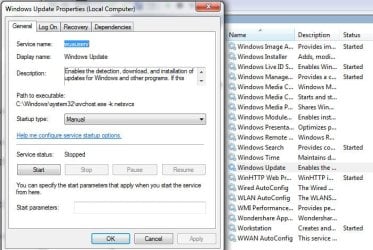
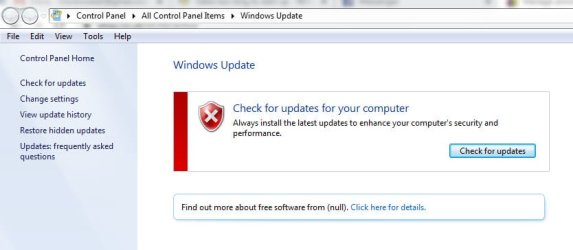
I have turneed off Windows Update & also selected Manual to check for updates,see attached photos.

I have also installed the Simplix for the link advised.

Can you advise what i now need to do if anything.

Thanks
 

Attachments

  • 7069.jpg
    7069.jpg
    63.1 KB · Views: 21
  • 7070.jpg
    7070.jpg
    31.1 KB · Views: 0

My Computer My Computer

Computer type
Laptop
Computer Manufacturer/Model Number
Dell Inspiron P07T & Pc Windows 32 / 64 bit
OS
Microsoft Windows 7 Professional 64-bit 7601 Multiprocessor Free Service Pack 1
CPU
AMD Athlon(tm) II Neo K345 Dual-Core Processor
Motherboard
Dell Inc.
Memory
8.00 GB
Graphics Card(s)
ATI Mobility Radeon HD 4200 Series
Sound Card
(1) AMD High Definition Audio Device (2) High Definition A
Monitor(s) Displays
Generic PnP Monitor
Screen Resolution
1366 x 768 x 32 bits (4294967296 colors) @ 59 Hz
Hard Drives
(1) WDC WD3200BEKT-75PVMT0 ATA Device (2) Generic- Multi-Card USB Device
PSU
Dell 65w ac adapter model no LA65NS0-00
Keyboard
Standard Ps2 keyboard
Mouse
Ps2 compatible mouse
Internet Speed
Download 38.9Mbps Upload 18.1Mbps
Antivirus
Avg internet security 19.7.3103 (build 19.7.4674.524)
Browser
Google Chrome Version 76.0.3809.132 (Official Build) (64-bit
Hi,
I have turneed off Windows Update & also selected Manual to check for updates,see attached photos.

I have also installed the Simplix for the link advised.

Can you advise what i now need to do if anything.

Thanks

Leave WU to Never Check. Every two months, run WU manually to find updates for Office etc and decide witch one to install.
Also, Every two months download and run the latest Simplix package.

The link I posted has a link to download a Simplix downloader (UpdatePack7R2) The UpdatePack7R2.exe always download the latest Simplix

The Link in MajorGeeks is to directly download latest Simplix.

Anyway, once you have downloaded the latest Simplix (880MB), run it to install the latest updates.

To uninstall the telemetry, run cmd file to uninstall those KB files.
kb_spy.cmd.txt
Rename it as KB_Spy.cmd and run it.
 

My Computers My Computers

System One System Two

  • Computer type
    PC/Desktop
    Computer Manufacturer/Model Number
    custom build
    OS
    Windows 7 HP 64
    CPU
    i5 6600K - 800MHz to 4200MHz
    Motherboard
    GA-Z170-HD3P
    Memory
    4+4G GSkill DDR4 3000
    Graphics Card(s)
    IG - Intel 530
    Monitor(s) Displays
    Samsung 226BW
    Screen Resolution
    1680x1050
    Hard Drives
    (1) -1 SM951 – 128GB M.2 AHCI PCIe SSD drive for Windows 7 and Lubuntu
    (2) -1 WD SATA 3 - 1T for Data
    (3) -1 WD SATA 3 - 1T for backup
    PSU
    Thermaltake 450W TR2 gold
    Keyboard
    Old and good Chicony mechanical keyboard
    Mouse
    Logitech mX performance - 9 buttons (had to disable some)
    Internet Speed
    500Mb/s
    Browser
    Firefox 64
    Other Info
    TinyWall firewall
  • Computer type
    Laptop
    System Manufacturer/Model Number
    Asus Q550LF
    OS
    Windows 7 Pro
    CPU
    i7-4500U 800MHz to 3.0GHz
    Motherboard
    Asus Q550LF
    Memory
    (4+4)G DDR3 1600
    Graphics Card(s)
    IG intel 4400 + NVIDIA GeForce GT 745M
    Sound Card
    Realtek
    Monitor(s) Displays
    LG Display LP156WF4-SPH1
    Screen Resolution
    1920 x 1080
    Hard Drives
    BX500 120G SSD for Windows and programs +
    1T HDD for data
    Internet Speed
    500 Mb/s
    Browser
    Firefox
    Other Info
    TinyWall firewall
But do i need to run simplex again in the future or am i now just using windows update to check.

Thanks
 

My Computer My Computer

Computer type
Laptop
Computer Manufacturer/Model Number
Dell Inspiron P07T & Pc Windows 32 / 64 bit
OS
Microsoft Windows 7 Professional 64-bit 7601 Multiprocessor Free Service Pack 1
CPU
AMD Athlon(tm) II Neo K345 Dual-Core Processor
Motherboard
Dell Inc.
Memory
8.00 GB
Graphics Card(s)
ATI Mobility Radeon HD 4200 Series
Sound Card
(1) AMD High Definition Audio Device (2) High Definition A
Monitor(s) Displays
Generic PnP Monitor
Screen Resolution
1366 x 768 x 32 bits (4294967296 colors) @ 59 Hz
Hard Drives
(1) WDC WD3200BEKT-75PVMT0 ATA Device (2) Generic- Multi-Card USB Device
PSU
Dell 65w ac adapter model no LA65NS0-00
Keyboard
Standard Ps2 keyboard
Mouse
Ps2 compatible mouse
Internet Speed
Download 38.9Mbps Upload 18.1Mbps
Antivirus
Avg internet security 19.7.3103 (build 19.7.4674.524)
Browser
Google Chrome Version 76.0.3809.132 (Official Build) (64-bit
But do i need to run simplex again in the future or am i now just using windows update to check.

Thanks

Use WU only for office. Read my last post.
 

My Computers My Computers

System One System Two

  • Computer type
    PC/Desktop
    Computer Manufacturer/Model Number
    custom build
    OS
    Windows 7 HP 64
    CPU
    i5 6600K - 800MHz to 4200MHz
    Motherboard
    GA-Z170-HD3P
    Memory
    4+4G GSkill DDR4 3000
    Graphics Card(s)
    IG - Intel 530
    Monitor(s) Displays
    Samsung 226BW
    Screen Resolution
    1680x1050
    Hard Drives
    (1) -1 SM951 – 128GB M.2 AHCI PCIe SSD drive for Windows 7 and Lubuntu
    (2) -1 WD SATA 3 - 1T for Data
    (3) -1 WD SATA 3 - 1T for backup
    PSU
    Thermaltake 450W TR2 gold
    Keyboard
    Old and good Chicony mechanical keyboard
    Mouse
    Logitech mX performance - 9 buttons (had to disable some)
    Internet Speed
    500Mb/s
    Browser
    Firefox 64
    Other Info
    TinyWall firewall
  • Computer type
    Laptop
    System Manufacturer/Model Number
    Asus Q550LF
    OS
    Windows 7 Pro
    CPU
    i7-4500U 800MHz to 3.0GHz
    Motherboard
    Asus Q550LF
    Memory
    (4+4)G DDR3 1600
    Graphics Card(s)
    IG intel 4400 + NVIDIA GeForce GT 745M
    Sound Card
    Realtek
    Monitor(s) Displays
    LG Display LP156WF4-SPH1
    Screen Resolution
    1920 x 1080
    Hard Drives
    BX500 120G SSD for Windows and programs +
    1T HDD for data
    Internet Speed
    500 Mb/s
    Browser
    Firefox
    Other Info
    TinyWall firewall
Many thanks
 

My Computer My Computer

Computer type
Laptop
Computer Manufacturer/Model Number
Dell Inspiron P07T & Pc Windows 32 / 64 bit
OS
Microsoft Windows 7 Professional 64-bit 7601 Multiprocessor Free Service Pack 1
CPU
AMD Athlon(tm) II Neo K345 Dual-Core Processor
Motherboard
Dell Inc.
Memory
8.00 GB
Graphics Card(s)
ATI Mobility Radeon HD 4200 Series
Sound Card
(1) AMD High Definition Audio Device (2) High Definition A
Monitor(s) Displays
Generic PnP Monitor
Screen Resolution
1366 x 768 x 32 bits (4294967296 colors) @ 59 Hz
Hard Drives
(1) WDC WD3200BEKT-75PVMT0 ATA Device (2) Generic- Multi-Card USB Device
PSU
Dell 65w ac adapter model no LA65NS0-00
Keyboard
Standard Ps2 keyboard
Mouse
Ps2 compatible mouse
Internet Speed
Download 38.9Mbps Upload 18.1Mbps
Antivirus
Avg internet security 19.7.3103 (build 19.7.4674.524)
Browser
Google Chrome Version 76.0.3809.132 (Official Build) (64-bit
You should install a small SSD (120G) for windows and programs and use the HDD for data only.
It's a way to have the speed of a SSD and the space of a HDD at low cost. That is what I have on my desktop and laptop.
 

My Computers My Computers

System One System Two

  • Computer type
    PC/Desktop
    Computer Manufacturer/Model Number
    custom build
    OS
    Windows 7 HP 64
    CPU
    i5 6600K - 800MHz to 4200MHz
    Motherboard
    GA-Z170-HD3P
    Memory
    4+4G GSkill DDR4 3000
    Graphics Card(s)
    IG - Intel 530
    Monitor(s) Displays
    Samsung 226BW
    Screen Resolution
    1680x1050
    Hard Drives
    (1) -1 SM951 – 128GB M.2 AHCI PCIe SSD drive for Windows 7 and Lubuntu
    (2) -1 WD SATA 3 - 1T for Data
    (3) -1 WD SATA 3 - 1T for backup
    PSU
    Thermaltake 450W TR2 gold
    Keyboard
    Old and good Chicony mechanical keyboard
    Mouse
    Logitech mX performance - 9 buttons (had to disable some)
    Internet Speed
    500Mb/s
    Browser
    Firefox 64
    Other Info
    TinyWall firewall
  • Computer type
    Laptop
    System Manufacturer/Model Number
    Asus Q550LF
    OS
    Windows 7 Pro
    CPU
    i7-4500U 800MHz to 3.0GHz
    Motherboard
    Asus Q550LF
    Memory
    (4+4)G DDR3 1600
    Graphics Card(s)
    IG intel 4400 + NVIDIA GeForce GT 745M
    Sound Card
    Realtek
    Monitor(s) Displays
    LG Display LP156WF4-SPH1
    Screen Resolution
    1920 x 1080
    Hard Drives
    BX500 120G SSD for Windows and programs +
    1T HDD for data
    Internet Speed
    500 Mb/s
    Browser
    Firefox
    Other Info
    TinyWall firewall
Hi,
Sorry for late reply been away with work.
I think this is what i am going to do.

With regards windows 7 once i instal the SSD do i need to install windows to the SSD & delete/uninstall from where it currently is ?

Thanks
 

My Computer My Computer

Computer type
Laptop
Computer Manufacturer/Model Number
Dell Inspiron P07T & Pc Windows 32 / 64 bit
OS
Microsoft Windows 7 Professional 64-bit 7601 Multiprocessor Free Service Pack 1
CPU
AMD Athlon(tm) II Neo K345 Dual-Core Processor
Motherboard
Dell Inc.
Memory
8.00 GB
Graphics Card(s)
ATI Mobility Radeon HD 4200 Series
Sound Card
(1) AMD High Definition Audio Device (2) High Definition A
Monitor(s) Displays
Generic PnP Monitor
Screen Resolution
1366 x 768 x 32 bits (4294967296 colors) @ 59 Hz
Hard Drives
(1) WDC WD3200BEKT-75PVMT0 ATA Device (2) Generic- Multi-Card USB Device
PSU
Dell 65w ac adapter model no LA65NS0-00
Keyboard
Standard Ps2 keyboard
Mouse
Ps2 compatible mouse
Internet Speed
Download 38.9Mbps Upload 18.1Mbps
Antivirus
Avg internet security 19.7.3103 (build 19.7.4674.524)
Browser
Google Chrome Version 76.0.3809.132 (Official Build) (64-bit
If I can help here. Before you install SSD, make a backup of the HDD system image. Then install SSD and remove HDD - this is to prevent complications with Boot Manager. When you are happy, install Windows 7 on SSD. When you have Windows 7 running smoothly, then you can reconnect HDD. Well, HDD still has boot information on it, so you want to set HDD as inactive and then erase the contents of HDD. Once done, the HDD will have capacity for your data.
 

My Computer My Computer

Computer type
PC/Desktop
OS
Windows 7 x64, Vista x64, 8.1 smartphone
CPU
Intel E8400 65W 64-bit
Motherboard
Gigabyte EP45-UD3LR
Memory
DDR2 2 x 2GB, 1GB x 2
Graphics Card(s)
XFX Radeon HD5750
Sound Card
AMD High Definition Audio; Realtek High Definition Audio
Monitor(s) Displays
iiyama prolite X2377HDS
Screen Resolution
1920 x 1080
Hard Drives
500GB 7200 rpm Seagate ST3500413AS 16MB, 500GB 5400 rpm Toshiba MQ02ABF050H 32MB, 200GB 7200 rpm Seagate ST3200820AS 8MB, 2TB 7200 rpm Western Digital WD20EZRX 64MB
PSU
Enermax Liberty Modular
Case
Antec P193 Midi Tower
Keyboard
Mionix ZIBAL 60
Mouse
Razer USB 2.0 Diamondback Mouse or Huion Graphics Tablet
Browser
Internet Explorer, Lunascape, Firefox, Opera, Avast Safezone
I just want to add here about your original issue. Sometimes a service can tie things up on computer start. So if at all possible you want to go into Services right away and then above in the services display window click the tab that says Status until you sort all services that may say starting. If you find a service/s that says starting and it's taking a while, then you will know what program it may be and you can either uninstall it if it's not needed or set the service/s to delayed start or manual.

To get to your services right away on computer boot you can create a shortcut to services on your desktop. To do that simply type in services.msc in search under the Start orb and right click it and select copy. Now on your desktop right click and paste as shortcut.
 

My Computer My Computer

Computer type
PC/Desktop
OS
Windows 7 Ultimate x64
One way to find out what may be the issue with a computer problem is to retrace your steps. Did you install any software, a driver or piece of hardware prior to the issue?
 

My Computer My Computer

Computer type
PC/Desktop
OS
Windows 7 Ultimate x64
If you have installed programs like Antivirus, CCleanerl, Malwarebytes, OneDrive, and a plethora of others, upon startup they all access the Net for updating, including Windows Update if you have that set to anything other than not to check for updates.

Task Manager, processes tab. If you click on the CPU click there if the > is pointing down you will see a descending order of which processes are using CPU cycles and how much.

I have my startup programs as minimal as possible.
 

My Computer My Computer

Computer type
PC/Desktop
Computer Manufacturer/Model Number
HP Desktop & Compaq Laptop
OS
Win 10 x64, Linux Lite, Win 7 x64, BlackArch, & Kali
Hard Drives
Samsung 850 Pro 256Gb,
Hitachi HDD 1Tb,
Crucial MX SSD 250Gb
Segate 3Tb USB 3.0 Ext. Backup HDD
Internet Speed
150Mbps dn, 20Mbps up
Antivirus
Avast Free, Malwarebytes Anti-Exploit & Anti-Ransomware
Browser
Firefox, Chrome, Opera, & VPN
Ive deleted Onedrive.
Ive searched for ccleaner, malwarebytes, etc but nothing found. I also remember deleting them when I had finished the scans.

No services were showing starting. They were either running or stopped.

Windows update is set to never check for updates.

Looking at the start up items in msconfig I’ve only got 3 ticked. Ive tried without these ticked but made no difference.
 

My Computer My Computer

Computer type
Laptop
Computer Manufacturer/Model Number
Dell Inspiron P07T & Pc Windows 32 / 64 bit
OS
Microsoft Windows 7 Professional 64-bit 7601 Multiprocessor Free Service Pack 1
CPU
AMD Athlon(tm) II Neo K345 Dual-Core Processor
Motherboard
Dell Inc.
Memory
8.00 GB
Graphics Card(s)
ATI Mobility Radeon HD 4200 Series
Sound Card
(1) AMD High Definition Audio Device (2) High Definition A
Monitor(s) Displays
Generic PnP Monitor
Screen Resolution
1366 x 768 x 32 bits (4294967296 colors) @ 59 Hz
Hard Drives
(1) WDC WD3200BEKT-75PVMT0 ATA Device (2) Generic- Multi-Card USB Device
PSU
Dell 65w ac adapter model no LA65NS0-00
Keyboard
Standard Ps2 keyboard
Mouse
Ps2 compatible mouse
Internet Speed
Download 38.9Mbps Upload 18.1Mbps
Antivirus
Avg internet security 19.7.3103 (build 19.7.4674.524)
Browser
Google Chrome Version 76.0.3809.132 (Official Build) (64-bit
But do i need to run simplex again in the future or am i now just using windows update to check.

Thanks

You should install a small SSD (120G) for windows and programs and use the HDD for data only.
It's a way to have the speed of a SSD and the space of a HDD at low cost. That is what I have on my desktop and laptop.


So I’ve taken your advice & purchased a 120Gb SSD
Just waiting for it to now arrive.

Currently when I start the pc I select 32 or 64 but like mentioned above.
On the 64 bit is one piece of software I use.
Now today I’ve been advised that this piece of software will soon not be supported for Windows 7

So now I have another problem or do I ??

So basically I will have a HDD and also a SSD
I would like to keep using Windows 7 BUT I also have Windows 10

So what are my options for making this work.

If I need to purchase another SSD then so be it.

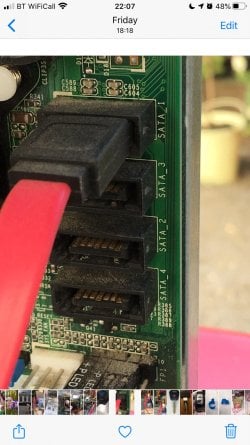
I took some photos when I had the case open.
Please look at photo attached.
The cable connected is the HDD
I plan to also connect the SSD in the second connection.

If I need to purchase another SSD I assume I can connect in the next connection down ?


Please advise many thanks.
 

Attachments

  • 5257B816-A48E-4E85-92F4-34DAB88031C7.jpg
    5257B816-A48E-4E85-92F4-34DAB88031C7.jpg
    262.6 KB · Views: 2

My Computer My Computer

Computer type
Laptop
Computer Manufacturer/Model Number
Dell Inspiron P07T & Pc Windows 32 / 64 bit
OS
Microsoft Windows 7 Professional 64-bit 7601 Multiprocessor Free Service Pack 1
CPU
AMD Athlon(tm) II Neo K345 Dual-Core Processor
Motherboard
Dell Inc.
Memory
8.00 GB
Graphics Card(s)
ATI Mobility Radeon HD 4200 Series
Sound Card
(1) AMD High Definition Audio Device (2) High Definition A
Monitor(s) Displays
Generic PnP Monitor
Screen Resolution
1366 x 768 x 32 bits (4294967296 colors) @ 59 Hz
Hard Drives
(1) WDC WD3200BEKT-75PVMT0 ATA Device (2) Generic- Multi-Card USB Device
PSU
Dell 65w ac adapter model no LA65NS0-00
Keyboard
Standard Ps2 keyboard
Mouse
Ps2 compatible mouse
Internet Speed
Download 38.9Mbps Upload 18.1Mbps
Antivirus
Avg internet security 19.7.3103 (build 19.7.4674.524)
Browser
Google Chrome Version 76.0.3809.132 (Official Build) (64-bit
Back
Top