backing up windows 7

tech7

New member
Local time
10:41 AM
Messages
23
Location
New Zealand
Hi

i got windows 7 installed on my computer

i want to backup my system

which way should i back it up

system image or system repair disc

and whats the difference between them

thanks help me!!!:D:D:D
 

My Computer

OS
Windows 7
Hi Tech7 and welcome to the SevenForums.

System Repair Disc is something you (hopefully never!) need when things go really bad. It is a good idea to create a repair disc, though as it self it has nothing to with backing up your system.

If you read through these forums, you notice that a lot of users are using third party solutions for their backup needs. I am one of those who trust MS and Windows 7, I'm using the Windows 7 Backup. I've been extremely satisfied, it does what it promises.

System Image is a practical tool when something happens and you have to completely reinstall your system. It contains the whole Windows 7 hard drive, including all the files, folders, applications and software. Restoring a system image returns your computer exactly like it was when image was created. Personally I use system image as my main backup system, as told in tutorials here and here.

Backup is a bit more flexible letting you to choose what to backup. You can easily change settings adding files to a backup or removing them.

Both System Image and Backup functions can be fully automated.

Kari

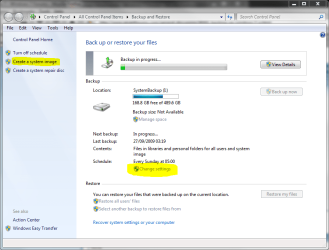
backup.PNG
 

My Computer

Computer type
Laptop
Computer Manufacturer/Model Number
HP ENVY 17-1150eg
OS
Windows 10 Pro x64 EN-GB
CPU
1.6 GHz Intel Core i7-720QM Processor
Memory
6 GB
Graphics Card(s)
ATI Mobility Radeon HD 5850 Graphics
Sound Card
Beats sound system with integrated subwoofer
Monitor(s) Displays
17" laptop display, 22" LED and 32" Full HD TV through HDMI
Screen Resolution
1600*900 (1), 1920*1080 (2&3)
Hard Drives
Internal: 2 x 500 GB SATA Hard Disk Drive 7200 rpm
External: 2TB for backups, 3TB USB3 network drive for media
Cooling
As Envy runs a bit warm, I have it on a Cooler Master pad
Keyboard
Logitech diNovo Media Desktop Laser (bluetooth)
Mouse
Logitech Performance Mouse MX
Internet Speed
50/10 Mbps VDSL
Antivirus
Windows Defender 4.3.9431.0
Browser
Maxthon 3.5.2., IE11

My Computer

Computer Manufacturer/Model Number
MasterB/Custom
OS
Windows 7 Professional x64
CPU
QuadCore AMD Phenom II X4 Black Edition 955 3.2 GHz
Motherboard
Asus M4A785TD-V Evo
Memory
8 GB Crucial DDR3
Graphics Card(s)
SAPPHIRE Radeon HD 4890 1GB HDMI New Edition
Sound Card
VIA VT1708S HD Audio 7.1 onboard/ ATI HDMI video card
Monitor(s) Displays
Acer H233H 23'' LCD HDMI
Screen Resolution
1920x1080
Hard Drives
1x 500GB and 1x 1TB 7200RPM 32MB Cache WD Caviar Black
PSU
CORSAIR CMPSU-620HX 620W
Case
COOLER MASTER Storm Scout SGC-2000
Cooling
2x 140mm and 1x 120mm case fans, Stock CPU fan
Keyboard
Logitech MX 3200
Mouse
Logitech MX 3200
Internet Speed
15 Mbps
Other Info
My first build!
thanks kari

so i will probably just create a system image as my main backup
and if something does go wrong and i need to reload that image
how would i do that?

thnaks
 

My Computer

OS
Windows 7
With a hope and a prayer that it works as advertised.

Reason I say that is that it (W7 backup) didn't work for me when I tested it. By test, I mean when I tried to restore a full image backup I made with it by booting from the Windows install disk. Probably was just my particular external hard drive that didn't work well with it, but that was enough to put me off it.

So I went back to my old standard (which is Acronis True Image Home, now using v. 2010) to make both compressed image backups and sector by sector clones of my entire C: drive. I sleep better now. Acronis has worked well for me for many many years now and the newest version seems pretty awesome to me.
 

My Computer

Computer Manufacturer/Model Number
HP DV8t quad
OS
Windows 7 Ultimate x64 (Retail)
CPU
i7-Q 720
Motherboard
Motherboard Chipset Intel Ibex Peak-M PM55, Intel Lynnfield
Memory
6 GB
Graphics Card(s)
nVidia GeForce GT 230M (1GB)
Sound Card
IDT High Definition Audio CODEC
Monitor(s) Displays
18.4 inch HP Infinity FHD (Samsung 184HT03-001)
Screen Resolution
1920 x 1080
Hard Drives
Hitachi 500GB 7200 rpm (x2)
Seagate FreeAgent 1.5 TB External USB (x2)
Thermaltake BlacX eSATA/USB 2.0 3.5/2.5 HD dock
Cooling
Zalman NC-2000 notebook cooling pad
Keyboard
laptop
Mouse
Logitech VX Revolution
Other Info
Backup Unit: Lenovo T61p
so has anyone used system image
and restored it
becuz i really need to know as i sont want to take any risks with windows 7
:sarc::sarc::sarc:
 

My Computer

OS
Windows 7
Try it yourself like I did. Maybe it will work for you. Even if it works for someone else, that doesn't necessarily mean it will work for you. 10 people could post in this thread that it works for them and that won't necessarily assure that it will work for you. The only way to be sure is to test it out on your system and see if it works (i.e., will restore properly) for you.
 

My Computer

Computer Manufacturer/Model Number
HP DV8t quad
OS
Windows 7 Ultimate x64 (Retail)
CPU
i7-Q 720
Motherboard
Motherboard Chipset Intel Ibex Peak-M PM55, Intel Lynnfield
Memory
6 GB
Graphics Card(s)
nVidia GeForce GT 230M (1GB)
Sound Card
IDT High Definition Audio CODEC
Monitor(s) Displays
18.4 inch HP Infinity FHD (Samsung 184HT03-001)
Screen Resolution
1920 x 1080
Hard Drives
Hitachi 500GB 7200 rpm (x2)
Seagate FreeAgent 1.5 TB External USB (x2)
Thermaltake BlacX eSATA/USB 2.0 3.5/2.5 HD dock
Cooling
Zalman NC-2000 notebook cooling pad
Keyboard
laptop
Mouse
Logitech VX Revolution
Other Info
Backup Unit: Lenovo T61p
one more question

how do i restore a system image
from a portable hard drive
 

My Computer

OS
Windows 7
Depending on the program, it will ask you for the image file and location ... select your drive, and the image file...;)
 

My Computer

Computer type
PC/Desktop
Computer Manufacturer/Model Number
LENOVO K450 @3.0GHZ
OS
64-bit Windows 8.1 Pro
CPU
Core(TM) i5 CPU 4330 Haswell @ 3.20GHz
Motherboard
LENOVO
Memory
12.00 GB
Graphics Card(s)
Intel(R) HD Graphics
Sound Card
Intel HD integtrated
Monitor(s) Displays
HP 25' ISP Monitor
Screen Resolution
1900/1020
Hard Drives
(1) ST1000DM003-1CH162 (2) Generic STORAGE DEVICE USB Device (3) Generic STORAGE DEVICE USB Device
Internet Speed
100mb down/10mb up
thanks for the help guyz
now i can backup my windows 7
thanks alot
 

My Computer

OS
Windows 7
Good luck and welcome to SevenForums!! ;)
 

My Computer

Computer type
PC/Desktop
Computer Manufacturer/Model Number
LENOVO K450 @3.0GHZ
OS
64-bit Windows 8.1 Pro
CPU
Core(TM) i5 CPU 4330 Haswell @ 3.20GHz
Motherboard
LENOVO
Memory
12.00 GB
Graphics Card(s)
Intel(R) HD Graphics
Sound Card
Intel HD integtrated
Monitor(s) Displays
HP 25' ISP Monitor
Screen Resolution
1900/1020
Hard Drives
(1) ST1000DM003-1CH162 (2) Generic STORAGE DEVICE USB Device (3) Generic STORAGE DEVICE USB Device
Internet Speed
100mb down/10mb up
thanks for the help guyz
now i can backup my windows 7
thanks alot

You can find several free backup programs that will do the job for you. This Seven Forums site has an extensive list of free programs that work with Windows 7.

FREE Great Programs for Window 7

Among others you will find:

Macrium Reflect

If you have a Seagate or Western Digital hard drive in your system you can get an Acronis True Image HD manufacturer version:

Seagate DiscWizard

Western Digital, Acronis True Image WD Edition Software


If you want to find all your system information and more:

SIW - System Information for Windows


Another Seven Forums thread for 64 bit Win7 free programs:

Free 64-bit programs

You should always keep your system image backups on a different physical hard drive or storage media, an external hard drive works well for this. Depending on the amount of personal data you have a smaller media like DVD or big flash drive might be enough.
If you keep your image backups on the main hard drive and it fails you will loose everything, operating system, personal data and your backup. Hard drives do fail.
 
Last edited:

My Computer

Computer type
PC/Desktop
Computer Manufacturer/Model Number
76~2.0
OS
Windows 7 Ult x64 - SP1/ Windows 8 Pro x64
CPU
Intel Core i5-3570K 4.6GHz
Motherboard
Gigabyte GA-Z77X UD3H, f18
Memory
8GB (2X4GB) DDR3 1600 Corsair Vengeance CL8 1.5v
Graphics Card(s)
Sapphire HD 7770 Vapor-X OC 1GB DDR5
Sound Card
Onboard VIA VT2021
Monitor(s) Displays
22" LCD Dell
Screen Resolution
1680x1050
Hard Drives
Samsung 840Pro 128GB SSD,
Seagate Barracuda 500GB SATA2 7200rpm 32MB cache, Seagate Barracuda 1TB SATA2 7200rpm 32MB cache,
PSU
Corsair HX650W
Case
Cooler Master Storm Scout
Cooling
Corsair H80 2x12cm Noctua NF P12 , 2x14cm case fans
Keyboard
Logitech Wave
Mouse
CM Sentinel
Internet Speed
Dismal
Antivirus
Avast
Browser
Opera Next
Other Info
Haswell laptop: HP Envy 17t-j, i7-4700MQ, GeForce 740M 2GB DDR3, 17.3" Full HD 1920x1080, 16GB RAM, Samsung 840 Pro 128GB, 1TB Hitachi 7200 HDD,
Desktop: eSATA ports,
External eSATA Seagate 500GB SATA2 7200rpm,
External WD USB 500GB
thanks kari

so i will probably just create a system image as my main backup
and if something does go wrong and i need to reload that image
how would i do that?

thnaks
so has anyone used system image
and restored it
becuz i really need to know as i sont want to take any risks with windows 7
:sarc::sarc::sarc:
one more question

how do i restore a system image
from a portable hard drive
To use System Image as you main backup plan, you need to have some knowledge how to use Virtual PC or Disk Management to extract single files and / or folders from the image. I would recommend you used both: create a System Image to be able to restore your system completely, and create a scheduled backup to use when you only need to restore some files or folders.

I've used the system image and been totally happy with it. At work we have several identical computers (same make and model, same hardware), so to test if we could migrate to Windows 7 I installed build 7100 to one of these computers, installed then all the software we need to have on every computer. After everything was installed, I created a System Image to an external HD, and a System Recovery Disc. Using System Recovery Disc to boot the two other computers, I then restored the image I had created with the first computer. Everything went smoothly, after this procedure all three computers had a working Windows 7 with all of our software.

To restore a System Image you start the Backup and Restore Application and click Recover system images or your computer at the bottom of the page. From the next page you choose Advanced recovery methods, then Use a system image you created earlier to recover your computer, following the instructions given to you on your screen.

When your computer has crashed and you can not start Windows, you can use Recovery Disc to boot. Windows 7 Help gives detailed information how to do this:
Windows 7 Help and Support said:
  1. Insert the installation disc or system repair disc.
  2. Restart your computer using the computer's power button.
  3. If prompted, press any key to start the computer from the installation disc or system repair disc.
    If your computer is not configured to start from a CD or DVD, check the information that came with your computer. You might need to change your computer's BIOS settings. For information about which settings to change, check your computer manufacturer's website. For more information about BIOS, see BIOS: frequently asked questions.
  4. Choose your language settings, and then click Next.
  5. Click Repair your computer.
    This step only applies if you are using a Windows installation disc.
  6. Select a recovery option, and then click Next.

Hope you find all the info you need. I will give you some rep points for showing you understand the importance of backup. On this forum I've often lost my nerves when reading some members posts telling backup is not so important. It is refreshing to notice you really want to be prepared. Nobody wants problems with the computer, nobody wants the computer to crash. But s*** happens.

Kari

 
Last edited:

My Computer

Computer type
Laptop
Computer Manufacturer/Model Number
HP ENVY 17-1150eg
OS
Windows 10 Pro x64 EN-GB
CPU
1.6 GHz Intel Core i7-720QM Processor
Memory
6 GB
Graphics Card(s)
ATI Mobility Radeon HD 5850 Graphics
Sound Card
Beats sound system with integrated subwoofer
Monitor(s) Displays
17" laptop display, 22" LED and 32" Full HD TV through HDMI
Screen Resolution
1600*900 (1), 1920*1080 (2&3)
Hard Drives
Internal: 2 x 500 GB SATA Hard Disk Drive 7200 rpm
External: 2TB for backups, 3TB USB3 network drive for media
Cooling
As Envy runs a bit warm, I have it on a Cooler Master pad
Keyboard
Logitech diNovo Media Desktop Laser (bluetooth)
Mouse
Logitech Performance Mouse MX
Internet Speed
50/10 Mbps VDSL
Antivirus
Windows Defender 4.3.9431.0
Browser
Maxthon 3.5.2., IE11
so has anyone used system image
and restored it
becuz i really need to know as i sont want to take any risks with windows 7
:sarc::sarc::sarc:

Yes, I have used it. Between test boxes at work and getting all of my hardware squared away at home...I've restored using this tool at least 20 different times on 4 different machines and have not encountered any problems at all restoring. I've backed up to internal secondary drive, I've backed up to external USB drives and I've even backed up to DVD media and restored from all of them.

The only "issue" i experienced was backing up a 160GB drive (which was nearly empty) with the utility and then trying to restore it onto an 80GB drive to test out the 80GB drive and the utility would not allow me to restore it onto a smaller disk.
 

My Computer

Computer Manufacturer/Model Number
Self-Built in July 2009
OS
Windows 7 Ultimate x64
CPU
Intel Q9550 2.83Ghz OC'd to 3.40Ghz
Motherboard
Gigabyte GA-EP45-UD3R rev. 1.1, F12 BIOS
Memory
8GB G.Skill PI DDR2-800, 4-4-4-12 timings
Graphics Card(s)
EVGA 1280MB Nvidia GeForce GTX570
Sound Card
Realtek ALC899A 8 channel onboard audio
Monitor(s) Displays
23" Acer x233H
Screen Resolution
1920x1080
Hard Drives
Intel X25-M 80GB Gen 2 SSD
Western Digital 1TB Caviar Black, 32MB cache. WD1001FALS
PSU
Corsair 620HX modular
Case
Antec P182
Cooling
stock
Keyboard
ABS M1 Mechanical
Mouse
Logitech G9 Laser Mouse
Internet Speed
15/2 cable modem
Other Info
Windows and Linux enthusiast. Logitech G35 Headset.
thanks alot guys
thanks kari
i now know how to backup and i will let you know how it goes
 

My Computer

OS
Windows 7
good news guys
all went to plan
my system image was created successfully
and system repair disc also worked fine
thanks alot
now i just have to do a rugular windows backup of my personal files
 

My Computer

OS
Windows 7
But did you actually try to restore to see if it really works?

Might be a good idea to at least check if you can boot from the repair disk and check if it will find/see and allow you use the backup image you created. That's where it failed for me. Ymm (hopefully) v.
 

My Computer

Computer Manufacturer/Model Number
HP DV8t quad
OS
Windows 7 Ultimate x64 (Retail)
CPU
i7-Q 720
Motherboard
Motherboard Chipset Intel Ibex Peak-M PM55, Intel Lynnfield
Memory
6 GB
Graphics Card(s)
nVidia GeForce GT 230M (1GB)
Sound Card
IDT High Definition Audio CODEC
Monitor(s) Displays
18.4 inch HP Infinity FHD (Samsung 184HT03-001)
Screen Resolution
1920 x 1080
Hard Drives
Hitachi 500GB 7200 rpm (x2)
Seagate FreeAgent 1.5 TB External USB (x2)
Thermaltake BlacX eSATA/USB 2.0 3.5/2.5 HD dock
Cooling
Zalman NC-2000 notebook cooling pad
Keyboard
laptop
Mouse
Logitech VX Revolution
Other Info
Backup Unit: Lenovo T61p
good news guys
all went to plan
my system image was created successfully
and system repair disc also worked fine
thanks alot
now i just have to do a rugular windows backup of my personal files

But did you actually try to restore to see if it really works?

Might be a good idea to at least check if you can boot from the repair disk and check if it will find/see and allow you use the backup image you created. That's where it failed for me. Ymm (hopefully) v.

harpua has a very good point, I have made several system repair discs that, for whatever reason, failed to work.
Always check them before you 'need' them.
 

My Computer

Computer type
PC/Desktop
Computer Manufacturer/Model Number
76~2.0
OS
Windows 7 Ult x64 - SP1/ Windows 8 Pro x64
CPU
Intel Core i5-3570K 4.6GHz
Motherboard
Gigabyte GA-Z77X UD3H, f18
Memory
8GB (2X4GB) DDR3 1600 Corsair Vengeance CL8 1.5v
Graphics Card(s)
Sapphire HD 7770 Vapor-X OC 1GB DDR5
Sound Card
Onboard VIA VT2021
Monitor(s) Displays
22" LCD Dell
Screen Resolution
1680x1050
Hard Drives
Samsung 840Pro 128GB SSD,
Seagate Barracuda 500GB SATA2 7200rpm 32MB cache, Seagate Barracuda 1TB SATA2 7200rpm 32MB cache,
PSU
Corsair HX650W
Case
Cooler Master Storm Scout
Cooling
Corsair H80 2x12cm Noctua NF P12 , 2x14cm case fans
Keyboard
Logitech Wave
Mouse
CM Sentinel
Internet Speed
Dismal
Antivirus
Avast
Browser
Opera Next
Other Info
Haswell laptop: HP Envy 17t-j, i7-4700MQ, GeForce 740M 2GB DDR3, 17.3" Full HD 1920x1080, 16GB RAM, Samsung 840 Pro 128GB, 1TB Hitachi 7200 HDD,
Desktop: eSATA ports,
External eSATA Seagate 500GB SATA2 7200rpm,
External WD USB 500GB
I downloaded and installed Macrium Reflect and man - even the free version is impressive!

Much faster then the regular backup program in Windows 7 and the backup image file is mounted as a drive letter for you without any effort once the backup is completed!

I restored a few odd files form that new drive letter (ok, so I used explorer to drag and drop them) to verify that they were all ok and it all worked fine, data was intact and .exe file worked. File sizes were identical to the originals!

You even get a PE-type of CD ISO to use for system recovery.

I'm (almost) sold on getting the paid version to get the easier file at a time recovery thing.

;)
 

My Computer

Computer Manufacturer/Model Number
Dell Lattitude E6500
OS
Windows 7 Pro (64bit).
CPU
Intel Core 2 Duo P8700 @ 2.54Ghz
Motherboard
Dell
Memory
8Gb
Graphics Card(s)
Intel/Dell "4 series Express Chipset"
Sound Card
Intel HD Audio
Monitor(s) Displays
Regular Laptop LCD display
Screen Resolution
1280x800
Hard Drives
Seagate ST9250410ASG 250Gb (well it IS a laptop)...
PSU
Dell
Case
Dell
Internet Speed
As much as I can get!!!!!
Back
Top