Backup access denied

mcquam

New member
Local time
12:25 AM
Messages
21
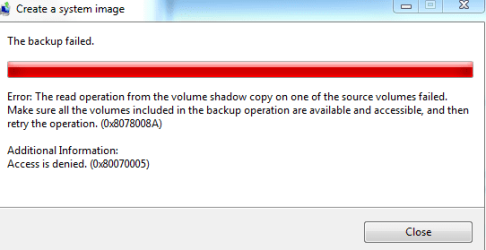
I am trying to backup to an internal HDD but when I try I get access denied error code 0x80070005 and the backup fails.

How can I fix this?
 

My Computer

Computer Manufacturer/Model Number
Shuttle SP35P2
OS
windows 7 64bit
CPU
Intel E8400
Hello mcquam.


The little bit of googling I just did comes back with network errors, are you trying to backup from a network?
 

My Computer

Computer Manufacturer/Model Number
* BFK Customs *
OS
W 7 64-bit Ultimate
CPU
Intel Q9550 Yorkfield
Motherboard
ASUS P5Q Pro
Memory
8GB Dominator 8500C5D
Graphics Card(s)
ATI : XFX 5870
Sound Card
Realtek HD Audio 7-1
Monitor(s) Displays
1x 47" LCD HDMI & 3x 26" LCD HDMI
Screen Resolution
1920x1080P & 1920x1200
Hard Drives
1x 80GB Intel X25-M G2 SSD : 1x 500GB & 1x 640GB WD Caviar Black(s)
PSU
Corsair 620HX
Case
Cooler Master RC-690
Cooling
Tuniq Tower 120, 2x 140mm and 3x 120mm case fans
Keyboard
Microsoft 500
Mouse
Razer Diamondback 3G
Internet Speed
14 Mb/s
Other Info
1x Koutech 3Gb/s SATA HDD Hot Swap Rack
I am trying to backup to an internal HDD but when I try I get access denied error code 0x80070005 and the backup fails.

How can I fix this?

Are you maybe trying to backup to the very same drive that you are desiring to backup?

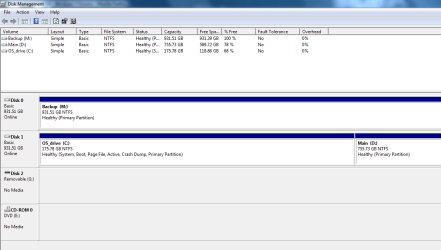
Post a copy of disk management output with your next post.


VIEW YOUR DISKS


WIN | type DISKMGMT.MSC | ENTER
WIN is the key with the flag on it.
This will run the Disk Management program and display info re your disks.

ALT SPACEBAR combo | X key
This will maximize the Disk Management display.

WIN | type SNIPPING | ENTER
This will run the "Snipping Tool" whcih allows you to take a picture of part or all of the screen.

Attach the "snip" to your next post.
Screenshot - How to post
 

My Computer

Computer Manufacturer/Model Number
Toshiba Satellite S875D-S7239 laptop
OS
MS Windows 7 Ultimate SP1 64-bit
CPU
AMD A10-4600M
Motherboard
AMD Pumori (Socket FT1)
Memory
6.00 GB Dual-Channel DDR3 @ 798MHz (11-11-12-28)
Graphics Card(s)
AMD Radeon HD 7660G
Sound Card
High Definition Audio Device
Monitor(s) Displays
Generic PnP Monitor (1600x900@60Hz)
Screen Resolution
1600x900@60Hz
Hard Drives
SSD 119GB Corsair CSSD-V128GB2 ATA Device
Keyboard
Standard PS/2 Keyboard
Mouse
HP Wireless Optical Mobile Mouse Model FHA-3410
Internet Speed
What the local pub, local coffee shop offers.
Other Info
Optical Drive:MATSHITA BD-CMB UJ160B ATA Device


Also have an Asus ha1002xp netbook with Win 7 Ultimate installed.
Hi thanks.

No I am backing up to a separate physical disk. It is formatted with MBR and I wondered if maybe that could cause the error?
 

Attachments

  • Capture.PNG
    Capture.PNG
    19.7 KB · Views: 69

My Computer

Computer Manufacturer/Model Number
Shuttle SP35P2
OS
windows 7 64bit
CPU
Intel E8400
And you are trying to backup which drive(s) to which drive?
 

My Computer

Computer Manufacturer/Model Number
Toshiba Satellite S875D-S7239 laptop
OS
MS Windows 7 Ultimate SP1 64-bit
CPU
AMD A10-4600M
Motherboard
AMD Pumori (Socket FT1)
Memory
6.00 GB Dual-Channel DDR3 @ 798MHz (11-11-12-28)
Graphics Card(s)
AMD Radeon HD 7660G
Sound Card
High Definition Audio Device
Monitor(s) Displays
Generic PnP Monitor (1600x900@60Hz)
Screen Resolution
1600x900@60Hz
Hard Drives
SSD 119GB Corsair CSSD-V128GB2 ATA Device
Keyboard
Standard PS/2 Keyboard
Mouse
HP Wireless Optical Mobile Mouse Model FHA-3410
Internet Speed
What the local pub, local coffee shop offers.
Other Info
Optical Drive:MATSHITA BD-CMB UJ160B ATA Device


Also have an Asus ha1002xp netbook with Win 7 Ultimate installed.
Sorry, see attachment.
 

Attachments

  • Capture3.PNG
    Capture3.PNG
    10.3 KB · Views: 51

My Computer

Computer Manufacturer/Model Number
Shuttle SP35P2
OS
windows 7 64bit
CPU
Intel E8400
I suspect that you have some pointers to drive M on your C or your D.

Let's see if you can perform a System Image backup from just C to M

Now this is a system image backup and NOT a backup of data folders, although the system image backup will include folders.

The Win 7 terminology is very confusing.

For a backup which will enable you to restore your computer to a prior state, then the system image backup does everything for you. The "data" backup allows you to perform incremental updates of, for example, your documents library and produces zip files

To perform a system image backup, plain and pure, then when you start up Win 7 Backup and Restore, choose from the LEFT-HAND PANE,
choose Create a system image

Let me know how this goes.

 

My Computer

Computer Manufacturer/Model Number
Toshiba Satellite S875D-S7239 laptop
OS
MS Windows 7 Ultimate SP1 64-bit
CPU
AMD A10-4600M
Motherboard
AMD Pumori (Socket FT1)
Memory
6.00 GB Dual-Channel DDR3 @ 798MHz (11-11-12-28)
Graphics Card(s)
AMD Radeon HD 7660G
Sound Card
High Definition Audio Device
Monitor(s) Displays
Generic PnP Monitor (1600x900@60Hz)
Screen Resolution
1600x900@60Hz
Hard Drives
SSD 119GB Corsair CSSD-V128GB2 ATA Device
Keyboard
Standard PS/2 Keyboard
Mouse
HP Wireless Optical Mobile Mouse Model FHA-3410
Internet Speed
What the local pub, local coffee shop offers.
Other Info
Optical Drive:MATSHITA BD-CMB UJ160B ATA Device


Also have an Asus ha1002xp netbook with Win 7 Ultimate installed.
Did as you said. See attached
 

Attachments

  • Capture4.PNG
    Capture4.PNG
    7.1 KB · Views: 48

My Computer

Computer Manufacturer/Model Number
Shuttle SP35P2
OS
windows 7 64bit
CPU
Intel E8400
and you tried to make an image of C and only of C to M?

Has M ever been formatted? Is it formatted as NTFS?

Is M accessible?

Do you not have a CD/DVD device on this computer?
 

My Computer

Computer Manufacturer/Model Number
Toshiba Satellite S875D-S7239 laptop
OS
MS Windows 7 Ultimate SP1 64-bit
CPU
AMD A10-4600M
Motherboard
AMD Pumori (Socket FT1)
Memory
6.00 GB Dual-Channel DDR3 @ 798MHz (11-11-12-28)
Graphics Card(s)
AMD Radeon HD 7660G
Sound Card
High Definition Audio Device
Monitor(s) Displays
Generic PnP Monitor (1600x900@60Hz)
Screen Resolution
1600x900@60Hz
Hard Drives
SSD 119GB Corsair CSSD-V128GB2 ATA Device
Keyboard
Standard PS/2 Keyboard
Mouse
HP Wireless Optical Mobile Mouse Model FHA-3410
Internet Speed
What the local pub, local coffee shop offers.
Other Info
Optical Drive:MATSHITA BD-CMB UJ160B ATA Device


Also have an Asus ha1002xp netbook with Win 7 Ultimate installed.
Yes image of only c to m.

Yes, NTFS.

I can copy files to M and use them (jpegs at least).

Yes, DVD - perhaps I cut it off with the snipping tool.
 

Attachments

  • Capture5.PNG
    Capture5.PNG
    21.3 KB · Views: 20

My Computer

Computer Manufacturer/Model Number
Shuttle SP35P2
OS
windows 7 64bit
CPU
Intel E8400
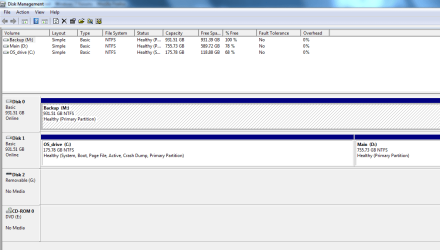
OK. I see from disk management that it's formatted as ntfs.

Now there is no way a system image of C and only C to M can fail unless you have a corrupted system or you have references to M on the C.

To test, you can shrink M in half-its empty anyway-create a new partition in the empty space and name it N or whatever. Now try the "create a system image" specifying C and C only as "source" and the new drive, N, as where to put the backup.
 

My Computer

Computer Manufacturer/Model Number
Toshiba Satellite S875D-S7239 laptop
OS
MS Windows 7 Ultimate SP1 64-bit
CPU
AMD A10-4600M
Motherboard
AMD Pumori (Socket FT1)
Memory
6.00 GB Dual-Channel DDR3 @ 798MHz (11-11-12-28)
Graphics Card(s)
AMD Radeon HD 7660G
Sound Card
High Definition Audio Device
Monitor(s) Displays
Generic PnP Monitor (1600x900@60Hz)
Screen Resolution
1600x900@60Hz
Hard Drives
SSD 119GB Corsair CSSD-V128GB2 ATA Device
Keyboard
Standard PS/2 Keyboard
Mouse
HP Wireless Optical Mobile Mouse Model FHA-3410
Internet Speed
What the local pub, local coffee shop offers.
Other Info
Optical Drive:MATSHITA BD-CMB UJ160B ATA Device


Also have an Asus ha1002xp netbook with Win 7 Ultimate installed.
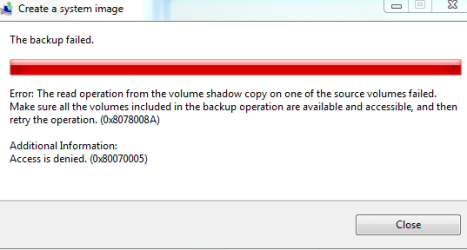
Did as you said with same result.
 

Attachments

  • Capture6.PNG
    Capture6.PNG
    6.6 KB · Views: 5

My Computer

Computer Manufacturer/Model Number
Shuttle SP35P2
OS
windows 7 64bit
CPU
Intel E8400
Forgot disk mgmt
 

Attachments

  • Capture7.PNG
    Capture7.PNG
    22.5 KB · Views: 18

My Computer

Computer Manufacturer/Model Number
Shuttle SP35P2
OS
windows 7 64bit
CPU
Intel E8400
OK.

Let me take a walk and see if I can figure out what you are doing.

Because according to what you say you are doing, then there is no way that message could ever appear.

If you were trying to back up c to d, then we would see something like that.

But only imaging with none of that other stuff ("backup"), then all should run smoothly.

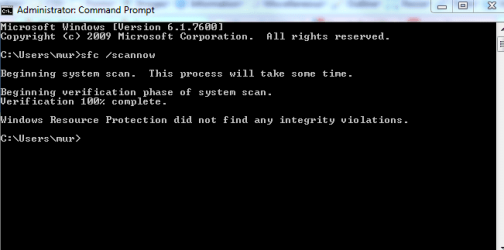
I can only suggest running SFC (system file checker).

If that shows up nothing, then contact Microsoft as you have a one in a million case which has never happened before.
 

My Computer

Computer Manufacturer/Model Number
Toshiba Satellite S875D-S7239 laptop
OS
MS Windows 7 Ultimate SP1 64-bit
CPU
AMD A10-4600M
Motherboard
AMD Pumori (Socket FT1)
Memory
6.00 GB Dual-Channel DDR3 @ 798MHz (11-11-12-28)
Graphics Card(s)
AMD Radeon HD 7660G
Sound Card
High Definition Audio Device
Monitor(s) Displays
Generic PnP Monitor (1600x900@60Hz)
Screen Resolution
1600x900@60Hz
Hard Drives
SSD 119GB Corsair CSSD-V128GB2 ATA Device
Keyboard
Standard PS/2 Keyboard
Mouse
HP Wireless Optical Mobile Mouse Model FHA-3410
Internet Speed
What the local pub, local coffee shop offers.
Other Info
Optical Drive:MATSHITA BD-CMB UJ160B ATA Device


Also have an Asus ha1002xp netbook with Win 7 Ultimate installed.
Yes, I did exactly as you said.

I ran sfc.exe and something popped up and disappeared. Where do I find the report?

Please also see my previous thread which was resolved. http://www.sevenforums.com/installation-setup/114299-2nd-disk-causes-boot-fail.html However, in the course of fixing this, one of the things I tried (per another thread on here) was to give my user increased permissions. I have no idea what I did.
 

My Computer

Computer Manufacturer/Model Number
Shuttle SP35P2
OS
windows 7 64bit
CPU
Intel E8400

My Computer

Computer Manufacturer/Model Number
Toshiba Satellite S875D-S7239 laptop
OS
MS Windows 7 Ultimate SP1 64-bit
CPU
AMD A10-4600M
Motherboard
AMD Pumori (Socket FT1)
Memory
6.00 GB Dual-Channel DDR3 @ 798MHz (11-11-12-28)
Graphics Card(s)
AMD Radeon HD 7660G
Sound Card
High Definition Audio Device
Monitor(s) Displays
Generic PnP Monitor (1600x900@60Hz)
Screen Resolution
1600x900@60Hz
Hard Drives
SSD 119GB Corsair CSSD-V128GB2 ATA Device
Keyboard
Standard PS/2 Keyboard
Mouse
HP Wireless Optical Mobile Mouse Model FHA-3410
Internet Speed
What the local pub, local coffee shop offers.
Other Info
Optical Drive:MATSHITA BD-CMB UJ160B ATA Device


Also have an Asus ha1002xp netbook with Win 7 Ultimate installed.
You need to run SFC in an elevated command prompt. Right click on command prompt and clcik on Run as administrator. Then type in your SFC /SCANNOW command and hit enter.
 

My Computer

Computer Manufacturer/Model Number
Home built
OS
Windows 7 Ultimate 32 bit
CPU
Intel(R) Pentium(R) 4 CPU 3.00GHz
Motherboard
ASUS P4P800-VM Motherboard Chipset: Intel 865G + ICH5
Memory
2.50 GB RAM
Graphics Card(s)
NVIDIA GeForce 7600 GS
Sound Card
SoundMax Integrated Digital Audio (Chip)
Monitor(s) Displays
ViewSonic VX 1962 wm
Screen Resolution
1680 X 1050
Hard Drives
Seagate Barracuda 7200.10 80 GB
ST380215A ATA Device 18.6 GB
Western Digital "My Book" external hard drive 750 GB
Cooling
Fan based
Keyboard
Microsoft Comfort Curve Keyboard 2000 v10 USB
Mouse
Logitec optic USB
Internet Speed
3.01 Mb/s download 0.64 Mb/s upload
Seems fine.
 

Attachments

  • Capture8.PNG
    Capture8.PNG
    10.1 KB · Views: 35

My Computer

Computer Manufacturer/Model Number
Shuttle SP35P2
OS
windows 7 64bit
CPU
Intel E8400
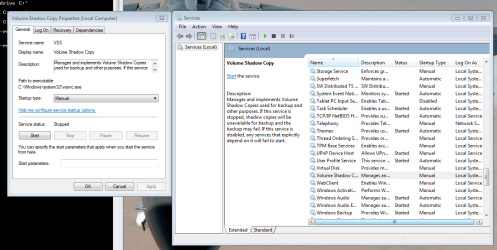
Have you tried to change the "volume shadow copy" settings? I had to do this to fix the same issue and other WIn 7 backup failures. One time it was failing because it didn't like some file names (too long). This just goes to show you how quirky this utility is.

Go to the windows start menu and type in "services" in the search box. In services right click on "Volume shadow copy" and select "properties". In the properties dialog box make sure "startup type" is set to "manual". See if that helps....


Dave
 

Attachments

  • Capture.PNG
    Capture.PNG
    56.3 KB · Views: 29

My Computer

Computer Manufacturer/Model Number
Custom Built
OS
Windows 7 Pro 64
CPU
i7-960
Motherboard
Gigabyte X58
Memory
12GB Corsair DDR3
Graphics Card(s)
ATI V5800
Sound Card
On Board
Monitor(s) Displays
27" Samsung, 22" Asus
Hard Drives
160GB Intel SSD X 2
1TB 7200 RPM bulk storage
1TB 7200 RPM Back Up drive
PSU
Corsair 850W modular
Case
Cooler Master HAF 932
Cooling
Air cooled, Cooler Master Htper 212
Back
Top