- Local time
- 10:41 AM
- Messages
- 60
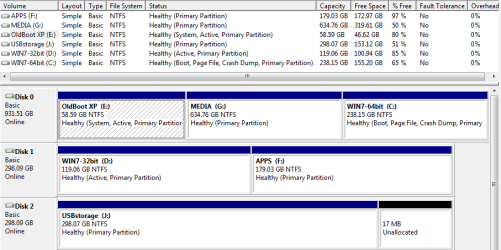
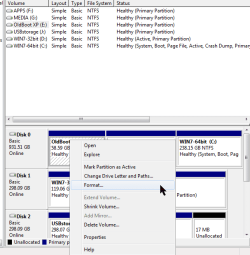
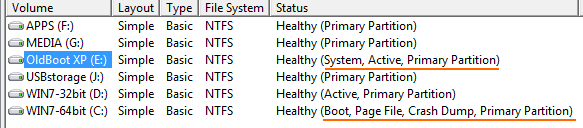
Let's start with this snap below. I only ever use the C "boot" partition for booting, yet somehow years ago when I went from XP to 7 I ended up with these partitions, a legacy from way earlier when my techy buddy set up my XP. Everything works smoothly, though, except for one problem. The tech at this one Backupper image utility says to allow for a proper system restore from a saved image I should choose "System Backup" in the utility. OK then, in that process the program insists on including not only my preferred C (boot) partition but this unwanted E (system) partition. When I do that, things go smoothly, but the image becomes significantly larger, taking up precious "J" USB storage, plus it takes longer. Since I couldn't change Backupper I figured I'd Format the unused E. But Windows refuses, I guess since it's the 'system'. I'd really like to zero out the used space there. Is there any way?
Attachments
My Computer
At a glance
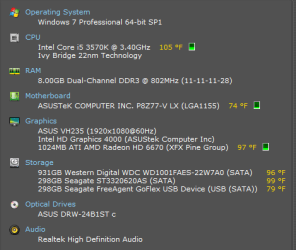
Windows 7 Professional SP1 64-bitIntel Core i5 3570K @ 3.40GHz8.00GB Dual-Channel DDR3 @ 802MHz1024MB ATI AMD Radeon HD 6670
- Computer type
- PC/Desktop
- Computer Manufacturer/Model Number
- home-made 2008
- OS
- Windows 7 Professional SP1 64-bit
- CPU
- Intel Core i5 3570K @ 3.40GHz
- Motherboard
- ASUSTeK COMPUTER INC. P8Z77-V LX
- Memory
- 8.00GB Dual-Channel DDR3 @ 802MHz
- Graphics Card(s)
- 1024MB ATI AMD Radeon HD 6670
- Sound Card
- N.A. - mobo sound
- Monitor(s) Displays
- HP V242h 24' + HITACHI 51F59 HDTV
- Screen Resolution
- 1920x1080
- Hard Drives
- Transcend 480 GB TLC SATA III 2.5' Solid State Drive
313GB Seagate ST3320620AS ATA Device (SATA)
977GB Western Digital WDC WD1001FAES-22W7A0 ATA Device (SATA)
320GB Seagate FreeAgent GoFlex USB external
- PSU
- RAIDMAX 530W Modular
- Case
- CoolerMaster HAF912Plus
- Cooling
- built-in CPU and case + Coolermaster Megaflow
- Keyboard
- Logitech Illuminated Keyboard K740
- Mouse
- iOne Lynx S2 mouse
- Antivirus
- Panda, Malwarebytes
- Browser
- Firefox 54.01