Sime83
New member
Hello everyone,
I have a 1TB hard drive on my PC and a few months ago I bought another 1TB hard drive as a backup drive.
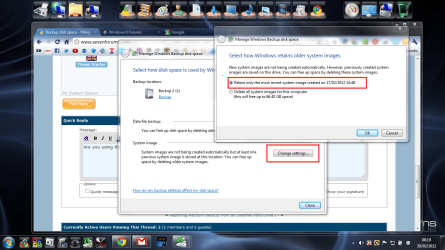
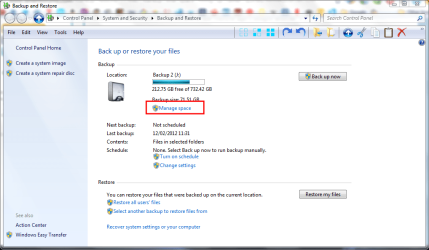
I back up every week or so using the windows disk image facility (http://www.sevenforums.com/tutorials/663-backup-complete-computer-create-image-backup.html?ltr=B) , but each time I backup the space taken up on the backup drive increases drastically. It would appear to be backing up up ANOTHER image instead of overwriting the new one?
I canot find anywhere to say over-write the existing image, would I be better to delete the image before creating a new one?
Many thanks,
Simon
I have a 1TB hard drive on my PC and a few months ago I bought another 1TB hard drive as a backup drive.
I back up every week or so using the windows disk image facility (http://www.sevenforums.com/tutorials/663-backup-complete-computer-create-image-backup.html?ltr=B) , but each time I backup the space taken up on the backup drive increases drastically. It would appear to be backing up up ANOTHER image instead of overwriting the new one?
I canot find anywhere to say over-write the existing image, would I be better to delete the image before creating a new one?
Many thanks,
Simon
My Computer
- Computer type
- PC/Desktop
- OS
- Windows 7 Home Premium 64 Bit
- CPU
- AMD PHENOM II X4 970 (3.50GHz/8MB CACHE/AM3) - BLACK EDITION
- Motherboard
- ASUS® M4A87TD/USB3: DUAL DDR3,SATA 6.0GB/s, USB 3.0
- Memory
- 4GB SAMSUNG DDR3 DUAL-DDR3 1333MHz
- Graphics Card(s)
- 1GB NVIDIA GEFORCE GTX460
- Hard Drives
- 1TB WD CAVIAR GREEN WD10EARS, SATA 3 Gb/s, 64MB CACHE
1TB WD CAVIAR GREEN WD10EARS, SATA 3 Gb/s, 64MB CACHE
- PSU
- CORSAIR 650W TX SERIES
- Case
- MAELSTROM T900