Solved Backup Error code: 0x81000019

"Quote: Originally Posted by A Guy
Try this.

Start> Right click Computer> Manage
Select Storage> Disk management
Verify that you have a System Reserved partition of 100 MB
If yes, right click on this volume and select Properties.
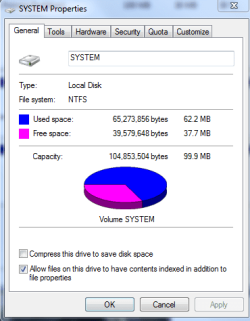
View used and free space.

You must have around 40 MB free space for backup to complete successfully

A Guy"

I had not heard this but A Guy knows his stuff so having less than 40mb free space on the Sys Reserved partition must have been what was blocking your image from being created. I have 73mb free on mine and it makes an image.

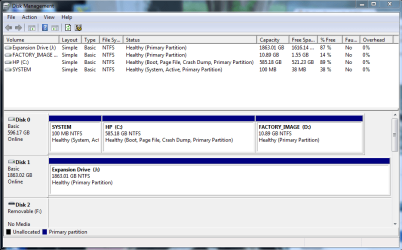
However this problem should now be solved by recovering the System MBR into Win7 as the 100mb is no longer System Active, correct? Please post the Disk Mgmt screenshot so we can see.

And again: can you now make a Win7 backup image stored to data drive?
 
here's what disk management is saying. ...i'm not really sure what i did earlier, but it is fixed now. things are they way they were, including windows backup is having the same issue about not finishing. SYSTEM partition still only has 37.7mb free space.

sorry, and nope. still cannot make a Windows 7 backup image stored to data drive
 

Attachments

  • disk management.PNG
    disk management.PNG
    123.6 KB · Views: 207
  • disk management 2.PNG
    disk management 2.PNG
    45 KB · Views: 73

My Computer

Computer type
PC/Desktop
Computer Manufacturer/Model Number
Custom Build and MSI GE60 0ND laptop
OS
windows 7 64bit on both
CPU
AMD FX-8350 @4.6GHz/Intel Core i7-3610QM @2.3GHz
Motherboard
ASUS M5A99X EVO R2.0/MS-16GA
Memory
16GB G.Skill 1866MHz/8GB dual channel 1600MHz
Graphics Card(s)
two Sapphire HD7970 OC 3Gb in crossfire/GTX660M 2Gb
Sound Card
Realtek HD Audio/Realtek HD Audio with THX TruStudio Pro
Monitor(s) Displays
Hanns-G 27" 1080p /Generic PnP Monitor
Screen Resolution
both 1920x1080p 60Hz
Hard Drives
250GB Samsung 840 EVO SSD,
1TB WD Blue
3x2TB WD Greens
/Samsung 840 EVO mSATA
PSU
Corsair HX750/laptop psu
Case
NZXT Source 530
Cooling
CoolerMaster Hyper 212 Evo
Keyboard
Logitech G710+/laptop keyboard by steelseries
Mouse
Logitec G500s/Logitec G500
Internet Speed
50Mbps down/1-3 Mbps up
Other Info
Scythe Kaze Master Pro 5.25 fan controller; APC Back-UPS XS 1500
Did you run the exact DIskpart commands given to mark Win7 partition Active, mark 100mb System Reserved Inactive and then run Startup Repair, as they are not changed.
 
no i did not. i did the opposite using the windows 7 disk i had so that i could get the computer to boot again.

if you can do the DISKPART from any cmd.exe when the computer is booted normally, then yes i can do that now.

however, i don't know what you mean by running startup repair?
 

My Computer

Computer type
PC/Desktop
Computer Manufacturer/Model Number
Custom Build and MSI GE60 0ND laptop
OS
windows 7 64bit on both
CPU
AMD FX-8350 @4.6GHz/Intel Core i7-3610QM @2.3GHz
Motherboard
ASUS M5A99X EVO R2.0/MS-16GA
Memory
16GB G.Skill 1866MHz/8GB dual channel 1600MHz
Graphics Card(s)
two Sapphire HD7970 OC 3Gb in crossfire/GTX660M 2Gb
Sound Card
Realtek HD Audio/Realtek HD Audio with THX TruStudio Pro
Monitor(s) Displays
Hanns-G 27" 1080p /Generic PnP Monitor
Screen Resolution
both 1920x1080p 60Hz
Hard Drives
250GB Samsung 840 EVO SSD,
1TB WD Blue
3x2TB WD Greens
/Samsung 840 EVO mSATA
PSU
Corsair HX750/laptop psu
Case
NZXT Source 530
Cooling
CoolerMaster Hyper 212 Evo
Keyboard
Logitech G710+/laptop keyboard by steelseries
Mouse
Logitec G500s/Logitec G500
Internet Speed
50Mbps down/1-3 Mbps up
Other Info
Scythe Kaze Master Pro 5.25 fan controller; APC Back-UPS XS 1500
Here is the Seven Forums tutorial on removing the System Reserved partition: http://www.sevenforums.com/tutorials/71363-system-reserved-partition-delete.html

Follow this with Startup Repair run up to 3 times with reboots until Win7 starts: http://www.sevenforums.com/tutorials/681-startup-repair.html

Or you can use A Guy's approach which should also work since you haven't gotten rid of SysReserved partition yet. I was trying to get you started up while solving the imaging problem by deleting 100mb and recovering System MBR into Win7.
 
ok, i understand what you're saying now. i followed all links and am printing everything out. i'm going to follow those steps and ill post again when its all done.

thanks for your help
 

My Computer

Computer type
PC/Desktop
Computer Manufacturer/Model Number
Custom Build and MSI GE60 0ND laptop
OS
windows 7 64bit on both
CPU
AMD FX-8350 @4.6GHz/Intel Core i7-3610QM @2.3GHz
Motherboard
ASUS M5A99X EVO R2.0/MS-16GA
Memory
16GB G.Skill 1866MHz/8GB dual channel 1600MHz
Graphics Card(s)
two Sapphire HD7970 OC 3Gb in crossfire/GTX660M 2Gb
Sound Card
Realtek HD Audio/Realtek HD Audio with THX TruStudio Pro
Monitor(s) Displays
Hanns-G 27" 1080p /Generic PnP Monitor
Screen Resolution
both 1920x1080p 60Hz
Hard Drives
250GB Samsung 840 EVO SSD,
1TB WD Blue
3x2TB WD Greens
/Samsung 840 EVO mSATA
PSU
Corsair HX750/laptop psu
Case
NZXT Source 530
Cooling
CoolerMaster Hyper 212 Evo
Keyboard
Logitech G710+/laptop keyboard by steelseries
Mouse
Logitec G500s/Logitec G500
Internet Speed
50Mbps down/1-3 Mbps up
Other Info
Scythe Kaze Master Pro 5.25 fan controller; APC Back-UPS XS 1500
ok, i understand what you're saying now. i followed all links and am printing everything out. i'm going to follow those steps and ill post again when its all done.

thanks for your help

socrgy9, sorry this turned into an ordeal for you. My method would have been a workaround. Gregs method removes the 100MB partition, and thus the issue we think is creating your original problem. Gregs method is ultimately better for you. He originally meant it to fix your boot problem, and the original problem in one fell swoop, but deleting the partition should be a more elegant way than creating a new larger one. A Guy
 

My Computer

Computer type
PC/Desktop
OS
Windows 10 Home x64
CPU
INTEL Core i5-750 Quad-Core 3.37GHz
Motherboard
ASUS P7P55D
Memory
HyperX Fury Black Series 8GB (2 x 4GB) 1866Mhz
Graphics Card(s)
EVGA GeForce GTX 750 Superclocked 1GB 128-Bit GDDR5
Monitor(s) Displays
LG 32MA68HY 32" IPS
Screen Resolution
1920 x 1080
Hard Drives
Samsung 840 Evo 120GB, SEAGATE 500GB Barracuda® 7200.12, SATA 3 Gb/s, 7200 RPM, 16MB cache
PSU
ANTEC TruePower New TP-550, 80 PLUS, 550W
Case
ANTEC Three Hundred Illusion
Cooling
COOLER MASTER Hyper 212 Plus, 4 x 120mm 1 x 140mm Noctua's
Internet Speed
85 + Mbps
Antivirus
Avast
Browser
Vivaldi
thanks A guy! i don't care if its an ordeal, i just wanted the thing fixed! :) you guys have been great. ill post when fixed
 

My Computer

Computer type
PC/Desktop
Computer Manufacturer/Model Number
Custom Build and MSI GE60 0ND laptop
OS
windows 7 64bit on both
CPU
AMD FX-8350 @4.6GHz/Intel Core i7-3610QM @2.3GHz
Motherboard
ASUS M5A99X EVO R2.0/MS-16GA
Memory
16GB G.Skill 1866MHz/8GB dual channel 1600MHz
Graphics Card(s)
two Sapphire HD7970 OC 3Gb in crossfire/GTX660M 2Gb
Sound Card
Realtek HD Audio/Realtek HD Audio with THX TruStudio Pro
Monitor(s) Displays
Hanns-G 27" 1080p /Generic PnP Monitor
Screen Resolution
both 1920x1080p 60Hz
Hard Drives
250GB Samsung 840 EVO SSD,
1TB WD Blue
3x2TB WD Greens
/Samsung 840 EVO mSATA
PSU
Corsair HX750/laptop psu
Case
NZXT Source 530
Cooling
CoolerMaster Hyper 212 Evo
Keyboard
Logitech G710+/laptop keyboard by steelseries
Mouse
Logitec G500s/Logitec G500
Internet Speed
50Mbps down/1-3 Mbps up
Other Info
Scythe Kaze Master Pro 5.25 fan controller; APC Back-UPS XS 1500
Well, we appreciate that. We're both in CA., so we're pretty bleary eyed about now. We'd actually be interested to see if creating a new , larger partition would have fixed it. Let us know what you find out either way. A Guy
 

My Computer

Computer type
PC/Desktop
OS
Windows 10 Home x64
CPU
INTEL Core i5-750 Quad-Core 3.37GHz
Motherboard
ASUS P7P55D
Memory
HyperX Fury Black Series 8GB (2 x 4GB) 1866Mhz
Graphics Card(s)
EVGA GeForce GTX 750 Superclocked 1GB 128-Bit GDDR5
Monitor(s) Displays
LG 32MA68HY 32" IPS
Screen Resolution
1920 x 1080
Hard Drives
Samsung 840 Evo 120GB, SEAGATE 500GB Barracuda® 7200.12, SATA 3 Gb/s, 7200 RPM, 16MB cache
PSU
ANTEC TruePower New TP-550, 80 PLUS, 550W
Case
ANTEC Three Hundred Illusion
Cooling
COOLER MASTER Hyper 212 Plus, 4 x 120mm 1 x 140mm Noctua's
Internet Speed
85 + Mbps
Antivirus
Avast
Browser
Vivaldi
There is an easier-to-use graphical interface to do all of this using free Partition Wizard bootable CD. BareFootKid just wrote up a tutorial about using it to remove the 100mb Sys Reserved partition:
http://www.sevenforums.com/tutorials/93322-partition-wizard-use-bootable-cd.html

Using it might be easier for you to delete 100mb and also resize Windows 7 into the deleted 100mb HD space at the same time.

Look it over to see if you like it. I think PW is the coolest tool we use here. Before I would type out all the steps to do this (about a hundred times) but BareFoot has now done it for us with pictures.
 
Thank you all so much! you guys are awesome! everything worked. i removed the partition, startup repair fixed the master boot record, the computer runs like is always does with no hiccups, and the windows backup is working fine as i type this! you guys are awesome!


sorry again for keeping anyone up so late. I'm a soldier over in Korea and i always forget about the ~14 hour time difference. i really appreciate this guys. now i can back up my system, and put in my new hardware.
 

My Computer

Computer type
PC/Desktop
Computer Manufacturer/Model Number
Custom Build and MSI GE60 0ND laptop
OS
windows 7 64bit on both
CPU
AMD FX-8350 @4.6GHz/Intel Core i7-3610QM @2.3GHz
Motherboard
ASUS M5A99X EVO R2.0/MS-16GA
Memory
16GB G.Skill 1866MHz/8GB dual channel 1600MHz
Graphics Card(s)
two Sapphire HD7970 OC 3Gb in crossfire/GTX660M 2Gb
Sound Card
Realtek HD Audio/Realtek HD Audio with THX TruStudio Pro
Monitor(s) Displays
Hanns-G 27" 1080p /Generic PnP Monitor
Screen Resolution
both 1920x1080p 60Hz
Hard Drives
250GB Samsung 840 EVO SSD,
1TB WD Blue
3x2TB WD Greens
/Samsung 840 EVO mSATA
PSU
Corsair HX750/laptop psu
Case
NZXT Source 530
Cooling
CoolerMaster Hyper 212 Evo
Keyboard
Logitech G710+/laptop keyboard by steelseries
Mouse
Logitec G500s/Logitec G500
Internet Speed
50Mbps down/1-3 Mbps up
Other Info
Scythe Kaze Master Pro 5.25 fan controller; APC Back-UPS XS 1500
socrgy,

Glad to see that GregRocker's very sound advice fixed your problem.

I'm now back among the living.

I VERY STRONGLY recommend making a System Repair disk.

[FONT=&quot]CREATE A SYSTEM REPAIR DISK[/FONT]
START | type System Repair | Enter key | Create Disk button


My next strong recommendation is to backup your drive.

If your system bottoms out or your computer gets stolen then you will not have lost everything dear to your heart.


DISK COPY/CLONE/PARTITION/BACKUP/RESTORE SOFTWARE


PARTITION WIZARD (a favorite of many SevenForum contributors)
Free download partition magic, partition manager and partition wizard online.
Free Download Magic Partition Manager Software – Partition Wizard Online


MACRIUM REFLECT
Macrium Reflect Backup and Hard Disk Imaging for Windows 7, Vista, XP and Server 2003/2008

Macrium Reflect. A complete hard disk image and backup software solution for your PC. Protect your personal documents, photos, music and emails. Upgrade your hard disk or try new operating systems in the safe knowledge that everything is securely saved in an easily recovered backup file

PARAGON BACKUP AND RECOVERY SOFTWARE
Free Backup Software: Paragon Backup & Recovery Free Edition - Overview
Backup & Recovery Free Edition
Total PC Protection for Serious Users! Take complete control of your PC’s safety. Based on solid commercial backup and recovery software from Paragon, the new Backup & Recovery Free Edition will give you a rich set of features that you can trust. Smart people backup; Backup & Recovery is smart backup.

EASEUS
EASEUS Disk Copy is a FREE reliable disaster recovery, hard disk copy, disk clone, partition copy, backup freeware. Support for all Hard Drive and removable drive.
EASEUS Disk Copy: Free Disk Copy, Disk Clone, Partition Copy Software. Sector by Sector for hard drive backup freeware.


WINDOWS 7
Backup & Restore (WIN | type back | Enter)
Disk Management (DiskMgmt.msc)
Disk Partitioning (DiskPart)

 

My Computer

Computer Manufacturer/Model Number
Toshiba Satellite S875D-S7239 laptop
OS
MS Windows 7 Ultimate SP1 64-bit
CPU
AMD A10-4600M
Motherboard
AMD Pumori (Socket FT1)
Memory
6.00 GB Dual-Channel DDR3 @ 798MHz (11-11-12-28)
Graphics Card(s)
AMD Radeon HD 7660G
Sound Card
High Definition Audio Device
Monitor(s) Displays
Generic PnP Monitor (1600x900@60Hz)
Screen Resolution
1600x900@60Hz
Hard Drives
SSD 119GB Corsair CSSD-V128GB2 ATA Device
Keyboard
Standard PS/2 Keyboard
Mouse
HP Wireless Optical Mobile Mouse Model FHA-3410
Internet Speed
What the local pub, local coffee shop offers.
Other Info
Optical Drive:MATSHITA BD-CMB UJ160B ATA Device


Also have an Asus ha1002xp netbook with Win 7 Ultimate installed.
thanks karlsnooks! and thanks for all your help too. the windows backup worked fine. and all is well again.


thanks!
 

My Computer

Computer type
PC/Desktop
Computer Manufacturer/Model Number
Custom Build and MSI GE60 0ND laptop
OS
windows 7 64bit on both
CPU
AMD FX-8350 @4.6GHz/Intel Core i7-3610QM @2.3GHz
Motherboard
ASUS M5A99X EVO R2.0/MS-16GA
Memory
16GB G.Skill 1866MHz/8GB dual channel 1600MHz
Graphics Card(s)
two Sapphire HD7970 OC 3Gb in crossfire/GTX660M 2Gb
Sound Card
Realtek HD Audio/Realtek HD Audio with THX TruStudio Pro
Monitor(s) Displays
Hanns-G 27" 1080p /Generic PnP Monitor
Screen Resolution
both 1920x1080p 60Hz
Hard Drives
250GB Samsung 840 EVO SSD,
1TB WD Blue
3x2TB WD Greens
/Samsung 840 EVO mSATA
PSU
Corsair HX750/laptop psu
Case
NZXT Source 530
Cooling
CoolerMaster Hyper 212 Evo
Keyboard
Logitech G710+/laptop keyboard by steelseries
Mouse
Logitec G500s/Logitec G500
Internet Speed
50Mbps down/1-3 Mbps up
Other Info
Scythe Kaze Master Pro 5.25 fan controller; APC Back-UPS XS 1500
socgry,
Glad that we could be of assistance. And glad to hear that backup went smoothly.
 

My Computer

Computer Manufacturer/Model Number
Toshiba Satellite S875D-S7239 laptop
OS
MS Windows 7 Ultimate SP1 64-bit
CPU
AMD A10-4600M
Motherboard
AMD Pumori (Socket FT1)
Memory
6.00 GB Dual-Channel DDR3 @ 798MHz (11-11-12-28)
Graphics Card(s)
AMD Radeon HD 7660G
Sound Card
High Definition Audio Device
Monitor(s) Displays
Generic PnP Monitor (1600x900@60Hz)
Screen Resolution
1600x900@60Hz
Hard Drives
SSD 119GB Corsair CSSD-V128GB2 ATA Device
Keyboard
Standard PS/2 Keyboard
Mouse
HP Wireless Optical Mobile Mouse Model FHA-3410
Internet Speed
What the local pub, local coffee shop offers.
Other Info
Optical Drive:MATSHITA BD-CMB UJ160B ATA Device


Also have an Asus ha1002xp netbook with Win 7 Ultimate installed.
Glad it worked.

It was A Guy's research that discovered the 100mb Sys Reserved must have at least 40mb Free Space to create an image. This is important new information that I was unaware of and led directly to the solution of removing 100mb partition which is a much more common operation here.

Thank you for your service there in Korea. We are glad to help you here anytime for any reason.
 
socrgy9, that's great. That's what we were hoping. Glad you got it sorted, and thank you for your service, we all appreciate that. A Guy
 

My Computer

Computer type
PC/Desktop
OS
Windows 10 Home x64
CPU
INTEL Core i5-750 Quad-Core 3.37GHz
Motherboard
ASUS P7P55D
Memory
HyperX Fury Black Series 8GB (2 x 4GB) 1866Mhz
Graphics Card(s)
EVGA GeForce GTX 750 Superclocked 1GB 128-Bit GDDR5
Monitor(s) Displays
LG 32MA68HY 32" IPS
Screen Resolution
1920 x 1080
Hard Drives
Samsung 840 Evo 120GB, SEAGATE 500GB Barracuda® 7200.12, SATA 3 Gb/s, 7200 RPM, 16MB cache
PSU
ANTEC TruePower New TP-550, 80 PLUS, 550W
Case
ANTEC Three Hundred Illusion
Cooling
COOLER MASTER Hyper 212 Plus, 4 x 120mm 1 x 140mm Noctua's
Internet Speed
85 + Mbps
Antivirus
Avast
Browser
Vivaldi
If these steps dont solve your problem try this

First off thanks for everyone in this forum who contributes. If you tried these steps and it still would not work for you and you have a large hard drive it may be necessary to expand the size of the hidden system drive. I read lots of posts on this here and elsewhere. On one technet post from a Microsoft poster it said that for drives with 500GB may need as much as ~224MB free space on the system drive. I have a 1TB drive with only about 200GB used. The same microsoft technet post said you may need 1GB or more space in your hidden drive for a 1TB+ drive.

I used Partition Wizard to make mine about 1800 MB. Everything is finally working for me finally. My 100MB system partition had 75MB free. What finally solved my issue was everything in this thread AND expanding the size of this partition.

On more thing to check is your system restore for the C: drive. I noticed that was getting broken by some of the partion resizing and MBR repairs...

Thank you all for the help. Adding some of my own.
 

My Computer

OS
Windows 7 Ultimate x64
Windows 7 Backup failed with error code: 0x81000019

REGARDING ERROR CODE: 0x81000019

Since I usually use Sevenforums.com as my point of reference for most of the problems I encountered with my PC, I want to share my experience with other users in order to help them as well.

For two weeks now, I have been trying to fix the aforementioned error code: 0x81000019 regarding the windows 7 backup failure, I finally came up with a happy ending. Here is the drill:

First off, before anything one has to log in to an administrator level account.

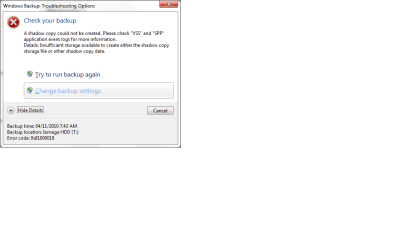
1- The root cause of the problem is "System reserved" partition whose capacity for free space cannot be under 40 MB. Mine was at 31 MB at the time I was trying to back up and I always ended up with the following error message we all know of:

 Win 7 Backup Error Message.png
 
2- I created a new volume in "Disk Mangement" from my Windows (C:) Drive as allocated space of let say 490 MG. This volume will be used to resize or expand "System Reserved" partition.

3-Trying to resize the darn partion (system Reserved) after going to Disk Management by right-clicking on it, the "Extend Volume" in the context Menu was greyed out. So, it was practically impossible to click on it.

Remember, to go to Disk Management: Click on Windows ORB >>> Right-click on Computer >>> Left Click on Manage >>> In Computer Management Window, click On Disk Management under Storage. That should give you a good view of all the primary and Logical partition on your PC.

Disk Management.png

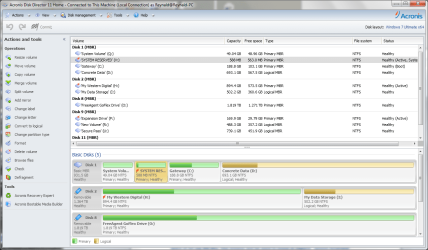
The workaround was to use "Acronis Disk Director Suite". After firing up the latter, a window similar to the one in Windows Disk Management is open. There, I clicked on "System Reseved" partition and then click on "Resize" under Operations in the left pane. Another window opens telling you that before the action can be completed you have to commit it. So, I clicked on "Commit pending operations" in the ToolBar. That will basically close Windows 7 as if it was restarting. Let Disk Director finish its task. Once the operation has completed, the log in screen should show up again.

Acronis Disk Director 11 home.png

4-After logging in and going back to disk Management, you would notice that "Disk Director Home 11" didn't actually resize the "System Reseved partition, but only put the New volume created in step 2 contiguous to the System Reserved partition. Now, if you right-clck on the latter, the "Extend Volume" was no longer greyed out and you could click on it to alow the resizing of "System Reserved" partition.

Once done, I could run Windows 7 backup without any glitch whatsoever. So, I didn't have to delete the hidden "System Reserved" partition or do any Diskpart in command Line. In my humble opinion, the main problem for most users was to find a way to resize that troublesome partition.

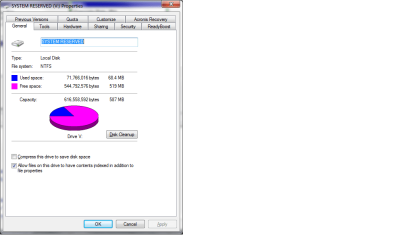
According to most forums I browsed through, they say that the "System Reserved" should never be more than 500 MB in capacity. I don't think that holds true because mine is at 587 MB as can be seen from the screenshot below and didn't prevent my backup to run successfully up to the end.

System Reserved Used & Free Space.png

Ted Pacheco.
 

My Computer

OS
Windows 7
Thanks, Ted. Since this post first appeared we have helped several with this issue resize the System Reserved partition to around 200mb which seems to be plenty big.

The tool to use is free Partition Wizard bootable CD, which unlike other partitioning tools uses DataSafe so that it won't fail (just reboot and try again until you bail out at startup). You need to resize Win7 partition first from the left by about 100mb, then resize SysRserved into the space you've created using PW or Disk Mgmt to extend Partition.

Be prepared with DVD Repair console or Repair CD as any resizing on the boot sector might require Startup Repair to be run a few times to repair the MBR. Don't allow SysReserved to lose its Active flag, either.

If you have any further questions or issues, open a new thread for help.
 
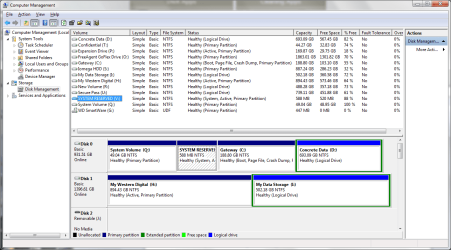
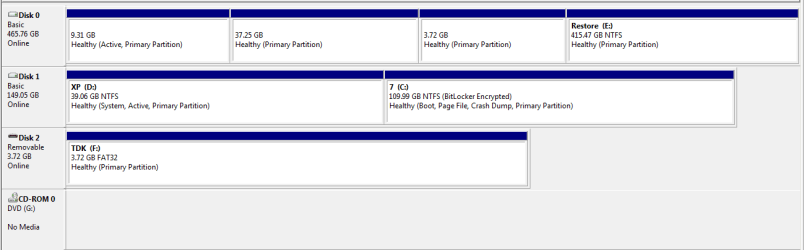
I've recently restored from Windows system images, both XP & 7. I now get the backup-error-code-0x81000019. Shadow copy fails in but a few seconds. I am confused about the System Reserved Partition as cannot see one at all?

Please see attached.

EDIT: I did manually delete XP with partition manager, don't ask why. This was a bad move, hence restored from system image, but now backup will not run. Can I create a new System Reserved Partition or am I screwed?
 

Attachments

  • Capture.PNG
    Capture.PNG
    29.8 KB · Views: 89
Last edited:

My Computer

OS
Windows 7 Ultimate x86 Retail
CPU
E8400 3012MHz
Motherboard
ASRock ConRoe1333-D667 R3.0
Memory
OCZ 4096MB
Graphics Card(s)
PNY Geforce 220 1GB
Sound Card
Onboard
Monitor(s) Displays
iiyama
Screen Resolution
Wide Screen
Hard Drives
Seagate 500GB
Western Digital 500GB
PSU
Antec 380W EarthWatts Green PSU 80plus Bronze Certified
Cooling
Noctua Low Profile NH-U9B
Back
Top