Solved Backup Error code: 0x81000019

My Computer

Computer Manufacturer/Model Number
Acer Aspire 5741
OS
Windows 7 Home Premium 64-bit
It's strange because occasionallly users report Data Lifeguard won't boot or run but others can.

I use GWScan which is a version of DL, but I can't find the download any longer.

You might try SeaTools which is pretty universal. There are also HD diagnostics which are well regarded on Universal Boot Disk and Hiren's although I haven't tried them and our favorite manager Partition Wizard CD has a surface scan and scans file system from boot.
 
Hi everyone,

I'm sorry to necro this thread, but I am currently having a 0x81000019 problem myself and would like to better understand some of the suggestions made throughout this thread.

Here is a quote from the very first post in this thread:

Backup location: Expansion Drive (J: ) my external hard drive.
Error code: 0x81000019

i have a 2Tb external hard drive so i'm pretty sure it shouldn't be a space issue.


The think that puzzles me the most is: why do you suggest to enlarge the System-reserved partition, when the OP was trying to create a backup on a large external drive?

Isn't the point of the backup (also called shadow copy) to create an image of the Windows partition and copy it into the desired drive (in this case an external disk)?

Why does anything have to be copied into the System-reserved partition?

I'm really confused right now :S
Thanks in advance!
 

My Computer

Computer type
PC/Desktop
OS
Windows7 64 Home Premium
CPU
Intel i5-2500K
Motherboard
GIGABYTE Z68X-UD3H-B3
Memory
G.Skill Ripjaws 8GB (2x4GB)
Graphics Card(s)
MSI 560GTX-Ti Twin Frozr II
Monitor(s) Displays
Dell U2311H
Screen Resolution
1920x1080
PSU
Corsair 650TX V2
Case
Fractal Design Define R3
Cooling
Thermaltake Frio
Antivirus
BitDefender
Browser
Firefox
What we found is that there needs to be 31mb of free space on Sys Reserved partition to create a SysVolInfo file just to enable creation of an image. If the drive has a letter it will sometimes have been been written onto to take up that space thus causing the error.

The solution is to expand or remove the System Reserved partition, and remove any drive letter in Disk Mgmt: .Drive Letter - Add, Change, or Remove in Windows 7 - Windows 7 Forums
 

My Computer

Computer type
PC/Desktop
Computer Manufacturer/Model Number
Own build
OS
Windows 7x64 Home Premium SP1
CPU
Intel i7 2600k
Motherboard
ASUS P8Z68 Deluxe
Memory
G.Skill Ripjaws (DDR3-1600) 2x4GB
Graphics Card(s)
Nvidia GeForce GTS 450; Intel HD Graphics 3000(GT2+)
Monitor(s) Displays
Dell Ultrasharp IPS panel U2311H, Samsung SyncMaster P2350
Screen Resolution
1920x1080
Hard Drives
Samsung 850 Pro SSD 256GB, Samsung SSD 840 120GB, Seagates 1TB Barracuda ST31000528AS x2
PSU
Seasonic M12II 520W
Case
Lian Li Lancool PC-K60
Cooling
Case: 1x120mm, 3x140mm CPU: Hyper 212+
Keyboard
Logitech MK520 (wireless)
Mouse
Logitech MK520
Internet Speed
6-7 Mbps
Antivirus
Norton Security Premium, Malwarebytes on 2 (MSE on 3rd PC)
Browser
FireFox
Other Info
Audio: Logitech Z523 2.1
Hey guys,

Just for future reference, I have used the method below (quoted from the 3rd page in this thread):

Here is the Seven Forums tutorial on removing the System Reserved partition: http://www.sevenforums.com/tutorials/71363-system-reserved-partition-delete.html

Follow this with Startup Repair run up to 3 times with reboots until Win7 starts: http://www.sevenforums.com/tutorials/681-startup-repair.html

And it worked. I was finally able to do the windows backup image / shadow copy. :D


However, now I have another small problem.

My C drive was left with a 100MB empty space where the System-Reserved partition used to be. See image below:


I tried using the Partition Wizard Bootable CD to extend the Windows partition into this space (in other words, enlarge it to the left), but it doesn't let me.

Any ideas of how I can get these 100MB back?

It it possible to make a 100MB partition there and then "merge" both partitions? Seems like the merge function is disabled in the free version of Partition Wizard.

Thanks in advance!

HM
 

My Computer

Computer type
PC/Desktop
OS
Windows7 64 Home Premium
CPU
Intel i5-2500K
Motherboard
GIGABYTE Z68X-UD3H-B3
Memory
G.Skill Ripjaws 8GB (2x4GB)
Graphics Card(s)
MSI 560GTX-Ti Twin Frozr II
Monitor(s) Displays
Dell U2311H
Screen Resolution
1920x1080
PSU
Corsair 650TX V2
Case
Fractal Design Define R3
Cooling
Thermaltake Frio
Antivirus
BitDefender
Browser
Firefox
Nevermind, I fixed the problem.

I tried Hiren's Boot CD, which includes a Home Edition of Partition Wizard in it's Mini WinXP environment.

With this PW I was able to extend the Windows partition to occupy all of my C drive.

I had to run the Startup Repair procedure a couple of times after that, though. But everything is working now!

Cheers,
HM
 

My Computer

Computer type
PC/Desktop
OS
Windows7 64 Home Premium
CPU
Intel i5-2500K
Motherboard
GIGABYTE Z68X-UD3H-B3
Memory
G.Skill Ripjaws 8GB (2x4GB)
Graphics Card(s)
MSI 560GTX-Ti Twin Frozr II
Monitor(s) Displays
Dell U2311H
Screen Resolution
1920x1080
PSU
Corsair 650TX V2
Case
Fractal Design Define R3
Cooling
Thermaltake Frio
Antivirus
BitDefender
Browser
Firefox
You must have been clicking on the 100mb instead of C to Resize Win7 to the left. But glad you got it done, and with the boot disk which is the only failsafe method besides Disk Mgmt, since all other Partition managers and even PW Home edition can and will fail during resizing which can result in data loss.

Nice work, Howard! :geek:
 
I found how to fix it

I found how to fix it on Boardreader.com from BobK1110:
Run services.msc, stop COM+ Event System then restart it.
My backup worked fine.
zebloc.
 

My Computer

Computer Manufacturer/Model Number
Rogers Computer Technology
OS
Windows 7 Home Premium 32 bit
CPU
Intel(R) Core(TM) i3 [email protected]
Motherboard
ASUS P7P55D
Memory
4.00 GB
Graphics Card(s)
ATI Radeon HD 4670
Sound Card
ATI High Definition Audio Device
Monitor(s) Displays
SONY CPD-G520P
Hard Drives
ST3500418AS ATA Device 465GB 2 partitions
PSU
Thermaltake TR2 430W
Case
Tt Thermaltake
Cooling
Air
zebloc message

I found how to fix it on Boardreader.com from BobK1110:
Run services.msc, stop COM+ Event System then restart it.
My backup worked fine.
zebloc.

Thanks for the info. This worked beautifully.
 

My Computer

Computer type
PC/Desktop
OS
Windows 7 Home

My Computer

Computer type
PC/Desktop
Computer Manufacturer/Model Number
Own build
OS
Windows 7x64 Home Premium SP1
CPU
Intel i7 2600k
Motherboard
ASUS P8Z68 Deluxe
Memory
G.Skill Ripjaws (DDR3-1600) 2x4GB
Graphics Card(s)
Nvidia GeForce GTS 450; Intel HD Graphics 3000(GT2+)
Monitor(s) Displays
Dell Ultrasharp IPS panel U2311H, Samsung SyncMaster P2350
Screen Resolution
1920x1080
Hard Drives
Samsung 850 Pro SSD 256GB, Samsung SSD 840 120GB, Seagates 1TB Barracuda ST31000528AS x2
PSU
Seasonic M12II 520W
Case
Lian Li Lancool PC-K60
Cooling
Case: 1x120mm, 3x140mm CPU: Hyper 212+
Keyboard
Logitech MK520 (wireless)
Mouse
Logitech MK520
Internet Speed
6-7 Mbps
Antivirus
Norton Security Premium, Malwarebytes on 2 (MSE on 3rd PC)
Browser
FireFox
Other Info
Audio: Logitech Z523 2.1
How do you fix error 0x81000019 if your "system reserved" partition is "EFI System Partition" instead?
 

My Computer

Computer type
PC/Desktop
Computer Manufacturer/Model Number
Custom
OS
Microsoft Windows 7 Home Premium 64-bit Service Pack 1
CPU
AMD A10-6800K APU with Radeon(tm)™ HD Graphics 4100
Motherboard
ASRock FM2A85X Extreme4-M
Memory
(2) G.Skill F3-12800CL10-8GBXL
Graphics Card(s)
ASUS R7 250 Series (0x6610)
Sound Card
Realtek High Definition Audio
Monitor(s) Displays
Acer X213H LCD monitor, 21"
Screen Resolution
1920 x 1080 x 32 bits @ 60 Hz
Hard Drives
WD Black, 1.0TB, WDC WD1002FAEX-00Z3A0
PSU
Rosewill Quark-650
Case
Raidmax Comet SECC Steel ATX Mid Tower Computer Case
Cooling
1 x 80mm + 2 x 120mm + Stock cooler
Mouse
Gear Head Wireless Optical 5-button mouse
Internet Speed
FTTx 6000 / 1000
Antivirus
Avast! Free Antivirus 2015.10.0.2208
Browser
Google Chrome Version 40.0.2214.115
Other Info
*AMD Dual-Graphics
*Uses OpenDNS
*Uses Folding@Home
*HP 16x Super-Multi DVD Writer
*Superspeed 74-in-1 Card Reader
*Maximum overclock has not been determined.
Have you made any changes in your partitioning structure at all? Post back screenshot of Disk Management - Post a Screen Capture Image

Are there any other performance issues? Go over your install thoroughly with the Troubleshooting Steps for Windows 7 which will turn up most problems.

If its limited to Win7 backup then I'd consider an alternative like Macrium - Image your system which is heavily preferred here, or the premium Acronis app which comes with any WD or Seagate drive in the mix. These are better choices anyway.
 
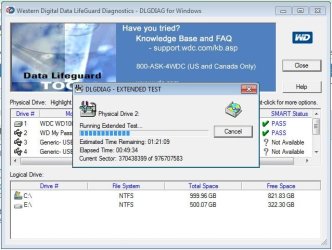
Current Pending Sector > 0, WD My Passport 0730 USB Device

Well, there is some news to report, I did a System Restore back before everything broke and the backup succeeded. But then ...

My external hard disk reported an error this morning, so I'm running Data Lifeguard on it. Do they make those on bootable CD-ROM or USB images, rather than floppies? What if I need to quit Windows to diagnose a problem on my internal drive?

2014-02-24_045411.jpg

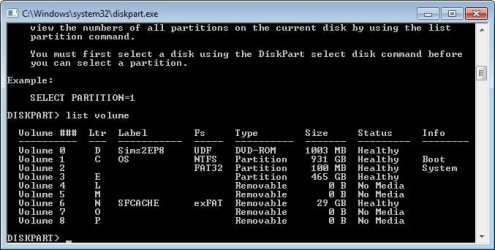
About partitions ... It doesn't take into account about the 128 MB "Microsoft System Reserved" partition which is always created on GPT volumes. I suppose if this area was used as a scratch disk it probably wasn't cleaned.
2014-02-24_044725.jpg
2014-02-24_044348.jpg
 

My Computer

Computer type
PC/Desktop
Computer Manufacturer/Model Number
Custom
OS
Microsoft Windows 7 Home Premium 64-bit Service Pack 1
CPU
AMD A10-6800K APU with Radeon(tm)™ HD Graphics 4100
Motherboard
ASRock FM2A85X Extreme4-M
Memory
(2) G.Skill F3-12800CL10-8GBXL
Graphics Card(s)
ASUS R7 250 Series (0x6610)
Sound Card
Realtek High Definition Audio
Monitor(s) Displays
Acer X213H LCD monitor, 21"
Screen Resolution
1920 x 1080 x 32 bits @ 60 Hz
Hard Drives
WD Black, 1.0TB, WDC WD1002FAEX-00Z3A0
PSU
Rosewill Quark-650
Case
Raidmax Comet SECC Steel ATX Mid Tower Computer Case
Cooling
1 x 80mm + 2 x 120mm + Stock cooler
Mouse
Gear Head Wireless Optical 5-button mouse
Internet Speed
FTTx 6000 / 1000
Antivirus
Avast! Free Antivirus 2015.10.0.2208
Browser
Google Chrome Version 40.0.2214.115
Other Info
*AMD Dual-Graphics
*Uses OpenDNS
*Uses Folding@Home
*HP 16x Super-Multi DVD Writer
*Superspeed 74-in-1 Card Reader
*Maximum overclock has not been determined.
Is this exactly what you did? System Restore.

WD Data Lifeguard doesn't have a bootable app any longer except on some boot disks that are not supported here. It should be definitive.

Make sure your data is backed up from External and then also run a full Disk Check with both boxes ticked.
 

My Computer

Computer type
PC/Desktop
Computer Manufacturer/Model Number
Own build
OS
Windows 7x64 Home Premium SP1
CPU
Intel i7 2600k
Motherboard
ASUS P8Z68 Deluxe
Memory
G.Skill Ripjaws (DDR3-1600) 2x4GB
Graphics Card(s)
Nvidia GeForce GTS 450; Intel HD Graphics 3000(GT2+)
Monitor(s) Displays
Dell Ultrasharp IPS panel U2311H, Samsung SyncMaster P2350
Screen Resolution
1920x1080
Hard Drives
Samsung 850 Pro SSD 256GB, Samsung SSD 840 120GB, Seagates 1TB Barracuda ST31000528AS x2
PSU
Seasonic M12II 520W
Case
Lian Li Lancool PC-K60
Cooling
Case: 1x120mm, 3x140mm CPU: Hyper 212+
Keyboard
Logitech MK520 (wireless)
Mouse
Logitech MK520
Internet Speed
6-7 Mbps
Antivirus
Norton Security Premium, Malwarebytes on 2 (MSE on 3rd PC)
Browser
FireFox
Other Info
Audio: Logitech Z523 2.1
Thanks for the heads-up Michael. The bootable Data Lifeguard disappeared several years ago. I inquired of WD a year or more ago and heard nothing. John Carrona who keeps HD Diagnostic list told me in November it still wasn't available for some reason. All that remained on their website in that time was making a bootable floppy.

That .pdf tutorial on making flash stick with Rufus apparently just came out in Feb 2014 after several years' wait. I don't know if its been changed on all of their Product pages but will bookmark it.
 
Just to add Greg I have not used this DOS version. The link I gave was for a a VelociRaptor but the same software is shown as applicable to the WD Black, Green (& others).
WD Support / Downloads / SATA & SAS / WD Black
I'm not guaranteeing it and certainly back up your HDD first.
 

My Computer

Computer type
PC/Desktop
Computer Manufacturer/Model Number
Own build
OS
Windows 7x64 Home Premium SP1
CPU
Intel i7 2600k
Motherboard
ASUS P8Z68 Deluxe
Memory
G.Skill Ripjaws (DDR3-1600) 2x4GB
Graphics Card(s)
Nvidia GeForce GTS 450; Intel HD Graphics 3000(GT2+)
Monitor(s) Displays
Dell Ultrasharp IPS panel U2311H, Samsung SyncMaster P2350
Screen Resolution
1920x1080
Hard Drives
Samsung 850 Pro SSD 256GB, Samsung SSD 840 120GB, Seagates 1TB Barracuda ST31000528AS x2
PSU
Seasonic M12II 520W
Case
Lian Li Lancool PC-K60
Cooling
Case: 1x120mm, 3x140mm CPU: Hyper 212+
Keyboard
Logitech MK520 (wireless)
Mouse
Logitech MK520
Internet Speed
6-7 Mbps
Antivirus
Norton Security Premium, Malwarebytes on 2 (MSE on 3rd PC)
Browser
FireFox
Other Info
Audio: Logitech Z523 2.1
Back
Top