
backup error message

drpepper

New member
I have been using Windows 7's backup program to create image and file backups saved to an external drive (Toshiba 500GB). I get an error message upon completion of each backup. Exploring the external drive's files confirms that the backup has been completed.

See attached screenshots. One is the error message (files_skipped). The other is details (which_files). The backup is configured to backup C: drive. It makes no sense to me that I receive an error message concerning Z: drive.

Is it possible that I configured the backup task improperly? How can I prevent the warning message?

Thanks for your help.
drpepper
 

Attachments
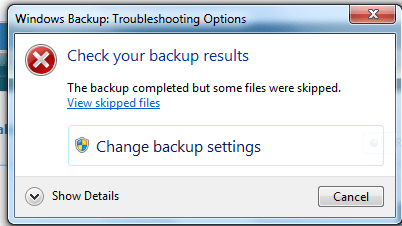
  • files_skipped.PNG
    files_skipped.PNG
    34.7 KB · Views: 4
  • which_files.PNG
    which_files.PNG
    25.2 KB · Views: 9
Last edited:

My Computer

Computer type
PC/Desktop
Computer Manufacturer/Model Number
Lenovo 1068AHU B570 (laptop)
OS
Windows 7 Home Premium SP1 64bit
CPU
Intel Core i3
Motherboard
Lenovo Emerald Lake
Memory
8GB DDR3
Graphics Card(s)
Intel HD graphics family
Sound Card
Realtek HD audio
Monitor(s) Displays
ThinkPad Display 1366x768 (15.6")
Hard Drives
WD 320GB WDC WD3200BPVT
Internet Speed
80Kbs maximum -->speed is a misnomer
Other Info
Logitech MK550 wireless mouse/keyboard combo used when at home.

My Computer

Computer Manufacturer/Model Number
HP, Dell, Gateway, Toshiba - 4 laptops and 2 desktops
OS
Vista, Windows7, Mint Mate, Zorin, Windows 8
CPU
from 1.6GHz Duo to i7
Monitor(s) Displays
2x HP w2207
Hard Drives
5x HDD, 7x SSD, 12x Externals
Keyboard
with trackball - no mices
Mouse
Trackball mice
Internet Speed
DSL 6000
Is your Toshiba 500gb drive Z on your "My computer" listing?
 

My Computer

Computer Manufacturer/Model Number
Custom Build
OS
Windows 7 Professional 64 Bit Service Pack 1
CPU
Intel i7-2600K OC to 3.8Ghz
Motherboard
Asus TUF Sabertooth P67
Memory
Corsair Vengence 16GB (X4 4GB)
Graphics Card(s)
X2 EVGA GTX570 SLI
Sound Card
Creative Soundblaster X-FI TI
Monitor(s) Displays
Dual HP 2311 LED Displays
Screen Resolution
1920X1080 single / 3840X1080 desktop
Hard Drives
Crucial Force 3 SSD 120GB 6Gb/s ( OS Drive )
WD Caviar Black 2 TB 6 Gb/s (Data drive)
PSU
Kingwin Mach 1 1000w Modular 80+ Bronze
Case
AZZA solano 1000
Cooling
Zalmen 700 LED CPU, X2 240mm case fans , X3 120mm case fans
Keyboard
Razer Black Widow Mechanical
Mouse
Razer Mamba
Internet Speed
26.7 mb/s Down / 7.39 Up
Gromit1710,

Yes, the Toshiba 500GB is Z: drive. My apologies, I should have said so. In spite of the longer reply to whs (below), I would like to know if there is a solution to the problem I posted. Even if I choose to use a different backup program, it may be helpful to me when my friends have problems and call me.

____________________________________________________________________

whs,

I have been using backups for about two years, but fortunately(?) have never had occasion to attempt to perform any restore tasks. Therefore, you may be able to help me understand a few things regarding the proper choice of backup programs and procedures. I will start with what I found in the home pages for macrium and paragon. Then I will pose some questions.

1) Macrium free does not include differential, incremental, file, or folder backup tasks.
2) Paragon free includes differential and full backup. Included are data, Operating System, software,drivers, and settings.

Am I correct in the following?
1) If my understanding is correct, macrium free offers only image backup.
2) Paragon free's term full backup and the included listing describes an image backup.
3) An image backup is preferable because programs do not have to be reinstalled and configured, all settings and preferences are saved, and restoring an image is a one step procedure.
4) Differential and incremental backups after an image backup are quicker than an image backup.
5) A useful backup strategy to employ is to have an image backup followed by several differential or incremental backups. After a predetermined number of differential or incremental backups, start the cycle over and delete the backups in the previous cycle.
6) Paragon's available backup tasks would make it easier to restore individual folders or files.

Thank you both for your replies.

drpepper
 

My Computer

Computer type
PC/Desktop
Computer Manufacturer/Model Number
Lenovo 1068AHU B570 (laptop)
OS
Windows 7 Home Premium SP1 64bit
CPU
Intel Core i3
Motherboard
Lenovo Emerald Lake
Memory
8GB DDR3
Graphics Card(s)
Intel HD graphics family
Sound Card
Realtek HD audio
Monitor(s) Displays
ThinkPad Display 1366x768 (15.6")
Hard Drives
WD 320GB WDC WD3200BPVT
Internet Speed
80Kbs maximum -->speed is a misnomer
Other Info
Logitech MK550 wireless mouse/keyboard combo used when at home.
I have been using Windows 7's backup program to create image and file backups saved to an external drive (Toshiba 500GB). I get an error message upon completion of each backup. Exploring the external drive's files confirms that the backup has been completed.

See attached screenshots. One is the error message (files_skipped). The other is details (which_files). The backup is configured to backup C: drive. It makes no sense to me that I receive an error message concerning Z: drive.

Is it possible that I configured the backup task improperly? How can I prevent the warning message?

Thanks for your help.
drpepper

Yes it is. The problem you have is probably that you have a folder that is on you backup drive in a library. If you go into backup configuration and tick "let me chose" you can exclude any folders on you backup drive.
 

My Computer

Computer type
Laptop
Computer Manufacturer/Model Number
Hewlett-Packard/G62-107SA Notebook
OS
Microsoft Windows 7 Home Premium 64-bit Service Pack 1
CPU
Intel(R) Core(TM) i3 CPU M 330 @ 2.13GHz
Motherboard
Hewlett-Packard 1425
Memory
8 GB DDR3
Graphics Card(s)
Intel(R) HD Graphics
Sound Card
Realtek High Definition Audio
Monitor(s) Displays
Builtin
Screen Resolution
1366 x 768 x 32 bits (4294967296 colors) @ 60 Hz
Hard Drives
250 GB SATA Hard Disk Drive 7200 rpm
2TB Seagate GoFlex USB 2 Drive
1TB Iomega Prestige USB 2 Drive
1.5TB Iomega Prestige USB 2 Drive (Samsung)
2TB WD MyBook Live NAS.
Mouse
Logitech Anywhere MX
Internet Speed
152 Mbs download 10 Mbs upload
Antivirus
Norton 360
Browser
Chrome
kado897,

It looks like you nailed it. There is a library entry for the backup drive. This is my first experience with Windows 7. I bet I did this while trying to grasp the concept of Libraries. (I don't feel real smart right now.)

Anyway... The library is empty when the external drive is not connected. With the external drive connected it shows the backup files contained in the external drive. Can I safely delete this library to resolve the problem, or am I better off excluding the file as you recommended?

Thanks for your guidance.
drpepper
 

My Computer

Computer type
PC/Desktop
Computer Manufacturer/Model Number
Lenovo 1068AHU B570 (laptop)
OS
Windows 7 Home Premium SP1 64bit
CPU
Intel Core i3
Motherboard
Lenovo Emerald Lake
Memory
8GB DDR3
Graphics Card(s)
Intel HD graphics family
Sound Card
Realtek HD audio
Monitor(s) Displays
ThinkPad Display 1366x768 (15.6")
Hard Drives
WD 320GB WDC WD3200BPVT
Internet Speed
80Kbs maximum -->speed is a misnomer
Other Info
Logitech MK550 wireless mouse/keyboard combo used when at home.
If you want to keep the folder in a library then you should reconfigure backup. If however you no longer want the folder in a library then if this is a library you created yourself then you can delete it. If it is a folder you have included in a standard library (music, documents, videos,pictures) the you should remove the folder from the library.
 

My Computer

Computer type
Laptop
Computer Manufacturer/Model Number
Hewlett-Packard/G62-107SA Notebook
OS
Microsoft Windows 7 Home Premium 64-bit Service Pack 1
CPU
Intel(R) Core(TM) i3 CPU M 330 @ 2.13GHz
Motherboard
Hewlett-Packard 1425
Memory
8 GB DDR3
Graphics Card(s)
Intel(R) HD Graphics
Sound Card
Realtek High Definition Audio
Monitor(s) Displays
Builtin
Screen Resolution
1366 x 768 x 32 bits (4294967296 colors) @ 60 Hz
Hard Drives
250 GB SATA Hard Disk Drive 7200 rpm
2TB Seagate GoFlex USB 2 Drive
1TB Iomega Prestige USB 2 Drive
1.5TB Iomega Prestige USB 2 Drive (Samsung)
2TB WD MyBook Live NAS.
Mouse
Logitech Anywhere MX
Internet Speed
152 Mbs download 10 Mbs upload
Antivirus
Norton 360
Browser
Chrome
Gromit1710,

Yes, the Toshiba 500GB is Z: drive. My apologies, I should have said so. In spite of the longer reply to whs (below), I would like to know if there is a solution to the problem I posted. Even if I choose to use a different backup program, it may be helpful to me when my friends have problems and call me.

____________________________________________________________________

whs,

I have been using backups for about two years, but fortunately(?) have never had occasion to attempt to perform any restore tasks. Therefore, you may be able to help me understand a few things regarding the proper choice of backup programs and procedures. I will start with what I found in the home pages for macrium and paragon. Then I will pose some questions.

1) Macrium free does not include differential, incremental, file, or folder backup tasks.
2) Paragon free includes differential and full backup. Included are data, Operating System, software,drivers, and settings.

Am I correct in the following?
1) If my understanding is correct, macrium free offers only image backup.
2) Paragon free's term full backup and the included listing describes an image backup.
3) An image backup is preferable because programs do not have to be reinstalled and configured, all settings and preferences are saved, and restoring an image is a one step procedure.
4) Differential and incremental backups after an image backup are quicker than an image backup.
5) A useful backup strategy to employ is to have an image backup followed by several differential or incremental backups. After a predetermined number of differential or incremental backups, start the cycle over and delete the backups in the previous cycle.
6) Paragon's available backup tasks would make it easier to restore individual folders or files.

Thank you both for your replies.

drpepper
You are right on all accounts. Given the choice, you should take differentials, not incrementals (because they are a chain and if that breaks you lose everything).

I prefer full backups though (that is why I use free Macrium). They are much easier to manage and the bit more external disk space in not a big deal where we now work with 1TB and bigger external disks. Time is no factor either because you can run the imaging in the background.

I also recommend to image to 2 different disks - I alternate so that I can even exclude a failure of one external disk.

You can even make Macrium backups and recoveries without installing Macrium. Version 4.2 of Macrium (which works very well) is on the free Hirens DVD. You find Macrium in the program list of the XP environment. There are a lot of other useful programs too.

Version 5.0 of free Macrium you can run from the WinPE CD of Macrium. But then you have to install it at least once so that you can burn the CD (which is a little lengthy because they have to download WAIK from Microsoft).
 

My Computer

Computer Manufacturer/Model Number
HP, Dell, Gateway, Toshiba - 4 laptops and 2 desktops
OS
Vista, Windows7, Mint Mate, Zorin, Windows 8
CPU
from 1.6GHz Duo to i7
Monitor(s) Displays
2x HP w2207
Hard Drives
5x HDD, 7x SSD, 12x Externals
Keyboard
with trackball - no mices
Mouse
Trackball mice
Internet Speed
DSL 6000
kado897,

Thanks for the guidance. I deleted the offending library entries, and ran a backup to test the results. The backup completed successfully, there were no error messages. My problem was that I thought the message was referring to the external drive, not the library entry.

whs,

Thanks for the answers and advice. I had been using windows backup on the new laptop while trying to decide what program would suit me the best. My XP machine uses Acronis. I am sick of the nag update and upgrade messages. I paid good money for it and received no useful support when I had issues or questions. Customer support acted as if I was unimportant because I was not using it for a business application. Their forum treated me like my inquiries were not worthy of their time.

The combination of your advice in this thread and the sitcky threads should go a long way toward providing me with a free solution.

Thanks again to all who provided guidance in this thread.

drpepper
 

My Computer

Computer type
PC/Desktop
Computer Manufacturer/Model Number
Lenovo 1068AHU B570 (laptop)
OS
Windows 7 Home Premium SP1 64bit
CPU
Intel Core i3
Motherboard
Lenovo Emerald Lake
Memory
8GB DDR3
Graphics Card(s)
Intel HD graphics family
Sound Card
Realtek HD audio
Monitor(s) Displays
ThinkPad Display 1366x768 (15.6")
Hard Drives
WD 320GB WDC WD3200BPVT
Internet Speed
80Kbs maximum -->speed is a misnomer
Other Info
Logitech MK550 wireless mouse/keyboard combo used when at home.
kado897,

Thanks for the guidance. I deleted the offending library entries, and ran a backup to test the results. The backup completed successfully, there were no error messages. My problem was that I thought the message was referring to the external drive, not the library entry.

The combination of your advice in this thread and the sitcky threads should go a long way toward providing me with a free solution.

Thanks again to all who provided guidance in this thread.

drpepper

Glad to help drpepper. The tutorials section is worth a look also.
 

My Computer

Computer type
Laptop
Computer Manufacturer/Model Number
Hewlett-Packard/G62-107SA Notebook
OS
Microsoft Windows 7 Home Premium 64-bit Service Pack 1
CPU
Intel(R) Core(TM) i3 CPU M 330 @ 2.13GHz
Motherboard
Hewlett-Packard 1425
Memory
8 GB DDR3
Graphics Card(s)
Intel(R) HD Graphics
Sound Card
Realtek High Definition Audio
Monitor(s) Displays
Builtin
Screen Resolution
1366 x 768 x 32 bits (4294967296 colors) @ 60 Hz
Hard Drives
250 GB SATA Hard Disk Drive 7200 rpm
2TB Seagate GoFlex USB 2 Drive
1TB Iomega Prestige USB 2 Drive
1.5TB Iomega Prestige USB 2 Drive (Samsung)
2TB WD MyBook Live NAS.
Mouse
Logitech Anywhere MX
Internet Speed
152 Mbs download 10 Mbs upload
Antivirus
Norton 360
Browser
Chrome
Back
Top
