Solved Backup Files order different from original

albertkao

New member
Local time
10:22 AM
Messages
7
My original files order on C:\Romans is as follows.
I copied the files to USB flash drive G by drag and drop.
The backup files order on drive G is different from C drive.
e.g. Romans14.mp3 becomes the first file listed on drive G.
Why?
How to fix this problem?

Microsoft Windows [Version 6.1.7600]
Copyright (c) 2009 Microsoft Corporation. All rights reserved.

Code:
c:\Romans>dir
 Volume in drive C is Acer
 Volume Serial Number is 5CBC-C608

 Directory of c:\Romans

07/08/2011  06:17 PM    <DIR>          .
07/08/2011  06:17 PM    <DIR>          ..
18/05/2011  09:29 PM         1,075,034 45  Romans01.mp3
18/05/2011  09:29 PM           915,791 45  Romans02.mp3
18/05/2011  09:29 PM           923,524 45  Romans03.mp3
18/05/2011  09:29 PM           865,950 45  Romans04.mp3
18/05/2011  09:29 PM           778,283 45  Romans05.mp3
18/05/2011  09:29 PM           821,019 45  Romans06.mp3
18/05/2011  09:29 PM           877,235 45  Romans07.mp3
18/05/2011  09:29 PM         1,397,489 45  Romans08.mp3
18/05/2011  09:29 PM         1,075,766 45  Romans09.mp3
18/05/2011  09:29 PM           684,871 45  Romans10.mp3
18/05/2011  09:29 PM         1,237,204 45  Romans11.mp3
18/05/2011  09:29 PM           676,303 45  Romans12.mp3
18/05/2011  09:29 PM           559,065 45  Romans13.mp3
18/05/2011  09:29 PM           800,228 45  Romans14.mp3
18/05/2011  09:29 PM         1,044,838 45  Romans15.mp3
18/05/2011  09:29 PM           795,004 45  Romans16.mp3
              16 File(s)     14,527,604 bytes
               2 Dir(s)  235,175,964,672 bytes free

Code:
c:\Romans>dir G:
 Volume in drive G has no label.
 Volume Serial Number is 3C31-7C4F

 Directory of G:\

18/05/2011  09:29 PM           800,228 45  Romans14.mp3
18/05/2011  09:29 PM         1,044,838 45  Romans15.mp3
18/05/2011  09:29 PM           795,004 45  Romans16.mp3
18/05/2011  09:29 PM         1,075,034 45  Romans01.mp3
18/05/2011  09:29 PM           915,791 45  Romans02.mp3
18/05/2011  09:29 PM           923,524 45  Romans03.mp3
18/05/2011  09:29 PM           865,950 45  Romans04.mp3
18/05/2011  09:29 PM           778,283 45  Romans05.mp3
18/05/2011  09:29 PM           821,019 45  Romans06.mp3
18/05/2011  09:29 PM           877,235 45  Romans07.mp3
18/05/2011  09:29 PM         1,397,489 45  Romans08.mp3
18/05/2011  09:29 PM         1,075,766 45  Romans09.mp3
18/05/2011  09:29 PM           684,871 45  Romans10.mp3
18/05/2011  09:29 PM         1,237,204 45  Romans11.mp3
18/05/2011  09:29 PM           676,303 45  Romans12.mp3
18/05/2011  09:29 PM           559,065 45  Romans13.mp3
              16 File(s)     14,527,604 bytes
               0 Dir(s)   3,986,284,544 bytes free
 

My Computer

OS
Windows 7 Home 64bit
Just out of curiosity, what is the file format on the USB flash drive?

FAT32? NTFS?

Did you FORMAT the drive before using it?

Do you get the same result if you do the directory display in two steps:
CD G
DIR
 

My Computer

Computer type
PC/Desktop
Computer Manufacturer/Model Number
Home-built, two systems (1) and (2)
OS
Windows 7 Pro x64 (1), Win7 Pro X64 (2)
CPU
i5-3350p 3.1Ghz/6MB-cache (1); E8400 3.0Ghz/6MB-cache (2)
Motherboard
ASUS P8Z77-V Pro (1); ASUS P5Q3 (2)
Memory
8GB PC3-12800 DDR3 (1); 4GB PC3-10600 DDR3 (2)
Graphics Card(s)
ATI HD7750 (1), (see TV cards); ATI R7 250 (2)
Sound Card
Realtek ALC892 HD Audio (1); Realtek ALC1200 HD Audio (2)
Monitor(s) Displays
Eizo HD2441W LCD, Eizo S2433W (1); Eizo 24" S2433W (2)
Screen Resolution
1920x1200, 1920x1200 (1); 1920x1200 (2)
Hard Drives
(1) 1TB SATA-II (7200RPM), 2x2TB SATA-III (7200RPM), 250GB SATA-III (10000RPM) for OS; 2x2TB external USB 3.0

(2) 320GB SATA-II (7200RPM), 750GB SATA-II (7200RPM), 150GB SATA-II (10000RPM) for OS; 2TB external USB 3.0
PSU
Nesteq ECS-6001 600W (1); Nesteq ECS-5001 500W (2)
Case
Acousti-Case 360 (1) and (2)
Cooling
Noctua NH-U12P SE2 for CPU, 2x120mm case fans (1) and (2)
Keyboard
IBM PS/2 (1) and (2)
Mouse
Logitech MX Revolution wireless (1); Microsoft wired (2)
Internet Speed
100mbps down / 10mbps up
Antivirus
Microsoft Security Essentials; Malwarebyte Anti-Malware Pro
Browser
Firefox
Other Info
Ceton InfiniTV 4-tuner cablecard-enabled TV card as well as Hauppauge HVR-2250 OTA/ATSC 2-tuner TV card in (1), running under Win7 WMC
Just out of curiosity, what is the file format on the USB flash drive?

FAT32? NTFS?

Did you FORMAT the drive before using it?

Do you get the same result if you do the directory display in two steps:
CD G
DIR

I did not format the drive before using it.
After formatting the USB drive to NTFS, the backup files appear in the same order as the original files in drive C which is formatted to NTFS when running the DIR command.
However, the NTFS file format on the USB drive is not recognized by my standalone CD/mp3 player.
Therefore I like to format the USB drive to FAT32 so that my standalone CD/mp3 player can use it.
How to make the files copied from NTFS drive to the FAT32 formatted USB drive appear in the same order?
Do I name the files in a specific way?
 

My Computer

OS
Windows 7 Home 64bit
I did not format the drive before using it.
Not unusual, but it also might clearly be responsible for the symptom.

It's too late now that you've formatted it to NTFS, but do you know what file format it was in originally? If you had looked at the drive using DISKMGMT before you formatted it, you would have seen there what Win7 thought it was. Oh well.


After formatting the USB drive to NTFS, the backup files appear in the same order as the original files in drive C which is formatted to NTFS when running the DIR command.
Not surprising.


However, the NTFS file format on the USB drive is not recognized by my standalone CD/mp3 player.
Also not surprising.

Most PMP's that support removable microSD cards (e.g. Cowon J3, which I have) REQUIRE that the media be formatted with FAT32. They do not support NTFS.

Only if you intended to use your USB drive strictly with Windows would NTFS formatting be an acceptable approach. If you also need to use it with music players, I believe you're going to have to go with FAT32.


Therefore I like to format the USB drive to FAT32 so that my standalone CD/mp3 player can use it.
Agreed.


How to make the files copied from NTFS drive to the FAT32 formatted USB drive appear in the same order?

Do I name the files in a specific way?
I don't think there's any difference in the ordering with FAT32 vs. NTFS. I suspect that whatever your drive was formatted with originally may have been the issue. I have a feeling that if you re-format it to FAT32 that it will mirror your NTFS source file name sequence.


Note that there IS one subtle difference between NTFS and FAT32, insofar as the dates of the folder/files are concerned. NTFS and Win7 recognizes daylight savings time, whereas FAT32 and Win7 does not.

So depending on when during the calendar year you copied a file from NTFS source to FAT32 target, and then when during the calendar year you compare the source/target files, your date/times may match exactly or they may not. For example if you copied the file during daylight savings time and then you compare it while still in daylight savings time, they'll look the same. But if you copied it during standard time and then compare it while in daylight savings time, they will differ.

And the time difference is not just 1-hour as you might expect. It's 1-hour and 2-seconds!!! Don't ask me to explain it. That's just the way it works.

I know this because the portable music collection for my Cowon J3 stored on internal/external storage of the J3 is living on a FAT32 environment. My PC's music collection is on an NTFS environment. When I use Beyond Compare to sync updates to my PC music collection onto the J3, I will see "differences" of date/time where the time is off by 1-hour and 2-seconds, for exactly the situation I describe above.

But as far as the alphabetical name sequence of FAT32 vs. NTFS, they are identical from the perspective of Windows.
 

My Computer

Computer type
PC/Desktop
Computer Manufacturer/Model Number
Home-built, two systems (1) and (2)
OS
Windows 7 Pro x64 (1), Win7 Pro X64 (2)
CPU
i5-3350p 3.1Ghz/6MB-cache (1); E8400 3.0Ghz/6MB-cache (2)
Motherboard
ASUS P8Z77-V Pro (1); ASUS P5Q3 (2)
Memory
8GB PC3-12800 DDR3 (1); 4GB PC3-10600 DDR3 (2)
Graphics Card(s)
ATI HD7750 (1), (see TV cards); ATI R7 250 (2)
Sound Card
Realtek ALC892 HD Audio (1); Realtek ALC1200 HD Audio (2)
Monitor(s) Displays
Eizo HD2441W LCD, Eizo S2433W (1); Eizo 24" S2433W (2)
Screen Resolution
1920x1200, 1920x1200 (1); 1920x1200 (2)
Hard Drives
(1) 1TB SATA-II (7200RPM), 2x2TB SATA-III (7200RPM), 250GB SATA-III (10000RPM) for OS; 2x2TB external USB 3.0

(2) 320GB SATA-II (7200RPM), 750GB SATA-II (7200RPM), 150GB SATA-II (10000RPM) for OS; 2TB external USB 3.0
PSU
Nesteq ECS-6001 600W (1); Nesteq ECS-5001 500W (2)
Case
Acousti-Case 360 (1) and (2)
Cooling
Noctua NH-U12P SE2 for CPU, 2x120mm case fans (1) and (2)
Keyboard
IBM PS/2 (1) and (2)
Mouse
Logitech MX Revolution wireless (1); Microsoft wired (2)
Internet Speed
100mbps down / 10mbps up
Antivirus
Microsoft Security Essentials; Malwarebyte Anti-Malware Pro
Browser
Firefox
Other Info
Ceton InfiniTV 4-tuner cablecard-enabled TV card as well as Hauppauge HVR-2250 OTA/ATSC 2-tuner TV card in (1), running under Win7 WMC
I did not format the drive before using it.
Not unusual, but it also might clearly be responsible for the symptom.

It's too late now that you've formatted it to NTFS, but do you know what file format it was in originally? If you had looked at the drive using DISKMGMT before you formatted it, you would have seen there what Win7 thought it was. Oh well.


After formatting the USB drive to NTFS, the backup files appear in the same order as the original files in drive C which is formatted to NTFS when running the DIR command.
Not surprising.


Also not surprising.

Most PMP's that support removable microSD cards (e.g. Cowon J3, which I have) REQUIRE that the media be formatted with FAT32. They do not support NTFS.

Only if you intended to use your USB drive strictly with Windows would NTFS formatting be an acceptable approach. If you also need to use it with music players, I believe you're going to have to go with FAT32.


Therefore I like to format the USB drive to FAT32 so that my standalone CD/mp3 player can use it.
Agreed.


How to make the files copied from NTFS drive to the FAT32 formatted USB drive appear in the same order?

Do I name the files in a specific way?
I don't think there's any difference in the ordering with FAT32 vs. NTFS. I suspect that whatever your drive was formatted with originally may have been the issue. I have a feeling that if you re-format it to FAT32 that it will mirror your NTFS source file name sequence.


Note that there IS one subtle difference between NTFS and FAT32, insofar as the dates of the folder/files are concerned. NTFS and Win7 recognizes daylight savings time, whereas FAT32 and Win7 does not.

So depending on when during the calendar year you copied a file from NTFS source to FAT32 target, and then when during the calendar year you compare the source/target files, your date/times may match exactly or they may not. For example if you copied the file during daylight savings time and then you compare it while still in daylight savings time, they'll look the same. But if you copied it during standard time and then compare it while in daylight savings time, they will differ.

And the time difference is not just 1-hour as you might expect. It's 1-hour and 2-seconds!!! Don't ask me to explain it. That's just the way it works.

I know this because the portable music collection for my Cowon J3 stored on internal/external storage of the J3 is living on a FAT32 environment. My PC's music collection is on an NTFS environment. When I use Beyond Compare to sync updates to my PC music collection onto the J3, I will see "differences" of date/time where the time is off by 1-hour and 2-seconds, for exactly the situation I describe above.

But as far as the alphabetical name sequence of FAT32 vs. NTFS, they are identical from the perspective of Windows.

What is the procedure to ensure that the display order of the files on the NTFS & FAT32 environment are the same?
 

My Computer

OS
Windows 7 Home 64bit
Just a shot, with the USB drive attached open it in explorer and right click in an empty spot, click Sort By and select Name. Try different ones to see if that will sort the way you wish.
If you format the drive again, UNcheck Quick format. Some AData drive comes with some built-in software but a full format should get rid of it.


Alternatively instead of this naming scheme:
18/05/2011 09:29 PM 1,075,034 45 Romans01.mp3
18/05/2011 09:29 PM 915,791 45 Romans02.mp3
18/05/2011 09:29 PM 923,524 45 Romans03.mp3
18/05/2011 09:29 PM 865,950 45 Romans04.mp3
18/05/2011 09:29 PM 778,283 45 Romans05.mp3

Try this way:
18/05/2011 09:29 PM 1,075,034 45 Romans1.mp3
18/05/2011 09:29 PM 915,791 45 Romans2.mp3
18/05/2011 09:29 PM 923,524 45 Romans3.mp3
18/05/2011 09:29 PM 865,950 45 Romans4.mp3
18/05/2011 09:29 PM 778,283 45 Romans5.mp3

In other words, drop the leading zeroes.
 

My Computer

Computer type
PC/Desktop
Computer Manufacturer/Model Number
Home Built Desktop By DataTech
OS
Windows 7 Ultimate X64 SP1
CPU
Intel i5-2550K, Differing ~4.4-4.8GHz No built in GPU
Motherboard
ASUS P8Z68-V PRO/GEN3
Memory
16GB G.Skill Sniper 1866MHz @ 2133MHz 2x8GB
Graphics Card(s)
ASUS GTX650TIB-DC2OC-2GD5, (650TI Boost)
Sound Card
Onboard Realtek 5-1
Monitor(s) Displays
Samsung P2570HD
Screen Resolution
1920x1080
Hard Drives
Samsung 840 Pro 256GB SSD for OS, 500GB Seagate Constellation (Enterprise drive) for Data
PSU
Corsair HX650W
Case
Inwin Dragon Rider
Cooling
Hyper 212 EVO w/two Noctua fans, push-pull, @1300 RPM
Keyboard
E-Z Eyes, bright yellow keys with large characters
Mouse
steelseries SENSEI Laser Pro Gaming
Internet Speed
48-51Mbs Mbs down, 11 Mbs up Xfinity Cable
Antivirus
Norton Internet Security 2013
Browser
IE 10, Opera, Pale Moon if needed
Other Info
4 case fans, LG BluRay-RE, ASUS DVD-RW, Mr. Fusion power supply, 1.21 gigawatts.
What is the procedure to ensure that the display order of the files on the NTFS & FAT32 environment are the same?
Well again, I don't believe there should be ANY difference in the display order of the files on NTFS vs. FAT32, given the same directory being presented by Windows Explorer or similar products. There's no Windows setting or configuration option to control this.

However as Britton30 pointed out, sometimes the "ASCII collating sequence" can seem unusual and unexpected (by humans) depending on the program doing the "sorting". This usually involves the presence or absence of extra "zeros" somewhere in the name. We tend to want to see names like this as "numeric" with the expected sequence accordingly, but often this is not the case depending on what program/tool you are browsing/saving with.

Anyway, to avoid speculation... do you have an actual example of an actual contradiction of sequence between NTFS and FAT32? Can you please post a screenshot of this, so that we can see exactly what your particular "failing" situation looks like, and the file names involved?
 

My Computer

Computer type
PC/Desktop
Computer Manufacturer/Model Number
Home-built, two systems (1) and (2)
OS
Windows 7 Pro x64 (1), Win7 Pro X64 (2)
CPU
i5-3350p 3.1Ghz/6MB-cache (1); E8400 3.0Ghz/6MB-cache (2)
Motherboard
ASUS P8Z77-V Pro (1); ASUS P5Q3 (2)
Memory
8GB PC3-12800 DDR3 (1); 4GB PC3-10600 DDR3 (2)
Graphics Card(s)
ATI HD7750 (1), (see TV cards); ATI R7 250 (2)
Sound Card
Realtek ALC892 HD Audio (1); Realtek ALC1200 HD Audio (2)
Monitor(s) Displays
Eizo HD2441W LCD, Eizo S2433W (1); Eizo 24" S2433W (2)
Screen Resolution
1920x1200, 1920x1200 (1); 1920x1200 (2)
Hard Drives
(1) 1TB SATA-II (7200RPM), 2x2TB SATA-III (7200RPM), 250GB SATA-III (10000RPM) for OS; 2x2TB external USB 3.0

(2) 320GB SATA-II (7200RPM), 750GB SATA-II (7200RPM), 150GB SATA-II (10000RPM) for OS; 2TB external USB 3.0
PSU
Nesteq ECS-6001 600W (1); Nesteq ECS-5001 500W (2)
Case
Acousti-Case 360 (1) and (2)
Cooling
Noctua NH-U12P SE2 for CPU, 2x120mm case fans (1) and (2)
Keyboard
IBM PS/2 (1) and (2)
Mouse
Logitech MX Revolution wireless (1); Microsoft wired (2)
Internet Speed
100mbps down / 10mbps up
Antivirus
Microsoft Security Essentials; Malwarebyte Anti-Malware Pro
Browser
Firefox
Other Info
Ceton InfiniTV 4-tuner cablecard-enabled TV card as well as Hauppauge HVR-2250 OTA/ATSC 2-tuner TV card in (1), running under Win7 WMC
What is the procedure to ensure that the display order of the files on the NTFS & FAT32 environment are the same?
Well again, I don't believe there should be ANY difference in the display order of the files on NTFS vs. FAT32, given the same directory being presented by Windows Explorer or similar products. There's no Windows setting or configuration option to control this.

However as Britton30 pointed out, sometimes the "ASCII collating sequence" can seem unusual and unexpected (by humans) depending on the program doing the "sorting". This usually involves the presence or absence of extra "zeros" somewhere in the name. We tend to want to see names like this as "numeric" with the expected sequence accordingly, but often this is not the case depending on what program/tool you are browsing/saving with.

Anyway, to avoid speculation... do you have an actual example of an actual contradiction of sequence between NTFS and FAT32? Can you please post a screenshot of this, so that we can see exactly what your particular "failing" situation looks like, and the file names involved?

I format the USB drive to FAT32.
I remove the prefix string "45 " from all the filenames.
Attached are two screenshots of the same USB drive.
The order displayed in DOS console fails - Romans08.mp3 appears first.
The order displayed in Explorer is ok.
 

Attachments

My Computer

OS
Windows 7 Home 64bit
I format the USB drive to FAT32.
I remove the prefix string "45 " from all the filenames.
Attached are two screenshots of the same USB drive.
The order displayed in DOS console fails - Romans08.mp3 appears first.
The order displayed in Explorer is ok.
Ok. I now have the answers.

(1) A FAT32 directory itself is, like FAT16, not alphabetically arranged or indexed in any way. The entries are simply "chained" to each other in physical sequence based on creation date/time, i.e. the order in which the files pointed to by those directory entries were created.

So if you start at the front of the directory chain and browse sequentially, you will be actually reading the entries in date/time sequence, not in alphabetical sequence.

(2) In contract, an NTFS directory is highly indexed so as to provide superior performance. It is actually delivered in alphabetical sequence if you browse it sequentially.

(3) DOS directory displays are purely physical in that they browse the directory chain sequentially. So when presenting the directory for a FAT32 disk you are actually seeing the entries presented in date/time order, because that's how the physical entry chain was created as new files were added... by chaining a new directory entry at the end of the current chain.

So a DOS directory display of a FAT32 disk delivers entries in date/time sequence, because that's how FAT32 delivers "GETNEXT directory entry" because that's how the chain is built. In contrast, a DOS directory display of an NTFS disk delivers "GETNEXT directory entry" in alphabetical sequence, because that's how the NTFS indexed directory structure is returned.

(4) If you want a DOS directory from FAT16 or FAT32 to be presented in alphabetical sequence, you must add the "/on" operand which specifies "order by NAME". If you leave off the "/on" operand you'll just see the directory in physical chain sequence, which means by date/time.

(5) Windows Explorer ALWAYS PRESENTS THE CONTENTS OF A FOLDER IN ALPHABETICAL SEQUENCE, no matter whether the folder resides on FAT16, FAT32 or NTFS. So even though the underlying true physical directory entry chain on FAT32 is really arranged by date/time, Windows Explorer sorts it alphabetically for presentation.

(6) Although your screenshot shows all of your files created on the same date and time, I'm certain that you somehow created that ROMANS08.mp3 file first, so that its directory entry is physically first.


I don't have any non-NTFS hard disks, but I do have FAT32 on my portable music player storage. (drive letter Y). And I happen to have a folder on the portable music player that contains files which exhibit the date/time vs. alphabetical characteristic.

I also happen to have a duplicate of the music collection folder on my PC's hard drive (drive letter D), which is NTFS and which has the identical date/time vs. alphabetical characteristic.

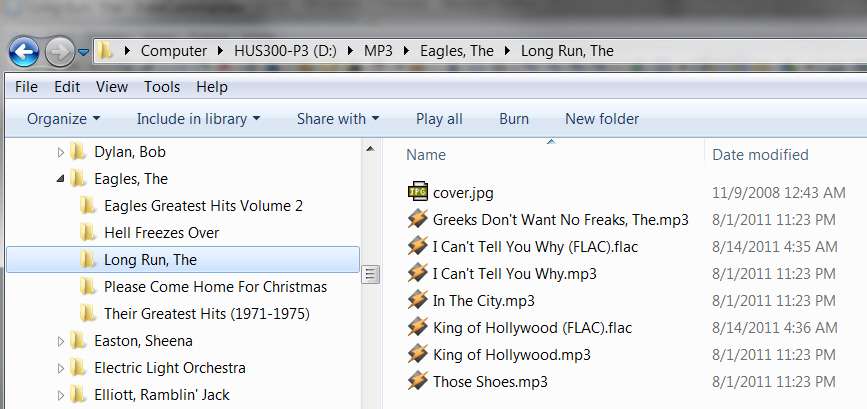
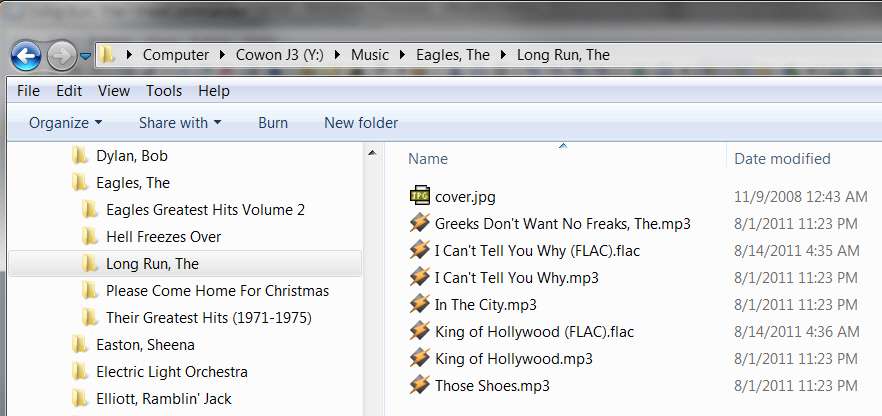
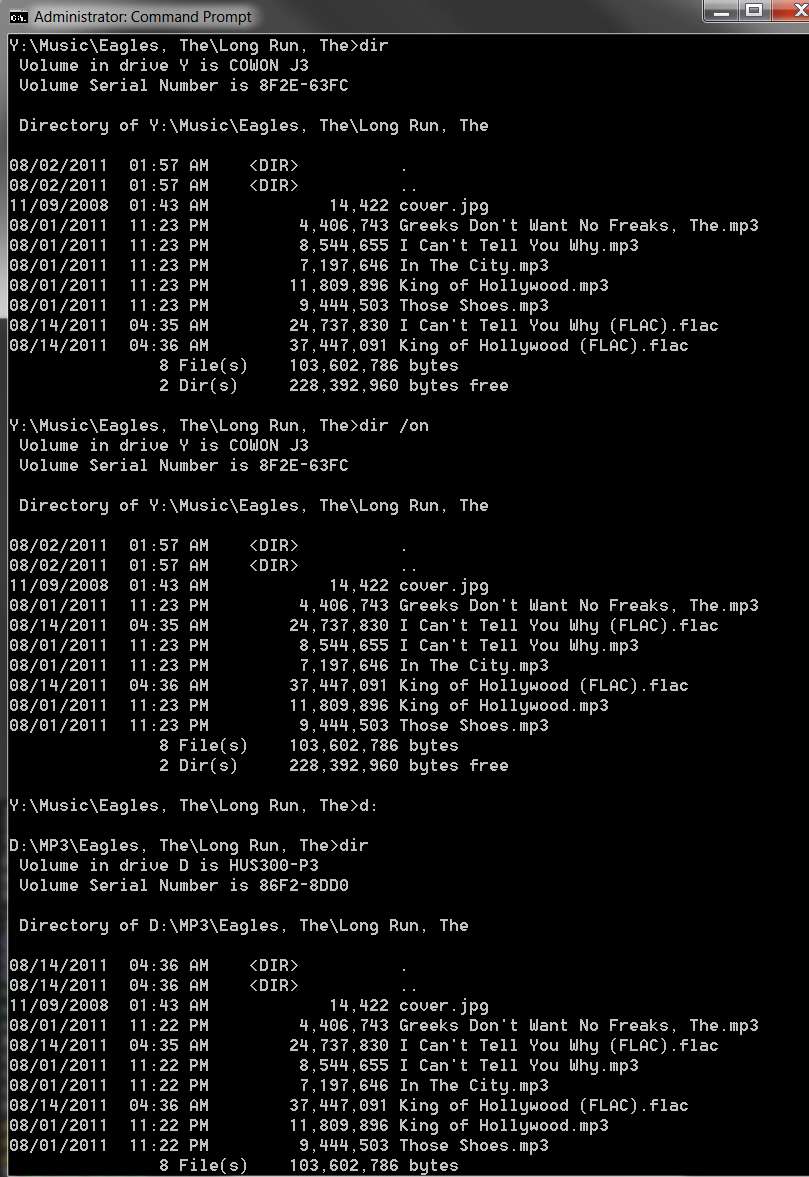
So, I now present a demonstration of the above discussion, using my own FAT32 vs. NTFS identical folders, to show the exact same results you're getting.

There is nothing wrong with any of the results. It is simply that if you use DOS to do a directory display then you will get date/time sequence from FAT32 unless you specify "/on" as well to request alphabetical sequence. In contrast, a DOS directory display from NTFS will always be alphabetical since that's the physical nature and structure of the indexed NTFS directory entry chain.

And in contrast, an Explorer display is always alphabetical, no matter FAT32 or NTFS.

(1) Explorer view of NTFS folder -> alphabetical

orderexplorerntfs.jpg


(2) Explorer view of FAT32 folder -> alphabetical

orderexplorerfat32.jpg


(3) DOS view of (a) FAT32 with "DIR" -> date/time sequence, (b) FAT32 with "DIR /on" -> alphabetical sequence, and (c) NTFS with "DIR" -> alphabetical sequence

orderdos.jpg
 
Last edited:

My Computer

Computer type
PC/Desktop
Computer Manufacturer/Model Number
Home-built, two systems (1) and (2)
OS
Windows 7 Pro x64 (1), Win7 Pro X64 (2)
CPU
i5-3350p 3.1Ghz/6MB-cache (1); E8400 3.0Ghz/6MB-cache (2)
Motherboard
ASUS P8Z77-V Pro (1); ASUS P5Q3 (2)
Memory
8GB PC3-12800 DDR3 (1); 4GB PC3-10600 DDR3 (2)
Graphics Card(s)
ATI HD7750 (1), (see TV cards); ATI R7 250 (2)
Sound Card
Realtek ALC892 HD Audio (1); Realtek ALC1200 HD Audio (2)
Monitor(s) Displays
Eizo HD2441W LCD, Eizo S2433W (1); Eizo 24" S2433W (2)
Screen Resolution
1920x1200, 1920x1200 (1); 1920x1200 (2)
Hard Drives
(1) 1TB SATA-II (7200RPM), 2x2TB SATA-III (7200RPM), 250GB SATA-III (10000RPM) for OS; 2x2TB external USB 3.0

(2) 320GB SATA-II (7200RPM), 750GB SATA-II (7200RPM), 150GB SATA-II (10000RPM) for OS; 2TB external USB 3.0
PSU
Nesteq ECS-6001 600W (1); Nesteq ECS-5001 500W (2)
Case
Acousti-Case 360 (1) and (2)
Cooling
Noctua NH-U12P SE2 for CPU, 2x120mm case fans (1) and (2)
Keyboard
IBM PS/2 (1) and (2)
Mouse
Logitech MX Revolution wireless (1); Microsoft wired (2)
Internet Speed
100mbps down / 10mbps up
Antivirus
Microsoft Security Essentials; Malwarebyte Anti-Malware Pro
Browser
Firefox
Other Info
Ceton InfiniTV 4-tuner cablecard-enabled TV card as well as Hauppauge HVR-2250 OTA/ATSC 2-tuner TV card in (1), running under Win7 WMC
My original files order on C:\Romans is as follows.
I copied the files to USB flash drive G by drag and drop.
The backup files order on drive G is different from C drive.
e.g. Romans14.mp3 becomes the first file listed on drive G.
I'm still thinking about this issue...

After my post above that at least explains the difference between FAT16/FAT32 directories and NTFS directories, and why this results in different directory display sequences whether using DOS ("DIR" or "DIR /on") vs. Windows Explorer, I still had a question about the source folder going into the copy process.

I thought you'd simply used a DOS "COPY", and then were looking at the results with a DOS "DIR", and I assumed that the source directory was equally out-of-order alphabetically. But now looking again at your original two directories I see that it's not. The source directory on C is in sequence alphabetically.

Also, your C-drive is NTFS, so it would have to be alphabetical.

Now I see you say that you used drag/drop to do the copy from C to G (your FAT32 USB drive). Did you select all files together from C, and then drag/drop/copy them onto G together? Or did you do it in two steps... first 14-16, and then 1-13 in a second drag/drop/copy?

I still am 100% positive that a DOS "DIR" command is purely in physical directory order, which means date/time order of when the files were actually created. So in order for 14-16 to appear first in your DIR of the target G version of the directory, that would imply that 14-16 had been created first (in time), and then 1-13 had been created subsequently.

So... do you recall the order in which or how you did the original copy? Was it all 16 at once in one drag/drop/copy, and somehow Windows scrambled which files got created first on G? Or did you actually do 14-16 first, and then 1-13 second?

Have you tried just doing a DOS COPY, to see (or confirm) that the output directory on G will look EXACTLY like the input directory on C? I would think that has to happen, since the DOS COPY is a loop of individual copies, retrieving an input file from the input directory via GETNEXT and copying it, and then retrieving the next input file from the input directory via GETNEXT and copying it, etc. You'd think that this would produce an exact duplicate in sequence of the files on the ouput, matching the input files... per the DOS DIR sequence.


Again, I know that the DOS DIR command works the way it does. That's why they added an "/on" opeand, to allow you to request an alphabetcial display instead of the date/time sequence which is what DIR just does on FAT16/FAT32.

So I'm still unhappy, until we can explain how/why files 14-16 got created first on G, and 1-13 second.

I can certainly try this myself (which I probably will). I will use both Windows Explorer and Free Commander (an Explorer equivalent) for the drag/drop of all 16 files at once, to see how it comes out. And I will also try a DOS COPY.
 

My Computer

Computer type
PC/Desktop
Computer Manufacturer/Model Number
Home-built, two systems (1) and (2)
OS
Windows 7 Pro x64 (1), Win7 Pro X64 (2)
CPU
i5-3350p 3.1Ghz/6MB-cache (1); E8400 3.0Ghz/6MB-cache (2)
Motherboard
ASUS P8Z77-V Pro (1); ASUS P5Q3 (2)
Memory
8GB PC3-12800 DDR3 (1); 4GB PC3-10600 DDR3 (2)
Graphics Card(s)
ATI HD7750 (1), (see TV cards); ATI R7 250 (2)
Sound Card
Realtek ALC892 HD Audio (1); Realtek ALC1200 HD Audio (2)
Monitor(s) Displays
Eizo HD2441W LCD, Eizo S2433W (1); Eizo 24" S2433W (2)
Screen Resolution
1920x1200, 1920x1200 (1); 1920x1200 (2)
Hard Drives
(1) 1TB SATA-II (7200RPM), 2x2TB SATA-III (7200RPM), 250GB SATA-III (10000RPM) for OS; 2x2TB external USB 3.0

(2) 320GB SATA-II (7200RPM), 750GB SATA-II (7200RPM), 150GB SATA-II (10000RPM) for OS; 2TB external USB 3.0
PSU
Nesteq ECS-6001 600W (1); Nesteq ECS-5001 500W (2)
Case
Acousti-Case 360 (1) and (2)
Cooling
Noctua NH-U12P SE2 for CPU, 2x120mm case fans (1) and (2)
Keyboard
IBM PS/2 (1) and (2)
Mouse
Logitech MX Revolution wireless (1); Microsoft wired (2)
Internet Speed
100mbps down / 10mbps up
Antivirus
Microsoft Security Essentials; Malwarebyte Anti-Malware Pro
Browser
Firefox
Other Info
Ceton InfiniTV 4-tuner cablecard-enabled TV card as well as Hauppauge HVR-2250 OTA/ATSC 2-tuner TV card in (1), running under Win7 WMC
My original files order on C:\Romans is as follows.
I copied the files to USB flash drive G by drag and drop.
The backup files order on drive G is different from C drive.
e.g. Romans14.mp3 becomes the first file listed on drive G.
I'm still thinking about this issue...

After my post above that at least explains the difference between FAT16/FAT32 directories and NTFS directories, and why this results in different directory display sequences whether using DOS ("DIR" or "DIR /on") vs. Windows Explorer, I still had a question about the source folder going into the copy process.

I thought you'd simply used a DOS "COPY", and then were looking at the results with a DOS "DIR", and I assumed that the source directory was equally out-of-order alphabetically. But now looking again at your original two directories I see that it's not. The source directory on C is in sequence alphabetically.

Also, your C-drive is NTFS, so it would have to be alphabetical.

Now I see you say that you used drag/drop to do the copy from C to G (your FAT32 USB drive). Did you select all files together from C, and then drag/drop/copy them onto G together? Or did you do it in two steps... first 14-16, and then 1-13 in a second drag/drop/copy?

I still am 100% positive that a DOS "DIR" command is purely in physical directory order, which means date/time order of when the files were actually created. So in order for 14-16 to appear first in your DIR of the target G version of the directory, that would imply that 14-16 had been created first (in time), and then 1-13 had been created subsequently.

So... do you recall the order in which or how you did the original copy? Was it all 16 at once in one drag/drop/copy, and somehow Windows scrambled which files got created first on G? Or did you actually do 14-16 first, and then 1-13 second?

Have you tried just doing a DOS COPY, to see (or confirm) that the output directory on G will look EXACTLY like the input directory on C? I would think that has to happen, since the DOS COPY is a loop of individual copies, retrieving an input file from the input directory via GETNEXT and copying it, and then retrieving the next input file from the input directory via GETNEXT and copying it, etc. You'd think that this would produce an exact duplicate in sequence of the files on the ouput, matching the input files... per the DOS DIR sequence.


Again, I know that the DOS DIR command works the way it does. That's why they added an "/on" opeand, to allow you to request an alphabetcial display instead of the date/time sequence which is what DIR just does on FAT16/FAT32.

So I'm still unhappy, until we can explain how/why files 14-16 got created first on G, and 1-13 second.

I can certainly try this myself (which I probably will). I will use both Windows Explorer and Free Commander (an Explorer equivalent) for the drag/drop of all 16 files at once, to see how it comes out. And I will also try a DOS COPY.


Using DOS "COPY" (c:\Romans>copy * g:\) solve the problem!
Looking at the results with a DOS "DIR" confirm that the files on G: are listed alphabetcially.
Thanks:).
 

My Computer

OS
Windows 7 Home 64bit
Using DOS "COPY" (c:\Romans>copy * g:\) solve the problem!
Looking at the results with a DOS "DIR" confirm that the files on G: are listed alphabetcially.
Thanks:).
AHA!!!

Excellent. Glad to help.
 

My Computer

Computer type
PC/Desktop
Computer Manufacturer/Model Number
Home-built, two systems (1) and (2)
OS
Windows 7 Pro x64 (1), Win7 Pro X64 (2)
CPU
i5-3350p 3.1Ghz/6MB-cache (1); E8400 3.0Ghz/6MB-cache (2)
Motherboard
ASUS P8Z77-V Pro (1); ASUS P5Q3 (2)
Memory
8GB PC3-12800 DDR3 (1); 4GB PC3-10600 DDR3 (2)
Graphics Card(s)
ATI HD7750 (1), (see TV cards); ATI R7 250 (2)
Sound Card
Realtek ALC892 HD Audio (1); Realtek ALC1200 HD Audio (2)
Monitor(s) Displays
Eizo HD2441W LCD, Eizo S2433W (1); Eizo 24" S2433W (2)
Screen Resolution
1920x1200, 1920x1200 (1); 1920x1200 (2)
Hard Drives
(1) 1TB SATA-II (7200RPM), 2x2TB SATA-III (7200RPM), 250GB SATA-III (10000RPM) for OS; 2x2TB external USB 3.0

(2) 320GB SATA-II (7200RPM), 750GB SATA-II (7200RPM), 150GB SATA-II (10000RPM) for OS; 2TB external USB 3.0
PSU
Nesteq ECS-6001 600W (1); Nesteq ECS-5001 500W (2)
Case
Acousti-Case 360 (1) and (2)
Cooling
Noctua NH-U12P SE2 for CPU, 2x120mm case fans (1) and (2)
Keyboard
IBM PS/2 (1) and (2)
Mouse
Logitech MX Revolution wireless (1); Microsoft wired (2)
Internet Speed
100mbps down / 10mbps up
Antivirus
Microsoft Security Essentials; Malwarebyte Anti-Malware Pro
Browser
Firefox
Other Info
Ceton InfiniTV 4-tuner cablecard-enabled TV card as well as Hauppauge HVR-2250 OTA/ATSC 2-tuner TV card in (1), running under Win7 WMC
Curious....Why does then even matter?
 

My Computer

Computer type
PC/Desktop
Computer Manufacturer/Model Number
Alienware Aurora ALX R4
OS
Windows 10 Pro (x64)
CPU
Intel Core i7-3930K (3.2GHz - 4.5GHz)
Motherboard
Alienware Aurora-R4 x79
Memory
4x Samsung 4GB PC3-12800 DDR3 (16GB 1600MHz)
Graphics Card(s)
Nvidia Geforce GTX 690
Sound Card
SteelSeries Siberia Elite
Monitor(s) Displays
Dell UltraSharp U3011
Screen Resolution
2560x1600
Hard Drives
Samsung 850 Pro 256 GB, Seagate 1TB Desktop Hybrid HDD, 2x Western Digital 4TB Green HDD
PSU
875W Some Dell PSU <.<
Case
Alienware Aurora ALX
Cooling
Custom Liquid Cooling (EK CPU & GPU blocks) dual EK 480RAD
Keyboard
Logitech G710+ Mechanical
Mouse
Logitech G700s
Internet Speed
Verizon Fios (50 mbps average)
Other Info
Server: Intel NUC D54250WYK: i5-4250U, 16GB, 256 GB mSATA, Windows Server 2012 R2
Curious....Why does then even matter?
The DOS "DIR" command retrieves and displays directory entries using a GETNEXT mechanism. Whatever the order delivered by GETNEXT, that's what "DIR" shows.

In contrast, "DIR /on" sorts the all entries retrieved into alphabetical sequence first and then presents them. The list from "DIR /on" will therefore always be "ordered by name", i.e. alphabetical.

For FAT16/FA32 directories, the directory entries presented by GETNEXT are from a directory chain, which has new elements for new files always added to the end (no matter what the alphabetical filename is). So a FAT16/FAT32 direct entry chain is always in date/time sequence, chronologically increasing by the date/time when that filename's entry was added to the end of the chain at that time. GETNEXT delivers entries in physical chain sequence, which means date/time by when the item was created.

In contrast, NTFS directories are maintained sorted alphabetically, and new items are inserted wherever they belong... to keep the alphabetical order of the directory entries. So GETNEXT for NTFS always delivers entries in alphabetical sequence, since that's the inherent structure of the directory.

Now DOS "COPY" is just a loop of GETNEXT-from-input/write-to-output. So the physical sequence of additions to the output will exactly match the order of directory entries delivered from the input as presented by GETNEXT.

Since his input is on NTFS, the GETNEXT loop against that directory will present entries in alphabetical sequence. As each one is retrieved, and written to the output which is on FAT32, a new directory entry is added to the end of the FAT32 directory chain. The output chain will thus be sequenced exactly identical to the GETNEXT sequence from the input directory.

And since the GETNEXT from NTFS input is always alphabetical, each new entry added on the FAT32 output directory chain will be added to the end, thus producing a FAT32 chain which is therefore being built in alphabetical sequence.

So when the finished FAT32 is displayed using DIR, i.e. retrieved in GETNEXT sequence by retrieving sequentially linked items from its FAT32 directory chain (actually in date/time sequence by when it was created), each entry retrieved will therefore also be in alphabetical sequence as well.


Still unanswered is how he got what he got originally using drag/drop via Windows Explorer rather than DOS "COPY". If he selected the entire group and copied it, you'd think the whole group would be copied in the order in which Windows Explorer saw it (which is actually always alphabetical no matter what type of file system).

So it seems like the only way he could have ended up with 14-16 and then 1-13 as "physical sequential chain sequence, by date/time of addition" is if he'd copied 14-16 first, and then did a second copy of 1-13.

Anyway, DOS "COPY" from NTFS to any output file system is guaranteed to produce alphabetical sequence on the output, because NTFS directories are always maintained alphabetically.
 

My Computer

Computer type
PC/Desktop
Computer Manufacturer/Model Number
Home-built, two systems (1) and (2)
OS
Windows 7 Pro x64 (1), Win7 Pro X64 (2)
CPU
i5-3350p 3.1Ghz/6MB-cache (1); E8400 3.0Ghz/6MB-cache (2)
Motherboard
ASUS P8Z77-V Pro (1); ASUS P5Q3 (2)
Memory
8GB PC3-12800 DDR3 (1); 4GB PC3-10600 DDR3 (2)
Graphics Card(s)
ATI HD7750 (1), (see TV cards); ATI R7 250 (2)
Sound Card
Realtek ALC892 HD Audio (1); Realtek ALC1200 HD Audio (2)
Monitor(s) Displays
Eizo HD2441W LCD, Eizo S2433W (1); Eizo 24" S2433W (2)
Screen Resolution
1920x1200, 1920x1200 (1); 1920x1200 (2)
Hard Drives
(1) 1TB SATA-II (7200RPM), 2x2TB SATA-III (7200RPM), 250GB SATA-III (10000RPM) for OS; 2x2TB external USB 3.0

(2) 320GB SATA-II (7200RPM), 750GB SATA-II (7200RPM), 150GB SATA-II (10000RPM) for OS; 2TB external USB 3.0
PSU
Nesteq ECS-6001 600W (1); Nesteq ECS-5001 500W (2)
Case
Acousti-Case 360 (1) and (2)
Cooling
Noctua NH-U12P SE2 for CPU, 2x120mm case fans (1) and (2)
Keyboard
IBM PS/2 (1) and (2)
Mouse
Logitech MX Revolution wireless (1); Microsoft wired (2)
Internet Speed
100mbps down / 10mbps up
Antivirus
Microsoft Security Essentials; Malwarebyte Anti-Malware Pro
Browser
Firefox
Other Info
Ceton InfiniTV 4-tuner cablecard-enabled TV card as well as Hauppauge HVR-2250 OTA/ATSC 2-tuner TV card in (1), running under Win7 WMC
Right...but why would it even matter?
Stuff like this screams OCD to me. AKA. waste of time.

Why would the sorting of files matter for a backup?
Shouldn't the existence of the files be enough for a backup?
 

My Computer

Computer type
PC/Desktop
Computer Manufacturer/Model Number
Alienware Aurora ALX R4
OS
Windows 10 Pro (x64)
CPU
Intel Core i7-3930K (3.2GHz - 4.5GHz)
Motherboard
Alienware Aurora-R4 x79
Memory
4x Samsung 4GB PC3-12800 DDR3 (16GB 1600MHz)
Graphics Card(s)
Nvidia Geforce GTX 690
Sound Card
SteelSeries Siberia Elite
Monitor(s) Displays
Dell UltraSharp U3011
Screen Resolution
2560x1600
Hard Drives
Samsung 850 Pro 256 GB, Seagate 1TB Desktop Hybrid HDD, 2x Western Digital 4TB Green HDD
PSU
875W Some Dell PSU <.<
Case
Alienware Aurora ALX
Cooling
Custom Liquid Cooling (EK CPU & GPU blocks) dual EK 480RAD
Keyboard
Logitech G710+ Mechanical
Mouse
Logitech G700s
Internet Speed
Verizon Fios (50 mbps average)
Other Info
Server: Intel NUC D54250WYK: i5-4250U, 16GB, 256 GB mSATA, Windows Server 2012 R2
Right...but why would it even matter?
Stuff like this screams OCD to me. AKA. waste of time.

Why would the sorting of files matter for a backup?
Shouldn't the existence of the files be enough for a backup?
I see what you're getting at now... and, to be honest, I agree with you.

Who cares??
 

My Computer

Computer type
PC/Desktop
Computer Manufacturer/Model Number
Home-built, two systems (1) and (2)
OS
Windows 7 Pro x64 (1), Win7 Pro X64 (2)
CPU
i5-3350p 3.1Ghz/6MB-cache (1); E8400 3.0Ghz/6MB-cache (2)
Motherboard
ASUS P8Z77-V Pro (1); ASUS P5Q3 (2)
Memory
8GB PC3-12800 DDR3 (1); 4GB PC3-10600 DDR3 (2)
Graphics Card(s)
ATI HD7750 (1), (see TV cards); ATI R7 250 (2)
Sound Card
Realtek ALC892 HD Audio (1); Realtek ALC1200 HD Audio (2)
Monitor(s) Displays
Eizo HD2441W LCD, Eizo S2433W (1); Eizo 24" S2433W (2)
Screen Resolution
1920x1200, 1920x1200 (1); 1920x1200 (2)
Hard Drives
(1) 1TB SATA-II (7200RPM), 2x2TB SATA-III (7200RPM), 250GB SATA-III (10000RPM) for OS; 2x2TB external USB 3.0

(2) 320GB SATA-II (7200RPM), 750GB SATA-II (7200RPM), 150GB SATA-II (10000RPM) for OS; 2TB external USB 3.0
PSU
Nesteq ECS-6001 600W (1); Nesteq ECS-5001 500W (2)
Case
Acousti-Case 360 (1) and (2)
Cooling
Noctua NH-U12P SE2 for CPU, 2x120mm case fans (1) and (2)
Keyboard
IBM PS/2 (1) and (2)
Mouse
Logitech MX Revolution wireless (1); Microsoft wired (2)
Internet Speed
100mbps down / 10mbps up
Antivirus
Microsoft Security Essentials; Malwarebyte Anti-Malware Pro
Browser
Firefox
Other Info
Ceton InfiniTV 4-tuner cablecard-enabled TV card as well as Hauppauge HVR-2250 OTA/ATSC 2-tuner TV card in (1), running under Win7 WMC
Right...but why would it even matter?
Stuff like this screams OCD to me. AKA. waste of time.

Why would the sorting of files matter for a backup?
Shouldn't the existence of the files be enough for a backup?
You're right, but the OP needed some assistance, it was an issue to him. BTW, what is OCD? :confused:
 

My Computer

Computer type
PC/Desktop
Computer Manufacturer/Model Number
Home Built Desktop By DataTech
OS
Windows 7 Ultimate X64 SP1
CPU
Intel i5-2550K, Differing ~4.4-4.8GHz No built in GPU
Motherboard
ASUS P8Z68-V PRO/GEN3
Memory
16GB G.Skill Sniper 1866MHz @ 2133MHz 2x8GB
Graphics Card(s)
ASUS GTX650TIB-DC2OC-2GD5, (650TI Boost)
Sound Card
Onboard Realtek 5-1
Monitor(s) Displays
Samsung P2570HD
Screen Resolution
1920x1080
Hard Drives
Samsung 840 Pro 256GB SSD for OS, 500GB Seagate Constellation (Enterprise drive) for Data
PSU
Corsair HX650W
Case
Inwin Dragon Rider
Cooling
Hyper 212 EVO w/two Noctua fans, push-pull, @1300 RPM
Keyboard
E-Z Eyes, bright yellow keys with large characters
Mouse
steelseries SENSEI Laser Pro Gaming
Internet Speed
48-51Mbs Mbs down, 11 Mbs up Xfinity Cable
Antivirus
Norton Internet Security 2013
Browser
IE 10, Opera, Pale Moon if needed
Other Info
4 case fans, LG BluRay-RE, ASUS DVD-RW, Mr. Fusion power supply, 1.21 gigawatts.

My Computer

Computer type
PC/Desktop
Computer Manufacturer/Model Number
Dwarf Dwf/11/2012 r09/2013
OS
Windows 8.1 Pro RTM x64
CPU
Intel Core-i5-3570K 4-core @ 3.4GHz (Ivy Bridge) (OC 4.4GHz)
Motherboard
ASRock Z77 Extreme4-M
Memory
4 x 4GB DDR3-1600 Corsair Vengeance CMZ8GX3M2A1600C9B (16GB)
Graphics Card(s)
MSI GeForce GTX770 Gaming OC 2GB
Sound Card
Realtek High Definition on board solution (ALC 898)
Monitor(s) Displays
ViewSonic VA1912w Widescreen (VGA)
Screen Resolution
1440x900
Hard Drives
OCZ Agility 3 SSD 120GB SATA III x2 (RAID 0)
Samsung HD501LJ 500GB SATA II x2
Hitachi HDS721010CLA332 1TB SATA II
Iomega 1.5TB Ext USB 2.0
WD 2.0TB Ext USB 3.0
PSU
XFX Pro Series 850W Semi-Modular
Case
Gigabyte IF233
Cooling
1 x 120mm Front Inlet 1 x 120mm Rear Exhaust
Keyboard
Microsoft Comfort Curve Keyboard 3000 (USB)
Mouse
Microsoft Comfort Mouse 3000 for Business (USB)
Internet Speed
NetGear DG834Gv3 ADSL Modem/Router (Ethernet) ~4.0 Mb/s (O2)
Antivirus
Avast! 8.0.1497
Browser
IE 11
Other Info
Optical Drive: HL-DT-ST BD-RE BH10LS30 SATA Bluray
Lexmark S305 Printer/Scanner/Copier (USB)
WEI Score: 8.1/8.1/8.5/8.5/8.25
Asus Eee PC 1011PX Netbook (Windows 7 x86 Starter)
Right...but why would it even matter?
Stuff like this screams OCD to me. AKA. waste of time.

Why would the sorting of files matter for a backup?
Shouldn't the existence of the files be enough for a backup?
I see what you're getting at now... and, to be honest, I agree with you.

Who cares??

The sorting of files matter for a backup because I use the backup USB flash drive and insert it to a mp3/CD player to play the mp3 files on it.
The order of the mp3 files on the backup USB flash drive is important because they corresponds to the tracks of a ripped CD.
Maybe "backup" is a bad choice of word to describe the USB flash drive.
How about "portable"?
i.e. the portable USB flash drive is used to store the mp3 files.
Therefore it is not OCD .
 

My Computer

OS
Windows 7 Home 64bit
The sorting of files matter for a backup because I use the backup USB flash drive and insert it to a mp3/CD player to play the mp3 files on it.

The order of the mp3 files on the backup USB flash drive is important because they corresponds to the tracks of a ripped CD.
Just a comment on this...

With my Cowon J3 player, if you play an individual "album" folder (based on a browse of the tags database, developed by examining the tags in each music file), the order of play is actually TRACK NUMBER SEQUENCE, based on the internal track number field in the tag. In other words, typically you would start the tags-based browse by Artist, and then seeing all of the albums under that artist you would select a single "album" folder to play. All of this is really based on the tag field values, not the external physical folder/file names. And internal "track number" from the tag is the play sequence for this type of browse.

On the other hand, if you browse by "folder" (exactly like a Windows Explorer navigation, i.e. in alphabetical sequence by folder or file name) then the presentation and play sequence is purely alphabetical.

If your particular music player and its use of external USB drives is only like the "folder" browse of my Cowon J3, then I guess I can understand why this is important to you if your file names contain the track name imbedded (e.g. the 01, 02, 03, etc., at the end of your file names) since that will determine the sequential access of the FAT32 directory by the device... i.e. the CD track sequence, but based on external file name.

No such problem for my Cowon J3, as EITHER approach is possible... (a) track number sequence based on internal tag, or (b) alphabetical external file name sequence, depending on how you initiate the "browse".
 

My Computer

Computer type
PC/Desktop
Computer Manufacturer/Model Number
Home-built, two systems (1) and (2)
OS
Windows 7 Pro x64 (1), Win7 Pro X64 (2)
CPU
i5-3350p 3.1Ghz/6MB-cache (1); E8400 3.0Ghz/6MB-cache (2)
Motherboard
ASUS P8Z77-V Pro (1); ASUS P5Q3 (2)
Memory
8GB PC3-12800 DDR3 (1); 4GB PC3-10600 DDR3 (2)
Graphics Card(s)
ATI HD7750 (1), (see TV cards); ATI R7 250 (2)
Sound Card
Realtek ALC892 HD Audio (1); Realtek ALC1200 HD Audio (2)
Monitor(s) Displays
Eizo HD2441W LCD, Eizo S2433W (1); Eizo 24" S2433W (2)
Screen Resolution
1920x1200, 1920x1200 (1); 1920x1200 (2)
Hard Drives
(1) 1TB SATA-II (7200RPM), 2x2TB SATA-III (7200RPM), 250GB SATA-III (10000RPM) for OS; 2x2TB external USB 3.0

(2) 320GB SATA-II (7200RPM), 750GB SATA-II (7200RPM), 150GB SATA-II (10000RPM) for OS; 2TB external USB 3.0
PSU
Nesteq ECS-6001 600W (1); Nesteq ECS-5001 500W (2)
Case
Acousti-Case 360 (1) and (2)
Cooling
Noctua NH-U12P SE2 for CPU, 2x120mm case fans (1) and (2)
Keyboard
IBM PS/2 (1) and (2)
Mouse
Logitech MX Revolution wireless (1); Microsoft wired (2)
Internet Speed
100mbps down / 10mbps up
Antivirus
Microsoft Security Essentials; Malwarebyte Anti-Malware Pro
Browser
Firefox
Other Info
Ceton InfiniTV 4-tuner cablecard-enabled TV card as well as Hauppauge HVR-2250 OTA/ATSC 2-tuner TV card in (1), running under Win7 WMC
Back
Top