Solved Backup Internal Hard Drive

Space Cowboy

Space Cadet
Member
Local time
6:14 AM
Messages
46
Hi,

Is there a reason for not using a SSD as your backup Hard Drive.

Would using a mechanical hard drive be a better laptop setup than having a SSD instead?

In other words is your main SSD & replacing the secondary HD with a SSD have any negitive or positive effects on a laptop? My thoughts are less heat and a quicker system setup. A external mechanical HD being used for a daily backup.

Or is there any advantage to using a HD as the secoundary a better setuo? I have no desire for a raid setup.

C:\256gb SSD & E:\1 tb SSD

or

C:\256gb SSD & E:\1tb, 7200 rpm Hard Drive

Any thoughts or suggestions?

Thank You
 

My Computer

Computer type
Laptop
Computer Manufacturer/Model Number
Toshiba Qosmio X875-Q7290
OS
Windows 7 64 Bit
CPU
Mobile QuadCore Intel Core i7-3610QM, 3100 MHz (31 x 100)
Motherboard
DMI
Memory
32 GB
Graphics Card(s)
Nvidia GTX 670M 3 Gig Dedicated Ram
Sound Card
Built In Harman Kardon Speaker 3d Setup output to see below.
Monitor(s) Displays
17" @120 Hz With A Pair Of Rechargeable Nvidia 3D Glasses
Screen Resolution
1920 x 1080
Hard Drives
Plextor 128 Gb M3Pro
Mushkin Reactor 1TB SSD
Cooling
Cooler Master NotePal Laptop Cooling Pad with 3 Movable Fans
Keyboard
On-Screen
Mouse
Kensington Optical on 3M Precise Mouse Pad Repositionable
Internet Speed
110 Mbps Wireless
Antivirus
Microsoft Security Essentials x64
Browser
Google Portable x64
Other Info
Harman Kardon Soundsticks III 2.1 Channel Multimedia Speaker System with Subwoofer.
Built in R/W Blu-Ray - DVD & CD Burner
Netgear (R7000-100PAS) Nighthawk AC1900 Dual Band WiFi Router.
You get more space for the money with a mechanical hard drive. That factor alone makes it a good backup drive.

As your backup drive gets close to filling up, you will either need to buy a new drive or delete some backups from the current drive. This applies whether you have a mechanical hard drive or an SSD.

With a mechanical drive, you should figure on buying a new drive every few years, and then copying the most important backups to the new drive. If you don't do this, then your backups will eventually be lost, because a mechanical hard drive won't last forever. I don't know how often you should replace a solid state drive.

Here are some things to consider if you plan on keeping your backups for any length of time:

If you want to keep certain backups forever, then you will need to consider a few things:
1. The media used to store the backups.
2. Will that media be accessible in the future.
3. What is the shelf life of your backup media.
4. Will the format used to store your format be accessible in the future.

The only way to make sure you can continue to access your backups into the foreseeable future is to move all that you want to keep from their current storage to whatever is current at the time you move them. Then keep doing this about every 10 years. Otherwise, they will become obsolete and inaccessible.
 

My Computer

Computer type
PC/Desktop
Computer Manufacturer/Model Number
Dell
OS
Linux Mint 18.2 xfce 64-bit (VMWare host) / Windows 8.1 Pro 32-bit (VMWare guest)
CPU
Haswell
Memory
4 GB
Monitor(s) Displays
Acer 23"
Screen Resolution
1920 x 1080
Hard Drives
Two hard drives, 1TB each: One for Linux, one for my data.
Keyboard
IBM Model M
Antivirus
Sophos (Linux), Trend Micro (Windows)
Browser
Firefox, Opera
Other Info
I use Samba to share my data drive with the other computers at my house and with my guest session in VMWare Workstation Player.
As mrjimphelps pointed out, one reason for not using SSDs for backups is their cost; HDDs cost much less per GB. However, SSDs have another problem when being used for extended static backups. SSDs store data by the presence or lack of presence of a charge in its cells. That cell will eventually bleed down over time. That can vary from a few month to a year or more, depending on the quality of the SSD, how much data is stored on it, and the remaining write life, unless the SSD is powered up and read every so often. As long as backups are updated every month or two, that should never be a problem.

SSDs are far more durable physically and should last longer but, no matter what kind it is, all media will fail, given enough time, and can do so irrecoverably with little to no warning. That is one reason why one should always have more than one backup. For one's data to be reasonably safe, one should have two backup drives for every data drive in the computer--one kept onsite and one kept offsite--and those drives should be swapped out as often as practical to both as up to date as possible.

Replacing the secondary HDD in your with an SSD won't make your computer run any faster but it will speed up access to the data. An SSD will use less power and probably will improve the battery life of your computer a little. Also, SSDs are not subject to damage from being dropped or bumped like HDDs are. SSDs are completely silent, unlike HDDs, which may or may not emit an audible sound.

I'm using all SSDs now but it was expensive! I had a choice between selling my first or not buying a new truck. Since my first born would not have appreciated being sold and my daughter in law and grandchildren would have killed me, I had to forget about buying a new truck but I do not regret doing so. Fair warning, though, SSDs are as addictive as a drug; once you go all SSDs, you will not go back.
 

My Computer

Computer type
PC/Desktop
Computer Manufacturer/Model Number
Custom Build
OS
Win 7 Ultimate 64 bit
CPU
Intel i7-3930K
Motherboard
ASUS P9X79 WS
Memory
Kingston HyperX Genesis 32GB Kit (8x4GB Modules) 1600MHz DDR
Graphics Card(s)
MSI R7850 Twin Frozr 2GD5/OC Radeon HD 7850 2GB 256-bit GDDR
Sound Card
Asus Xonar Essence STX
Monitor(s) Displays
3x Asus VG248QE 24", Vizio 32" TV
Screen Resolution
1920 x 1080, ?
Hard Drives
Samsung 128GB 840 Pro SSD (1),
Samsung 4TB 850 EVO SSDs (4)
Samsung 4TB 850 EVO SSDs (16) external backup drives used in 2.5" hot swap bays in the computer.
PSU
Corsair HX750w
Case
Antec Two Hundred v2 (modified)
Cooling
Cooler Master GeminII S524 120mm (fan replaced with a 140mm)
Keyboard
Logitech G510s
Mouse
Logitech M525 (two in use)
Internet Speed
=< 32Mbps down, 8Mbps up
Antivirus
AVAST!, MBAM, SAS, Spybot S&D (all but MBAM free) Glary Util
Browser
IE11
Other Info
LSI 9211-8i HBA card (8 SATA III ports), 2.5" & 3.5" Hot Swap Bays, HooToo HT-CR001 PCI-E to USB 3.0 Internal Hub + 6 Slot Card Reader, and LG Model CH12LS28 BD-ROM Optical Drive. Also, ScanSnap S1500 ADF duplexing scanner, Canon 9000F flat bed scanner, Corsair SP2500 2.1 speakers, Samsung CLP 415nw laser color printer, Cyberpower PP2200SW UPS
SSDs have another problem when being used for extended static backups. SSDs store data by the presence or lack of presence of a charge in its cells. That cell will eventually bleed down over time. That can vary from a few month to a year or more, depending on the quality of the SSD, how much data is stored on it, and the remaining write life, unless the SSD is powered up and read every so often. As long as backups are updated every month or two, that should never be a problem.

I never thought about that. For me, that would definitely speak against using SSDs for long-term backup storage.

On my last job we backed up hundreds of servers every night to tape. Tape is by far the cheapest way to store massive amounts of data. Not only that, but the tape is only the storage medium; it is not the drive that reads the medium. With a mechanical hard drive, you have both the storage medium and the drive that reads the medium. My point in saying that is that with tape, you don't have to worry about the mechanism failing, because there is no mechanism - the mechanism is separate from the storage medium itself.

In my opinion, although tapes aren't the best way to do short-term storage of your backups, they are the best way to do long-term (10 years or more) storage of your backups. You will likely be able to find a tape drive somewhere out there (Ebay, etc) in order to recover your data, should that need arise. But if a long-term storage hard drive fails, you are out of luck.
 

My Computer

Computer type
PC/Desktop
Computer Manufacturer/Model Number
Dell
OS
Linux Mint 18.2 xfce 64-bit (VMWare host) / Windows 8.1 Pro 32-bit (VMWare guest)
CPU
Haswell
Memory
4 GB
Monitor(s) Displays
Acer 23"
Screen Resolution
1920 x 1080
Hard Drives
Two hard drives, 1TB each: One for Linux, one for my data.
Keyboard
IBM Model M
Antivirus
Sophos (Linux), Trend Micro (Windows)
Browser
Firefox, Opera
Other Info
I use Samba to share my data drive with the other computers at my house and with my guest session in VMWare Workstation Player.
I never thought about that. For me, that would definitely speak against using SSDs for long-term backup storage.

On my last job we backed up hundreds of servers every night to tape. Tape is by far the cheapest way to store massive amounts of data. Not only that, but the tape is only the storage medium; it is not the drive that reads the medium. With a mechanical hard drive, you have both the storage medium and the drive that reads the medium. My point in saying that is that with tape, you don't have to worry about the mechanism failing, because there is no mechanism - the mechanism is separate from the storage medium itself.

In my opinion, although tapes aren't the best way to do short-term storage of your backups, they are the best way to do long-term (10 years or more) storage of your backups. You will likely be able to find a tape drive somewhere out there (Ebay, etc) in order to recover your data, should that need arise. But if a long-term storage hard drive fails, you are out of luck.

Technically, data that is stored over long periods of time are archives, not backups. Backups have to be kept up to date to avoid losing new or changed data. But I'm picking nits now.

True, tape will last longer than most media and is best for cold (static) storage of data. However, the tape used isn't as cheap as one would think since it's much higher quality than even reel to reel audio tapes. However, the real (no pun intended) expense of using tape comes from the drives that record and read the tapes. Even used, they don't exactly give them away (and I wouldn't trust anything cheap from Fleabay).

HDDs are more practical for consumer static storage but an HDD that just sits on the shelf should be pulled down at least once or twice a year to make sure it can still spin up and that the data is still intact. If HDDs aren't run once in a while, they can seize up.
 

My Computer

Computer type
PC/Desktop
Computer Manufacturer/Model Number
Custom Build
OS
Win 7 Ultimate 64 bit
CPU
Intel i7-3930K
Motherboard
ASUS P9X79 WS
Memory
Kingston HyperX Genesis 32GB Kit (8x4GB Modules) 1600MHz DDR
Graphics Card(s)
MSI R7850 Twin Frozr 2GD5/OC Radeon HD 7850 2GB 256-bit GDDR
Sound Card
Asus Xonar Essence STX
Monitor(s) Displays
3x Asus VG248QE 24", Vizio 32" TV
Screen Resolution
1920 x 1080, ?
Hard Drives
Samsung 128GB 840 Pro SSD (1),
Samsung 4TB 850 EVO SSDs (4)
Samsung 4TB 850 EVO SSDs (16) external backup drives used in 2.5" hot swap bays in the computer.
PSU
Corsair HX750w
Case
Antec Two Hundred v2 (modified)
Cooling
Cooler Master GeminII S524 120mm (fan replaced with a 140mm)
Keyboard
Logitech G510s
Mouse
Logitech M525 (two in use)
Internet Speed
=< 32Mbps down, 8Mbps up
Antivirus
AVAST!, MBAM, SAS, Spybot S&D (all but MBAM free) Glary Util
Browser
IE11
Other Info
LSI 9211-8i HBA card (8 SATA III ports), 2.5" & 3.5" Hot Swap Bays, HooToo HT-CR001 PCI-E to USB 3.0 Internal Hub + 6 Slot Card Reader, and LG Model CH12LS28 BD-ROM Optical Drive. Also, ScanSnap S1500 ADF duplexing scanner, Canon 9000F flat bed scanner, Corsair SP2500 2.1 speakers, Samsung CLP 415nw laser color printer, Cyberpower PP2200SW UPS
True, tape will last longer than most media and is best for cold (static) storage of data. However, the tape used isn't as cheap as one would think since it's much higher quality than even reel to reel audio tapes. However, the real (no pun intended) expense of using tape comes from the drives that record and read the tapes. Even used, they don't exactly give them away (and I wouldn't trust anything cheap from Fleabay).

HDDs are more practical for consumer static storage but an HDD that just sits on the shelf should be pulled down at least once or twice a year to make sure it can still spin up and that the data is still intact. If HDDs aren't run once in a while, they can seize up.

I agree with everything you have said. We used LTO5 tapes at my last job. They weren't very expensive, if you considered how much data you could get on one tape; but the drives were outrageous. Not only that, but you likely would have to pay a fee to the company you were renting your tape backup machine from. We had two Spectralogic tape backup machines, and we paid a hefty monthly fee for each one, which included a nice chunk of change for each drive, because a drive wouldn't work in their machine unless they activated it. But boy were those machines a wonder! Each machine would hold 249 tapes plus a cleaning tape. Combine that with EMC Networker software, and you have a really awesome package. All you needed to do was set everything up, and then monitor it to make sure that it didn't get hung (which didn't happen very often). It would automatically backup tons of data (hundreds of servers) every night. All we needed to do was remove the full tapes and add empty tapes once per week.

This sort of massive operation is definitely not for a home user. However, the cloud storage service that that home user subscribes to may in fact have a setup a lot like I have described above.
 

My Computer

Computer type
PC/Desktop
Computer Manufacturer/Model Number
Dell
OS
Linux Mint 18.2 xfce 64-bit (VMWare host) / Windows 8.1 Pro 32-bit (VMWare guest)
CPU
Haswell
Memory
4 GB
Monitor(s) Displays
Acer 23"
Screen Resolution
1920 x 1080
Hard Drives
Two hard drives, 1TB each: One for Linux, one for my data.
Keyboard
IBM Model M
Antivirus
Sophos (Linux), Trend Micro (Windows)
Browser
Firefox, Opera
Other Info
I use Samba to share my data drive with the other computers at my house and with my guest session in VMWare Workstation Player.
I guess I forgot to clearly explain what my question is.
I do a nightly backup to a external hard drive but have the 2nd SSD inside the laptop for drivers and other things due to the small size of the main SSD. I have been looking around and most use one of each. Mine came with a 1tb spinner as E and died in less than a year so I replaced it with the a 2nd SSD.

I have a few external backups that get rotated each night. So the 2nd SSD is 1tb of drivers, programs, videos, music ect. I sync and backup on a regulure basis.

My laptop really didn't gain much speed when I added the 2nd SSD but has no spinners in it now.

Thanks.
 
Last edited:

My Computer

Computer type
Laptop
Computer Manufacturer/Model Number
Toshiba Qosmio X875-Q7290
OS
Windows 7 64 Bit
CPU
Mobile QuadCore Intel Core i7-3610QM, 3100 MHz (31 x 100)
Motherboard
DMI
Memory
32 GB
Graphics Card(s)
Nvidia GTX 670M 3 Gig Dedicated Ram
Sound Card
Built In Harman Kardon Speaker 3d Setup output to see below.
Monitor(s) Displays
17" @120 Hz With A Pair Of Rechargeable Nvidia 3D Glasses
Screen Resolution
1920 x 1080
Hard Drives
Plextor 128 Gb M3Pro
Mushkin Reactor 1TB SSD
Cooling
Cooler Master NotePal Laptop Cooling Pad with 3 Movable Fans
Keyboard
On-Screen
Mouse
Kensington Optical on 3M Precise Mouse Pad Repositionable
Internet Speed
110 Mbps Wireless
Antivirus
Microsoft Security Essentials x64
Browser
Google Portable x64
Other Info
Harman Kardon Soundsticks III 2.1 Channel Multimedia Speaker System with Subwoofer.
Built in R/W Blu-Ray - DVD & CD Burner
Netgear (R7000-100PAS) Nighthawk AC1900 Dual Band WiFi Router.
I guess I forgot to clearly explain what my question is.
I do a nightly backup to a external hard drive but have the 2nd SSD inside the laptop for drivers and other things due to the small size of the main SSD. I have been looking around and most use one of each. Mine came with a 1tb spinner as E and died in less than a year so I replaced it with the SSD.

I have a few external backups that get rotated each night. So the 2nd SSD is 1tb of drivers, programs, videos, music ect. I sync and backup on a regulure basis.

My laptop really didn't gain much speed when I added the 2nd SSD but has no spinners in it now.

Thanks.

Now I'm totally confused. :confused: What was your question again. Pretend I'm a senile, old lady (wait, I am one).
 

My Computer

Computer type
PC/Desktop
Computer Manufacturer/Model Number
Custom Build
OS
Win 7 Ultimate 64 bit
CPU
Intel i7-3930K
Motherboard
ASUS P9X79 WS
Memory
Kingston HyperX Genesis 32GB Kit (8x4GB Modules) 1600MHz DDR
Graphics Card(s)
MSI R7850 Twin Frozr 2GD5/OC Radeon HD 7850 2GB 256-bit GDDR
Sound Card
Asus Xonar Essence STX
Monitor(s) Displays
3x Asus VG248QE 24", Vizio 32" TV
Screen Resolution
1920 x 1080, ?
Hard Drives
Samsung 128GB 840 Pro SSD (1),
Samsung 4TB 850 EVO SSDs (4)
Samsung 4TB 850 EVO SSDs (16) external backup drives used in 2.5" hot swap bays in the computer.
PSU
Corsair HX750w
Case
Antec Two Hundred v2 (modified)
Cooling
Cooler Master GeminII S524 120mm (fan replaced with a 140mm)
Keyboard
Logitech G510s
Mouse
Logitech M525 (two in use)
Internet Speed
=< 32Mbps down, 8Mbps up
Antivirus
AVAST!, MBAM, SAS, Spybot S&D (all but MBAM free) Glary Util
Browser
IE11
Other Info
LSI 9211-8i HBA card (8 SATA III ports), 2.5" & 3.5" Hot Swap Bays, HooToo HT-CR001 PCI-E to USB 3.0 Internal Hub + 6 Slot Card Reader, and LG Model CH12LS28 BD-ROM Optical Drive. Also, ScanSnap S1500 ADF duplexing scanner, Canon 9000F flat bed scanner, Corsair SP2500 2.1 speakers, Samsung CLP 415nw laser color printer, Cyberpower PP2200SW UPS
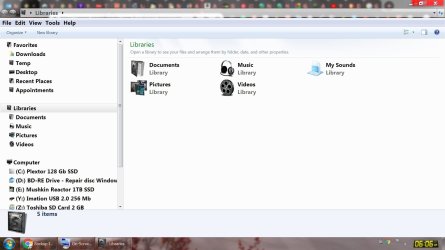
Is there a reason why most of the newer computers have at least one spinner? Does having both drives as SSD's provide any gain other than less heat.

It seems to provide no performace gain.
 

Attachments

  • sshot-001.jpg
    sshot-001.jpg
    112.1 KB · Views: 0

My Computer

Computer type
Laptop
Computer Manufacturer/Model Number
Toshiba Qosmio X875-Q7290
OS
Windows 7 64 Bit
CPU
Mobile QuadCore Intel Core i7-3610QM, 3100 MHz (31 x 100)
Motherboard
DMI
Memory
32 GB
Graphics Card(s)
Nvidia GTX 670M 3 Gig Dedicated Ram
Sound Card
Built In Harman Kardon Speaker 3d Setup output to see below.
Monitor(s) Displays
17" @120 Hz With A Pair Of Rechargeable Nvidia 3D Glasses
Screen Resolution
1920 x 1080
Hard Drives
Plextor 128 Gb M3Pro
Mushkin Reactor 1TB SSD
Cooling
Cooler Master NotePal Laptop Cooling Pad with 3 Movable Fans
Keyboard
On-Screen
Mouse
Kensington Optical on 3M Precise Mouse Pad Repositionable
Internet Speed
110 Mbps Wireless
Antivirus
Microsoft Security Essentials x64
Browser
Google Portable x64
Other Info
Harman Kardon Soundsticks III 2.1 Channel Multimedia Speaker System with Subwoofer.
Built in R/W Blu-Ray - DVD & CD Burner
Netgear (R7000-100PAS) Nighthawk AC1900 Dual Band WiFi Router.
Is there a reason why most of the newer computers have at least one spinner?...

Yes. SSDs cost considerably more per GB than HDDs. Using an SSD for the OS and programs and an HDD to store data is the most cost effective way to improve performance. Putting the OS and programs on the SSD will dramatically speed up booting the OS and loading programs over HDDs. Far less improvement is seen when putting data only on an SSD unless working with really large files.

...Does havid both drives as SSD provide any gain other than less heat.

Yes. It can increase battery charge life and won't fail if the laptop is dropped or even bumped hard while the drive is running. If working with really large files, such when processing raw photos, the increased speed will be noticeable. It's also possible the laptop will be quieter.
 

My Computer

Computer type
PC/Desktop
Computer Manufacturer/Model Number
Custom Build
OS
Win 7 Ultimate 64 bit
CPU
Intel i7-3930K
Motherboard
ASUS P9X79 WS
Memory
Kingston HyperX Genesis 32GB Kit (8x4GB Modules) 1600MHz DDR
Graphics Card(s)
MSI R7850 Twin Frozr 2GD5/OC Radeon HD 7850 2GB 256-bit GDDR
Sound Card
Asus Xonar Essence STX
Monitor(s) Displays
3x Asus VG248QE 24", Vizio 32" TV
Screen Resolution
1920 x 1080, ?
Hard Drives
Samsung 128GB 840 Pro SSD (1),
Samsung 4TB 850 EVO SSDs (4)
Samsung 4TB 850 EVO SSDs (16) external backup drives used in 2.5" hot swap bays in the computer.
PSU
Corsair HX750w
Case
Antec Two Hundred v2 (modified)
Cooling
Cooler Master GeminII S524 120mm (fan replaced with a 140mm)
Keyboard
Logitech G510s
Mouse
Logitech M525 (two in use)
Internet Speed
=< 32Mbps down, 8Mbps up
Antivirus
AVAST!, MBAM, SAS, Spybot S&D (all but MBAM free) Glary Util
Browser
IE11
Other Info
LSI 9211-8i HBA card (8 SATA III ports), 2.5" & 3.5" Hot Swap Bays, HooToo HT-CR001 PCI-E to USB 3.0 Internal Hub + 6 Slot Card Reader, and LG Model CH12LS28 BD-ROM Optical Drive. Also, ScanSnap S1500 ADF duplexing scanner, Canon 9000F flat bed scanner, Corsair SP2500 2.1 speakers, Samsung CLP 415nw laser color printer, Cyberpower PP2200SW UPS
Is there a reason why most of the newer computers have at least one spinner? Does having both drives as SSD's provide any gain other than less heat.

It seems to provide no performace gain.

According to your computer specs, you have 32 GB of RAM. And you already had one SSD. Both of those factors will give you a very fast computer. Therefore, it is understandable that you might not have seen much if any performance gain when you added a 2nd SSD, because you already had a very fast machine prior to installing the 2nd SSD.
 

My Computer

Computer type
PC/Desktop
Computer Manufacturer/Model Number
Dell
OS
Linux Mint 18.2 xfce 64-bit (VMWare host) / Windows 8.1 Pro 32-bit (VMWare guest)
CPU
Haswell
Memory
4 GB
Monitor(s) Displays
Acer 23"
Screen Resolution
1920 x 1080
Hard Drives
Two hard drives, 1TB each: One for Linux, one for my data.
Keyboard
IBM Model M
Antivirus
Sophos (Linux), Trend Micro (Windows)
Browser
Firefox, Opera
Other Info
I use Samba to share my data drive with the other computers at my house and with my guest session in VMWare Workstation Player.
Thanks,

I was hoping to reduce the heat mostly so this speed demon would last a few more years. My weakest area now is the graphics. With the monitor at 120hz there isn't really any need for anymore updates.

I have been looking at going back to a desktop next.

Thanks Everyone for your assistance.
 
Last edited:

My Computer

Computer type
Laptop
Computer Manufacturer/Model Number
Toshiba Qosmio X875-Q7290
OS
Windows 7 64 Bit
CPU
Mobile QuadCore Intel Core i7-3610QM, 3100 MHz (31 x 100)
Motherboard
DMI
Memory
32 GB
Graphics Card(s)
Nvidia GTX 670M 3 Gig Dedicated Ram
Sound Card
Built In Harman Kardon Speaker 3d Setup output to see below.
Monitor(s) Displays
17" @120 Hz With A Pair Of Rechargeable Nvidia 3D Glasses
Screen Resolution
1920 x 1080
Hard Drives
Plextor 128 Gb M3Pro
Mushkin Reactor 1TB SSD
Cooling
Cooler Master NotePal Laptop Cooling Pad with 3 Movable Fans
Keyboard
On-Screen
Mouse
Kensington Optical on 3M Precise Mouse Pad Repositionable
Internet Speed
110 Mbps Wireless
Antivirus
Microsoft Security Essentials x64
Browser
Google Portable x64
Other Info
Harman Kardon Soundsticks III 2.1 Channel Multimedia Speaker System with Subwoofer.
Built in R/W Blu-Ray - DVD & CD Burner
Netgear (R7000-100PAS) Nighthawk AC1900 Dual Band WiFi Router.
Thanks,

I was hoping to reduce the heat mostly so this speed demon would last a few more years. My weakest area now is the graphics. With the monitor at 120hz there isn't really any need for anymore updates.

I have been looking at going back to a desktop next.

Thanks Everyone for your assistance.

If you want to improve your graphics, you need a good graphics card. That means that you need to either buy a laptop with a good graphics card built in, or buy a desktop and pick your own graphics card.
 

My Computer

Computer type
PC/Desktop
Computer Manufacturer/Model Number
Dell
OS
Linux Mint 18.2 xfce 64-bit (VMWare host) / Windows 8.1 Pro 32-bit (VMWare guest)
CPU
Haswell
Memory
4 GB
Monitor(s) Displays
Acer 23"
Screen Resolution
1920 x 1080
Hard Drives
Two hard drives, 1TB each: One for Linux, one for my data.
Keyboard
IBM Model M
Antivirus
Sophos (Linux), Trend Micro (Windows)
Browser
Firefox, Opera
Other Info
I use Samba to share my data drive with the other computers at my house and with my guest session in VMWare Workstation Player.
Back
Top