
Solved Backup Maker Archive Bit Settings

386DX

New member
Member
Local time
11:37 AM
Messages
98
I'm trying to figure out the right settings for the differential to backup only the new files.

I think the problem has to do with the settings for the archive bit, either:

"Back up files with set archive bit only" or "Reset archive bit on backed up files." or both or neither

backup — Postimage.org

If it's relevant, I'm backing up to an external SSD. If I want to run a differential from the last full backup, do you know what the archive bit settings should be?

Thanks
 

My Computer

Computer type
PC/Desktop
Computer Manufacturer/Model Number
HP NP206AA-A2L-p6102f
OS
Win 7 Ultimate x64
CPU
2.8 GHz
Memory
8GB
Graphics Card(s)
ATI Radeon HD 4650
Sound Card
AMD High Definition Audio Device
Monitor(s) Displays
HP x20LED Series Wide LCD Monitor
Hard Drives
WDC WD20 SCSI
External Samsung Portable SSD T5 USB
Keyboard
HID Keyboard Device
Mouse
Gaming Optical Mouse16
Internet Speed
50Mbps
Browser
Firefox 71
I'm trying to figure out the right settings for the differential to backup only the new files...
I don't use Backup Maker, I have written a batch file of my own to do Full and Incremental backups of my user data. I makes extensive use of the Archive bit to do this.

To do a Full backup, tick just the box for 'Reset archive bit on backed up files'. This will back up everything, resetting all the archive bits. Any file that is modified after this will have its archive bit set, so it is easily identified.

There are two types of backups you could do after this, an Incremental or a Differential. The difference is that for a Differential all files changed since the last Full will be backed up, meaning that a subsequent Differential will contain the same files as the previous one, plus any new changes. A complete backup set is therefore the Full plus its latest Differential.

For an Incremental only changes since the last backup (Full or Incremental) will be backed up. Each Incremental will only include files that have changed since the last one. A complete backup set is the Full plus all subsequent Incrementals.

Once you have made a Full and have reset all archive bits, for the next backup to be a Differential, just tick 'Back up files with archive bit set only'.

For the next backup to be an Incremental, tick both 'Back up files with archive bit set only' and 'Reset archive bit on backed up files'.

Decide if you want to make Incrementals or Differentials and stick to it, at least until the next Full. If you mix the two you'll get a headache trying to work out which you need to keep for a complete backup set.
 

My Computers

System One System Two

  • Computer type
    Laptop
    Computer Manufacturer/Model Number
    Toshiba satellite C650D
    OS
    Windows 7 Home Premium x64
    CPU
    AMD V120
    Memory
    4GB
    Internet Speed
    150 Mbps
    Antivirus
    MSE
    Browser
    IE11, Edge, Firefox
    Other Info
    I also have W7 Pro on my System Two, and several W7 Hyper-V VMs. My other machines run Windows 10/11. Their specs are in my Ten Forums & Eleven Forum profiles.
  • Computer type
    Laptop
    System Manufacturer/Model Number
    Lenovo Thinkpad T430
    OS
    Windows 7 Pro x64
    CPU
    Intel i5-3320M
    Memory
    8 GB
    Hard Drives
    250GB Samsung SSD 860 EVO
    Antivirus
    MSE
Thanks, Bree. This is the clearest explanation I've seen on backup. I'll try it.
 

My Computer

Computer type
PC/Desktop
Computer Manufacturer/Model Number
HP NP206AA-A2L-p6102f
OS
Win 7 Ultimate x64
CPU
2.8 GHz
Memory
8GB
Graphics Card(s)
ATI Radeon HD 4650
Sound Card
AMD High Definition Audio Device
Monitor(s) Displays
HP x20LED Series Wide LCD Monitor
Hard Drives
WDC WD20 SCSI
External Samsung Portable SSD T5 USB
Keyboard
HID Keyboard Device
Mouse
Gaming Optical Mouse16
Internet Speed
50Mbps
Browser
Firefox 71
Whether I check one box, the other, neither or both, it always runs a full backup. I'll reinstall, unless I'm not getting the logic.
 

My Computer

Computer type
PC/Desktop
Computer Manufacturer/Model Number
HP NP206AA-A2L-p6102f
OS
Win 7 Ultimate x64
CPU
2.8 GHz
Memory
8GB
Graphics Card(s)
ATI Radeon HD 4650
Sound Card
AMD High Definition Audio Device
Monitor(s) Displays
HP x20LED Series Wide LCD Monitor
Hard Drives
WDC WD20 SCSI
External Samsung Portable SSD T5 USB
Keyboard
HID Keyboard Device
Mouse
Gaming Optical Mouse16
Internet Speed
50Mbps
Browser
Firefox 71
Whether I check one box, the other, neither or both, it always runs a full backup...
For your first backup the archive bit will be set on all the files, so everything should get backed up.


Provided the first backup cleared all the archive bits, it's the next backup where you can choose if you want to just back up files with their archive bit set and clear them.


To check if it is working as expected you can look at the file attributes with Windows Explorer in its Details view, but not by default. You have to right-click on the row of column names (Name, Date, Type, etc.). Select 'More..' in the menu then tick the box for Attributes. An 'A' in the column means the archive attribute is set.
 

My Computers

System One System Two

  • Computer type
    Laptop
    Computer Manufacturer/Model Number
    Toshiba satellite C650D
    OS
    Windows 7 Home Premium x64
    CPU
    AMD V120
    Memory
    4GB
    Internet Speed
    150 Mbps
    Antivirus
    MSE
    Browser
    IE11, Edge, Firefox
    Other Info
    I also have W7 Pro on my System Two, and several W7 Hyper-V VMs. My other machines run Windows 10/11. Their specs are in my Ten Forums & Eleven Forum profiles.
  • Computer type
    Laptop
    System Manufacturer/Model Number
    Lenovo Thinkpad T430
    OS
    Windows 7 Pro x64
    CPU
    Intel i5-3320M
    Memory
    8 GB
    Hard Drives
    250GB Samsung SSD 860 EVO
    Antivirus
    MSE
Thanks again Bree for helping me work through this. I’m having trouble understanding the logic and syntax of the archive bit. For me it’s a double negative kind of thing. :) I think I need to understand how the two states of the archive bit are defined. When it's "set," does that it will be backed up again? To me, the syntax says it's archived now, no need to back it up. Do I have the entire logic wrong?
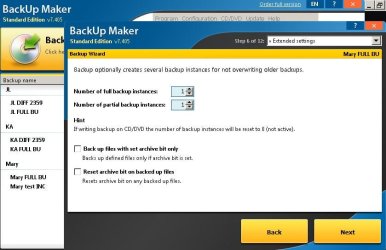
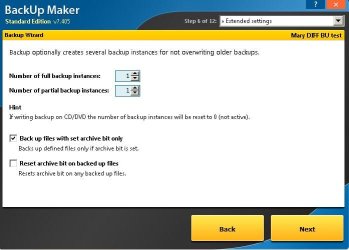
If the archive bit is "set," does that mean it's saying hey, back me up? So then those files would be backed up whether we call it a Full or Diff, correct?

Does "Resetting archive bit on backed up file" mean once a file is backed up, it re-raises its hand to say back me up again? If that's true, then the first BU should have neither checked, correct? I checked neither, and all files are then backed up, so far so good. See screenshot. Windows Explorer attribute is A.

Then, for the first Diff BU, I checked the top box only (“Back up files with set archive bit only”), but all files are backed up. See screenshot. Windows Explorer attribute is A.

So using their logic with check boxes, how do I run a diff to back up only the files that have been changed since the last full backup?

Thanks again.

Mary FULL BU settings.JPG

Mary DIFF BU settings.JPG
 

My Computer

Computer type
PC/Desktop
Computer Manufacturer/Model Number
HP NP206AA-A2L-p6102f
OS
Win 7 Ultimate x64
CPU
2.8 GHz
Memory
8GB
Graphics Card(s)
ATI Radeon HD 4650
Sound Card
AMD High Definition Audio Device
Monitor(s) Displays
HP x20LED Series Wide LCD Monitor
Hard Drives
WDC WD20 SCSI
External Samsung Portable SSD T5 USB
Keyboard
HID Keyboard Device
Mouse
Gaming Optical Mouse16
Internet Speed
50Mbps
Browser
Firefox 71
If the archive bit is "set," does that mean it's saying hey, back me up? So then those files would be backed up whether we call it a Full or Diff, correct?
Correct. The Archive bit means the file needs backing up. When you have cleared the archive bit, anything that modifies or edits the file will set the archive bit again. Think of the archive bit as saying 'this file has been modified'.

Does "Resetting archive bit on backed up file" mean once a file is backed up, it re-raises its hand to say back me up again?
No. It means that after the file has been successfully backed up the archive bit will be cleared. If you then only back up files that have the archive bit set, this file won't be backed up until it is modified and gets its archive bit set again.
 

My Computers

System One System Two

  • Computer type
    Laptop
    Computer Manufacturer/Model Number
    Toshiba satellite C650D
    OS
    Windows 7 Home Premium x64
    CPU
    AMD V120
    Memory
    4GB
    Internet Speed
    150 Mbps
    Antivirus
    MSE
    Browser
    IE11, Edge, Firefox
    Other Info
    I also have W7 Pro on my System Two, and several W7 Hyper-V VMs. My other machines run Windows 10/11. Their specs are in my Ten Forums & Eleven Forum profiles.
  • Computer type
    Laptop
    System Manufacturer/Model Number
    Lenovo Thinkpad T430
    OS
    Windows 7 Pro x64
    CPU
    Intel i5-3320M
    Memory
    8 GB
    Hard Drives
    250GB Samsung SSD 860 EVO
    Antivirus
    MSE
Thanks, Bree. I'll come back to this asap.
 

My Computer

Computer type
PC/Desktop
Computer Manufacturer/Model Number
HP NP206AA-A2L-p6102f
OS
Win 7 Ultimate x64
CPU
2.8 GHz
Memory
8GB
Graphics Card(s)
ATI Radeon HD 4650
Sound Card
AMD High Definition Audio Device
Monitor(s) Displays
HP x20LED Series Wide LCD Monitor
Hard Drives
WDC WD20 SCSI
External Samsung Portable SSD T5 USB
Keyboard
HID Keyboard Device
Mouse
Gaming Optical Mouse16
Internet Speed
50Mbps
Browser
Firefox 71
UPDATE: I checked the settings I use for backing up other folders. The settings are the same as for the folder I'm having trouble with (Mary), but the others run a Diff fine...just backing up the changed files. Does this sound like a bug? I reinstalled but same.
 

My Computer

Computer type
PC/Desktop
Computer Manufacturer/Model Number
HP NP206AA-A2L-p6102f
OS
Win 7 Ultimate x64
CPU
2.8 GHz
Memory
8GB
Graphics Card(s)
ATI Radeon HD 4650
Sound Card
AMD High Definition Audio Device
Monitor(s) Displays
HP x20LED Series Wide LCD Monitor
Hard Drives
WDC WD20 SCSI
External Samsung Portable SSD T5 USB
Keyboard
HID Keyboard Device
Mouse
Gaming Optical Mouse16
Internet Speed
50Mbps
Browser
Firefox 71
...the others run a Diff fine...just backing up the changed files. Does this sound like a bug?


If it works as expected in all folders except this one, it sounds more like another program that uses this Mary folder may be setting the archive bit on all the files.
 

My Computers

System One System Two

  • Computer type
    Laptop
    Computer Manufacturer/Model Number
    Toshiba satellite C650D
    OS
    Windows 7 Home Premium x64
    CPU
    AMD V120
    Memory
    4GB
    Internet Speed
    150 Mbps
    Antivirus
    MSE
    Browser
    IE11, Edge, Firefox
    Other Info
    I also have W7 Pro on my System Two, and several W7 Hyper-V VMs. My other machines run Windows 10/11. Their specs are in my Ten Forums & Eleven Forum profiles.
  • Computer type
    Laptop
    System Manufacturer/Model Number
    Lenovo Thinkpad T430
    OS
    Windows 7 Pro x64
    CPU
    Intel i5-3320M
    Memory
    8 GB
    Hard Drives
    250GB Samsung SSD 860 EVO
    Antivirus
    MSE
Thanks. Can you suggest any programs?
 

My Computer

Computer type
PC/Desktop
Computer Manufacturer/Model Number
HP NP206AA-A2L-p6102f
OS
Win 7 Ultimate x64
CPU
2.8 GHz
Memory
8GB
Graphics Card(s)
ATI Radeon HD 4650
Sound Card
AMD High Definition Audio Device
Monitor(s) Displays
HP x20LED Series Wide LCD Monitor
Hard Drives
WDC WD20 SCSI
External Samsung Portable SSD T5 USB
Keyboard
HID Keyboard Device
Mouse
Gaming Optical Mouse16
Internet Speed
50Mbps
Browser
Firefox 71
I did a temporary workaround. I ran a differential backup on this folder every 24 hours instead of by resetting the archive bits.
 

My Computer

Computer type
PC/Desktop
Computer Manufacturer/Model Number
HP NP206AA-A2L-p6102f
OS
Win 7 Ultimate x64
CPU
2.8 GHz
Memory
8GB
Graphics Card(s)
ATI Radeon HD 4650
Sound Card
AMD High Definition Audio Device
Monitor(s) Displays
HP x20LED Series Wide LCD Monitor
Hard Drives
WDC WD20 SCSI
External Samsung Portable SSD T5 USB
Keyboard
HID Keyboard Device
Mouse
Gaming Optical Mouse16
Internet Speed
50Mbps
Browser
Firefox 71
I think every Diff I ran started a full backup because when I ran the full backup, I hadn't checked to reset the archive bit. So the diff thought they were all to be backed up. Do I have that right?
 

My Computer

Computer type
PC/Desktop
Computer Manufacturer/Model Number
HP NP206AA-A2L-p6102f
OS
Win 7 Ultimate x64
CPU
2.8 GHz
Memory
8GB
Graphics Card(s)
ATI Radeon HD 4650
Sound Card
AMD High Definition Audio Device
Monitor(s) Displays
HP x20LED Series Wide LCD Monitor
Hard Drives
WDC WD20 SCSI
External Samsung Portable SSD T5 USB
Keyboard
HID Keyboard Device
Mouse
Gaming Optical Mouse16
Internet Speed
50Mbps
Browser
Firefox 71
Yes, if you want to use a Differential as the next backup, the the first Full must reset all the archive bits.
 

My Computers

System One System Two

  • Computer type
    Laptop
    Computer Manufacturer/Model Number
    Toshiba satellite C650D
    OS
    Windows 7 Home Premium x64
    CPU
    AMD V120
    Memory
    4GB
    Internet Speed
    150 Mbps
    Antivirus
    MSE
    Browser
    IE11, Edge, Firefox
    Other Info
    I also have W7 Pro on my System Two, and several W7 Hyper-V VMs. My other machines run Windows 10/11. Their specs are in my Ten Forums & Eleven Forum profiles.
  • Computer type
    Laptop
    System Manufacturer/Model Number
    Lenovo Thinkpad T430
    OS
    Windows 7 Pro x64
    CPU
    Intel i5-3320M
    Memory
    8 GB
    Hard Drives
    250GB Samsung SSD 860 EVO
    Antivirus
    MSE
So far so good. To keep the original file dates, do you suggest I set these options?
 

Attachments

  • winzip archive time.JPG
    winzip archive time.JPG
    68.8 KB · Views: 0

My Computer

Computer type
PC/Desktop
Computer Manufacturer/Model Number
HP NP206AA-A2L-p6102f
OS
Win 7 Ultimate x64
CPU
2.8 GHz
Memory
8GB
Graphics Card(s)
ATI Radeon HD 4650
Sound Card
AMD High Definition Audio Device
Monitor(s) Displays
HP x20LED Series Wide LCD Monitor
Hard Drives
WDC WD20 SCSI
External Samsung Portable SSD T5 USB
Keyboard
HID Keyboard Device
Mouse
Gaming Optical Mouse16
Internet Speed
50Mbps
Browser
Firefox 71
So far so good. To keep the original file dates, do you suggest I set these options?
As I said, I don't use Backup Maker. But ticking 'Store modification time' and 'Store creation time' look like they should do what you want.
 

My Computers

System One System Two

  • Computer type
    Laptop
    Computer Manufacturer/Model Number
    Toshiba satellite C650D
    OS
    Windows 7 Home Premium x64
    CPU
    AMD V120
    Memory
    4GB
    Internet Speed
    150 Mbps
    Antivirus
    MSE
    Browser
    IE11, Edge, Firefox
    Other Info
    I also have W7 Pro on my System Two, and several W7 Hyper-V VMs. My other machines run Windows 10/11. Their specs are in my Ten Forums & Eleven Forum profiles.
  • Computer type
    Laptop
    System Manufacturer/Model Number
    Lenovo Thinkpad T430
    OS
    Windows 7 Pro x64
    CPU
    Intel i5-3320M
    Memory
    8 GB
    Hard Drives
    250GB Samsung SSD 860 EVO
    Antivirus
    MSE
I should have specified, those settings are in WinZip. I'll try it, thanks.
 

My Computer

Computer type
PC/Desktop
Computer Manufacturer/Model Number
HP NP206AA-A2L-p6102f
OS
Win 7 Ultimate x64
CPU
2.8 GHz
Memory
8GB
Graphics Card(s)
ATI Radeon HD 4650
Sound Card
AMD High Definition Audio Device
Monitor(s) Displays
HP x20LED Series Wide LCD Monitor
Hard Drives
WDC WD20 SCSI
External Samsung Portable SSD T5 USB
Keyboard
HID Keyboard Device
Mouse
Gaming Optical Mouse16
Internet Speed
50Mbps
Browser
Firefox 71
I should have specified, those settings are in WinZip. I'll try it, thanks.


I prefer 7-Zip, and in that dates of files are always preserved.
 

My Computers

System One System Two

  • Computer type
    Laptop
    Computer Manufacturer/Model Number
    Toshiba satellite C650D
    OS
    Windows 7 Home Premium x64
    CPU
    AMD V120
    Memory
    4GB
    Internet Speed
    150 Mbps
    Antivirus
    MSE
    Browser
    IE11, Edge, Firefox
    Other Info
    I also have W7 Pro on my System Two, and several W7 Hyper-V VMs. My other machines run Windows 10/11. Their specs are in my Ten Forums & Eleven Forum profiles.
  • Computer type
    Laptop
    System Manufacturer/Model Number
    Lenovo Thinkpad T430
    OS
    Windows 7 Pro x64
    CPU
    Intel i5-3320M
    Memory
    8 GB
    Hard Drives
    250GB Samsung SSD 860 EVO
    Antivirus
    MSE
Thanks again.
 

My Computer

Computer type
PC/Desktop
Computer Manufacturer/Model Number
HP NP206AA-A2L-p6102f
OS
Win 7 Ultimate x64
CPU
2.8 GHz
Memory
8GB
Graphics Card(s)
ATI Radeon HD 4650
Sound Card
AMD High Definition Audio Device
Monitor(s) Displays
HP x20LED Series Wide LCD Monitor
Hard Drives
WDC WD20 SCSI
External Samsung Portable SSD T5 USB
Keyboard
HID Keyboard Device
Mouse
Gaming Optical Mouse16
Internet Speed
50Mbps
Browser
Firefox 71
Back
Top