

Booyah to all you outlook brainiacs!
I use OUTLOOK for many email accounts, mostly POP but also Office365 and also to hook up with my corporate clients using exchange. (No - I'm not a great bit-twiddler anymore, I just work on business stuff.)
I run a Windows 7 notebook that I carry around.
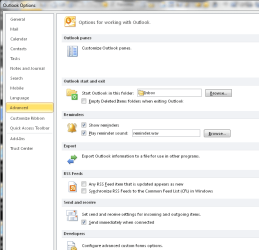
Anyway, my auto-archive settings seem to be missing. I'm sure they used to be here somewhere. I would have thought they would be on File > Options > Advanced > somewhere here, but no (see attached).
I don't see any admin templates installed in GPEDIT.msc (not that I would install ANY policies on my personal laptop anyway.)
Can you help me run down the problem and get archiving working? THANKS!
I use OUTLOOK for many email accounts, mostly POP but also Office365 and also to hook up with my corporate clients using exchange. (No - I'm not a great bit-twiddler anymore, I just work on business stuff.)
I run a Windows 7 notebook that I carry around.
Anyway, my auto-archive settings seem to be missing. I'm sure they used to be here somewhere. I would have thought they would be on File > Options > Advanced > somewhere here, but no (see attached).
I don't see any admin templates installed in GPEDIT.msc (not that I would install ANY policies on my personal laptop anyway.)
Can you help me run down the problem and get archiving working? THANKS!
Attachments
My Computer
- Computer type
- Laptop
- Computer Manufacturer/Model Number
- Dell Insprion 7559 next to a Toshiba Portege
- OS
- Win 7 Pro 64-bit
- CPU
- Intel Core i5
- Motherboard
- Intel
- Memory
- 16 GB Dell, 6 GB Toshiba
- Graphics Card(s)
- Intel crap on both but Dell also has nVidia GeForce GTX960M
- Sound Card
- RealTek
- Monitor(s) Displays
- internal and external ACER KA270H 27"
- Screen Resolution
- 1920x1080
- Hard Drives
- SSD 256 GB plus numerous WD Red or Purple on USB3 docks. Used to buy a lot of Seagate but tossed them the second time I got unrecoverable disc corruption in the midst of use.
- Keyboard
- Garage Mouse SW and some cheap Amazon China made USB device
- Mouse
- Garage Mouse and some cheap Amazon China made USB device
- Internet Speed
- 50 Mbps (allegedly, depends on server)
- Antivirus
- Defender, Malwarebytes Premium and Kaspersky
- Browser
- IE 11, and Chrome something


