

Hi there.
If you are upgrading a Laptop to an SSD or higher capacity drive or even replacing a laptop DON'T throw away the internal HDD's -- even if they are only 160 GB.
These make absolutely EXCELLENT backup / Archive storage areas or even Music / movie libraries.
Use a USB2==>SATA connector to connect to machine (even a tablet) - the low power of these devices make them great for this purpose as you don't need any extra power supply or even have to use enclosures.
I "rescued" 20 of these from a store that was just chucking out stuff -- re-format, HDD test and they are all good. Provided you haven't got too many users concurrently they go well in a NAS server too. Even though these disks aren't the fastest they are more than fast enough for streaming purposes (the limit is probably your Wi-Fi connection rather than the HDD's).
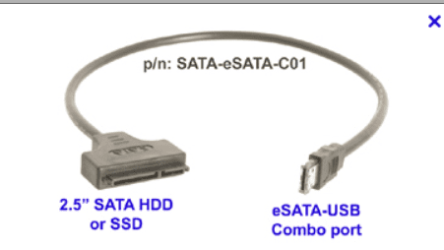
Here's the pic of a USB==>sata connector -- costs around 2 USD.
BTW opening up a laptop to get at the HDD is no problem -- even if you have a very old laptop the HDD can be "rescued".
Cheers
jimbo
If you are upgrading a Laptop to an SSD or higher capacity drive or even replacing a laptop DON'T throw away the internal HDD's -- even if they are only 160 GB.
These make absolutely EXCELLENT backup / Archive storage areas or even Music / movie libraries.
Use a USB2==>SATA connector to connect to machine (even a tablet) - the low power of these devices make them great for this purpose as you don't need any extra power supply or even have to use enclosures.
I "rescued" 20 of these from a store that was just chucking out stuff -- re-format, HDD test and they are all good. Provided you haven't got too many users concurrently they go well in a NAS server too. Even though these disks aren't the fastest they are more than fast enough for streaming purposes (the limit is probably your Wi-Fi connection rather than the HDD's).
Here's the pic of a USB==>sata connector -- costs around 2 USD.
BTW opening up a laptop to get at the HDD is no problem -- even if you have a very old laptop the HDD can be "rescued".
Cheers
jimbo
Attachments
My Computer
- Computer type
- PC/Desktop
- Computer Manufacturer/Model Number
- Custom built, several laptops HP/ASUS
- OS
- Linux CENTOS 7 / various Windows OS'es and servers
- CPU
- Intel i7 Intel i5
- Memory
- 8GB, 16GB
- Graphics Card(s)
- On Motherboard
- Sound Card
- Realtek HD audio
- Monitor(s) Displays
- Apple Cinema display, Samsung LCD
- Screen Resolution
- 1920 X 1080
- Hard Drives
- 4 X 1TB SATA
- Mouse
- Toshiba wireless laser
- Internet Speed
- > 20MB up


