Backup no longer works

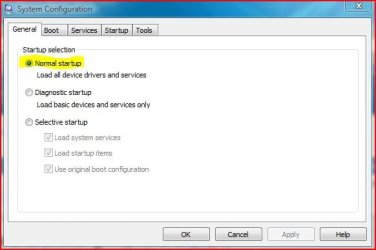
And that you are booted Normally without the Little tweaks
 

Attachments

  • msconfig.JPG
    msconfig.JPG
    23 KB · Views: 8

My Computer My Computer

Computer type
PC/Desktop
Computer Manufacturer/Model Number
Custom Built
OS
Windows 7 Professional x64 SP1 ; Windows Server 2012 R2 Standard
CPU
Intel Core i5 2400 @ 3.10GHz
Motherboard
Foxconn H67MP-S/-V/H67MP
Memory
8.0GB DDR3 @ 665MHz (2GBx4)
Graphics Card(s)
AMD Radeon HD 6870
Sound Card
Realtek High Definition Audio
Monitor(s) Displays
AOC 2243W & SMB1930NW
Screen Resolution
1440x900 & 1920x1080
Hard Drives
977GB Seagate ST31000524AS ATA Drive (SATA)
250GB WD iSCSI attached Drive
PSU
750W Gaming PSU
Case
Novatech Night
Cooling
Fan
Keyboard
Dell Standard PS/2 Keyboard
Mouse
R.A.T 07 Gaming Mouse
Internet Speed
Download: 10 Mbps Ping: 30ms Upload: 0.81 Mbps
Browser
Google Chrome
Other Info
Optiarc DVD RW AD-5260S ATA Device
Don't know what the Little Tweaks are, so I guess the answer is Yes!
 

My Computer My Computer

OS
Windows 7 64-bit
CPU
Intel i7 920 @ 4GHz
Motherboard
Asus P6T Deluxe V2
Memory
6Gb
Graphics Card(s)
nVidia GTX 285
Sound Card
X-Fi Extreme Audio PCIe
Screen Resolution
1900x1200
backup

i use Macrium reflect to back up entire C partition and works well, i shrunk my WinRe Vista partition which ment the C partition was bigger, from the Macrium recovery disk i reinstalled the partition no problems, as it asks if i want to extend the recovery partition to fit Volume C,easy to use and back up i frequently, just reboot and its like nothing had happened (defragging the drive 1st seems to help speed up the process)
 

My Computer My Computer

Computer type
PC/Desktop
OS
Windows 7 X64 Bit
CPU
Intel(R) Core(TM)i7-4771 CPU @ 3.50GH
Motherboard
Asus Sabertooth Z87
Memory
Corsair 4x8 Vengeance (32GB)
Graphics Card(s)
NVIDIA GeForce GTX780
Monitor(s) Displays
LG
Screen Resolution
1920x1080
PSU
Corsair CX750
Case
Corsair 200 series
Cooling
H80i Liquid Cooler
Keyboard
Microsoft
Mouse
Microsoft
Internet Speed
good times-500-850 kbs bad times-50-100 kbs
Thanks for that.
The thing is, I don't want to back up whole partitions, just selected files and folders across several partitions.
As I said earlier, I already use Geniesoft Timeline 2.1 for my main backup. It is excellent. Very similar to Time Machine on OS X.
Has no-one got any further thoughts on the original problem?
 

My Computer My Computer

OS
Windows 7 64-bit
CPU
Intel i7 920 @ 4GHz
Motherboard
Asus P6T Deluxe V2
Memory
6Gb
Graphics Card(s)
nVidia GTX 285
Sound Card
X-Fi Extreme Audio PCIe
Screen Resolution
1900x1200
Step 1:

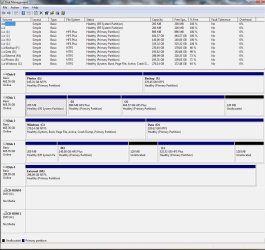
Run Disk Management and make a snapshot of output thereof.
Be sure to maximize the output before making the snapshot.
You can use the Snipping Tool which comes with Win 7 or use MS Paint to make the snapshot.
Include the snapshot in your next post.
Be sure that the external drive is connected when you run Disk Management.

To run Disk Management:
WIN | type DISKMGMT.MSC | ENTER

To run Snipping Tool:
WIN | type SNIP | ENTER

WIN is that key with the wavy flag on it.

How to Post a Screenshot
 

My Computer My Computer

Computer Manufacturer/Model Number
Toshiba Satellite S875D-S7239 laptop
OS
MS Windows 7 Ultimate SP1 64-bit
CPU
AMD A10-4600M
Motherboard
AMD Pumori (Socket FT1)
Memory
6.00 GB Dual-Channel DDR3 @ 798MHz (11-11-12-28)
Graphics Card(s)
AMD Radeon HD 7660G
Sound Card
High Definition Audio Device
Monitor(s) Displays
Generic PnP Monitor (1600x900@60Hz)
Screen Resolution
1600x900@60Hz
Hard Drives
SSD 119GB Corsair CSSD-V128GB2 ATA Device
Keyboard
Standard PS/2 Keyboard
Mouse
HP Wireless Optical Mobile Mouse Model FHA-3410
Internet Speed
What the local pub, local coffee shop offers.
Other Info
Optical Drive:MATSHITA BD-CMB UJ160B ATA Device


Also have an Asus ha1002xp netbook with Win 7 Ultimate installed.
You have more serious issues than the backup if Repair Install is erroring out.

Backup your files externally by click n drag, Disable your AV, unplug any USB devices, try again.

Next do a Clean Boot Procedure to try install: How to Troubleshoot a Problem by Performing a Clean Startup in Windows 7 or Vista

Next test your memory using memtest86 for 5-6 passes, reseat your RAM, swap sticks.

Next test your HD using maker's full diag/repair CD scan: Hard Drive Diagnostics Tools and Utilities (Storage) - TACKtech Corp.

Update your SATA controller driver, reset the CMOS: Clear CMOS - 3 Ways to Clear the CMOS - Reset BIOS

If you are still unable to do a Repair Install, wipe your HD before clean reinstalling from booted DVD: http://www.sevenforums.com/tutorials/91339-ssd-optimize-windows-re-installation.html
 
Last edited by a moderator:
Run Disk Management and make a snapshot of output thereof.
FWIW
External M: is the drive I'm trying to backup to.

gregrocker, thanks for your input. I'll look into what you suggest. However, I don't have any problems at all with my system except for Windows Backup not working. For many months, I've had no crashes or problems at all.
I use Timeline as my main backup which does selected files from c: and d: and continually backs them up to Backup (f:).
Also, since the Windows Backup issue, I've gone back to my old Acronis True Image 2009 to perform the secondary backups to the External m: drive with no problem at all.
 

Attachments

  • sc2.jpg
    sc2.jpg
    158.9 KB · Views: 18

My Computer My Computer

OS
Windows 7 64-bit
CPU
Intel i7 920 @ 4GHz
Motherboard
Asus P6T Deluxe V2
Memory
6Gb
Graphics Card(s)
nVidia GTX 285
Sound Card
X-Fi Extreme Audio PCIe
Screen Resolution
1900x1200
imacken,

Although I find some inconsistencies in some of the posts and your disk management snapshot,

I agree with Greg: if Repair Install is failing, you have more serious problems.

I recommend following his advice.
 

My Computer My Computer

Computer Manufacturer/Model Number
Toshiba Satellite S875D-S7239 laptop
OS
MS Windows 7 Ultimate SP1 64-bit
CPU
AMD A10-4600M
Motherboard
AMD Pumori (Socket FT1)
Memory
6.00 GB Dual-Channel DDR3 @ 798MHz (11-11-12-28)
Graphics Card(s)
AMD Radeon HD 7660G
Sound Card
High Definition Audio Device
Monitor(s) Displays
Generic PnP Monitor (1600x900@60Hz)
Screen Resolution
1600x900@60Hz
Hard Drives
SSD 119GB Corsair CSSD-V128GB2 ATA Device
Keyboard
Standard PS/2 Keyboard
Mouse
HP Wireless Optical Mobile Mouse Model FHA-3410
Internet Speed
What the local pub, local coffee shop offers.
Other Info
Optical Drive:MATSHITA BD-CMB UJ160B ATA Device


Also have an Asus ha1002xp netbook with Win 7 Ultimate installed.
If you're happy with performance then monitor it closely for further problems.

Check Event Viewer>Admin View to google repeat errors to eventual resolution.

Click through WEI score link at Computer>Properties to choose Advanced Tools, look for cued issues, check Performance log, Generate a System Health Report.

Run sfc /scannow to see if System Files have been corrupted which could explain why backup fails only on built-in backup.

If further problems arise work through the checklist given to absolve hardware, then Repair Install which is the next best thing to clean reinstall and keeps all your programs, files and settings in place.
 
Thanks guys.

karlsnooks: Can you explain what you mean by inconsistencies in my posts and screenshots?

gregrocker: I've done the WDigital diagnostic on all drives (including the external usb) and they are all OK. I did a MEMTEST yesterday and it was absolutely fine.

The DVD setup error. I'm wondering if it has to do with some stuff I did months ago to get rid of the annoying 'System Reserved' partition that W7 put on. What do you think?
 

My Computer My Computer

OS
Windows 7 64-bit
CPU
Intel i7 920 @ 4GHz
Motherboard
Asus P6T Deluxe V2
Memory
6Gb
Graphics Card(s)
nVidia GTX 285
Sound Card
X-Fi Extreme Audio PCIe
Screen Resolution
1900x1200
The inconsistency I see is that the 200mb EFI System partition is highlighted as the booted partition (by diagonal lines) while it is not denoted as System Active Boot - the Win7 partition (correctly) is.

Confirm DISK2 is set as first HD to boot in BIOS setup to be sure.

I would want to work through the error blocking Repair Install to run it as it should solve all problems unless one is related to settings which it reimports (rare).

Google the exact text and number of the error to read all about it and work through to solution.
 
The info is correct.
I have a boot partition that allows me to select whether I boot into Windows or other OSs.
I did a system diagnostics report and it was fine.
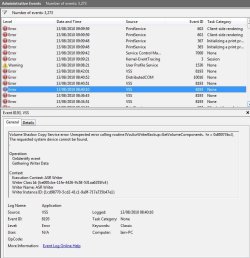
See attached an Event Viewer error report. Those VSS errors are similar to what I was getting from Windows backup.
 

Attachments

  • sc3.jpg
    sc3.jpg
    91.6 KB · Views: 9

My Computer My Computer

OS
Windows 7 64-bit
CPU
Intel i7 920 @ 4GHz
Motherboard
Asus P6T Deluxe V2
Memory
6Gb
Graphics Card(s)
nVidia GTX 285
Sound Card
X-Fi Extreme Audio PCIe
Screen Resolution
1900x1200
It would have been nice to know all along that you are multi-booting as it suddenly becomes clear that you likely have creeping corruption from your bootloader.

The procedure is to google the error text and identifying numbers to read how others have resolved the issue. The VSS errors are likely related to your backup failure and especially need to be resolved. Do you even have System Restore points now and do they work?
 
Thanks again.
Sorry, I didn't think that the multi-boot thing was relevant to having problems with Windows Backup.
I did Google the error code and message before posting here and couldn't find anything useful to my case.
I think the setup.exe error is to do with the boot partition issue and isn't anything to worry about. (Agree?)
The Windows Backup problem - subject of the post! - is more odd. I haven't changed anything on my system at all, and it had worked without a problem for many months. Only in the last few days has it become an issue.
 

My Computer My Computer

OS
Windows 7 64-bit
CPU
Intel i7 920 @ 4GHz
Motherboard
Asus P6T Deluxe V2
Memory
6Gb
Graphics Card(s)
nVidia GTX 285
Sound Card
X-Fi Extreme Audio PCIe
Screen Resolution
1900x1200
What I would do is boot your OS's on separate HD's via the BIOS boot order and one-time BIOS Boot Menu key, which makes them independent and avoids GRUB or other boot loader corruption of WIn7.

By all appearances Win7 is already independent to be booted via BIOS and removing it from GRUB or whatever is messing it up should help a lot.

Even better, Reinstalling it to wiped HD with all other HD's unplugged would give you a fresh start free from the previous corruption.
 
OK, ALL PROBLEMS SOLVED!
Booting from the Windows drive has solved the 1) Repair Install problem and 2) the Windows Backup problem.
I guess Windows was trying to write to the boot partition in 1) and couldn't.
I can't quite understand the Windows Backup thing though.
Any ideas?
Also, any ideas on how to get it working with Chameleon boot partition? I do seem to remember that all my drives got re-ordered in BIOS for some reason a few weeks ago.
 

My Computer My Computer

OS
Windows 7 64-bit
CPU
Intel i7 920 @ 4GHz
Motherboard
Asus P6T Deluxe V2
Memory
6Gb
Graphics Card(s)
nVidia GTX 285
Sound Card
X-Fi Extreme Audio PCIe
Screen Resolution
1900x1200
Glad to hear that all problems are solved.
Greg is without equal when it comes to diagnosing boot-related problems.
 

My Computer My Computer

Computer Manufacturer/Model Number
Toshiba Satellite S875D-S7239 laptop
OS
MS Windows 7 Ultimate SP1 64-bit
CPU
AMD A10-4600M
Motherboard
AMD Pumori (Socket FT1)
Memory
6.00 GB Dual-Channel DDR3 @ 798MHz (11-11-12-28)
Graphics Card(s)
AMD Radeon HD 7660G
Sound Card
High Definition Audio Device
Monitor(s) Displays
Generic PnP Monitor (1600x900@60Hz)
Screen Resolution
1600x900@60Hz
Hard Drives
SSD 119GB Corsair CSSD-V128GB2 ATA Device
Keyboard
Standard PS/2 Keyboard
Mouse
HP Wireless Optical Mobile Mouse Model FHA-3410
Internet Speed
What the local pub, local coffee shop offers.
Other Info
Optical Drive:MATSHITA BD-CMB UJ160B ATA Device


Also have an Asus ha1002xp netbook with Win 7 Ultimate installed.
The backup was likely hamstrung by VSS corruption from the 3rd party boot manager, as was the Repair Install.

I do not recommend you boot Win7 from the manager again, as it is unnecessary since you have separate HD's and can boot much cleaner via the BIOS boot order and BIOS one-time Boot Menu key, which keeps the HD's independent.

You would probably do better to boot your other OS's via BIOS as well and drop the boot manager. But at the very least I wouldn't involve Win7 in that mess again.

Good catch on the Disk Mgmt screenie, Karl.
 
Thanks a lot guys.
I'm still confused however by why Windows Backup used to work OK, and also why other backup applications (True Image and Timeline) work OK booting from Chameleon. Do they not use VSS?
 

My Computer My Computer

OS
Windows 7 64-bit
CPU
Intel i7 920 @ 4GHz
Motherboard
Asus P6T Deluxe V2
Memory
6Gb
Graphics Card(s)
nVidia GTX 285
Sound Card
X-Fi Extreme Audio PCIe
Screen Resolution
1900x1200
No further thoughts on that, guys?
 

My Computer My Computer

OS
Windows 7 64-bit
CPU
Intel i7 920 @ 4GHz
Motherboard
Asus P6T Deluxe V2
Memory
6Gb
Graphics Card(s)
nVidia GTX 285
Sound Card
X-Fi Extreme Audio PCIe
Screen Resolution
1900x1200
Back
Top