

tusharpatil001
New member
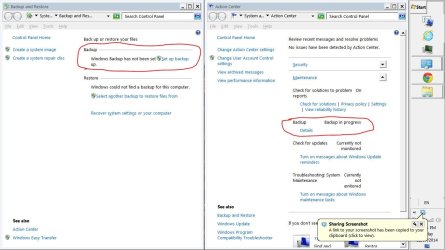
I have 1tb HHD, and connected it to take backup as I'm facing some BSOD problem. But during backup BSOD death occurred and backup process halted. I restarted it but didn't showed progress so I aborted it. After disconnecting my external hhd still it shows Backup in Progress. So to reset it I downloaded that Reset.reg key and ran it. It did partial work, my backup status is in default state but Action center still shows Backup in progress"
Now how to reset this so that I can take new Windows backup?
Now how to reset this so that I can take new Windows backup?
Attachments

Last edited by a moderator:
My Computer
- Computer type
- Laptop
- Computer Manufacturer/Model Number
- Dell Inspiron N5010-Laptop
- OS
- Windows 7 Home Premium 64 bit
- CPU
- Intel(R) Core(TM) i5 CPU M 460 @ 2.53GHz
- Motherboard
- Dell Inc. 0YXXJJ
- Memory
- DDR3-SDRAM-4GB
- Graphics Card(s)
- ATI Mobility Radeon HD 5650- 1 GB
- Sound Card
- IDT High Definition Audio Controller
- Monitor(s) Displays
- Generic PnP Monitor-1
- Screen Resolution
- 1366 x 768 (32-bit) (60 Hz)
- Hard Drives
- Western Digital-500 GB
- Cooling
- 1 CPU Fan
- Keyboard
- Standard PS/2 Keyboard
- Mouse
- Synaptics PS/2 Port TouchPad
- Internet Speed
- 1 mbps
- Other Info
- Dell Wireless 365 Bluetooth Module;Network Card - Realtek RTL8102E/RTL8103E Family PCI-E Fast Ethernet NIC (NDIS 6.20);Network Card - DW1501 Wireless-N WLAN Half-Mini Card


