Backup User and System Files - Reset to Default Configuration

How to Reset Windows Backup Files Configuration in Windows 7 and Windows 8

   Information
This will show you how to reset the backup user and system files current configuration back to a default unconfigured state in Windows 7 and Windows 8.

You must be logged in as an administrator to reset Windows Backup.

   Note
This can be handy if you had deleted the current User and System Backup Files, and would like to reset this back to a default unconfigured state to not have the last backup information still displayed in Backup and Restore.

   Tip
Backup User and System Files will remain in a default unconfigured state until the next time you create a new User and System files backup.


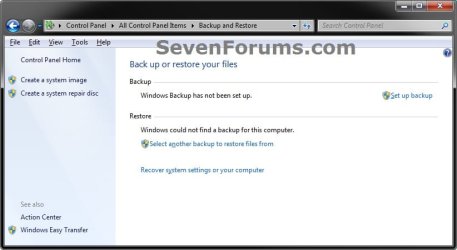
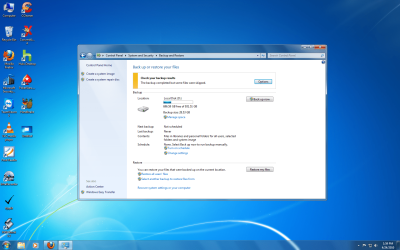
EXAMPLE: Backup User and System Files Configured and Reset
NOTE: The left screenshot is Backup with an existing backup configuration with the backup files deleted. The right screenshot is Backup reset to the default unconfigured state. Screen1.jpg

Default.jpg


OPTION ONE

To Reset Windows Backup to Default using a Reg File Download

1. Click/tap on the download button below to download the file below.
Reset_Back_Up_Files.reg

Download


2. Save the .reg file to your Desktop.

3. Double click/tap on the downloaded .reg file to merge it.

4. Click/tap on Run, Yes (UAC), Yes, and OK when prompted.

5. When done, you can delete the downloaded .reg file if you like.

6. If You Had Set an Automatic Backup Schedule
NOTE: This is to remove the automatic backup schedule from within Task Scheduler so that you will not get a "The last backup did not complete successfully" type message in Action Center. A) Press the Windows + R keys to open the Run dialog, type taskschd.msc, and press Enter.

B) If prompted by UAC, then click/tap on Yes.

C) In the left pane of Task Scheduler, double click/tap on Task Scheduler Library, Microsoft, and Windows to expand them, then select WindowsBackup. (see screenshot below) Task1.jpg
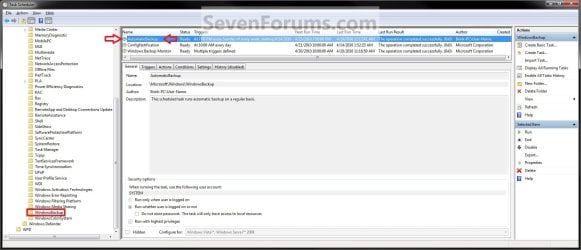
D) In the middle pane, right click/tap on only AutomaticBackup (if available), and click on Delete. (see screenshot above)
NOTE: If AutomaticBackup is not there, then you did not have a automatic backup schedule set.

E) Click/tap on OK to confirm deletion. (see screenshot below) Task2.jpg
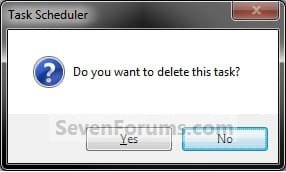
F) Close Task Scheduler.


OPTION TWO

To Reset Windows Backup to Default in Registry Editor

1. Press the Windows + R keys to open the Run dialog,, type regedit, and press Enter.

2. If prompted by UAC, then click/tap on Yes.

3. In regedit, navigate to the location below (see screenshot below) HKEY_LOCAL_MACHINE\SOFTWARE\Microsoft\Windows\CurrentVersion\WindowsBackup
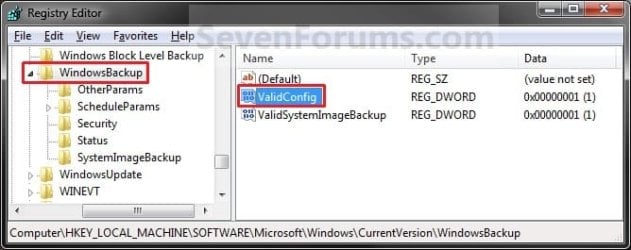
Reg1.jpg
4. In the right pane, right click on ValidConfig and click/tap on Delete. (see screenshot above)

5. Click/tap on Yes to confirm deletion.

6. The registry will now look like this. (see screenshot below) Reg2.jpg
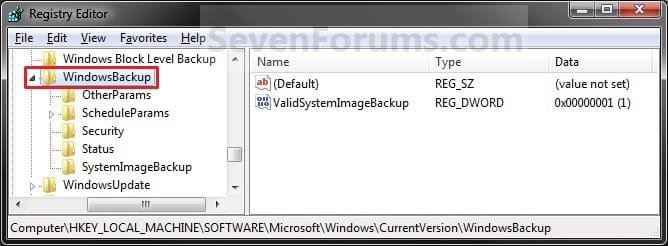
7. In the left pane, right click on ScheduleParams and click/tap on Delete. (see screenshot below) Reg3.jpg
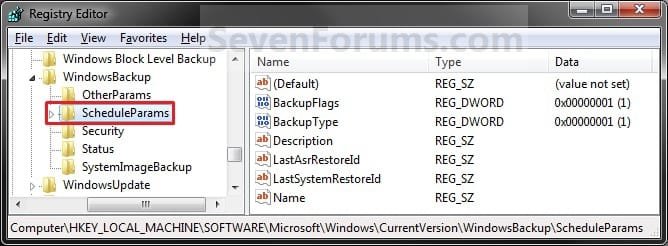
8. Click on Yes to confirm deletion.

9. In the left pane, right click on Security and click/tap on Delete. (see screenshot below) Reg4.jpg
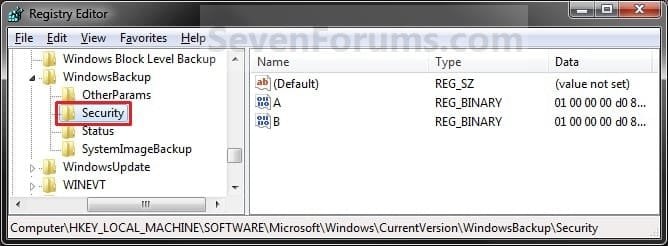
10. Click/tap on Yes to confirm deletion.

11. In the left pane, right click on Status and click/tap on Delete. (see screenshot below) Reg5.jpg
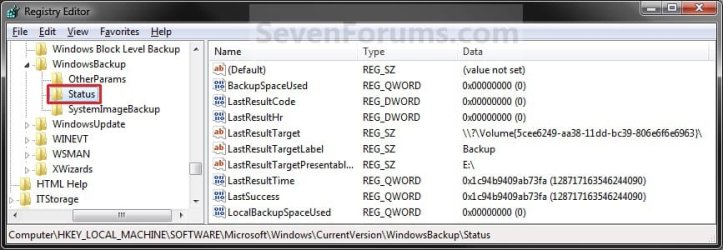
12. Click/tap on Yes to confirm deletion.

13. The registry will now look like this. (2ee screenshot below) Reg6.jpg
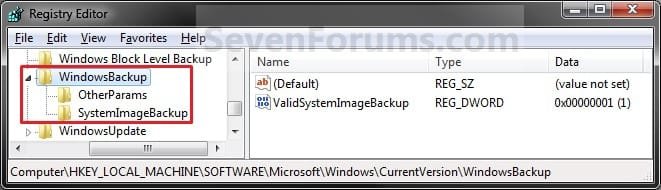
14. Close regedit.

15. If You Had Set a Automatic Backup Schedule
NOTE: This is to remove the automatic backup schedule from within Task Scheduler so that you will not get a "The last backup did not complete successfully" type message in Action Center. A) Press the Windows + R keys to open the Run dialog, type taskschd.msc, and press Enter.

B) If prompted by UAC, then click/tap on Yes if administrator or enter the administrator's password if standard user.

C) In the left pane of Task Scheduler, double click/tap on Task Scheduler Library, Microsoft, and Windows to expand them, then select WindowsBackup. (see screenshot below) Task1.jpg
D) In the middle pane, right click on only AutomaticBackup (if available), and click on Delete. (see screenshot above)
NOTE: If AutomaticBackup is not there, then you did not have a automatic backup schedule set.

E) Click/tap on OK to confirm deletion. (see screenshot below) Task2.jpg
F) Close Task Scheduler.
That's it,
Shawn


Attachments

Last edited:
Last edited:

My Computer My Computer

OS
Windows 7 x64
CPU
i7 860
Motherboard
ASUS P7P55D-E
Memory
Corsair CMX8GX3M2A1600C9 ,DDR3 ,8 GB
Graphics Card(s)
Sapphire ATI Radeon HD 5770 ,1 GB
Monitor(s) Displays
Dell U2311H
Hard Drives
WD Caviar Black x1
WD Caviar Blue x2
Intel Series 530 120 GB X2
PSU
Corsair CMPSU-750TX
Keyboard
Logitech S510
Mouse
Logitech LX5
Hello Kizo2703, and welcome to Seven Forums.

Are you using McAfee by chance? Folks have reported that McAfee was the cause of this for them. As a test exit out of McAfee to see if it will let you afterwards.

If not, then you can try a System Restore using a restore point dated when you knew it worked ok, or if all else fails a repair install should help.

Hope this helps,
Shawn
 

My Computer My Computer

Computer type
PC/Desktop
Computer Manufacturer/Model Number
Self built custom
OS
64-bit Windows 11 Pro for Workstations
CPU
Intel i7-8700K OC'd to 5 GHz
Motherboard
ASUS ROG Maximus XI Formula Z390
Memory
64 GB (4x16GB) G.SKILL TridentZ RGB DDR4 3600 MHz
Graphics Card(s)
ASUS ROG-STRIX-GTX1080TI-O11G-GAMING
Sound Card
Integrated
Monitor(s) Displays
2 x Samsung Odyssey G7 27"
Screen Resolution
2560x1440
Hard Drives
1TB Samsung 990 PRO M.2,
4TB Samsung 990 PRO PRO M.2,
TerraMaster F8 SSD Plus NAS
PSU
Seasonic Prime Titanium 850W
Case
Thermaltake Core P3
Cooling
Corsair Hydro H115i
Keyboard
Logitech wireless K800
Mouse
Logitech MX Master 4
Internet Speed
2 Gb/s Download and 100 Mb/s Upload
Antivirus
Malwarebyte Anti-Malware Premium
Browser
Google Chrome
Other Info
Logitech Z625 speaker system,
Logitech BRIO 4K Pro webcam,
HP Color LaserJet Pro MFP M477fdn,
APC SMART-UPS RT 1000 XL - SURT1000XLI,
Galaxy S23 Plus phone
Win 7 backup

No ,now I have AVG ,and I also tested it but it's the same. System restore doesn't help because I simply don't know when did that started! Until yesterday I didn't made any backups ,but when I started it stopped on 13% without any notice! And ,of course I can't change anything!
OK ,I will try with repair and than we will see! Thanks anyway!
:confused:
 

My Computer My Computer

OS
Windows 7 x64
CPU
i7 860
Motherboard
ASUS P7P55D-E
Memory
Corsair CMX8GX3M2A1600C9 ,DDR3 ,8 GB
Graphics Card(s)
Sapphire ATI Radeon HD 5770 ,1 GB
Monitor(s) Displays
Dell U2311H
Hard Drives
WD Caviar Black x1
WD Caviar Blue x2
Intel Series 530 120 GB X2
PSU
Corsair CMPSU-750TX
Keyboard
Logitech S510
Mouse
Logitech LX5
I hope it goes smoothly for you.
 

My Computer My Computer

Computer type
PC/Desktop
Computer Manufacturer/Model Number
Self built custom
OS
64-bit Windows 11 Pro for Workstations
CPU
Intel i7-8700K OC'd to 5 GHz
Motherboard
ASUS ROG Maximus XI Formula Z390
Memory
64 GB (4x16GB) G.SKILL TridentZ RGB DDR4 3600 MHz
Graphics Card(s)
ASUS ROG-STRIX-GTX1080TI-O11G-GAMING
Sound Card
Integrated
Monitor(s) Displays
2 x Samsung Odyssey G7 27"
Screen Resolution
2560x1440
Hard Drives
1TB Samsung 990 PRO M.2,
4TB Samsung 990 PRO PRO M.2,
TerraMaster F8 SSD Plus NAS
PSU
Seasonic Prime Titanium 850W
Case
Thermaltake Core P3
Cooling
Corsair Hydro H115i
Keyboard
Logitech wireless K800
Mouse
Logitech MX Master 4
Internet Speed
2 Gb/s Download and 100 Mb/s Upload
Antivirus
Malwarebyte Anti-Malware Premium
Browser
Google Chrome
Other Info
Logitech Z625 speaker system,
Logitech BRIO 4K Pro webcam,
HP Color LaserJet Pro MFP M477fdn,
APC SMART-UPS RT 1000 XL - SURT1000XLI,
Galaxy S23 Plus phone
Hi Shawn,

Thanks for the nice walkthrough. After doing all the steps you suggested the backup information is gone from Backup and Restore applet but the last backup info and timestamp is still showing in the action center. I tried everything I could think of with no luck. I cleared the logs, messing with the registry etc, nothing did the trick. Do you have any suggestions on how can I reset the backup status in the action center?

Thanks a lot,
Alex.
 

My Computer My Computer

OS
Windows 7
Hello Alex, and welcome to Seven Forums.

I have not found a way to reset the Action Center for backups yet other than it being updated the next time that you do a backup. I'll keep looking into it and will update this tutorial and you if I find a way.

Sorry, :(
Shawn
 

My Computer My Computer

Computer type
PC/Desktop
Computer Manufacturer/Model Number
Self built custom
OS
64-bit Windows 11 Pro for Workstations
CPU
Intel i7-8700K OC'd to 5 GHz
Motherboard
ASUS ROG Maximus XI Formula Z390
Memory
64 GB (4x16GB) G.SKILL TridentZ RGB DDR4 3600 MHz
Graphics Card(s)
ASUS ROG-STRIX-GTX1080TI-O11G-GAMING
Sound Card
Integrated
Monitor(s) Displays
2 x Samsung Odyssey G7 27"
Screen Resolution
2560x1440
Hard Drives
1TB Samsung 990 PRO M.2,
4TB Samsung 990 PRO PRO M.2,
TerraMaster F8 SSD Plus NAS
PSU
Seasonic Prime Titanium 850W
Case
Thermaltake Core P3
Cooling
Corsair Hydro H115i
Keyboard
Logitech wireless K800
Mouse
Logitech MX Master 4
Internet Speed
2 Gb/s Download and 100 Mb/s Upload
Antivirus
Malwarebyte Anti-Malware Premium
Browser
Google Chrome
Other Info
Logitech Z625 speaker system,
Logitech BRIO 4K Pro webcam,
HP Color LaserJet Pro MFP M477fdn,
APC SMART-UPS RT 1000 XL - SURT1000XLI,
Galaxy S23 Plus phone
Thanks for the feedback Swawn. Please keep me in the loop if you find anything. :)

Alex.
 

My Computer My Computer

OS
Windows 7
Will do. :)
 

My Computer My Computer

Computer type
PC/Desktop
Computer Manufacturer/Model Number
Self built custom
OS
64-bit Windows 11 Pro for Workstations
CPU
Intel i7-8700K OC'd to 5 GHz
Motherboard
ASUS ROG Maximus XI Formula Z390
Memory
64 GB (4x16GB) G.SKILL TridentZ RGB DDR4 3600 MHz
Graphics Card(s)
ASUS ROG-STRIX-GTX1080TI-O11G-GAMING
Sound Card
Integrated
Monitor(s) Displays
2 x Samsung Odyssey G7 27"
Screen Resolution
2560x1440
Hard Drives
1TB Samsung 990 PRO M.2,
4TB Samsung 990 PRO PRO M.2,
TerraMaster F8 SSD Plus NAS
PSU
Seasonic Prime Titanium 850W
Case
Thermaltake Core P3
Cooling
Corsair Hydro H115i
Keyboard
Logitech wireless K800
Mouse
Logitech MX Master 4
Internet Speed
2 Gb/s Download and 100 Mb/s Upload
Antivirus
Malwarebyte Anti-Malware Premium
Browser
Google Chrome
Other Info
Logitech Z625 speaker system,
Logitech BRIO 4K Pro webcam,
HP Color LaserJet Pro MFP M477fdn,
APC SMART-UPS RT 1000 XL - SURT1000XLI,
Galaxy S23 Plus phone
You're welcome DjProDG. :)
 

My Computer My Computer

Computer type
PC/Desktop
Computer Manufacturer/Model Number
Self built custom
OS
64-bit Windows 11 Pro for Workstations
CPU
Intel i7-8700K OC'd to 5 GHz
Motherboard
ASUS ROG Maximus XI Formula Z390
Memory
64 GB (4x16GB) G.SKILL TridentZ RGB DDR4 3600 MHz
Graphics Card(s)
ASUS ROG-STRIX-GTX1080TI-O11G-GAMING
Sound Card
Integrated
Monitor(s) Displays
2 x Samsung Odyssey G7 27"
Screen Resolution
2560x1440
Hard Drives
1TB Samsung 990 PRO M.2,
4TB Samsung 990 PRO PRO M.2,
TerraMaster F8 SSD Plus NAS
PSU
Seasonic Prime Titanium 850W
Case
Thermaltake Core P3
Cooling
Corsair Hydro H115i
Keyboard
Logitech wireless K800
Mouse
Logitech MX Master 4
Internet Speed
2 Gb/s Download and 100 Mb/s Upload
Antivirus
Malwarebyte Anti-Malware Premium
Browser
Google Chrome
Other Info
Logitech Z625 speaker system,
Logitech BRIO 4K Pro webcam,
HP Color LaserJet Pro MFP M477fdn,
APC SMART-UPS RT 1000 XL - SURT1000XLI,
Galaxy S23 Plus phone
Thank you Brink, I've been having some problems with Windows backup so I don't plan on using it anymore or at least till I figure it out, Anyway this reset is exactly what I needed for now. Thanks,D.

Tried to rep you but it wouldn't let me.
 

My Computer My Computer

Computer type
PC/Desktop
Computer Manufacturer/Model Number
Self Built
OS
Win 10 Pro x64
CPU
Intel I5-2500K @3.3GHz
Motherboard
Asrock P67 Extreme4
Memory
16GB G.Skill Ripjaws X (4x4GB)
Graphics Card(s)
EVGA GeForce 750 Ti SC 2GB
Sound Card
ASUS Xonar DG 5.1 Channels 24-bit 96KHz PCI Interface Sound
Monitor(s) Displays
auria eq2367
Screen Resolution
1920 x 1080
Hard Drives
250GB Samsung 850 EVO SSD
1TB WD Blue
1TB Hitachi
PSU
SeaSonic X 650W 80 Plus Gold
Case
Corsair Obsidian 750D
Cooling
Corsair H60, Three 140mm case fans
Keyboard
Logitech Wireless Keyboard K520
Mouse
Logitech Wireless Mouse M310
Internet Speed
Wave Broadband ~ 100 dn 5 up
Antivirus
Windows Defender, Malwarebytes Premium
Browser
Edge, IE11, Chrome
Other Info
Laptop specs: HP g7-1365dx /
CPU: AMD A6-3420M APU with Radeon(tm) HD Graphics /
RAM: Crucial 8Gb (2x4Gb) /
SSD: Crucial M4-CT128M4SSD2 ATA Device/ FW 000F /
GFX: AMD Radeon HD 6520G /
OS: Windows 10 Pro x64
Your welcome Derek. I'm happy to hear that it was able to help you. :)
 

My Computer My Computer

Computer type
PC/Desktop
Computer Manufacturer/Model Number
Self built custom
OS
64-bit Windows 11 Pro for Workstations
CPU
Intel i7-8700K OC'd to 5 GHz
Motherboard
ASUS ROG Maximus XI Formula Z390
Memory
64 GB (4x16GB) G.SKILL TridentZ RGB DDR4 3600 MHz
Graphics Card(s)
ASUS ROG-STRIX-GTX1080TI-O11G-GAMING
Sound Card
Integrated
Monitor(s) Displays
2 x Samsung Odyssey G7 27"
Screen Resolution
2560x1440
Hard Drives
1TB Samsung 990 PRO M.2,
4TB Samsung 990 PRO PRO M.2,
TerraMaster F8 SSD Plus NAS
PSU
Seasonic Prime Titanium 850W
Case
Thermaltake Core P3
Cooling
Corsair Hydro H115i
Keyboard
Logitech wireless K800
Mouse
Logitech MX Master 4
Internet Speed
2 Gb/s Download and 100 Mb/s Upload
Antivirus
Malwarebyte Anti-Malware Premium
Browser
Google Chrome
Other Info
Logitech Z625 speaker system,
Logitech BRIO 4K Pro webcam,
HP Color LaserJet Pro MFP M477fdn,
APC SMART-UPS RT 1000 XL - SURT1000XLI,
Galaxy S23 Plus phone
Hey Shawn,
This trick worked perfectly, although it didn't help with that blasted bug where the backup options are unavailable. Good post anyways, I'm glad I discovered these (ya, a little late)
 

My Computer My Computer

Computer Manufacturer/Model Number
none (me)
OS
Windows 7 Home Premium 64-Bit
CPU
AMD Phenom II X2 550 BE
Motherboard
Asus M4A785TD-M EVO
Memory
Corsair Dominator 1600 4gb
Graphics Card(s)
MSI R5770 Hawk
Sound Card
integrated
Monitor(s) Displays
ASUS VW224U 22"
Screen Resolution
1680x1050
Hard Drives
WD Caviar Black 750gb
PSU
Corsair HX750
Case
Cooler Master HAF 922
Cooling
Scythe Mugen 2
Mouse
Gigabyte GM-M6800
Other Info
Computer name: the Duece
question is this what i have to do in order to reset my "manage space". at the top of this tutrorial there are two pictures, under my manage space it shows Backup Size 28.53GB

before joining this forum, i simply deleted the items in my backup drive manually...
 

My Computers My Computers

System One System Two

  • Computer type
    PC/Desktop
    Computer Manufacturer/Model Number
    PowerSpec G164
    OS
    WIN10
    CPU
    AMD Ryzen 5 3600 6-Core Processor 3.59 GHz
    Memory
    16.0 GB
    Internet Speed
    VERY FAST>>>!!!
  • Antivirus
    ESET Security Premium
Hello Eldin, and welcome to Seven Forums.

I'm not sure I follow exactly what you are wanting.

If you just want to remove the "Manage Space" completely, then using this tutorial on the first page will reset this window to it's default state of not being setup. You would still need to delete the backup though.

Hope this helps,
Shawn
 

My Computer My Computer

Computer type
PC/Desktop
Computer Manufacturer/Model Number
Self built custom
OS
64-bit Windows 11 Pro for Workstations
CPU
Intel i7-8700K OC'd to 5 GHz
Motherboard
ASUS ROG Maximus XI Formula Z390
Memory
64 GB (4x16GB) G.SKILL TridentZ RGB DDR4 3600 MHz
Graphics Card(s)
ASUS ROG-STRIX-GTX1080TI-O11G-GAMING
Sound Card
Integrated
Monitor(s) Displays
2 x Samsung Odyssey G7 27"
Screen Resolution
2560x1440
Hard Drives
1TB Samsung 990 PRO M.2,
4TB Samsung 990 PRO PRO M.2,
TerraMaster F8 SSD Plus NAS
PSU
Seasonic Prime Titanium 850W
Case
Thermaltake Core P3
Cooling
Corsair Hydro H115i
Keyboard
Logitech wireless K800
Mouse
Logitech MX Master 4
Internet Speed
2 Gb/s Download and 100 Mb/s Upload
Antivirus
Malwarebyte Anti-Malware Premium
Browser
Google Chrome
Other Info
Logitech Z625 speaker system,
Logitech BRIO 4K Pro webcam,
HP Color LaserJet Pro MFP M477fdn,
APC SMART-UPS RT 1000 XL - SURT1000XLI,
Galaxy S23 Plus phone
i want to but its no longer there, because i right click on the icons it placed on my backup drive and deleted... heres a pic of what it shows

Untitled.png

heres another picture that shows the space i want to get back

Untitled2.png

thanks
 

My Computers My Computers

System One System Two

  • Computer type
    PC/Desktop
    Computer Manufacturer/Model Number
    PowerSpec G164
    OS
    WIN10
    CPU
    AMD Ryzen 5 3600 6-Core Processor 3.59 GHz
    Memory
    16.0 GB
    Internet Speed
    VERY FAST>>>!!!
  • Antivirus
    ESET Security Premium
Eldin,

To regain the space, you would just need to delete the backups that you no longer want. If you do not want any of them, then delete then all, and reset Backup using the tutorial on the first page. :)
 

My Computer My Computer

Computer type
PC/Desktop
Computer Manufacturer/Model Number
Self built custom
OS
64-bit Windows 11 Pro for Workstations
CPU
Intel i7-8700K OC'd to 5 GHz
Motherboard
ASUS ROG Maximus XI Formula Z390
Memory
64 GB (4x16GB) G.SKILL TridentZ RGB DDR4 3600 MHz
Graphics Card(s)
ASUS ROG-STRIX-GTX1080TI-O11G-GAMING
Sound Card
Integrated
Monitor(s) Displays
2 x Samsung Odyssey G7 27"
Screen Resolution
2560x1440
Hard Drives
1TB Samsung 990 PRO M.2,
4TB Samsung 990 PRO PRO M.2,
TerraMaster F8 SSD Plus NAS
PSU
Seasonic Prime Titanium 850W
Case
Thermaltake Core P3
Cooling
Corsair Hydro H115i
Keyboard
Logitech wireless K800
Mouse
Logitech MX Master 4
Internet Speed
2 Gb/s Download and 100 Mb/s Upload
Antivirus
Malwarebyte Anti-Malware Premium
Browser
Google Chrome
Other Info
Logitech Z625 speaker system,
Logitech BRIO 4K Pro webcam,
HP Color LaserJet Pro MFP M477fdn,
APC SMART-UPS RT 1000 XL - SURT1000XLI,
Galaxy S23 Plus phone
so i did the reset thing, and now it doesnt show that managed space.. but im still missing 30GB of my second drive.. its a total of 931.31GB there are two folders in there equalling 200GB so i should have 731GB left. but it shows 696GB..

i WANTED to delete the backup images like the tutorials shows but my place is... that i deleted like an idot. i went into the second drive, highlighted the folders it place after the system backup and right click delete. thats why it didnt show me the option to delete the image like the tutorials show.

my recourse will have to be, send those two folders with 200GB into my primary hard drive and then reformated that drive and see if i get back to 931GB and then copy those two folders back into that drive.

wish i had read this earlier before i deleted stuff the wrong way.
 

My Computers My Computers

System One System Two

  • Computer type
    PC/Desktop
    Computer Manufacturer/Model Number
    PowerSpec G164
    OS
    WIN10
    CPU
    AMD Ryzen 5 3600 6-Core Processor 3.59 GHz
    Memory
    16.0 GB
    Internet Speed
    VERY FAST>>>!!!
  • Antivirus
    ESET Security Premium
Eldin,

There's no need to format. To regain the space back, all you have to do is delete the backup folders. (see NOTE box at the top of the tutorials below for the location of these backup folders).

http://www.sevenforums.com/tutorials/615-backup-user-system-files.html

http://www.sevenforums.com/tutorials/663-backup-complete-computer-create-image-backup.html


It's just that when you delete these backup folders to free up space, the used space still shows up listed in "Manage Space", even when it is not actually on the HDD anymore, until you reset using the tutorial on the first page. Only when you delete the backups from within "Managed Space" do they not show up automatically. ;)
 

My Computer My Computer

Computer type
PC/Desktop
Computer Manufacturer/Model Number
Self built custom
OS
64-bit Windows 11 Pro for Workstations
CPU
Intel i7-8700K OC'd to 5 GHz
Motherboard
ASUS ROG Maximus XI Formula Z390
Memory
64 GB (4x16GB) G.SKILL TridentZ RGB DDR4 3600 MHz
Graphics Card(s)
ASUS ROG-STRIX-GTX1080TI-O11G-GAMING
Sound Card
Integrated
Monitor(s) Displays
2 x Samsung Odyssey G7 27"
Screen Resolution
2560x1440
Hard Drives
1TB Samsung 990 PRO M.2,
4TB Samsung 990 PRO PRO M.2,
TerraMaster F8 SSD Plus NAS
PSU
Seasonic Prime Titanium 850W
Case
Thermaltake Core P3
Cooling
Corsair Hydro H115i
Keyboard
Logitech wireless K800
Mouse
Logitech MX Master 4
Internet Speed
2 Gb/s Download and 100 Mb/s Upload
Antivirus
Malwarebyte Anti-Malware Premium
Browser
Google Chrome
Other Info
Logitech Z625 speaker system,
Logitech BRIO 4K Pro webcam,
HP Color LaserJet Pro MFP M477fdn,
APC SMART-UPS RT 1000 XL - SURT1000XLI,
Galaxy S23 Plus phone
Back
Top