backup/restore system image?

soulfood

New member
Member
VIP
Local time
8:25 PM
Messages
180
hey , this a stupid question, i think. but i just can't understand what is the deference between a system restore image and a backup data image etc? i've heard that u can save both a system restore image and backup at the same time to an external hard drive : for example, f:drive\name of pc user\backupImageSet YYYY-MM-DD HHMMSS is this correct? how is this possible , thank you
 
Last edited:

My Computer

Computer Manufacturer/Model Number
windows XP professional service pack 2
OS
XP windows Professional
CPU
intel core 2 Duo/ E8400 3.00 Ghz
Motherboard
Gigabyte EP355-DS3
Memory
3.50 GB
Graphics Card(s)
Gigabyte 512MB 8800GT
Sound Card
?
Monitor(s) Displays
HP 2159m
Hard Drives
C: 400GB
D: 80GB
G: 100GB
H: 300GB
PSU
?
Case
CoolerMaster Centurion CAC-TO5
Cooling
?
As Brink says, "There are no dumb questions, just the people who do not ask them." :)

nodumbques.JPG

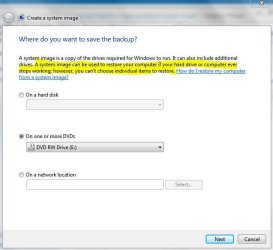
A "plain backup" usually just backs up data files, while a system image backs up everything on your drive. A system image is a kind of backup. To confuse things, it depends on which backup/imaging program you use as to whether or not you can extract individual files. The native Windows 7 tool lets you create a "plain backup" of data files, or a full system image. But you cannot restore individual files from the system image.

sysimg.JPG

Let's say you accidentally delete an important letter that had been in your Documents folder. Either a system image or a data backup could restore that letter. But if all you had was a Windows 7 system image, you'd have to restore the entire hard drive and not just the letter. That's why the native Windows 7 lets you select what kinds of backups you want to create: a data backup, a system image, or both. Other backup software (like Macrium, EaseUS Todo, Paragon, etc) offer more flexibility than the native Windows 7 imaging tool.

Hope this doesn't make it even more confusing.
 

My Computer

Computer type
Laptop
Computer Manufacturer/Model Number
Sony Vaio VPCEB47GM Laptop
OS
Win 7 Pro 64-bit
CPU
Intel i5 2.4 Ghz
Memory
8GB DDR3
Graphics Card(s)
Intel HD 3000
Sound Card
IDT High Definition
Monitor(s) Displays
15.6 WGXA Anti-Glare LED
Screen Resolution
1280x800
Hard Drives
640Gb 7200rpm
Antivirus
MSE
Browser
Opera (primary) with IE9 backup
As stated the file/folder backup is aimed at backing up your data and restoring everything, specific folders or files:
http://www.sevenforums.com/tutorials/174270-backup-manually-extract-files-vista-windows-7-a.html
However if you have an image all isn't lost. You can still extract files and folders
http://www.sevenforums.com/tutorials/24771-system-image-extract-files-using-disk-management.html
But normally as stated, images are generally intended to provided a full system restore.

You can also mount and extract files/folders from the popular (free or paid) imaging program, Macrium Reflect. Probably a little easier in fact.
Note: When you "extract" from an image you should be copying so that the image is left untouched.
 

My Computer

Computer type
PC/Desktop
Computer Manufacturer/Model Number
Own build
OS
Windows 7x64 Home Premium SP1
CPU
Intel i7 2600k
Motherboard
ASUS P8Z68 Deluxe
Memory
G.Skill Ripjaws (DDR3-1600) 2x4GB
Graphics Card(s)
Nvidia GeForce GTS 450; Intel HD Graphics 3000(GT2+)
Monitor(s) Displays
Dell Ultrasharp IPS panel U2311H, Samsung SyncMaster P2350
Screen Resolution
1920x1080
Hard Drives
Samsung 850 Pro SSD 256GB, Samsung SSD 840 120GB, Seagates 1TB Barracuda ST31000528AS x2
PSU
Seasonic M12II 520W
Case
Lian Li Lancool PC-K60
Cooling
Case: 1x120mm, 3x140mm CPU: Hyper 212+
Keyboard
Logitech MK520 (wireless)
Mouse
Logitech MK520
Internet Speed
6-7 Mbps
Antivirus
Norton Security Premium, Malwarebytes on 2 (MSE on 3rd PC)
Browser
FireFox
Other Info
Audio: Logitech Z523 2.1
If you use a system image, it will save all your settings and "customizations". I use a custom (clear) start button and various other personal things and redoing them after a clean install takes up to an hour and a half. With a system inmage it takes considerably less.

System restore will take you back to an earlier time, but at the risk of losing newer programs, settings etc.
 

My Computer

Computer type
Laptop
Computer Manufacturer/Model Number
MSI GE72VR Apache Pro-416
OS
Windows 10x64 Build 1709
CPU
Intel i7 7700HQ Kaby Lake
Motherboard
Micro-Star Intl. MS-179B (U3C1)
Memory
16 GB DDR4 @2400
Graphics Card(s)
Nvidia Geforce GTX 1060
Screen Resolution
1920x1080 120Hz
Hard Drives
256 GB Nvme M.2 SSD

1TB HDD@7200
Cooling
Cooler Blast 4
Keyboard
Steel Series
Antivirus
Bit Defender Free
Browser
Edge
Back
Top