Backup, shrink, rearrange primary partitions to create extended?

aodhlorcan

New member
Local time
2:30 AM
Messages
5
Location
Texas
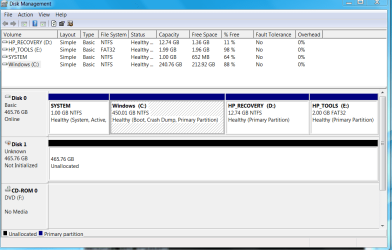
My new HP Zbook 15 laptop has a 500GB HDD with four primary partitions. Partition 1 is labeled "SYSTEM". Partition 2 is the Windows C: drive. Partition 3 is HP_RECOVERY. Partition 4 is HP_TOOLS. All but the Windows partition are pretty small. The Windows C: drive is 450GB, and the NTFS volume in it was originally the same size.

I turned off hibernation, system recovery, and the page file, rebooted, then used diskmgmt.msc to shrink the C: drive. That appeared to work only partially. The disk management tool shows that the capacity of the C: volume is now 240 GB, but the primary partition that it resides in is still 450GB. It didn't shrink along with the volume.

My original thought was to use the space freed from the Windows partition to create another partition for a Linux LVM. However, since the partition didn't shrink, there wasn't any free space to utilize. I realize now that it wouldn't have worked anyway because there are already four primary partitions.

To get what I want, I think I will have to back up and delete the HP_RECOVERY and HP_TOOLS partitions (#3 and #4), then shrink the Windows partition (the volume inside it is already shrunk), then create a new partition #3 and restore the HP_RECOVERY partition, then create an extended partition #4, create a logical partition in it for HP_TOOLS, then create another logical partition in the extended partition for my LVM volume.

Does that approach sound like it will work? What can I use to back up and restore partitions #3 and #4? After I delete them, how can I get partition #2 to shrink down to the current shrunk Windows volume size?

Thanks for your help!
 

My Computer My Computer

At a glance

Windows 7 Pro x642.4 GHz Core i7-4700MQ Quad Core32GBNVIDIA Quadro K1100M with 2GB GDDR5
Computer type
Laptop
Computer Manufacturer/Model Number
HP ZBook 15
OS
Windows 7 Pro x64
CPU
2.4 GHz Core i7-4700MQ Quad Core
Memory
32GB
Graphics Card(s)
NVIDIA Quadro K1100M with 2GB GDDR5
Hard Drives
HGST 500GB 7200 rpm HDD,
Samsung 500GB 840 EVO SDD
Browser
Firefox, Chrome, Internet Explorer
Best thing you can do is post a screen shot of Windows Disk Management so we can better visualize what you described.

Good tools:

Macrium for partition backup via an image file.

Partition Wizard 8.1.1 for creating and configuring partitions.

Generally, when you shrink a partition, you are left with "unallocated space", which you can then reassign with either Windows Disk Management or Partition Wizard.

Have you made a set of HP recovery disks? I'd do that before deleting the HP recovery partition unless you are going on record as never having any interest in restoring to "out of the box" state.

HP may put boot files in some cuckoo location too, so I'd wait for more input on that. On a typical home build, boot files would be in "system reserved", but I'm not sure what HP may have done.
 

My Computer My Computer

At a glance

Windows 7 Home Premium SP1, 64-bitIntel Skylake i5-6600K, not overclocked8 GB HyperX DDR4-2666 (2 x 4 GB)none; graphics are integrated on CPU
Computer type
PC/Desktop
Computer Manufacturer/Model Number
Ignatz Special; 4 speed manual gearbox; factory air conditioning; one of one
OS
Windows 7 Home Premium SP1, 64-bit
CPU
Intel Skylake i5-6600K, not overclocked
Motherboard
AsRock Z170M Extreme 4, micro ATX
Memory
8 GB HyperX DDR4-2666 (2 x 4 GB)
Graphics Card(s)
none; graphics are integrated on CPU
Sound Card
onboard: Realtek ALC1150; external: USB Behringer UF0-202
Monitor(s) Displays
Dell S2340M 23 inch IPS
Screen Resolution
1600 x 900
Hard Drives
System: Crucial MX100 series SSD, 128 GB;
Data: Samsung Spinpoint 103SJ, 1 TB;
Backup: WD Caviar Green WD30EZRX-00D8PB0, 3 TB
PSU
Rosewill SilentNight 500 watt fanless, semi-modular
Case
Antec Solo II
Cooling
Noctua NH-U12S; Noctua F12 intake, Noctua S12A exhaust
Keyboard
Microsoft 200 6JH-00001 USB
Mouse
Dell or Microsoft optical wired; USB
Antivirus
Microsoft Security Essentials and Malwarebytes Premium
Browser
Pale Moon
Other Info
All fans PWM; speeds at idle: CPU circa 500 rpm; intake circa 600 rpm; exhaust circa 600 rpm; CPU temps 27 idle and 47 C load in a warm room (27 C/81 F) when running Intel Extreme Tuning Utility stress test.

My Computer My Computer

At a glance

Windows 10 Pro x64Intel Core i7 6700KGSkill TridentZ RGB 16GB 3600 16-16-16-36EVGA GTX 980 Ti SC x2
Computer type
PC/Desktop
Computer Manufacturer/Model Number
Skylake Special #666
OS
Windows 10 Pro x64
CPU
Intel Core i7 6700K
Motherboard
Asus Sabertooth Z170 Mark 1
Memory
GSkill TridentZ RGB 16GB 3600 16-16-16-36
Graphics Card(s)
EVGA GTX 980 Ti SC x2
Sound Card
Realtek High Definition
Monitor(s) Displays
AOC G2460PG
Screen Resolution
1920 x 1080 144Hz
Hard Drives
Samsung 860 Pro 256GB, Seagate Barracuda 4TB x2
PSU
EVGA 1000 P2, EVGA White Custom Braided Cables
Case
Corsair Vengeance C70 Gunmetal Black
Cooling
Corsair H100i v2, Corsair ML120 x2, Thermal Grizzly Kryonaut
Keyboard
Logitech G910 Orion Spectrum
Mouse
Logitech G700s
Internet Speed
Verizon Fios Quantum Gateway 75/75
Antivirus
Windows Defender, Malwarebytes Free 3.8.3
Browser
Chrome
Other Info
Corsair SP120 x4, LG Blu-ray Drive, Durabrand HT-395 100 Watt Dolby Digital Amp, Corsair H2100 Wireless 7.1 Headset
I have the Win 7 Pro SP 1 operating system recovery and repair DVD supplied by HP, as well as an application and driver recovery DVD, also supplied by HP. I haven't made system recovery discs yet, but I'll do that for sure before I delete any partitions. This is a brand new laptop, minimally customized so far, and I have no data or software that I need to preserve. So as long as I can get back to the HP default installation using the supplied DVD's, I'm good.

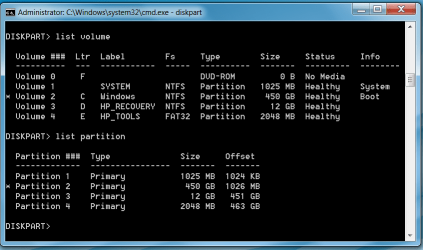
Here are the screenshots. Note the discrepancy between the Windows C: volume size given by diskmgmt.msc (240GB) vs DISKPART (450GB). In both cases, the partition itself shows 450GB.

diskmgmt.PNG

diskpart.PNG

Thank you both for the software recommendations. I going to download them both and see how they work.
 
Last edited:

My Computer My Computer

At a glance

Windows 7 Pro x642.4 GHz Core i7-4700MQ Quad Core32GBNVIDIA Quadro K1100M with 2GB GDDR5
Computer type
Laptop
Computer Manufacturer/Model Number
HP ZBook 15
OS
Windows 7 Pro x64
CPU
2.4 GHz Core i7-4700MQ Quad Core
Memory
32GB
Graphics Card(s)
NVIDIA Quadro K1100M with 2GB GDDR5
Hard Drives
HGST 500GB 7200 rpm HDD,
Samsung 500GB 840 EVO SDD
Browser
Firefox, Chrome, Internet Explorer
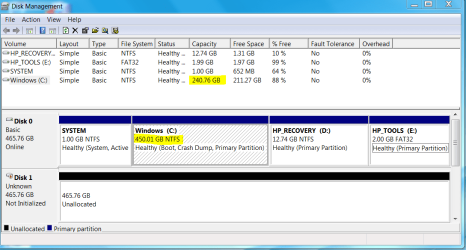
We regularly see Disk Mgmt anomalies. If it were't clear what's happened then Partition Wizard boot disk will almost always settle the discrepancy.

What works best for HP if you want to keep the OS, Recovery and Diagnostics (HP Tools) bootable is to convert C to Logical and then make as many adjacent Logical partitions as you want: How to set partition as Primary or Logical with Partition Wizard

YOu can then adjust partition sizes using PW"s cool new Extend tool that will shift empty space to/from any partition whether adjacent, Primary or not. How to extend partition easily with Partition Wizard - video help.

However you are fighting the worst load of any brand of bloatware and duplicate utilities which interfere with better versions built into Win7. You'd be much better off doing a Clean Reinstall - Factory OEM Windows 7 following the Special Note for HP Owners at the end. You likely have Minimal Recovery on that newer PC which is nearly the same.
 
Last edited:
That is the craziest thing I`ve ever seen :shock:
 

My Computer My Computer

At a glance

Windows 10 Pro x64Intel Core i7 6700KGSkill TridentZ RGB 16GB 3600 16-16-16-36EVGA GTX 980 Ti SC x2
Computer type
PC/Desktop
Computer Manufacturer/Model Number
Skylake Special #666
OS
Windows 10 Pro x64
CPU
Intel Core i7 6700K
Motherboard
Asus Sabertooth Z170 Mark 1
Memory
GSkill TridentZ RGB 16GB 3600 16-16-16-36
Graphics Card(s)
EVGA GTX 980 Ti SC x2
Sound Card
Realtek High Definition
Monitor(s) Displays
AOC G2460PG
Screen Resolution
1920 x 1080 144Hz
Hard Drives
Samsung 860 Pro 256GB, Seagate Barracuda 4TB x2
PSU
EVGA 1000 P2, EVGA White Custom Braided Cables
Case
Corsair Vengeance C70 Gunmetal Black
Cooling
Corsair H100i v2, Corsair ML120 x2, Thermal Grizzly Kryonaut
Keyboard
Logitech G910 Orion Spectrum
Mouse
Logitech G700s
Internet Speed
Verizon Fios Quantum Gateway 75/75
Antivirus
Windows Defender, Malwarebytes Free 3.8.3
Browser
Chrome
Other Info
Corsair SP120 x4, LG Blu-ray Drive, Durabrand HT-395 100 Watt Dolby Digital Amp, Corsair H2100 Wireless 7.1 Headset
I booted the PartitionWizard CD and tried to convert the HP_RECOVERY and HP_TOOLS partitions to logical. I applied the change in PW, and it seemed like it worked. However, Windows diskmgmt.msc, diskpart, and cfdisk (from a Linux distro) all still show four primary partitions and no logical partitions.

When I rebooted Windows, I first got an HP screen that asked if I wanted to copy the HDD MBR to the backup MBR, copy the backup MBR to the HDD MBR, or take no action. I took no action, as I don't want to do anything until I understand the current status.

After the HP screen, Windows started to boot, and I immediately got the CHKDSK screen you get whenever there are disk errors that need to be corrected. CHKDSK thought it was a FAT partition. I let it proceed, and it issued hundreds of "Bad link in lost chain at cluster xxxxxxx" messages. It finished repairing, and the system booted normally.

diskmgmt.msc and diskpart both look like they did before. It seems that PW didn't really change anything. Or at least, nothing that stuck. (Yes, I did APPLY the changes in PW.)

diskmgmt1.PNG

diskpart1.PNG
 
Last edited:

My Computer My Computer

At a glance

Windows 7 Pro x642.4 GHz Core i7-4700MQ Quad Core32GBNVIDIA Quadro K1100M with 2GB GDDR5
Computer type
Laptop
Computer Manufacturer/Model Number
HP ZBook 15
OS
Windows 7 Pro x64
CPU
2.4 GHz Core i7-4700MQ Quad Core
Memory
32GB
Graphics Card(s)
NVIDIA Quadro K1100M with 2GB GDDR5
Hard Drives
HGST 500GB 7200 rpm HDD,
Samsung 500GB 840 EVO SDD
Browser
Firefox, Chrome, Internet Explorer
Why would you try to convert Recovery and Tools to Logical when I just explained they need to remain Primary to be bootable, so C is the partition on HP which needs to be converted to keep the OS, Recovery and Diagnostics Tools bootable?:huh:
 
I read your post yesterday, but I apparently didn't retain it overnight. I'll blame the evening's liquid festivities. :)

But in the screen shots I posted, the C: (Windows) volume shows to be bootable. The HP Recovery and Tools partitions are not marked bootable. Doesn't that mean that the Windows volume must be in a primary partition?

Edit: I just booted PW again and tried to convert the Windows partition to logical. It told me "Cannot convert this primary partition to logical partition". It didn't provide further details. It's an encrypted partition. I wonder if that makes a difference?
 
Last edited:

My Computer My Computer

At a glance

Windows 7 Pro x642.4 GHz Core i7-4700MQ Quad Core32GBNVIDIA Quadro K1100M with 2GB GDDR5
Computer type
Laptop
Computer Manufacturer/Model Number
HP ZBook 15
OS
Windows 7 Pro x64
CPU
2.4 GHz Core i7-4700MQ Quad Core
Memory
32GB
Graphics Card(s)
NVIDIA Quadro K1100M with 2GB GDDR5
Hard Drives
HGST 500GB 7200 rpm HDD,
Samsung 500GB 840 EVO SDD
Browser
Firefox, Chrome, Internet Explorer
Need to see what you did. New screenshot please.

"Boot" label only means its the presently booted partition. "System" is the partition booting the OS. If you want to preserve the bloated HP preinstalled OS then Recov needs to remain Primary to stay Bootable when called, likewise HP tools.

Posted from Venice Muscle Beach.
 
OK, I understand the bootable characteristic of the various partitions now. Thank you.

I can't get a screenshot of PW because I'm using the bootable CD. I guess I could take a picture of the screen with my phone and upload that, but there would be nothing different from the previous screen shots anyway. PW gives me an error popup window "Cannot convert this primary partition to logical partition" when I tell it to convert the Windows partition to a logical partition, so there is no change for me to apply.

I'm considering taking your advice on the clean factory install. I want to read your tutorial carefully before I attempt it, and it will probably be next weekend before I have time. Thank you for all your help so far.
 

My Computer My Computer

At a glance

Windows 7 Pro x642.4 GHz Core i7-4700MQ Quad Core32GBNVIDIA Quadro K1100M with 2GB GDDR5
Computer type
Laptop
Computer Manufacturer/Model Number
HP ZBook 15
OS
Windows 7 Pro x64
CPU
2.4 GHz Core i7-4700MQ Quad Core
Memory
32GB
Graphics Card(s)
NVIDIA Quadro K1100M with 2GB GDDR5
Hard Drives
HGST 500GB 7200 rpm HDD,
Samsung 500GB 840 EVO SDD
Browser
Firefox, Chrome, Internet Explorer
That's you best choice in any case. Be sure to read the Special Note to HP Owners for trying Minimal Recovery or how to keep HP Tools bootable if you Clean Install

I don't know why C won't convert if all others remain Primary. If Tools is now Logical it would prohibit it since C is not adjacent as all Logicals must be.
 
Back
Top