
I have been doing backups using Windows backup since I set up WIN7 back in Oct 09. Until about 2 months ago, I was doing backups to an external USB drive. Back in November 10 I got a NAS box, and I have been sending my backups there. All has been well.
Last night, Windows decided upon it's own to do a system image of an old data drive that's inside my box for reasons only it knows.
I have three local hard drives, C:, D:, and F:.
D: is simply a data drive.
F: is a drive containing an old Windows 7RC copy. I left it there in case I needed to copy any data from it. I really don't even use it, and it's not used for anything.
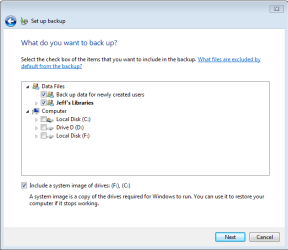
My Windows backup "Let Me Choose" screen looks like the attachment shown below. As you can see, "Include a system image of drives" shows "(F , (C"
, (C"
Why has it decided on it's own to include F:? It never did before. My backups have only included a system image of C:. Clearly Windows "thinks" that F: is "required for Windows to run", and the question is WHY?
Can anyone help me out here? I don't want images of F:, and I'd rather not pull the drive. How can I make Windows Backup stop thinking F: is "required"?
Thanks in advance.
Last night, Windows decided upon it's own to do a system image of an old data drive that's inside my box for reasons only it knows.
I have three local hard drives, C:, D:, and F:.
D: is simply a data drive.
F: is a drive containing an old Windows 7RC copy. I left it there in case I needed to copy any data from it. I really don't even use it, and it's not used for anything.
My Windows backup "Let Me Choose" screen looks like the attachment shown below. As you can see, "Include a system image of drives" shows "(F
, (C"Why has it decided on it's own to include F:? It never did before. My backups have only included a system image of C:. Clearly Windows "thinks" that F: is "required for Windows to run", and the question is WHY?
Can anyone help me out here? I don't want images of F:, and I'd rather not pull the drive. How can I make Windows Backup stop thinking F: is "required"?
Thanks in advance.
Attachments
My Computer
At a glance
Win 7 x64 ProfessionalIntel Core i5-750 2.67Ghz4gbNvidia GeForce 9500GT 512mb
- Computer Manufacturer/Model Number
- DYI
- OS
- Win 7 x64 Professional
- CPU
- Intel Core i5-750 2.67Ghz
- Motherboard
- Gigabyte P55M-UD4
- Memory
- 4gb
- Graphics Card(s)
- Nvidia GeForce 9500GT 512mb
- Sound Card
- On MB
- Monitor(s) Displays
- Lg Flatron
- Screen Resolution
- 1280 x 1024
- Hard Drives
- C: 200mb Maxtor SATA 3
D: 500gb WD SATA 3


