
Backup Windows Live Email Contacts and Messages

Coastalguy

New member
Member
Local time
3:18 PM
Messages
43
Under XP, I have always backed up my OUtlook Express address book and email messages from the C: drive location.

Now under Windows 7 and using Windows Live Email, I am trying to find the appropriate contact and message files so that I can back them up in the event of ever needing a possible OS reinstall.

Can someone give me the path to these files (including the file names and suffixes)?

Thanks
 

My Computer My Computer

At a glance

XP Home 32bit, XP Home(2) 32bit, Ubuntu Meerk...Intel Pentium 4, 2.8ghz, 478 SocketKingston DDR400 (2 GB)Gforce 6200, AGP, 512mb DDR2
Computer Manufacturer/Model Number
Self Built
OS
XP Home 32bit, XP Home(2) 32bit, Ubuntu Meerkat 32bit
CPU
Intel Pentium 4, 2.8ghz, 478 Socket
Motherboard
Asus, P4P800SE
Memory
Kingston DDR400 (2 GB)
Graphics Card(s)
Gforce 6200, AGP, 512mb DDR2
Sound Card
SoundMax Integrated on MB
Monitor(s) Displays
NEC MultiSync 1940CX
Screen Resolution
1024x768
Hard Drives
Master (1) - Western Digital 500GB
Slave (2) - Western Digital 120GB
Hi Coastalguy, there is no need to backup email in WLM as it will still be available by accessing your account directly. WLM only uses a contacts list and if its the same account your signed in with, they will be available on WLM when you sign in again.
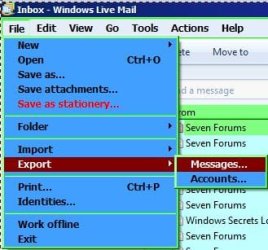
If you don't sign in to WLM messages can be saved. I use WLM 2010, so yours will be slightly different if using WLM 2011.

RR.JPG
 

My Computer My Computer

At a glance

Win7 H.Prem. 32bit+SP1
Computer Manufacturer/Model Number
Look in my Signature.
OS
Win7 H.Prem. 32bit+SP1
My Account?

I am not sure what you mean by accessing my account. Aren't WLM messages and contact files stored on the same partition as the Win7 OS? By backing up, I mean to have a copy of the messages and contacts on another partition in case I ever need to reinstall Windows 7, thereby wiping out all files under the Win8 os partition.

Am I missing something here? Possibly you mean I can export them to another partition instead of doing a backup? I am using a batch file to backup all of my data and would like to include these backups in my batch file to keep the backup down to one routine.
 

My Computer My Computer

At a glance

XP Home 32bit, XP Home(2) 32bit, Ubuntu Meerk...Intel Pentium 4, 2.8ghz, 478 SocketKingston DDR400 (2 GB)Gforce 6200, AGP, 512mb DDR2
Computer Manufacturer/Model Number
Self Built
OS
XP Home 32bit, XP Home(2) 32bit, Ubuntu Meerkat 32bit
CPU
Intel Pentium 4, 2.8ghz, 478 Socket
Motherboard
Asus, P4P800SE
Memory
Kingston DDR400 (2 GB)
Graphics Card(s)
Gforce 6200, AGP, 512mb DDR2
Sound Card
SoundMax Integrated on MB
Monitor(s) Displays
NEC MultiSync 1940CX
Screen Resolution
1024x768
Hard Drives
Master (1) - Western Digital 500GB
Slave (2) - Western Digital 120GB
What email account do you have & do you use it to sign in to WLM
 

My Computer My Computer

At a glance

Win7 H.Prem. 32bit+SP1
Computer Manufacturer/Model Number
Look in my Signature.
OS
Win7 H.Prem. 32bit+SP1
Email Accounts

I have 7 email accounts that I download from various sources, and I do not use any of these accounts to log into WML.
 

My Computer My Computer

At a glance

XP Home 32bit, XP Home(2) 32bit, Ubuntu Meerk...Intel Pentium 4, 2.8ghz, 478 SocketKingston DDR400 (2 GB)Gforce 6200, AGP, 512mb DDR2
Computer Manufacturer/Model Number
Self Built
OS
XP Home 32bit, XP Home(2) 32bit, Ubuntu Meerkat 32bit
CPU
Intel Pentium 4, 2.8ghz, 478 Socket
Motherboard
Asus, P4P800SE
Memory
Kingston DDR400 (2 GB)
Graphics Card(s)
Gforce 6200, AGP, 512mb DDR2
Sound Card
SoundMax Integrated on MB
Monitor(s) Displays
NEC MultiSync 1940CX
Screen Resolution
1024x768
Hard Drives
Master (1) - Western Digital 500GB
Slave (2) - Western Digital 120GB
If one of your accounts is hotmail, use it to sign in to WLM, then store all your contacts in it directly, that way you will never lose them and will be available for all your other accounts.
 

My Computer My Computer

At a glance

Win7 H.Prem. 32bit+SP1
Computer Manufacturer/Model Number
Look in my Signature.
OS
Win7 H.Prem. 32bit+SP1
No Hotmail

I do not have hotmail. Just gmail, several website domain emails, and embarqmail. Just curious, that if I have to do a clean, reformatted, re-install of Windows 7, where the account information is kept that it wouldn't be lost. Is it not on the Windows 7 partition that would be lost if that partition was re-formatted?

Are you saying that the contact and message files cannot be copied? As you seem to do not want to tell me where these files are, I presume that copying them is forbidden or something??
 

My Computer My Computer

At a glance

XP Home 32bit, XP Home(2) 32bit, Ubuntu Meerk...Intel Pentium 4, 2.8ghz, 478 SocketKingston DDR400 (2 GB)Gforce 6200, AGP, 512mb DDR2
Computer Manufacturer/Model Number
Self Built
OS
XP Home 32bit, XP Home(2) 32bit, Ubuntu Meerkat 32bit
CPU
Intel Pentium 4, 2.8ghz, 478 Socket
Motherboard
Asus, P4P800SE
Memory
Kingston DDR400 (2 GB)
Graphics Card(s)
Gforce 6200, AGP, 512mb DDR2
Sound Card
SoundMax Integrated on MB
Monitor(s) Displays
NEC MultiSync 1940CX
Screen Resolution
1024x768
Hard Drives
Master (1) - Western Digital 500GB
Slave (2) - Western Digital 120GB
Look at my image, it shows how to backup mail & accounts.
 

My Computer My Computer

At a glance

Win7 H.Prem. 32bit+SP1
Computer Manufacturer/Model Number
Look in my Signature.
OS
Win7 H.Prem. 32bit+SP1
...Can someone give me the path to these files (including the file names and suffixes)...
Windows Live Mail « The Field Guide
Locates contacts and says how to find the Message store:
"To find the location of your message store, go: Tools->Options…->Advanced [tab]->Maintenance->Store Folder (the default location is a hidden folder)."

However, if you have been using your "signed-in" contact list, that list is duplicated at the webiste "contacts.live.com" so there is no need to save/export/import it. You still need to save your message store and use it as the source for importing all your messages into a new install of WLM.
 

My Computer My Computer

At a glance

Windows 8 Pro w/MC 32-bitIntel Atom 1.86 GHz2 GBIntel GMA 500
Computer type
PC/Desktop
Computer Manufacturer/Model Number
OQO 2+
OS
Windows 8 Pro w/MC 32-bit
CPU
Intel Atom 1.86 GHz
Motherboard
OQO 2+
Memory
2 GB
Graphics Card(s)
Intel GMA 500
Sound Card
IDT
Monitor(s) Displays
LCD
Screen Resolution
800 x 480 (portable) 1280 x 1024 (docked)
Hard Drives
64 GB SSD
PSU
9 Ah Battery (portable) or OQO Brick (docked)
Case
Shirt Pocket Sized
Cooling
Tiny Fan
Keyboard
Slide out (portable) DiNovo Edge (docked)
Mouse
Eraser head (portable) Logitech Bluetooth (docked)
Internet Speed
WWAN or 802.11G (portable) T1 (docked)
Browser
IE 10
Other Info
DVD-RW OQO Docking Station

My Computer My Computer

At a glance

Win7 Pro-64 Biti7-2600-3.4GHz8 GIG DDR3onboard
Computer Manufacturer/Model Number
Put together
OS
Win7 Pro-64 Bit
CPU
i7-2600-3.4GHz
Motherboard
ASRock Z68M
Memory
8 GIG DDR3
Graphics Card(s)
onboard
Sound Card
onboard
Hard Drives
Seagate 1TB 7200RPM
PSU
680 W
Case
black
Cooling
stock fans
Keyboard
Microsoft
Mouse
Microsoft optical
Thanks,

RonCerr,

Great info, what I was looking for. Obviously, when I went to the store folder, it notes a change button. I assume then, that like Outlook Express, I can change where the messages are stored, i.e. included with my data that is normally backed up.

In OE though, if I remember correctly, you had to copy the messages to the new location first, before selecting change and then browse to the new message location. I assume MLV is the same?
 

My Computer My Computer

At a glance

XP Home 32bit, XP Home(2) 32bit, Ubuntu Meerk...Intel Pentium 4, 2.8ghz, 478 SocketKingston DDR400 (2 GB)Gforce 6200, AGP, 512mb DDR2
Computer Manufacturer/Model Number
Self Built
OS
XP Home 32bit, XP Home(2) 32bit, Ubuntu Meerkat 32bit
CPU
Intel Pentium 4, 2.8ghz, 478 Socket
Motherboard
Asus, P4P800SE
Memory
Kingston DDR400 (2 GB)
Graphics Card(s)
Gforce 6200, AGP, 512mb DDR2
Sound Card
SoundMax Integrated on MB
Monitor(s) Displays
NEC MultiSync 1940CX
Screen Resolution
1024x768
Hard Drives
Master (1) - Western Digital 500GB
Slave (2) - Western Digital 120GB
...In OE though, if I remember correctly, you had to copy the messages to the new location first, before selecting change and then browse to the new message location. I assume MLV is the same?
Don't know since I never changed default locations for either program. However both Windows Mail from Vista and Windows Live Mail for Windows 7 are signifcantly different form OE: OE used *.dbx files to store groups of many emails while the newer programs store each email separately as a *.eml file.
 

My Computer My Computer

At a glance

Windows 8 Pro w/MC 32-bitIntel Atom 1.86 GHz2 GBIntel GMA 500
Computer type
PC/Desktop
Computer Manufacturer/Model Number
OQO 2+
OS
Windows 8 Pro w/MC 32-bit
CPU
Intel Atom 1.86 GHz
Motherboard
OQO 2+
Memory
2 GB
Graphics Card(s)
Intel GMA 500
Sound Card
IDT
Monitor(s) Displays
LCD
Screen Resolution
800 x 480 (portable) 1280 x 1024 (docked)
Hard Drives
64 GB SSD
PSU
9 Ah Battery (portable) or OQO Brick (docked)
Case
Shirt Pocket Sized
Cooling
Tiny Fan
Keyboard
Slide out (portable) DiNovo Edge (docked)
Mouse
Eraser head (portable) Logitech Bluetooth (docked)
Internet Speed
WWAN or 802.11G (portable) T1 (docked)
Browser
IE 10
Other Info
DVD-RW OQO Docking Station
Move store folder location.

Changed the store location on WLM, using the Change option and selecting the new location. Closed everything down and restarted after which the files were copied to the new location. Yes, on OE you had to copy them first, but obviously not on WLM.

Did find out that email messages are all saved individually on .eml files, when I backed up the partition that I changed over to. Many, many files. Not sure I like this, due to the many files involved.

Just curious if you know if these individual files can be viewed directly. I used to copy my OE Send and Delete files to a backup folder and view them using a free software package. This kept the size of these active folders small. Would like to do the same with WLM message files, but not sure on viewing them if copied elsewhere.
 

My Computer My Computer

At a glance

XP Home 32bit, XP Home(2) 32bit, Ubuntu Meerk...Intel Pentium 4, 2.8ghz, 478 SocketKingston DDR400 (2 GB)Gforce 6200, AGP, 512mb DDR2
Computer Manufacturer/Model Number
Self Built
OS
XP Home 32bit, XP Home(2) 32bit, Ubuntu Meerkat 32bit
CPU
Intel Pentium 4, 2.8ghz, 478 Socket
Motherboard
Asus, P4P800SE
Memory
Kingston DDR400 (2 GB)
Graphics Card(s)
Gforce 6200, AGP, 512mb DDR2
Sound Card
SoundMax Integrated on MB
Monitor(s) Displays
NEC MultiSync 1940CX
Screen Resolution
1024x768
Hard Drives
Master (1) - Western Digital 500GB
Slave (2) - Western Digital 120GB
Back
Top