Windows Live Mail - Export and Import Email Messages

How to Export and Import Email Messages in Windows Live Mail


   Information
This will show you how to export (backup) and import (restore) all or select message folders that contain your email messages, or only single email messages in Windows Live Mail.


METHOD ONE

To Export or Import All Email Messages in One or More Account Folders


Option One

Export (Backup) All Email Messages in One or More Account Folders


1. Create a New Folder on your desktop, and name it what you like.
NOTE: This is the folder that you will be exporting your message folders that contain your email messages into.

2. Open Windows Live Mail.

3. Click on the Tools icon drop down arrow, select Export email, and click on Email messages. (see screenshot below)
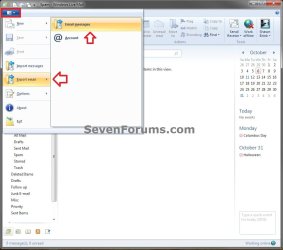
Export-1.jpg
4. Select Microsoft Windows Live Mail, and click on Next. (see screenshot below)
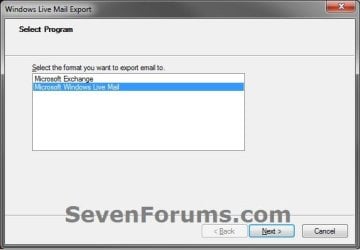
Export-2.jpg
5. Click on the Browse button. (see screenshot below)
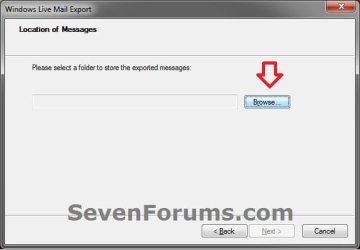
Export-3.jpg
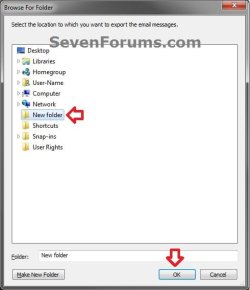
6. Navigate to and select the New Folder that you created in step 1, then click on OK. (see screenshot below)
Export-4.jpg
7. Click on the Next button. (see screenshot below)
Export-5.jpg
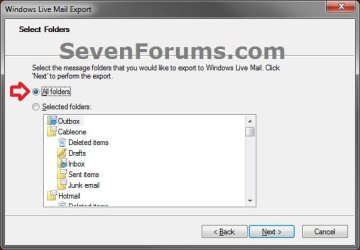
8. To Export All Message Folders from All Email Accounts
A) Select (dot) All folders, and click on Next. (see screenshot below)
Export-6-A.jpg
B) Go to step 10.
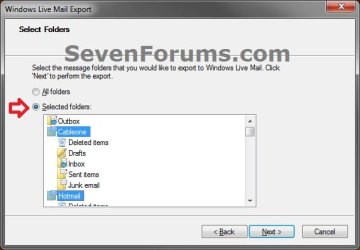
9. To Export Selected Message Folders from Selected Email Accounts
A) Select (dot) Selected folders, press and hold the CTRL key and select (left click on) the random message folders that you want to export, release the CTRL key, then click on Next. (see screenshot below)
Export-6-B.jpg
10. Click on the Finish button. (see screenshot below)
Export-7.jpg
11. The selected message folders have now been exported into the New Folder from step 1. Save the New Folder to a safe location. This is the folder that is needed to be able to import or restore your messages in OPTION TWO below.


Option Two

Import (Restore) All Email Messages from One or More Exported Account Folders


1. Open Windows Live Mail.

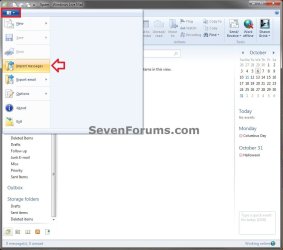
2. Click on the Tools icon drop down arrow, and click on Import messages. (see screenshot below)
Import-1.jpg
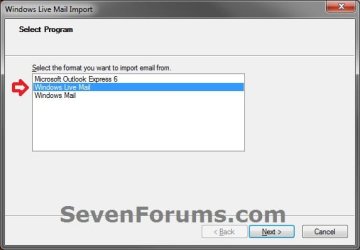
3. Select Windows Live Mail, and click on Next. (see screenshot below)
Import-2.jpg
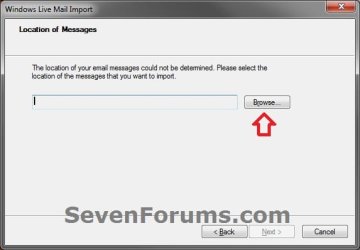
4. Click on the Browse button. (see screenshot below)
Import-3.jpg
5. Navigate to and select the New Folder from OPTION ONE that contains your exported message folders, then click on OK. (see screenshot below)
Import-4.jpg
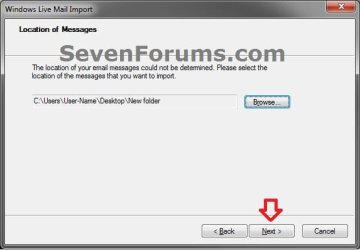
6. Click on the Next button. (see screenshot below)
Import-5.jpg
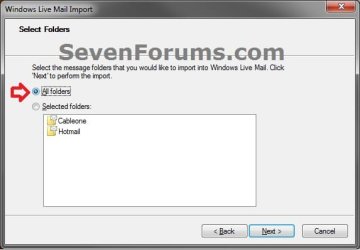
7. To Import All Message Folders
A) Select (dot) All folders, and click on Next. (see screenshot below)
Import-6-A.jpg
B) Go to step 9.
8. To Import Selected Message Folders
A) Select (dot) Selected folders, press and hold the CTRL key and select (left click on) the random message folders that you want to import, release the CTRL key, then click on Next. (see screenshot below)
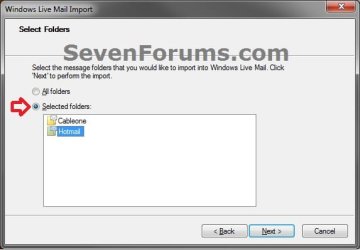
Import-6-B.jpg
9. Click on the Finish button. (see screenshot below)
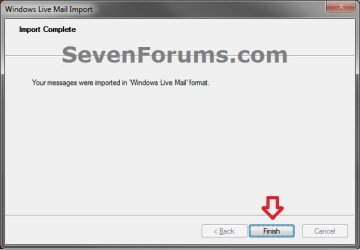
Import-7.jpg
10. At the bottom of left pane of Windows Live Mail, expand (double click on) Storage folders and Imported Folder. Your imported messages folders from step 7 or 8 will be subfolders in Imported Folder. You can open each imported message folder to see your imported email messages, or move them to any other folder.
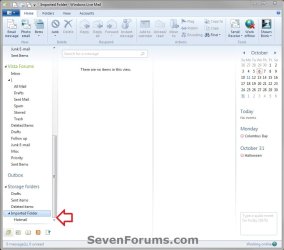
Import-8.jpg
   Tip
If you do not see Storage folders, then you can click on the View tab and click on the Storage folders toolbar item to highlight it and have it available now. (see screenshot below)

Storage_Folders.jpg


METHOD TWO

To Backup (Save) or Restore (Copy) Single Email Messages


Option One

Backup (Save) Single Email Messages from Windows Live Mail


1. Open Windows Live Mail, and open (double click) the email message that you want to backup (save).

2. Click on the menu drop down arrow, select Save, and click on Save as file. (see screenshot below)
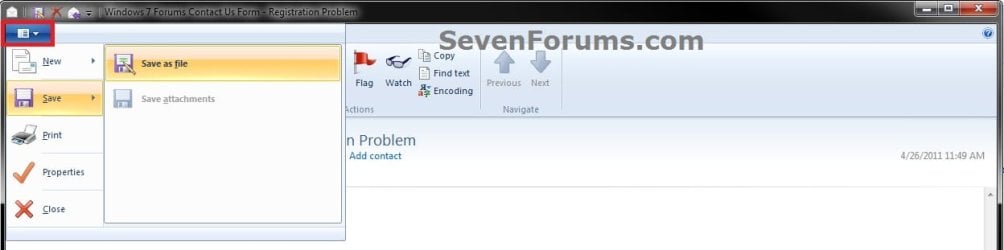
Export-Specific-1.jpg
3. Navigate to where you want to save the email message to, leave the "Save as type" as Mail (*.eml), and click on Save. (see screenshot below)
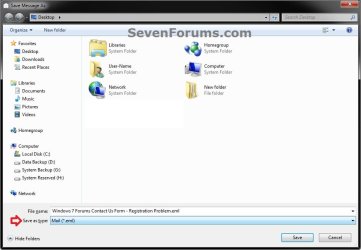
Export-Specific-2.jpg
4. Repeat these steps for any other single email messages that you would like to backup from Windows Live Mail.


Option Two

Restore (Copy) Single Email Messages Back into Windows Live Mail


1. In Windows Explorer, navigate to where you saved the email message at from Option One above.

2. Double click on the backed up (saved) email message to have it opened with Windows Live Mail.

3. In the opened email message, click on the Copy to button on the ribbon toolbar. (see screenshot below)
Import-Specific-1.jpg
4. Select a message folder of a email account that you want to copy this email message to, and click on OK. (see screenshot below)
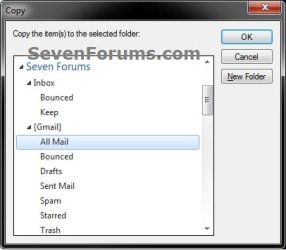
Import-Specific-2.jpg
5. The saved message has now been copied into the selected message folder, and will display as unread.

6. Repeat these steps for any other single email messages that you would like to restore back into Windows Live Mail.
That's it,
Shawn


Last edited:
Nice tutorial as usual Shawn.
I can copy my backup folder to a HDD but I get a warning saying I cannot copy to a USB flash drive. Can you think of a reason why this may be the case?

Hello Michael,

Odd. Are you saving the backup folder to say your desktop first, then copying it to the USB flash drive?
 
Last edited:

My Computer My Computer

At a glance

64-bit Windows 11 Pro for WorkstationsIntel i7-8700K OC'd to 5 GHz64 GB (4x16GB) G.SKILL TridentZ RGB DDR4 3600...ASUS ROG-STRIX-GTX1080TI-O11G-GAMING
Computer type
PC/Desktop
Computer Manufacturer/Model Number
Self built custom
OS
64-bit Windows 11 Pro for Workstations
CPU
Intel i7-8700K OC'd to 5 GHz
Motherboard
ASUS ROG Maximus XI Formula Z390
Memory
64 GB (4x16GB) G.SKILL TridentZ RGB DDR4 3600 MHz
Graphics Card(s)
ASUS ROG-STRIX-GTX1080TI-O11G-GAMING
Sound Card
Integrated
Monitor(s) Displays
2 x Samsung Odyssey G7 27"
Screen Resolution
2560x1440
Hard Drives
1TB Samsung 990 PRO M.2,
4TB Samsung 990 PRO PRO M.2,
TerraMaster F8 SSD Plus NAS
PSU
Seasonic Prime Titanium 850W
Case
Thermaltake Core P3
Cooling
Corsair Hydro H115i
Keyboard
Logitech wireless K800
Mouse
Logitech MX Master 4
Internet Speed
2 Gb/s Download and 100 Mb/s Upload
Antivirus
Malwarebyte Anti-Malware Premium
Browser
Google Chrome
Other Info
Logitech Z625 speaker system,
Logitech BRIO 4K Pro webcam,
HP Color LaserJet Pro MFP M477fdn,
APC SMART-UPS RT 1000 XL - SURT1000XLI,
Galaxy S23 Plus phone
Hello Michael,

Odd. Are you saving the backup folder to say your desktop first, then copying it to the USB flash drive?
Correct. I can copy to internal and external HDDs but not to a flash drive. I tried a couple of different flash drives.
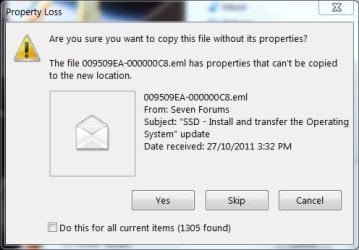
It isn't a big deal since I can copy to an ext HDD but it's curious the flash drive has a problem. Here is the type of error
livemailexport2 usb.jpg
I could accept copy without properties but HDDs don't have this issue and I'm not sure what "without properties implies".
 

My Computer My Computer

At a glance

Windows 7x64 Home Premium SP1Intel i7 2600kG.Skill Ripjaws (DDR3-1600) 2x4GBNvidia GeForce GTS 450; Intel HD Graphics 300...
Computer type
PC/Desktop
Computer Manufacturer/Model Number
Own build
OS
Windows 7x64 Home Premium SP1
CPU
Intel i7 2600k
Motherboard
ASUS P8Z68 Deluxe
Memory
G.Skill Ripjaws (DDR3-1600) 2x4GB
Graphics Card(s)
Nvidia GeForce GTS 450; Intel HD Graphics 3000(GT2+)
Monitor(s) Displays
Dell Ultrasharp IPS panel U2311H, Samsung SyncMaster P2350
Screen Resolution
1920x1080
Hard Drives
Samsung 850 Pro SSD 256GB, Samsung SSD 840 120GB, Seagates 1TB Barracuda ST31000528AS x2
PSU
Seasonic M12II 520W
Case
Lian Li Lancool PC-K60
Cooling
Case: 1x120mm, 3x140mm CPU: Hyper 212+
Keyboard
Logitech MK520 (wireless)
Mouse
Logitech MK520
Internet Speed
6-7 Mbps
Antivirus
Norton Security Premium, Malwarebytes on 2 (MSE on 3rd PC)
Browser
FireFox
Other Info
Audio: Logitech Z523 2.1
I believe it's due to some issue with the USB flash drive being formatted at FAT32 instead of NTFS. You might format the USB as NTFS, then see if you still get this message when trying to copy them over to the USB.
 

My Computer My Computer

At a glance

64-bit Windows 11 Pro for WorkstationsIntel i7-8700K OC'd to 5 GHz64 GB (4x16GB) G.SKILL TridentZ RGB DDR4 3600...ASUS ROG-STRIX-GTX1080TI-O11G-GAMING
Computer type
PC/Desktop
Computer Manufacturer/Model Number
Self built custom
OS
64-bit Windows 11 Pro for Workstations
CPU
Intel i7-8700K OC'd to 5 GHz
Motherboard
ASUS ROG Maximus XI Formula Z390
Memory
64 GB (4x16GB) G.SKILL TridentZ RGB DDR4 3600 MHz
Graphics Card(s)
ASUS ROG-STRIX-GTX1080TI-O11G-GAMING
Sound Card
Integrated
Monitor(s) Displays
2 x Samsung Odyssey G7 27"
Screen Resolution
2560x1440
Hard Drives
1TB Samsung 990 PRO M.2,
4TB Samsung 990 PRO PRO M.2,
TerraMaster F8 SSD Plus NAS
PSU
Seasonic Prime Titanium 850W
Case
Thermaltake Core P3
Cooling
Corsair Hydro H115i
Keyboard
Logitech wireless K800
Mouse
Logitech MX Master 4
Internet Speed
2 Gb/s Download and 100 Mb/s Upload
Antivirus
Malwarebyte Anti-Malware Premium
Browser
Google Chrome
Other Info
Logitech Z625 speaker system,
Logitech BRIO 4K Pro webcam,
HP Color LaserJet Pro MFP M477fdn,
APC SMART-UPS RT 1000 XL - SURT1000XLI,
Galaxy S23 Plus phone
I believe it's due to some issue with the USB flash drive being formatted at FAT32 instead of NTFS. You might format the USB as NTFS, then see if you still get this message when trying to copy them over to the USB.
You are correct thanks:)
 

My Computer My Computer

At a glance

Windows 7x64 Home Premium SP1Intel i7 2600kG.Skill Ripjaws (DDR3-1600) 2x4GBNvidia GeForce GTS 450; Intel HD Graphics 300...
Computer type
PC/Desktop
Computer Manufacturer/Model Number
Own build
OS
Windows 7x64 Home Premium SP1
CPU
Intel i7 2600k
Motherboard
ASUS P8Z68 Deluxe
Memory
G.Skill Ripjaws (DDR3-1600) 2x4GB
Graphics Card(s)
Nvidia GeForce GTS 450; Intel HD Graphics 3000(GT2+)
Monitor(s) Displays
Dell Ultrasharp IPS panel U2311H, Samsung SyncMaster P2350
Screen Resolution
1920x1080
Hard Drives
Samsung 850 Pro SSD 256GB, Samsung SSD 840 120GB, Seagates 1TB Barracuda ST31000528AS x2
PSU
Seasonic M12II 520W
Case
Lian Li Lancool PC-K60
Cooling
Case: 1x120mm, 3x140mm CPU: Hyper 212+
Keyboard
Logitech MK520 (wireless)
Mouse
Logitech MK520
Internet Speed
6-7 Mbps
Antivirus
Norton Security Premium, Malwarebytes on 2 (MSE on 3rd PC)
Browser
FireFox
Other Info
Audio: Logitech Z523 2.1
Perfect. I'm glad that did the trick. :)
 

My Computer My Computer

At a glance

64-bit Windows 11 Pro for WorkstationsIntel i7-8700K OC'd to 5 GHz64 GB (4x16GB) G.SKILL TridentZ RGB DDR4 3600...ASUS ROG-STRIX-GTX1080TI-O11G-GAMING
Computer type
PC/Desktop
Computer Manufacturer/Model Number
Self built custom
OS
64-bit Windows 11 Pro for Workstations
CPU
Intel i7-8700K OC'd to 5 GHz
Motherboard
ASUS ROG Maximus XI Formula Z390
Memory
64 GB (4x16GB) G.SKILL TridentZ RGB DDR4 3600 MHz
Graphics Card(s)
ASUS ROG-STRIX-GTX1080TI-O11G-GAMING
Sound Card
Integrated
Monitor(s) Displays
2 x Samsung Odyssey G7 27"
Screen Resolution
2560x1440
Hard Drives
1TB Samsung 990 PRO M.2,
4TB Samsung 990 PRO PRO M.2,
TerraMaster F8 SSD Plus NAS
PSU
Seasonic Prime Titanium 850W
Case
Thermaltake Core P3
Cooling
Corsair Hydro H115i
Keyboard
Logitech wireless K800
Mouse
Logitech MX Master 4
Internet Speed
2 Gb/s Download and 100 Mb/s Upload
Antivirus
Malwarebyte Anti-Malware Premium
Browser
Google Chrome
Other Info
Logitech Z625 speaker system,
Logitech BRIO 4K Pro webcam,
HP Color LaserJet Pro MFP M477fdn,
APC SMART-UPS RT 1000 XL - SURT1000XLI,
Galaxy S23 Plus phone
Message transfer failure

I saved the old messages directly onto a USB stick and tried to transfer to the new machine.
Unfortunately, most email messages and folders were not transfered.
What seems to be the problem?
 

My Computer My Computer

At a glance

Vista business sp2 32bitIntel(R) Core(TM)2 CPU T5600 @ 1.83GHz (2 CPU...2038MB RAMMobile Intel(R) 945GM Express Chipset Family
Computer type
Laptop
Computer Manufacturer/Model Number
Lenovo 3000 V100
OS
Vista business sp2 32bit
CPU
Intel(R) Core(TM)2 CPU T5600 @ 1.83GHz (2 CPUs), ~
Memory
2038MB RAM
Graphics Card(s)
Mobile Intel(R) 945GM Express Chipset Family
Hard Drives
Fujitsu MHV2120BH PL
Antivirus
Microsoft Essential 2011
Browser
IE9
Hello Nanatsuaazu,

Did you export them into a "New Folder" on your desktop first, then copy the new folder to the USB exactly as outlined in the tutorial?

You should be able to also manually drag and drop any needed .eml files (messages) into an inbox folder in WLM as well.
 

My Computer My Computer

At a glance

64-bit Windows 11 Pro for WorkstationsIntel i7-8700K OC'd to 5 GHz64 GB (4x16GB) G.SKILL TridentZ RGB DDR4 3600...ASUS ROG-STRIX-GTX1080TI-O11G-GAMING
Computer type
PC/Desktop
Computer Manufacturer/Model Number
Self built custom
OS
64-bit Windows 11 Pro for Workstations
CPU
Intel i7-8700K OC'd to 5 GHz
Motherboard
ASUS ROG Maximus XI Formula Z390
Memory
64 GB (4x16GB) G.SKILL TridentZ RGB DDR4 3600 MHz
Graphics Card(s)
ASUS ROG-STRIX-GTX1080TI-O11G-GAMING
Sound Card
Integrated
Monitor(s) Displays
2 x Samsung Odyssey G7 27"
Screen Resolution
2560x1440
Hard Drives
1TB Samsung 990 PRO M.2,
4TB Samsung 990 PRO PRO M.2,
TerraMaster F8 SSD Plus NAS
PSU
Seasonic Prime Titanium 850W
Case
Thermaltake Core P3
Cooling
Corsair Hydro H115i
Keyboard
Logitech wireless K800
Mouse
Logitech MX Master 4
Internet Speed
2 Gb/s Download and 100 Mb/s Upload
Antivirus
Malwarebyte Anti-Malware Premium
Browser
Google Chrome
Other Info
Logitech Z625 speaker system,
Logitech BRIO 4K Pro webcam,
HP Color LaserJet Pro MFP M477fdn,
APC SMART-UPS RT 1000 XL - SURT1000XLI,
Galaxy S23 Plus phone
Dear
I have a doubt, How we can import messages on the same inbox folder. Now it is going to Storage folders .
Thanks
SVG
 

My Computer My Computer

At a glance

Windows 7 Professional x64
Computer type
PC/Desktop
OS
Windows 7 Professional x64
Hello SVG, and welcome to Seven Forums.

No worries. This is normal for your imported messages to go to Storage folders first. From there. you could move or drag/drop the messages into any inbox folder(s) of your choice. :)
 

My Computer My Computer

At a glance

64-bit Windows 11 Pro for WorkstationsIntel i7-8700K OC'd to 5 GHz64 GB (4x16GB) G.SKILL TridentZ RGB DDR4 3600...ASUS ROG-STRIX-GTX1080TI-O11G-GAMING
Computer type
PC/Desktop
Computer Manufacturer/Model Number
Self built custom
OS
64-bit Windows 11 Pro for Workstations
CPU
Intel i7-8700K OC'd to 5 GHz
Motherboard
ASUS ROG Maximus XI Formula Z390
Memory
64 GB (4x16GB) G.SKILL TridentZ RGB DDR4 3600 MHz
Graphics Card(s)
ASUS ROG-STRIX-GTX1080TI-O11G-GAMING
Sound Card
Integrated
Monitor(s) Displays
2 x Samsung Odyssey G7 27"
Screen Resolution
2560x1440
Hard Drives
1TB Samsung 990 PRO M.2,
4TB Samsung 990 PRO PRO M.2,
TerraMaster F8 SSD Plus NAS
PSU
Seasonic Prime Titanium 850W
Case
Thermaltake Core P3
Cooling
Corsair Hydro H115i
Keyboard
Logitech wireless K800
Mouse
Logitech MX Master 4
Internet Speed
2 Gb/s Download and 100 Mb/s Upload
Antivirus
Malwarebyte Anti-Malware Premium
Browser
Google Chrome
Other Info
Logitech Z625 speaker system,
Logitech BRIO 4K Pro webcam,
HP Color LaserJet Pro MFP M477fdn,
APC SMART-UPS RT 1000 XL - SURT1000XLI,
Galaxy S23 Plus phone
Thanks Brink,I will configure and let you know.If any problem persist I will come back to you!!!Thanks,SVG
 

My Computer My Computer

At a glance

Windows 7 Professional x64
Computer type
PC/Desktop
OS
Windows 7 Professional x64
You're welcome. I hope it goes smoothly for you. :)
 

My Computer My Computer

At a glance

64-bit Windows 11 Pro for WorkstationsIntel i7-8700K OC'd to 5 GHz64 GB (4x16GB) G.SKILL TridentZ RGB DDR4 3600...ASUS ROG-STRIX-GTX1080TI-O11G-GAMING
Computer type
PC/Desktop
Computer Manufacturer/Model Number
Self built custom
OS
64-bit Windows 11 Pro for Workstations
CPU
Intel i7-8700K OC'd to 5 GHz
Motherboard
ASUS ROG Maximus XI Formula Z390
Memory
64 GB (4x16GB) G.SKILL TridentZ RGB DDR4 3600 MHz
Graphics Card(s)
ASUS ROG-STRIX-GTX1080TI-O11G-GAMING
Sound Card
Integrated
Monitor(s) Displays
2 x Samsung Odyssey G7 27"
Screen Resolution
2560x1440
Hard Drives
1TB Samsung 990 PRO M.2,
4TB Samsung 990 PRO PRO M.2,
TerraMaster F8 SSD Plus NAS
PSU
Seasonic Prime Titanium 850W
Case
Thermaltake Core P3
Cooling
Corsair Hydro H115i
Keyboard
Logitech wireless K800
Mouse
Logitech MX Master 4
Internet Speed
2 Gb/s Download and 100 Mb/s Upload
Antivirus
Malwarebyte Anti-Malware Premium
Browser
Google Chrome
Other Info
Logitech Z625 speaker system,
Logitech BRIO 4K Pro webcam,
HP Color LaserJet Pro MFP M477fdn,
APC SMART-UPS RT 1000 XL - SURT1000XLI,
Galaxy S23 Plus phone
problem exporting sent emails

Hello,
I have been trying to use this tutorial and move sent emails from one Windows 7 computer to a new Windows 7 computer (both use Windows live mail). I have not been able to find my problem discussed, so I am hoping for some help. I exported the sent emails on the old computer to a folder set up on my desktop for this purpose. It seemed to work fine, but when I checked the items in the folder, I found that none of the addressees associated with the emails had been retained. Can you tell me how to correct this problem? Thanks much for your time.
 

My Computer My Computer

At a glance

Windows 7 Home Premium 64bit
Computer type
PC/Desktop
Computer Manufacturer/Model Number
Dell
OS
Windows 7 Home Premium 64bit
Hello Morton, and welcome to Seven Forums.

This would only export the messages themselves, and not any email accounts.

You can setup Windows Live Mail on the new computer with your email accounts, then import these messages back though.

Hope this helps, :)
Shawn
 

My Computer My Computer

At a glance

64-bit Windows 11 Pro for WorkstationsIntel i7-8700K OC'd to 5 GHz64 GB (4x16GB) G.SKILL TridentZ RGB DDR4 3600...ASUS ROG-STRIX-GTX1080TI-O11G-GAMING
Computer type
PC/Desktop
Computer Manufacturer/Model Number
Self built custom
OS
64-bit Windows 11 Pro for Workstations
CPU
Intel i7-8700K OC'd to 5 GHz
Motherboard
ASUS ROG Maximus XI Formula Z390
Memory
64 GB (4x16GB) G.SKILL TridentZ RGB DDR4 3600 MHz
Graphics Card(s)
ASUS ROG-STRIX-GTX1080TI-O11G-GAMING
Sound Card
Integrated
Monitor(s) Displays
2 x Samsung Odyssey G7 27"
Screen Resolution
2560x1440
Hard Drives
1TB Samsung 990 PRO M.2,
4TB Samsung 990 PRO PRO M.2,
TerraMaster F8 SSD Plus NAS
PSU
Seasonic Prime Titanium 850W
Case
Thermaltake Core P3
Cooling
Corsair Hydro H115i
Keyboard
Logitech wireless K800
Mouse
Logitech MX Master 4
Internet Speed
2 Gb/s Download and 100 Mb/s Upload
Antivirus
Malwarebyte Anti-Malware Premium
Browser
Google Chrome
Other Info
Logitech Z625 speaker system,
Logitech BRIO 4K Pro webcam,
HP Color LaserJet Pro MFP M477fdn,
APC SMART-UPS RT 1000 XL - SURT1000XLI,
Galaxy S23 Plus phone
Hi Brink,
Sorry but I'm still in the dark. My son networked my new computer and the old computer in order to facilitate the transfer of files, and the whole process seemed to work very well. He also transferred my current Frontier.com email account to the new computer (both computers use Windows Live Mail). For whatever reason, none of the sent emails got transferred from the old computer to the new one, and I'm just trying to copy them to the new computer. Is this just not possible? If it is possible, could you give me a step-by-step explanation of the process. Thanks for your patience.
 

My Computer My Computer

At a glance

Windows 7 Home Premium 64bit
Computer type
PC/Desktop
Computer Manufacturer/Model Number
Dell
OS
Windows 7 Home Premium 64bit
Since the sent emails were included in the backup, you should be able to also use Option Two in Method Two to import the exported sent emails.
 

My Computer My Computer

At a glance

64-bit Windows 11 Pro for WorkstationsIntel i7-8700K OC'd to 5 GHz64 GB (4x16GB) G.SKILL TridentZ RGB DDR4 3600...ASUS ROG-STRIX-GTX1080TI-O11G-GAMING
Computer type
PC/Desktop
Computer Manufacturer/Model Number
Self built custom
OS
64-bit Windows 11 Pro for Workstations
CPU
Intel i7-8700K OC'd to 5 GHz
Motherboard
ASUS ROG Maximus XI Formula Z390
Memory
64 GB (4x16GB) G.SKILL TridentZ RGB DDR4 3600 MHz
Graphics Card(s)
ASUS ROG-STRIX-GTX1080TI-O11G-GAMING
Sound Card
Integrated
Monitor(s) Displays
2 x Samsung Odyssey G7 27"
Screen Resolution
2560x1440
Hard Drives
1TB Samsung 990 PRO M.2,
4TB Samsung 990 PRO PRO M.2,
TerraMaster F8 SSD Plus NAS
PSU
Seasonic Prime Titanium 850W
Case
Thermaltake Core P3
Cooling
Corsair Hydro H115i
Keyboard
Logitech wireless K800
Mouse
Logitech MX Master 4
Internet Speed
2 Gb/s Download and 100 Mb/s Upload
Antivirus
Malwarebyte Anti-Malware Premium
Browser
Google Chrome
Other Info
Logitech Z625 speaker system,
Logitech BRIO 4K Pro webcam,
HP Color LaserJet Pro MFP M477fdn,
APC SMART-UPS RT 1000 XL - SURT1000XLI,
Galaxy S23 Plus phone
Importing emails to Windows Live Mail from a flash drive.

Hi, I did a complete recovery recently, but before that, I exported message folders to a flash drive using the tutorial in this thread, which is identical to one I found on a Windows site. This appeared to me to be successful. When I check the properties of the three folders I exported, they all show there is something in them. and the most important folder has 13.0 GB data in it, which sounds right. When I go to import the folders back to Windows live mail using the tutorial here and on the Windows site, Imported Folders show up, but they are empty. I also used an email recovery tool on the flash drive, and they are there and intact.
Any thoughts?
 

My Computer My Computer

At a glance

windows 7 home premium 64-bitintel core i5-2410m 2.30 GHz4.0 GIG
Computer type
Laptop
Computer Manufacturer/Model Number
Asus notebook K53E
OS
windows 7 home premium 64-bit
CPU
intel core i5-2410m 2.30 GHz
Memory
4.0 GIG
Antivirus
Norton
Hello Gary, and welcome to Seven Forums.

As a test, see if you may be able to manually restore your .eml files using option two in METHOD TWO. :)
 

My Computer My Computer

At a glance

64-bit Windows 11 Pro for WorkstationsIntel i7-8700K OC'd to 5 GHz64 GB (4x16GB) G.SKILL TridentZ RGB DDR4 3600...ASUS ROG-STRIX-GTX1080TI-O11G-GAMING
Computer type
PC/Desktop
Computer Manufacturer/Model Number
Self built custom
OS
64-bit Windows 11 Pro for Workstations
CPU
Intel i7-8700K OC'd to 5 GHz
Motherboard
ASUS ROG Maximus XI Formula Z390
Memory
64 GB (4x16GB) G.SKILL TridentZ RGB DDR4 3600 MHz
Graphics Card(s)
ASUS ROG-STRIX-GTX1080TI-O11G-GAMING
Sound Card
Integrated
Monitor(s) Displays
2 x Samsung Odyssey G7 27"
Screen Resolution
2560x1440
Hard Drives
1TB Samsung 990 PRO M.2,
4TB Samsung 990 PRO PRO M.2,
TerraMaster F8 SSD Plus NAS
PSU
Seasonic Prime Titanium 850W
Case
Thermaltake Core P3
Cooling
Corsair Hydro H115i
Keyboard
Logitech wireless K800
Mouse
Logitech MX Master 4
Internet Speed
2 Gb/s Download and 100 Mb/s Upload
Antivirus
Malwarebyte Anti-Malware Premium
Browser
Google Chrome
Other Info
Logitech Z625 speaker system,
Logitech BRIO 4K Pro webcam,
HP Color LaserJet Pro MFP M477fdn,
APC SMART-UPS RT 1000 XL - SURT1000XLI,
Galaxy S23 Plus phone
Problem with folder Structure

Hi,

when i usually export mails and later import them, it used to create the folder strucures i am used to. I can't remember that windows live mail ever put them into the storage folder. I don't want them in the storage folder, i want them imported into the acccount area. Example: I have 2 accounts already set up to import the messages into. When i import the emails, live mail doesn't put them there but in the storage folder. How can i change that?

Lucas Kane(gmx)<---import mails here
-inbox
-...
Frank Muecke(gmx)<--and here

Storage<-- not there

I hope my question is clear. I am from Germany and I sometimes lack the words to express myself crrectly.
 

My Computer My Computer

At a glance

Win7 64bit
Computer type
PC/Desktop
Computer Manufacturer/Model Number
Custom made
OS
Win7 64bit
Hello Lucas, and welcome to Seven Forums.

That's just where it imports them to by default, but you can just move them to any other inbox folder you like. :)
 

My Computer My Computer

At a glance

64-bit Windows 11 Pro for WorkstationsIntel i7-8700K OC'd to 5 GHz64 GB (4x16GB) G.SKILL TridentZ RGB DDR4 3600...ASUS ROG-STRIX-GTX1080TI-O11G-GAMING
Computer type
PC/Desktop
Computer Manufacturer/Model Number
Self built custom
OS
64-bit Windows 11 Pro for Workstations
CPU
Intel i7-8700K OC'd to 5 GHz
Motherboard
ASUS ROG Maximus XI Formula Z390
Memory
64 GB (4x16GB) G.SKILL TridentZ RGB DDR4 3600 MHz
Graphics Card(s)
ASUS ROG-STRIX-GTX1080TI-O11G-GAMING
Sound Card
Integrated
Monitor(s) Displays
2 x Samsung Odyssey G7 27"
Screen Resolution
2560x1440
Hard Drives
1TB Samsung 990 PRO M.2,
4TB Samsung 990 PRO PRO M.2,
TerraMaster F8 SSD Plus NAS
PSU
Seasonic Prime Titanium 850W
Case
Thermaltake Core P3
Cooling
Corsair Hydro H115i
Keyboard
Logitech wireless K800
Mouse
Logitech MX Master 4
Internet Speed
2 Gb/s Download and 100 Mb/s Upload
Antivirus
Malwarebyte Anti-Malware Premium
Browser
Google Chrome
Other Info
Logitech Z625 speaker system,
Logitech BRIO 4K Pro webcam,
HP Color LaserJet Pro MFP M477fdn,
APC SMART-UPS RT 1000 XL - SURT1000XLI,
Galaxy S23 Plus phone
Hi,

thanks for the fast reply.

It's just a pain in the a** because i have a lot of subfolders. I would have to create them all again because i can't move folders, just messages. Is ther no other way?


Also, for some reason, when i received new E-Mails, i received some I already had. So, some E-Mails are there twice now. What's that all about? I thought once i get my mails they are gone from the Mail-Server.
 

My Computer My Computer

At a glance

Win7 64bit
Computer type
PC/Desktop
Computer Manufacturer/Model Number
Custom made
OS
Win7 64bit
Back
Top