Bad image/D3DCOMPILER_43.dl error in Safari/BF3, tried everything!!

Ataraxey

New member
Local time
12:29 AM
Messages
25
Same issue in BF3 alpha, beta and now release as well as this randomly appearing when using Safari or Firefox.

D3DCompiller.dll error seems to be the problem, and always says

the program name.exe - "bad image" as the window title followed by the message
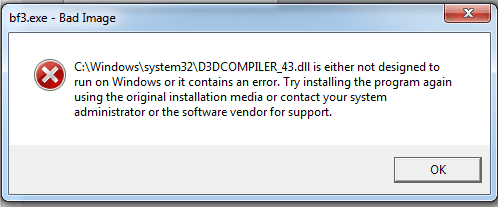
"C:\Windows\system32\D3DCOMPILER_43.dll is either not designed to run on windows or it contains an error. Try re installing the program again using the original installation method or contact your system administrator or the software vendor for support"

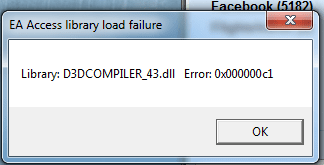
I've attached a picture with the error im getting for BF3 or Safari


I've also had it pop up in another error window as seen in the screenshot attached.


I've attempted to update DirectX already from the web installer only to be told i'm already running a newer one, i've manually downloaded the Redist and attempted to replace it, doesnt change anything, and i've reinstalled any and all of the games having this issue dozens of times without a fix in sight.


So...what can i do now? I ran SFC /scannow and it found no errors, verifyonly found nothing either.
So how can i get this fixed?

I have my windows CDs as well, should i attempt to do something with those?

Please help!
 

Attachments
  • d3d error 2.png
    d3d error 2.png
    8.3 KB · Views: 4,784
  • d3d error.png
    d3d error.png
    7.3 KB · Views: 2,887

My Computer My Computer

At a glance

Windows 7 Ultimate 64 BITIntel i7-9706 gigs G.SKILL PIEVGA Nvidia GTX 580 Hydro Copper 2
OS
Windows 7 Ultimate 64 BIT
CPU
Intel i7-970
Motherboard
Rampage 3 Formula
Memory
6 gigs G.SKILL PI
Graphics Card(s)
EVGA Nvidia GTX 580 Hydro Copper 2
Sound Card
n/a
Monitor(s) Displays
Dell SP2309W
Screen Resolution
2048x1152
Hard Drives
125 GB Crucial C300 (boot drive)
977 GB Samsung spinpoint
625 GB WD Black
PSU
Antec Trupower 750w
Case
CM 690II
Cooling
Watercooling 2 rad loop

My Computer My Computer

At a glance

Windows 2000 5.0 Build 2195Intel Core i7-2630QM@2GHz(2.9GHz Turbo Boost)...Kingston DDR3 1333 16GB (4GBx4)nVidia GTX 460m 1.5GB
Computer Manufacturer/Model Number
Asus G73SW-XN2
OS
Windows 2000 5.0 Build 2195
CPU
Intel Core i7-2630QM@2GHz(2.9GHz Turbo Boost) [Sandy Bridge]
Motherboard
Asus G73SW (Intel HM65 Chipset)
Memory
Kingston DDR3 1333 16GB (4GBx4)
Graphics Card(s)
nVidia GTX 460m 1.5GB
Sound Card
EAX Advanced HD 5.0, THX TruStudio
Monitor(s) Displays
17.3 in. primary & 23 in. secondary
Screen Resolution
1920x1080
Hard Drives
Seagate Momentus XT (SATA II) 500 GB @ 7200 RPM
Hitachi (SATA II) 500GB @ 7200 RPM

Non Raid because ASUS was crappy to choose an HM65 Chipset
Keyboard
Built-in 102-Key Backlit Keyboard
Other Info
It's a Laptop.
Did it again, said that my current version is newer and thus cant be updated.
 

My Computer My Computer

At a glance

Windows 7 Ultimate 64 BITIntel i7-9706 gigs G.SKILL PIEVGA Nvidia GTX 580 Hydro Copper 2
OS
Windows 7 Ultimate 64 BIT
CPU
Intel i7-970
Motherboard
Rampage 3 Formula
Memory
6 gigs G.SKILL PI
Graphics Card(s)
EVGA Nvidia GTX 580 Hydro Copper 2
Sound Card
n/a
Monitor(s) Displays
Dell SP2309W
Screen Resolution
2048x1152
Hard Drives
125 GB Crucial C300 (boot drive)
977 GB Samsung spinpoint
625 GB WD Black
PSU
Antec Trupower 750w
Case
CM 690II
Cooling
Watercooling 2 rad loop
Dunno if this would work, but here's my D3DCompiler_43.dll

Digitally Signed by Microsoft
MD5: 1c9b45e87528b8bb8cfa884ea0099a85
 

Attachments

My Computer My Computer

At a glance

Windows 2000 5.0 Build 2195Intel Core i7-2630QM@2GHz(2.9GHz Turbo Boost)...Kingston DDR3 1333 16GB (4GBx4)nVidia GTX 460m 1.5GB
Computer Manufacturer/Model Number
Asus G73SW-XN2
OS
Windows 2000 5.0 Build 2195
CPU
Intel Core i7-2630QM@2GHz(2.9GHz Turbo Boost) [Sandy Bridge]
Motherboard
Asus G73SW (Intel HM65 Chipset)
Memory
Kingston DDR3 1333 16GB (4GBx4)
Graphics Card(s)
nVidia GTX 460m 1.5GB
Sound Card
EAX Advanced HD 5.0, THX TruStudio
Monitor(s) Displays
17.3 in. primary & 23 in. secondary
Screen Resolution
1920x1080
Hard Drives
Seagate Momentus XT (SATA II) 500 GB @ 7200 RPM
Hitachi (SATA II) 500GB @ 7200 RPM

Non Raid because ASUS was crappy to choose an HM65 Chipset
Keyboard
Built-in 102-Key Backlit Keyboard
Other Info
It's a Laptop.
Having same error

Hey I am encountering the same problem, has anyone reached a solution here yet?
 

My Computer My Computer

At a glance

Windows 7 ultimate 64
OS
Windows 7 ultimate 64

My Computer My Computer

At a glance

Windows 7 Ultimate 32bit SP1Intel(R) Core(TM)2 Quad CPU @ 2.40GHz, 2400 MHz4 GBATI Radeon HD 2600 Pro
Computer type
PC/Desktop
Computer Manufacturer/Model Number
Bruce ... somewhere in his 40's
OS
Windows 7 Ultimate 32bit SP1
CPU
Intel(R) Core(TM)2 Quad CPU @ 2.40GHz, 2400 MHz
Motherboard
INTEL/D975XBX2
Memory
4 GB
Graphics Card(s)
ATI Radeon HD 2600 Pro
Monitor(s) Displays
Samsung SyncMaster 914v
Screen Resolution
1280 x 1024
Hard Drives
2/500GB each ... ST3500630AS ATA Device.
One is not connected
PSU
Rocketfish 700 W
Case
G.Skill Gigabyte Chassis
Keyboard
Standard PS/2 Keyboard
Mouse
Microsoft PS/2 Mouse
Internet Speed
DSL
Antivirus
Avira Internet Security
Browser
IE 11
Other Info
ATI HDMI Audio
yeah I've seen this, it does not address the error I'm currently getting

bf3.exe-Bad Image

C:|windows\system32\D3DCOMPILER_43.dll is either not designed to run on Windows or it contains an error. Try installing the program again using the original installation media or contact your system administrator or the software vendor for support.

Slowly driving myself crazy. Going to try a third party program to address...dllsuite. FML
 

My Computer My Computer

At a glance

Windows 7 ultimate 64
OS
Windows 7 ultimate 64
I have attached my D3DCOMPILER_43.dll. Rename yours to D3DCOMPILER_43OLD.dll and copy mine over it.

I have BF3 installed and working. Let me know how you get on.

Dave
 

Attachments

My Computer My Computer

At a glance

Windows 7 Ultimate x64Intel Core i7 2600K (O/C 4.7GHz)8GB Corsair Vengeance LP, DDR3, 1600MhzNvidia GTX 460 Graphics Card
Computer type
PC/Desktop
Computer Manufacturer/Model Number
Custom
OS
Windows 7 Ultimate x64
CPU
Intel Core i7 2600K (O/C 4.7GHz)
Motherboard
Asus ROG Maximus IV Extreme-Z - Intel Z68 Chipset
Memory
8GB Corsair Vengeance LP, DDR3, 1600Mhz
Graphics Card(s)
Nvidia GTX 460 Graphics Card
Sound Card
Onboard
Monitor(s) Displays
Dell E228WFP
Hard Drives
2 x 500GB Samsung SpinPoint Drives (1 for OS, 1 for Data and Apps)
PSU
CoolerMaster 1000W
Case
CoolerMaster HAF
Cooling
Air
Internet Speed
Fibre - 60MB Down, 30MB Up
Antivirus
ESET NOD32 Antivirus
Thanks so much Dave. I have replaced the file before but never renamed it my original with a different file name, if I do this will your file still copy over mine? This error is beginning to pop up more and more, which has me concerned as its a nearly new computer. I was thinking of trying a 3rd party program to clean/repair my registry, any thoughts on what or what not to use? Do you know of what the cause might have been? Is there a way to reinstall Directx11 that might take care of this, I've obviously tried using their end user web file thing...and downloading the most recent drivers. Can I downgrade to Dx9, would this help, can I overwrite my dx11? Thank you so mcuh, you are a king among men and infinitely more helpful than EA customer support.
 

My Computer My Computer

At a glance

Windows 7 ultimate 64
OS
Windows 7 ultimate 64
Edit

Hello again, you're welcome :).

Yes, just rename your old one and copy across. This is so we can keep yours as a backup but it will use mine.

I use ccleaner to clean the registry. Its free and isnt spyware. CCleaner - Optimization and Cleaning - Free Download
It will ask you if you want to do a backup of the regisrty components before it fixes them. I suggest you do this, just incase.

I'm not sure of the cause. It could be a recent update or it could have got currupted if not shut down correctly etc.

Check to see if your Graphics card is compatible with Windows 7 Directx11: Windows 7 Compatibility for : Hardware: Download Device Drivers

I wouldnt downgrade to Directx9 on a Windows 7 Machine. Directx10 and up is the way to go.

Dave
 
Last edited:

My Computer My Computer

At a glance

Windows 7 Ultimate x64Intel Core i7 2600K (O/C 4.7GHz)8GB Corsair Vengeance LP, DDR3, 1600MhzNvidia GTX 460 Graphics Card
Computer type
PC/Desktop
Computer Manufacturer/Model Number
Custom
OS
Windows 7 Ultimate x64
CPU
Intel Core i7 2600K (O/C 4.7GHz)
Motherboard
Asus ROG Maximus IV Extreme-Z - Intel Z68 Chipset
Memory
8GB Corsair Vengeance LP, DDR3, 1600Mhz
Graphics Card(s)
Nvidia GTX 460 Graphics Card
Sound Card
Onboard
Monitor(s) Displays
Dell E228WFP
Hard Drives
2 x 500GB Samsung SpinPoint Drives (1 for OS, 1 for Data and Apps)
PSU
CoolerMaster 1000W
Case
CoolerMaster HAF
Cooling
Air
Internet Speed
Fibre - 60MB Down, 30MB Up
Antivirus
ESET NOD32 Antivirus
Sadly, the problem persists. I've copied over the D3DCOMPILER_43.dll file, I've redownloaded everything having to do with directx end user etc... I've tried using cleaners and dllsuite to find the file, which is doesn't seem to notice any problem with. I am totally baffled and frustrated. This error is coming up in chrome and Battlefield 3 now...totally at a loss
 

Attachments

My Computer My Computer

At a glance

Windows 7 ultimate 64
OS
Windows 7 ultimate 64
Sorry to hear that.

Is your Graphics driver up-to-date? BF3 does prompt if it isnt though.

Have you tried doing a sfc /scannow to see if there are any problems with the System files? If not, click start>run and type in 'cmd'. in the black box type in 'sfc /scannow' .


Dave
 

My Computer My Computer

At a glance

Windows 7 Ultimate x64Intel Core i7 2600K (O/C 4.7GHz)8GB Corsair Vengeance LP, DDR3, 1600MhzNvidia GTX 460 Graphics Card
Computer type
PC/Desktop
Computer Manufacturer/Model Number
Custom
OS
Windows 7 Ultimate x64
CPU
Intel Core i7 2600K (O/C 4.7GHz)
Motherboard
Asus ROG Maximus IV Extreme-Z - Intel Z68 Chipset
Memory
8GB Corsair Vengeance LP, DDR3, 1600Mhz
Graphics Card(s)
Nvidia GTX 460 Graphics Card
Sound Card
Onboard
Monitor(s) Displays
Dell E228WFP
Hard Drives
2 x 500GB Samsung SpinPoint Drives (1 for OS, 1 for Data and Apps)
PSU
CoolerMaster 1000W
Case
CoolerMaster HAF
Cooling
Air
Internet Speed
Fibre - 60MB Down, 30MB Up
Antivirus
ESET NOD32 Antivirus
Dave,

I have downloaded the latest graphics driver for my nvidia 560ti, above I attached my dxdiag. If I perform this scan will it auto fix any problems encountered? I am trying opening a new admin user account, as EA suggested this, though I doubt it will yield any change. I can not begin to express my gratitude for your help with my problem. I am getting this Bad Image D3DCOMPILER_43.dll error in multiple programs and am really getting fed up, so again thank you thank you thank you, I appreciate your time and support, and you have provided me with the most on target support I've received. I will let you know if I ever get this thing solved. I am at work but will try the scan when I get home.
 

My Computer My Computer

At a glance

Windows 7 ultimate 64
OS
Windows 7 ultimate 64
I ran the scan and it found and fixed errors though the problem persists. I have a website that will cause my chrome.exe to put out the same error so I am saving myself the time of having to reinstall the game in order to get the prompt. I am going to try a clean boot to see if this solves the problem (a suggestion I found on another forum) If this fails I may try reinstalling windows 7 and then try a full reformat (not particularly appealing, but this thing is getting solved one way or another). Thanks to everyone for the help, I will post if I come to a solution. Dave, thanks again.
 

My Computer My Computer

At a glance

Windows 7 ultimate 64
OS
Windows 7 ultimate 64
Just found this about the Directx off a Directx website

New D3DCreateBlob Function

The June 2010 DirectX SDK includes a D3dcompiler_43.dll that exports the new D3DCreateBlob function. Therefore, you are no longer required to use D3d10.dll to create and use an arbitrary length data object.

Not sure if this can help
 

My Computer My Computer

At a glance

Windows 7 ultimate 64
OS
Windows 7 ultimate 64
Hello again,

It doesnt really mean anything to me tbh. You could try the following to re-register the .dll file:

Start>Run>type in 'CMD'
type: 'regsvr32 /u D3DCOMPILER_43.dll' and press enter
type: 'regsvr32 D3DCOMPILER_43.dll' and press enter.


When did it work last btw?

Dave
 

My Computer My Computer

At a glance

Windows 7 Ultimate x64Intel Core i7 2600K (O/C 4.7GHz)8GB Corsair Vengeance LP, DDR3, 1600MhzNvidia GTX 460 Graphics Card
Computer type
PC/Desktop
Computer Manufacturer/Model Number
Custom
OS
Windows 7 Ultimate x64
CPU
Intel Core i7 2600K (O/C 4.7GHz)
Motherboard
Asus ROG Maximus IV Extreme-Z - Intel Z68 Chipset
Memory
8GB Corsair Vengeance LP, DDR3, 1600Mhz
Graphics Card(s)
Nvidia GTX 460 Graphics Card
Sound Card
Onboard
Monitor(s) Displays
Dell E228WFP
Hard Drives
2 x 500GB Samsung SpinPoint Drives (1 for OS, 1 for Data and Apps)
PSU
CoolerMaster 1000W
Case
CoolerMaster HAF
Cooling
Air
Internet Speed
Fibre - 60MB Down, 30MB Up
Antivirus
ESET NOD32 Antivirus
Dave, Not exactly sure when the problem started coming up, definitely within the last month as the computer is brand new. I will try this tonight, thanks again for the tip.
 

My Computer My Computer

At a glance

Windows 7 ultimate 64
OS
Windows 7 ultimate 64
That gets me to error message


The model D3DCOMPILER_43.dll was loaded but the entry point dllunregister was not found.

Make sure the D3DCOMPILER_43.dll is a valid dll or ocx file and try again
 

My Computer My Computer

At a glance

Windows 7 ultimate 64
OS
Windows 7 ultimate 64
Did that error come up when opening a program or after registering the dll?
 

My Computer My Computer

At a glance

Windows 7 Ultimate x64Intel Core i7 2600K (O/C 4.7GHz)8GB Corsair Vengeance LP, DDR3, 1600MhzNvidia GTX 460 Graphics Card
Computer type
PC/Desktop
Computer Manufacturer/Model Number
Custom
OS
Windows 7 Ultimate x64
CPU
Intel Core i7 2600K (O/C 4.7GHz)
Motherboard
Asus ROG Maximus IV Extreme-Z - Intel Z68 Chipset
Memory
8GB Corsair Vengeance LP, DDR3, 1600Mhz
Graphics Card(s)
Nvidia GTX 460 Graphics Card
Sound Card
Onboard
Monitor(s) Displays
Dell E228WFP
Hard Drives
2 x 500GB Samsung SpinPoint Drives (1 for OS, 1 for Data and Apps)
PSU
CoolerMaster 1000W
Case
CoolerMaster HAF
Cooling
Air
Internet Speed
Fibre - 60MB Down, 30MB Up
Antivirus
ESET NOD32 Antivirus
It was when I ran the scan/register in the cmd function. I tried running another scan for malware, issue remains. I am hopefully receiving a copy of Windows 7 soon so I may move forward with a reformat unless you have any other suggestions. My system restore options were all too current of dates so they proved unhelpful, though I did try that path. Again, I appreciate all your continued support, if you can think of anything else that might be worth trying, I would greatly appreciate it. Hope this finds you well.
 

My Computer My Computer

At a glance

Windows 7 ultimate 64
OS
Windows 7 ultimate 64
Back
Top