Bad start to weekend - image failure

This is what precedes that screen:


Check your Restore Points if you get trigger-happy:

 
Ok - that was exciting.

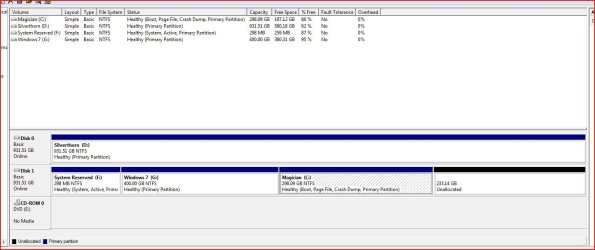
First things first....when I was in Vista making my last post, this is the view of disk management from in Vista (snip)

The hammering F8 thing didnt go quite as I had expected:
I went into that process having not seen your 2nd post Greg....this is what happened

Hit F8 a lot and then got what looked like a bios screen (which i have never seen before) asking which drive to boot from. Gave me 3 options: DVD, or 2 HDD's (it was using the bios names for the HDD's, NOT the labels of drives or partitions). Last option was boot from default - so i chose that.

I then carried on hitting F8 becasue I hadnt seen anything like what you described. Then i think there was a screen asking about repair...maybee not....cant recall now...but then it started loading Vista....timer bar....and then swapped suddenly to the W7 loading screen. then i got asked to log on from a network. ? There was a dropdown and it gave me the option to log on as IcarusII (which is the new admin i created in 7) so i did. Only then did I get to see the screen you described with Startup Repair at the top. Once I saw that I just hit shut down.

And then booted back into vista to grab the system disk management drives snip i took.

Im not sure why I had to do all that tho. Is that becasue of the question I asked regarding the EasyBCD default being E:? (which is my vista drive)

Matt

 

Attachments

  • Vista Disk Management 2.JPG
    Vista Disk Management 2.JPG
    88.1 KB · Views: 4

My Computer

Computer Manufacturer/Model Number
Manufacturer: Me
OS
W7 Home Prem, Vista home Prem
CPU
Intel E8600 3.3GHz dual core
Motherboard
Asus (need to find model)
Memory
4 Gb
Graphics Card(s)
Nvidia - GForce GTX 280 - 1Gb
Sound Card
Xonar Dx 5.1
Monitor(s) Displays
Hazro flatscreen
Screen Resolution
1920 x 1200
Hard Drives
1 x Samsung Spinpoint F1 300 gb
1 x Samsung Spinpoint F1 1 Tb
1 x Samsung Spinpoint F3 1 Tb
PSU
Later
Case
Infiniti Midi tower
Cooling
later
Keyboard
Logitech G11
Mouse
Logitech G9 Laser
Internet Speed
3mb/s - awful
Other Info
I built this three years ago. It was very fast at the time. Now it's about average but still runs any game I throw at it at max detail.

Currently

My Computer

Computer Manufacturer/Model Number
* BFK Customs *
OS
W 7 64-bit Ultimate
CPU
Intel Q9550 Yorkfield
Motherboard
ASUS P5Q Pro
Memory
8GB Dominator 8500C5D
Graphics Card(s)
ATI : XFX 5870
Sound Card
Realtek HD Audio 7-1
Monitor(s) Displays
1x 47" LCD HDMI & 3x 26" LCD HDMI
Screen Resolution
1920x1080P & 1920x1200
Hard Drives
1x 80GB Intel X25-M G2 SSD : 1x 500GB & 1x 640GB WD Caviar Black(s)
PSU
Corsair 620HX
Case
Cooler Master RC-690
Cooling
Tuniq Tower 120, 2x 140mm and 3x 120mm case fans
Keyboard
Microsoft 500
Mouse
Razer Diamondback 3G
Internet Speed
14 Mb/s
Other Info
1x Koutech 3Gb/s SATA HDD Hot Swap Rack
Well, I rekon this thread is done.

Ill follow up on the 4th primary partition stuff in the morning.

Hopefully i will have the user account query thread replied to then also.

Gnight folks and thanks for help
 

My Computer

Computer Manufacturer/Model Number
Manufacturer: Me
OS
W7 Home Prem, Vista home Prem
CPU
Intel E8600 3.3GHz dual core
Motherboard
Asus (need to find model)
Memory
4 Gb
Graphics Card(s)
Nvidia - GForce GTX 280 - 1Gb
Sound Card
Xonar Dx 5.1
Monitor(s) Displays
Hazro flatscreen
Screen Resolution
1920 x 1200
Hard Drives
1 x Samsung Spinpoint F1 300 gb
1 x Samsung Spinpoint F1 1 Tb
1 x Samsung Spinpoint F3 1 Tb
PSU
Later
Case
Infiniti Midi tower
Cooling
later
Keyboard
Logitech G11
Mouse
Logitech G9 Laser
Internet Speed
3mb/s - awful
Other Info
I built this three years ago. It was very fast at the time. Now it's about average but still runs any game I throw at it at max detail.

Currently
You're welcome Matt; glad you got it running.

I'm sure someone will help at the other thread soon enough.


User Accounts - query
 

My Computer

Computer Manufacturer/Model Number
* BFK Customs *
OS
W 7 64-bit Ultimate
CPU
Intel Q9550 Yorkfield
Motherboard
ASUS P5Q Pro
Memory
8GB Dominator 8500C5D
Graphics Card(s)
ATI : XFX 5870
Sound Card
Realtek HD Audio 7-1
Monitor(s) Displays
1x 47" LCD HDMI & 3x 26" LCD HDMI
Screen Resolution
1920x1080P & 1920x1200
Hard Drives
1x 80GB Intel X25-M G2 SSD : 1x 500GB & 1x 640GB WD Caviar Black(s)
PSU
Corsair 620HX
Case
Cooler Master RC-690
Cooling
Tuniq Tower 120, 2x 140mm and 3x 120mm case fans
Keyboard
Microsoft 500
Mouse
Razer Diamondback 3G
Internet Speed
14 Mb/s
Other Info
1x Koutech 3Gb/s SATA HDD Hot Swap Rack

My Computer

Computer Manufacturer/Model Number
* BFK Customs *
OS
W 7 64-bit Ultimate
CPU
Intel Q9550 Yorkfield
Motherboard
ASUS P5Q Pro
Memory
8GB Dominator 8500C5D
Graphics Card(s)
ATI : XFX 5870
Sound Card
Realtek HD Audio 7-1
Monitor(s) Displays
1x 47" LCD HDMI & 3x 26" LCD HDMI
Screen Resolution
1920x1080P & 1920x1200
Hard Drives
1x 80GB Intel X25-M G2 SSD : 1x 500GB & 1x 640GB WD Caviar Black(s)
PSU
Corsair 620HX
Case
Cooler Master RC-690
Cooling
Tuniq Tower 120, 2x 140mm and 3x 120mm case fans
Keyboard
Microsoft 500
Mouse
Razer Diamondback 3G
Internet Speed
14 Mb/s
Other Info
1x Koutech 3Gb/s SATA HDD Hot Swap Rack
Back
Top