
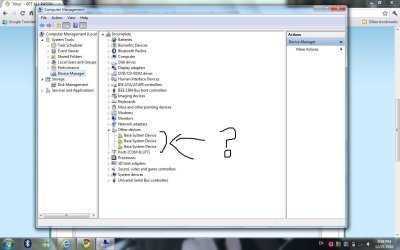
"Base System Device"

Kathy

New member
Local time
6:26 PM
Messages
33
Location
Israel
Hello all,
I opened the Device Manager and i found there "Base System Devices" Checked with a question mark.

I tried to fix with Windows Update & Updating Drivers .
I dunno ..
Nothing helps .

What can I do ?
 

Attachments

  • Devices.jpg
    Devices.jpg
    87.9 KB · Views: 23

My Computer

Computer Manufacturer/Model Number
HP Pavilion Enterainment PC dv5
OS
Windows 7 Ultimate 32-bit SP1
CPU
Intel Core2 Duo T5800 @ 2.00GHz
Memory
2.0GB RAM
Graphics Card(s)
NVIDIA GeForce 9200M GS
Screen Resolution
12800x800
Internet Speed
3.1Mbps
Hi Kathy. Did you just install W7 on that laptop (or did it come pre-loaded with W7)?

Quick guess answer:
I had the exact same issue on a laptop I installed W7 on and the 3 Base Devices were taken care of by installing the single device driver from HP downloads for the 6-in-1 Card Reader. Did you install yours yet?

Longer answer:

  • Right click on each of the devices and choose Properties.
  • Go to the Details Tab > from the drop down menu > Choose Hardware IDs.
  • You will see a list of codes like this: PCI\VEN_10EC&DEV_8168&SUBSYS_82C61043&REV_02
  • Write the top one down.

Now go here:
PCI Vendor and Device Lists

  • And enter the PCI/VEN_ code into the manufacturer box and "Search" and you will get the manufacturer name. (eg: 10EC)
  • Then enter the DEV_ code into the Device Search box and "Search" and you will get the type of device. (eg: 8168)
  • With this information you can determine what kind of driver and where to look for it.
If you need more help just post the info you find here.
 

My Computer

Computer type
PC/Desktop
Computer Manufacturer/Model Number
Home Built - Jan 2013
OS
Windows 7 64 Bit Home Premium SP1
CPU
i7-3820
Motherboard
Asus P9X79-PRO - Bios 4608
Memory
GSkill F3-14900CL9Q - 16GB
Graphics Card(s)
EVGA GeForce GTX660 - Driver 352.86
Sound Card
On board Realtek ALC898
Monitor(s) Displays
Acer S271HL
Screen Resolution
1920 x 1080
Hard Drives
#1- Samsung 840 Pro Series
#2- Western Digital WD1002FAEX Sata3 Black
#3- Western Digital WD1002FAEX Sata3 Black
PSU
Corsair CMPSU-850TX-V2 - 850 watt (by Seasonic)
Case
Corsair Obsidian 550D
Cooling
Standard 3 120mm case fans, Cooler Master Hyper 212 EVO
Keyboard
MS KC-0405
Mouse
Intellimouse 5-button
Internet Speed
56 Mbits/Sec (on a good day)
Antivirus
Avast & Malwarebytes
Browser
Firefox
Other Info
Asus DVD - DRW-24B1ST 24X
well done :) solved
 

My Computer

Computer Manufacturer/Model Number
HP Pavilion Enterainment PC dv5
OS
Windows 7 Ultimate 32-bit SP1
CPU
Intel Core2 Duo T5800 @ 2.00GHz
Memory
2.0GB RAM
Graphics Card(s)
NVIDIA GeForce 9200M GS
Screen Resolution
12800x800
Internet Speed
3.1Mbps
That was easy!:party:
Congrats!
 

My Computer

Computer type
PC/Desktop
Computer Manufacturer/Model Number
Home Built - Jan 2013
OS
Windows 7 64 Bit Home Premium SP1
CPU
i7-3820
Motherboard
Asus P9X79-PRO - Bios 4608
Memory
GSkill F3-14900CL9Q - 16GB
Graphics Card(s)
EVGA GeForce GTX660 - Driver 352.86
Sound Card
On board Realtek ALC898
Monitor(s) Displays
Acer S271HL
Screen Resolution
1920 x 1080
Hard Drives
#1- Samsung 840 Pro Series
#2- Western Digital WD1002FAEX Sata3 Black
#3- Western Digital WD1002FAEX Sata3 Black
PSU
Corsair CMPSU-850TX-V2 - 850 watt (by Seasonic)
Case
Corsair Obsidian 550D
Cooling
Standard 3 120mm case fans, Cooler Master Hyper 212 EVO
Keyboard
MS KC-0405
Mouse
Intellimouse 5-button
Internet Speed
56 Mbits/Sec (on a good day)
Antivirus
Avast & Malwarebytes
Browser
Firefox
Other Info
Asus DVD - DRW-24B1ST 24X
Back
Top