Basic questions on Home network options

trinaz

New member
Member
VIP
Local time
5:34 AM
Messages
477
Location
Phoenix
Running Win 7 Pro & XP SP3 on my home network....NOT using Home Group. Here are a couple relatively novice questions I am curious about:

1) I have a couple printers setup and working fine...can I access and use an optical drive one one W& computer from another computer in the network...?...have one lightscribe drive in W7 system...can I use it from other computers in the house and how ?

2) Can I run some programs installed on one PC only from other PC's in the house...?..rather than install the same program on all computers in the house...I guess similar to a "go to my PC" system that's advertised out there ?

Is this what the remote computer option is on XP & W7 ?

Thanks, TR
 

My Computer

Computer type
PC/Desktop
Computer Manufacturer/Model Number
Self built
OS
Windows 7 Pro 64bit SP1
CPU
AMD FX-6100 Six-Core Processor
Motherboard
M5A78L-M LX PLUS
Memory
2ea Corsair-1333MHz-PC3-10666-240-pin-CMX4GX3M1A1333C9
Graphics Card(s)
NVIDIA GeForce GT 630 - 1023MB (EVGA)
Sound Card
OnBoard Via High Def Audio
Monitor(s) Displays
Samsung 204B main - ASUS VS228 secondary
Screen Resolution
1920x1080 main - 1920x1080 secondary
Hard Drives
Samsung SSD 840 128GB Win7 Pro 64bit - Western Digital WDC 465GB - Seagate 640GB Sata B/U - Maxtor 500GB Sata B/U - Maxtor 200GB Sata
PSU
Antec 650 watt
Cooling
Multiple case fans
Keyboard
MS USB dual Wireless Keyboard - IntelliType Pro
Mouse
MS USB dual Wireless Mouse - IntelliPoint
Internet Speed
Cox Cable
Antivirus
Bitdefender IS 2014
Browser
FireFox Primary - IE 11
Other Info
Hauppaguge Win TV HVR-1250 (Model 22xxx, Hybrid ATSC/QAM)
Samsung HD103SI USB 1TB Desktop Drive - Backup & Disk Image storage
There is no way to run programs from another computer unless you use remote desktop software like the built-in program or TeamViewer.

To use the built-in client, first enable it:

View attachment 63218

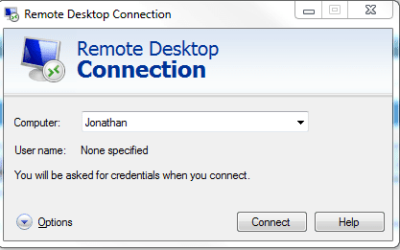
Then to use it, start typing remote desktop connection into the start menu and press enter.

Then enter the computer name that you want to log into.

Capture1.PNG

   Note
Only the Professional and higher editions of XP and 7 support hosting a remote desktop session. If you have the home version of XP, you will be able to connect to the 7 machine, but not the other way around.

If this is the case, consider using the free alternative TeamViewer instead.
 

My Computer

Computer Manufacturer/Model Number
Custom
OS
Windows 7 Professional x64
CPU
Intel i7 2600K OC'd @ 4620 MHz
Motherboard
Asus P8Z68-V Pro
Memory
16GB GSkill Sniper 2133 Mhz (4x4GB)
Graphics Card(s)
EVGA GeForce GTX 480 SuperClocked+
Sound Card
Realtek High Definition Audio
Monitor(s) Displays
2x Acer S273HLbmii 27"
Screen Resolution
2 x 1920x1080
Hard Drives
64GB Crucial M4 SSD

Storage: Hitachi 1TB 5400RPM, Samsung 1.5TB 5400RPM
PSU
Corsair HW Series 750w (modular)
Case
Cooler Master HAF 932 Advanced Blue Edition
Cooling
CM Hyper 212+ CPU cooler, 3x 230mm + 1x 140mm case fans
Keyboard
Logitech MK320 (wireless)
Mouse
Logitech MK320 (wireless)
Internet Speed
30 Mb/s : 2 Mb/s
The normal way to share the optical drive would be to open Windows Explorer on the computer with the CD ROM drive and right click on the drive (eg CDROM Drive E), then select sharing from the drop down menu and share the drive. Both machines must be on the same network. This should permit access to the CDROM drive from the machine with no CDROM drive. I think it would also help to turn on file and printer sharing and perhaps also make sure that your firewall and antivirus allow the connection. You can also map the shared drive (the optical drive) to the other computer so it shows up in windows explorer though that shouldnt be necessary.
I seriously doubt you can burn a cd/dvd over the network though. The network speed would probably make it impossible and there would probably also be buffer underrun errors. An optical drive can be shared for read accesss, but how would you run a CD burning program like nero on one system while the optical drive is on another system?
 
Last edited:

My Computer

Computer Manufacturer/Model Number
Too many to describe...
OS
Windows 7 x64 pro/ Windows 7 x86 Pro/ XP SP3 x86
Running Win 7 Pro & XP SP3 on my home network....NOT using Home Group. Here are a couple relatively novice questions I am curious about:

1) I have a couple printers setup and working fine...can I access and use an optical drive one one W& computer from another computer in the network...?...have one lightscribe drive in W7 system...can I use it from other computers in the house and how ?

Bill2 has the right answer to this one... You can simply share the drive.

However... I would also check the share permissions to make sure it's set as read only... The correct setting would be to Add "Everyone" if that isn't already there and check the Read checkbox in the Advanced Sharing/Permissions dialog.

The advice that you'll not likely burn a disk over the network is probably correct, unless you have a burner that will cache the files on the target machine before burning you're going to get buffering problems.

2) Can I run some programs installed on one PC only from other PC's in the house...?..rather than install the same program on all computers in the house...I guess similar to a "go to my PC" system that's advertised out there ?

Yes you can. You will need to share the programs folder in Program Files and create a shortcut on the other machine, you will then have to create permissions for the other user(s) to execute the program... but that's entirely doable. I've set several Workgroup based offices up to have seldom used programs (Like Tweak UI, Winamp, and other simple utilities) on a central server then created shortcuts in a folder so they could access them when needed.

(It may take some fiddling with permissions, but it can be done)

Is this what the remote computer option is on XP & W7 ?

Thanks, TR

Not really. Remote Desktop is really so that you can do something on your home computer from work... I use it to do maintenance and some setup on my HTPC (which runs without Keyboard or Mouse). But it's not really intended to run full out programs... For example, trying to watch a movie that way you'd immediately run into bandwidth problems as the remote desktop and movie stream compete for network time.

One of the things I see a lot (and this may be regional...) is that people don't realize they can open any file anywhere on their network simply by clicking on it.
For example: I have a rather nifty collection of movies on a NAS box and the family watches them on their own computers all the time simply by clicking on the file(s) they want.
 

My Computer

Computer Manufacturer/Model Number
Homebrew
OS
XP Pro SP3 X86 / Win7 Pro X86
CPU
Amd 64 x2 4200 (2.4ghz)
Motherboard
Asus M2N-MX SE Plus
Memory
Kingston DDR2 800 2gb
Graphics Card(s)
Nvidia GF-8400
Sound Card
Realtek on Motherboard
Monitor(s) Displays
Acer x-193bw
Screen Resolution
1440 x 900
Hard Drives
Western Digital 500g
PSU
350watt In-Win
Case
In-Win
Cooling
Air
Keyboard
yes
Mouse
yes
Internet Speed
5mpbs
Other Info
Also ASRock ION 330 as HTPC (on XP).
Acer Aspire as GP netbook (on XP).
Back
Top