Basic Theme + Aero = Impossible?

higgins

New member
Member
VIP
Local time
9:32 AM
Messages
144
Hi all!

I've been using Windows 7 for a while now, but after a clean install I decided, rather than trying to set it up like XP, actually to try out the new features. Specifically, I want to try out Aero and the new superbar which I both turned off and set up XP style the first time around.

However, it seems to me that enabling solely Aero is impossible, as it automatically turns on the transparent superbar and other transparency elements, such as the upper ends of the windows... and I REALLY can't live with those transparency effects.

Yet if I turn to the basic theme, all Aero is turned off... and turning it on (via fix problems with transparency) I get the whole pot! I don't want the whole pot!

How can I set up the basic theme with solid superbar and non-transparent window edges while having the other Aero effects available?

Thanks!
 

My Computer

Computer type
PC/Desktop
OS
Windows 7 x64
CPU
AMD Athlon(tm) II X2 250 Processor
Motherboard
N68C-GS FX
Memory
4GB DDR3 (PC3-10700H) Apacer Technology
Graphics Card(s)
NVIDIA GeForce GTX 560
Screen Resolution
1920x1080
Hard Drives
SSD + 2x HDD
PSU
450W
Case
Codegen SuperPower M608-CA 450W
Cooling
Fan
Antivirus
Microsoft Security Essentials
Hi higgins,

To change the transparency settings of Aero Glass (the Taskbar and window title bar effect), right-click on the desktop and select Personalize. Then click Window Color and uncheck Enable Transparency. Let me know if that's what you had in mind.

Cheers,

Walker
Windows Outreach Team
 

My Computer

Computer Manufacturer/Model Number
HP Pavilion dm3 (netbook) *** 27" iMac (Dual-Boot)
OS
Windows 7 Home Premium (64-bit) *** Windows XP SP3 (32-bit), OSX 10.6
CPU
AMD Athlon Neo X2 1.6GHz *** Intel Core i7 Quad Core 2.8GHz
Memory
4.00 GB *** 4.00 GB
Graphics Card(s)
ATI Radeon HD 3200, 384MB *** ATI Radeon HD 4850, 1GB
Sound Card
ATI High Definition Audio *** ATI High Definition Audio
Monitor(s) Displays
LG Flatron W2053TX
Screen Resolution
1600 x 900 (monitor), 1266 x 768 (laptop) *** 2560 x 1440
Hard Drives
300 GB SATA (internal), 500 GB HP SimpleSave (external) *** 1 TB SATA (internal), 160 GB LaCie (external)
Mouse
Logitech Cordless Optical Mouse for Notebooks
Internet Speed
Broadband
Yes, that's it! Thank you very much!

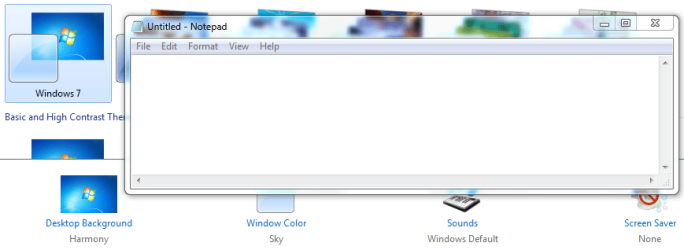
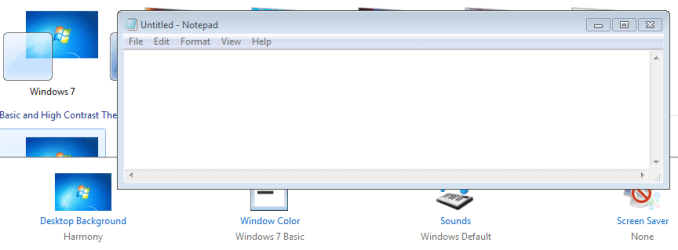
Edit: Wait, no! Not quite! It fixed the taskbar but not the window edges, which are still smudgy. Now I have window colour set to Sky with transparency turned off, but I want it to be Windows 7 Basic, and there's no such option there to pick!

I can get Windows 7 Basic only by choosing the basic theme but that turns off aero!
 

My Computer

Computer type
PC/Desktop
OS
Windows 7 x64
CPU
AMD Athlon(tm) II X2 250 Processor
Motherboard
N68C-GS FX
Memory
4GB DDR3 (PC3-10700H) Apacer Technology
Graphics Card(s)
NVIDIA GeForce GTX 560
Screen Resolution
1920x1080
Hard Drives
SSD + 2x HDD
PSU
450W
Case
Codegen SuperPower M608-CA 450W
Cooling
Fan
Antivirus
Microsoft Security Essentials
Are you sure you unchecked Enable Transparency? That pretty much does it for me... I'm not sure how much closer to solid colors you can get. With transparency turned off, the window frame still has a slight reflection effect around the top corners of the window... is that what you're seeing?

Walker
Windows Outreach Team
 

My Computer

Computer Manufacturer/Model Number
HP Pavilion dm3 (netbook) *** 27" iMac (Dual-Boot)
OS
Windows 7 Home Premium (64-bit) *** Windows XP SP3 (32-bit), OSX 10.6
CPU
AMD Athlon Neo X2 1.6GHz *** Intel Core i7 Quad Core 2.8GHz
Memory
4.00 GB *** 4.00 GB
Graphics Card(s)
ATI Radeon HD 3200, 384MB *** ATI Radeon HD 4850, 1GB
Sound Card
ATI High Definition Audio *** ATI High Definition Audio
Monitor(s) Displays
LG Flatron W2053TX
Screen Resolution
1600 x 900 (monitor), 1266 x 768 (laptop) *** 2560 x 1440
Hard Drives
300 GB SATA (internal), 500 GB HP SimpleSave (external) *** 1 TB SATA (internal), 160 GB LaCie (external)
Mouse
Logitech Cordless Optical Mouse for Notebooks
Internet Speed
Broadband
I'll include screen for transparency, transparency turned off and basic theme. Unlike in the basic theme, simply turning off transparency still leaves some smudge on the windows. Also, notice the "Window Colour" setting below the notepad. Aero themes have no "basic" window colour option.
 

Attachments

  • win7_transparency.PNG
    win7_transparency.PNG
    25.9 KB · Views: 47
  • win7_transparency_off.PNG
    win7_transparency_off.PNG
    19.8 KB · Views: 44
  • win7_basic.PNG
    win7_basic.PNG
    14.3 KB · Views: 41

My Computer

Computer type
PC/Desktop
OS
Windows 7 x64
CPU
AMD Athlon(tm) II X2 250 Processor
Motherboard
N68C-GS FX
Memory
4GB DDR3 (PC3-10700H) Apacer Technology
Graphics Card(s)
NVIDIA GeForce GTX 560
Screen Resolution
1920x1080
Hard Drives
SSD + 2x HDD
PSU
450W
Case
Codegen SuperPower M608-CA 450W
Cooling
Fan
Antivirus
Microsoft Security Essentials
Back
Top