Solved batch file question

Dayd

New member
Local time
2:45 PM
Messages
11
I have a batch file to restart windows and want to do on a schedule.

shutdown.exe /r /t 00

But when i try it manually or try to restart from start/restart there are programs running in the background and i have to force restart. What do i add to the batch file to stop the programs or force restart
 

My Computer

Computer type
PC/Desktop
OS
7 64 bit
Memory
3GB
The /f switch does exactly that, forcing a shutdown instead of waiting for programs to close gracefully

Code:
shutdown.exe /r /f

Note that, running programs will be killed immediately, without chance of saving anything. Data loss might occur is something was yet to be saved.
 

My Computer

Computer type
Laptop
Computer Manufacturer/Model Number
Toshiba Sattelite A665-S6092
OS
Windows 7 Ultimate x64
CPU
Intel Core i7-740QM
Memory
8 GB DDR3
Graphics Card(s)
NVIDIA GeForce 330GT
Screen Resolution
1366x768
Hard Drives
Samsung 840 SSD 500GB
1TB USB3 external HD
Cooling
Coolermaster Notepal U3 notebook cooling pad
Internet Speed
3mbps ASDL
Antivirus
ClamWin 0.98.7
Browser
Opera 12.17 x86 (main), Firefox 38 (sec), IE11 (last resort)
The /f switch does exactly that, forcing a shutdown instead of waiting for programs to close gracefully

Code:
shutdown.exe /r /f
Note that, running programs will be killed immediately, without chance of saving anything. Data loss might occur is something was yet to be saved.
Thanks. What does the t 00 mean in my original file

the /r f/ is reboot force?
 

My Computer

Computer type
PC/Desktop
OS
7 64 bit
Memory
3GB
What does the t 00 mean in my original file

It's a timeout, indicating how much time to wait before attempting to close all programs, according to help. In theory, it should close everything immediately (after 0 seconds), but it's not working in your case.


the /r f/ is reboot force?

Yes. /r means restart, and /f stands for force.

When on doubt, ask for help in the command line:

Code:
shutdown /?

This will show all valid switches and their meaning.
 

My Computer

Computer type
Laptop
Computer Manufacturer/Model Number
Toshiba Sattelite A665-S6092
OS
Windows 7 Ultimate x64
CPU
Intel Core i7-740QM
Memory
8 GB DDR3
Graphics Card(s)
NVIDIA GeForce 330GT
Screen Resolution
1366x768
Hard Drives
Samsung 840 SSD 500GB
1TB USB3 external HD
Cooling
Coolermaster Notepal U3 notebook cooling pad
Internet Speed
3mbps ASDL
Antivirus
ClamWin 0.98.7
Browser
Opera 12.17 x86 (main), Firefox 38 (sec), IE11 (last resort)
@echo off


start "" "C:\Windows\System32\SystemPropertiesProtection.exe"

starts system restore.


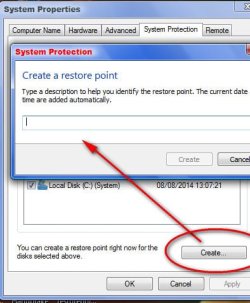
Is there a switch that will open the box to type name for restore point like clicking the create button does?

Thanks
 

My Computer

Computer type
PC/Desktop
OS
7 64 bit
Memory
3GB
What does the t 00 mean in my original file

It's a timeout, indicating how much time to wait before attempting to close all programs, according to help. In theory, it should close everything immediately (after 0 seconds), but it's not working in your case.


the /r f/ is reboot force?

Yes. /r means restart, and /f stands for force.

When on doubt, ask for help in the command line:

Code:
shutdown /?
This will show all valid switches and their meaning.
you mean from a command prompt? it does not show switches to me it tries to shut down?
 

My Computer

Computer type
PC/Desktop
OS
7 64 bit
Memory
3GB
@echo off


start "" "C:\Windows\System32\SystemPropertiesProtection.exe"

starts system restore.


Is there a switch that will open the box to type name for restore point like clicking the create button does?

Thanks

No idea really. But most important, that's NOT a command line application, but a full GUI. Using system restore from a command line should have another, CLI program to that purpose. I don't know how, but Google a bit and maybe you'll find alternatives.


you mean from a command prompt? it does not show switches to me it tries to shut down?

Yes, it's a standard that the /? switch shows helps but does nothing at all. Like this:
CmdHelpSwitch.png
 

My Computer

Computer type
Laptop
Computer Manufacturer/Model Number
Toshiba Sattelite A665-S6092
OS
Windows 7 Ultimate x64
CPU
Intel Core i7-740QM
Memory
8 GB DDR3
Graphics Card(s)
NVIDIA GeForce 330GT
Screen Resolution
1366x768
Hard Drives
Samsung 840 SSD 500GB
1TB USB3 external HD
Cooling
Coolermaster Notepal U3 notebook cooling pad
Internet Speed
3mbps ASDL
Antivirus
ClamWin 0.98.7
Browser
Opera 12.17 x86 (main), Firefox 38 (sec), IE11 (last resort)
No idea really. But most important, that's NOT a command line application, but a full GUI. Using system restore from a command line should have another, CLI program to that purpose. I don't know how, but Google a bit and maybe you'll find alternatives.
Ok thanks

I do not know much about command line application as you have noticed. I got those two on the web

EDIT: Got it. I was doing shutdown /? from C:\users\username instead of from C:\
 

My Computer

Computer type
PC/Desktop
OS
7 64 bit
Memory
3GB
@echo off


start "" "C:\Windows\System32\SystemPropertiesProtection.exe"

starts system restore.


Is there a switch that will open the box to type name for restore point like clicking the create button does?

Thanks

That doesn't start System Restore, it opens the System Properties dialog on the System Protection tab.
 

My Computer

Computer type
PC/Desktop
Computer Manufacturer/Model Number
Lenovo IdeaCenter 450
OS
Windows 10 Pro X64
CPU
Intel Quad Core i7-4770 @ 3.4Ghz
Memory
16.0GB PC3-12800 DDR3 SDRAM 1600 MHz
Graphics Card(s)
Intel Integrated HD Graphics
Sound Card
Realtek HD Audio
Monitor(s) Displays
HP 22" LCD
Screen Resolution
1680 x 1050
Hard Drives
250GB Samsung EVO SATA-3 SSD
2TB Seagate ST2000DM001 SATA-2
1.5TB Seagate ST3150041AS SATA
Keyboard
Dell USB
Mouse
Lenovo USB
Internet Speed
Cable via Road Runner 3MB Upload, 30MB Download
Antivirus
Windows Defender, MBAM Pro, MBAE
Browser
Seamonkey
Other Info
UEFI/GPT
PLDS DVD-RW DH16AERSH
It is the quickest way i know to get to system restore in one click. From the system protection tab create can be clicked. If you know a quicker way to open to the create box please tell
 

Attachments

  • sysres.jpg
    sysres.jpg
    31.6 KB · Views: 7

My Computer

Computer type
PC/Desktop
OS
7 64 bit
Memory
3GB

My Computer

Computer type
PC/Desktop
Computer Manufacturer/Model Number
Lenovo IdeaCenter 450
OS
Windows 10 Pro X64
CPU
Intel Quad Core i7-4770 @ 3.4Ghz
Memory
16.0GB PC3-12800 DDR3 SDRAM 1600 MHz
Graphics Card(s)
Intel Integrated HD Graphics
Sound Card
Realtek HD Audio
Monitor(s) Displays
HP 22" LCD
Screen Resolution
1680 x 1050
Hard Drives
250GB Samsung EVO SATA-3 SSD
2TB Seagate ST2000DM001 SATA-2
1.5TB Seagate ST3150041AS SATA
Keyboard
Dell USB
Mouse
Lenovo USB
Internet Speed
Cable via Road Runner 3MB Upload, 30MB Download
Antivirus
Windows Defender, MBAM Pro, MBAE
Browser
Seamonkey
Other Info
UEFI/GPT
PLDS DVD-RW DH16AERSH
Thanks.

Why not just put the vbs on the desktop instead of having shortcuts to it etc? It works like that
 
Last edited:

My Computer

Computer type
PC/Desktop
OS
7 64 bit
Memory
3GB
how would i make a vbs to have a program open then check for updates and then install any updates and close.

there are a couple programs . would each one need a vbs?
 

My Computer

Computer type
PC/Desktop
OS
7 64 bit
Memory
3GB
Thanks.

Why not just put the vbs on the desktop instead of having shortcuts to it etc? It works like that

Sure, that will work. I don't like having programs on my Desktop. I always keep all programs in a folder on a different drive or partition then place a link to the program (vbs in this case) on the Desktop. Just the way I like to do things.
 

My Computer

Computer type
PC/Desktop
Computer Manufacturer/Model Number
Lenovo IdeaCenter 450
OS
Windows 10 Pro X64
CPU
Intel Quad Core i7-4770 @ 3.4Ghz
Memory
16.0GB PC3-12800 DDR3 SDRAM 1600 MHz
Graphics Card(s)
Intel Integrated HD Graphics
Sound Card
Realtek HD Audio
Monitor(s) Displays
HP 22" LCD
Screen Resolution
1680 x 1050
Hard Drives
250GB Samsung EVO SATA-3 SSD
2TB Seagate ST2000DM001 SATA-2
1.5TB Seagate ST3150041AS SATA
Keyboard
Dell USB
Mouse
Lenovo USB
Internet Speed
Cable via Road Runner 3MB Upload, 30MB Download
Antivirus
Windows Defender, MBAM Pro, MBAE
Browser
Seamonkey
Other Info
UEFI/GPT
PLDS DVD-RW DH16AERSH

My Computer

Computer type
PC/Desktop
Computer Manufacturer/Model Number
Lenovo IdeaCenter 450
OS
Windows 10 Pro X64
CPU
Intel Quad Core i7-4770 @ 3.4Ghz
Memory
16.0GB PC3-12800 DDR3 SDRAM 1600 MHz
Graphics Card(s)
Intel Integrated HD Graphics
Sound Card
Realtek HD Audio
Monitor(s) Displays
HP 22" LCD
Screen Resolution
1680 x 1050
Hard Drives
250GB Samsung EVO SATA-3 SSD
2TB Seagate ST2000DM001 SATA-2
1.5TB Seagate ST3150041AS SATA
Keyboard
Dell USB
Mouse
Lenovo USB
Internet Speed
Cable via Road Runner 3MB Upload, 30MB Download
Antivirus
Windows Defender, MBAM Pro, MBAE
Browser
Seamonkey
Other Info
UEFI/GPT
PLDS DVD-RW DH16AERSH
Back
Top