
Battlefield Bad Company 2 freezing up

CombOver Carl

New member
Local time
10:04 AM
Messages
32
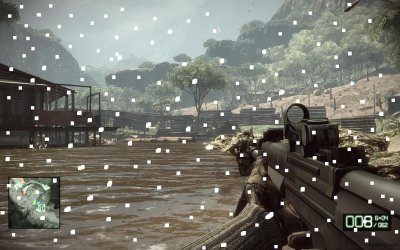
I've been having this issue with my game Battlefield Bad Company 2 freezing up on me. In the middle of a game (sometimes right after starting, other times after over an hour of playing) where my game will just freeze up on me and I will get small white squares across the screen. i cannot alt tab to get out so I end up having to hard boot the pc to exit.
I created a screenshot image to depict what I am talking about.
I have contacted my video card manufacturer, my motherboard manufacturer and the graphic chip manufacturer and have had very little sucess.
I've reduced the resolution in game, my vc drivers are up to date, my mb version is uptodat and my pc is brand new. It is more than powerful enough to run the game of maxed out settings.

I am running a Nvidia GTX 460 with a Asus P6X58D-E MB

I'll see if I can attach the screenshot image I made.
 

Attachments
  • BFBC2 screenshot issue.JPG
    BFBC2 screenshot issue.JPG
    103.8 KB · Views: 50

My Computer My Computer

At a glance

Windows 7, Home Premium 64 bitIntel Core i7-930 2.8GHz Quad-CoreCORSAIR XMS3 6GBEVGA 01G-P3-1373-AR GeForce GTX 460
OS
Windows 7, Home Premium 64 bit
CPU
Intel Core i7-930 2.8GHz Quad-Core
Motherboard
ASUS P6X58D-E
Memory
CORSAIR XMS3 6GB
Graphics Card(s)
EVGA 01G-P3-1373-AR GeForce GTX 460
Sound Card
Built in
PSU
CORSAIR CMPSU-850TX 850W
If that happens right at the start of the game, I'd be concerned.

First I'd verify your temps, make sure you're not overheating, which is the most common cause. Otherwise the card could be defective.

You can use this> CPUID - System & hardware benchmark, monitoring, reporting to watch your temps, and report back.

If it's not overheating, I would contact the manufacturer for a replacement/RMA.
 

My Computer My Computer

At a glance

HP Win7 Pro x64 | Custom Win7 Pro x64HP PhII X4 965 Black Ed. 3.4Ghz | PhII X6 110...8GB DDR3 1333 OC Black Edition x2HP XFX Radeon HD4890 1GB | AMD Radeon HD 6990
Computer Manufacturer/Model Number
HPE-112y Custom + Custom Build
OS
HP Win7 Pro x64 | Custom Win7 Pro x64
CPU
HP PhII X4 965 Black Ed. 3.4Ghz | PhII X6 1100T 3.3/3.7
Motherboard
OEM HP | ASUS Crosshair IV Extreme 890FX
Memory
8GB DDR3 1333 OC Black Edition x2
Graphics Card(s)
HP XFX Radeon HD4890 1GB | AMD Radeon HD 6990
Sound Card
Realtek 7.1 Digital HDMI x2
Monitor(s) Displays
HP 20" 1680x1050 LCD | Samsung 23" 2ms 1920x1200 LED
Screen Resolution
1680x1050 + 1920x1200 & HDTV for Gaming/TV
Hard Drives
1TB WD "Green" 5,400 RPM SCSI W/ AMD RAID/Xpert
Custom 2x 128GB OCZ Enyo SSD
PSU
Thermaltake Black Widow 850watt Modular x2
Case
HP HPE- 112y OEM Modded | Custom Xclio A380S
Cooling
HP Antec120mm | Custom Antec 360mm/250mm/200mm/120mm
Keyboard
HP G15 | G19
Mouse
G500 x2
Internet Speed
15mb down, 2mb up
Other Info
2x DVD-RAM | 2x BD-ROM
Thank you. Sometimes it happens when I turn on my pc and head right into the game. It never happens in single player mode though.

Is this temp monitoring software easy enough for a novice pc user to figure out?


If that happens right at the start of the game, I'd be concerned.

First I'd verify your temps, make sure you're not overheating, which is the most common cause. Otherwise the card could be defective.

You can use this> CPUID - System & hardware benchmark, monitoring, reporting to watch your temps, and report back.

If it's not overheating, I would contact the manufacturer for a replacement/RMA.
 

My Computer My Computer

At a glance

Windows 7, Home Premium 64 bitIntel Core i7-930 2.8GHz Quad-CoreCORSAIR XMS3 6GBEVGA 01G-P3-1373-AR GeForce GTX 460
OS
Windows 7, Home Premium 64 bit
CPU
Intel Core i7-930 2.8GHz Quad-Core
Motherboard
ASUS P6X58D-E
Memory
CORSAIR XMS3 6GB
Graphics Card(s)
EVGA 01G-P3-1373-AR GeForce GTX 460
Sound Card
Built in
PSU
CORSAIR CMPSU-850TX 850W
Ok I ran the monitor and got some temps. At idle, my video card temp is a max 95 degrees. During game play it went up to 168 degrees.
It seems to go up consistantly as the game goes on. I have no way of knowing if it goes higher or not since it would prevent me from running the game and seeing the monitor at the same time. Do theese temps sound high?

Fan speed hit a max of 1320 rmp, fan PMW - 30%, and Volt = 0.88v


If that happens right at the start of the game, I'd be concerned.

First I'd verify your temps, make sure you're not overheating, which is the most common cause. Otherwise the card could be defective.

You can use this> CPUID - System & hardware benchmark, monitoring, reporting to watch your temps, and report back.

If it's not overheating, I would contact the manufacturer for a replacement/RMA.
 

My Computer My Computer

At a glance

Windows 7, Home Premium 64 bitIntel Core i7-930 2.8GHz Quad-CoreCORSAIR XMS3 6GBEVGA 01G-P3-1373-AR GeForce GTX 460
OS
Windows 7, Home Premium 64 bit
CPU
Intel Core i7-930 2.8GHz Quad-Core
Motherboard
ASUS P6X58D-E
Memory
CORSAIR XMS3 6GB
Graphics Card(s)
EVGA 01G-P3-1373-AR GeForce GTX 460
Sound Card
Built in
PSU
CORSAIR CMPSU-850TX 850W
Heat is a bear on gaming and it should be checked for sure but I would also check to see if you have the latest drivers for both your Sound and Video cards... they seem to get corrupted easily (at least in my PC, your miles may vary ;))

Go to each individual manufacturer and download their latest drivers to a temp folder. Uninstall both the drivers for your Audio and Video, since I see you are using Nvidia, Do Not forget to also uninstall the PhysX drivers. Also, don't forget to run their sweeper to get rid of any instances from the registry.

Restart and once you are back on your desktop, stop your OS from finding or installing the drivers. Go to your temp folder and use the right click "Run as Administrator" for each driver.

Also, I would re install the game and when it asks you whether you want to install DirectX (even if it says version 9), go ahead and install it. Many people skip this part thinking that they have Ver. 10 and it should suffice, you still need to go through the process... can't really explain why but I guarantee you it won't do any damage to your directX files. I think I read that it just adds some files needed for the game to run at its best.

Good Luck.
 

My Computer My Computer

At a glance

Windows 7 x64 (Ultimate)Intel i5-4670K8GBs Ripjaws 2133MhzAsus GTX660 (2GBs)
Computer type
PC/Desktop
Computer Manufacturer/Model Number
Custom Built... Intel/Nvidia/ASRock
OS
Windows 7 x64 (Ultimate)
CPU
Intel i5-4670K
Motherboard
ASRock Z87 Extreme 6
Memory
8GBs Ripjaws 2133Mhz
Graphics Card(s)
Asus GTX660 (2GBs)
Sound Card
Onboard Realtek HD
Monitor(s) Displays
Acer AL2216W
Screen Resolution
1680 x 1050
Hard Drives
Samsung 840 SSD 120GBs
Samsung 750GB 32MB cache
1.5 TB
PSU
PC Cooling 750w Silencer
Case
Thermaltake Spedo Advance
Cooling
Std Cooler
Keyboard
Logitech G15
Mouse
Logitech G9
Internet Speed
Comcast 20Mbit
Antivirus
Avast
Browser
Firefox
Have you reinstalled your video card drivers? If so, have you done a 'clean' install?

I'll post this either way, for the sake of saving you time, disregard if you've already done this, exactly this way.

From control panel, device manager, expand the tree next to 'Display Adapter', it will list your GTX 460, right click it, select uninstall, and select to remove the driver as well, do 'not' restart, you need to run DriverSweeper first, we'll get to that. Now from control panel, go to add/remove programs, or simply click 'Uninstall a program' below it, from there remove all Nvidia software. When this is finished, browse to your C:\ drive, find the Nvidia folder, and delete it. It's been a while, but if it's like ATI, it's directly in the root of C, C:\Nvidia

Don't restart yet.

Download this driver, even if you think you have it already, just in case you've accidentally used the wrong driver, and it for whatever reason allowed you to install.

Here> http://www.nvidia.com/content/DriverDownload-March2009/confirmation.php?url=/Windows/260.99/260.99_desktop_win7_winvista_64bit_english_whql.exe&lang=us&type=GeForce

You need to do a clean install, so, download DriverSweeper and run this application 'after' you've uninstalled all of your Nvidia software.

http://downloads.guru3d.com/downloadget.php?id=1655&file=4&evp=b0e23b57cdae2217c3d377655ad3ce34 < Avoid the fake download links, simply click the "I Agree" at the bottom.


Now run DriverSweeper, when you're done, reboot, and install the new driver software suite, then reboot again.

Not finished yet, now:

As was said above, you should uninstall the game, 'AND' remove ALL folders left behind, these may have saved games, config settings, etc etc, something may be corrupt. IF, you have the Steam version, rather than reinstall the game, simply right click it in steam, select properties, select the 'local files' tab, and choose 'Verify integrity of game cache', and if any files are corrupt, it will reaquire them automatically for you as it verifies, this can take a few minutes.

So you have clean drivers, and a fresh install, or verified install of the game, now you're ready to play the game and test it out.

If the problem persists, read below. Post back.

After you've done everything above, you can try this.

Additionally, to check your temps:

Take a close look at HWMonitor while it's open. You will see that there are 3 temps for each device, the realtime temp, the lowest temp, and the highest temp.

Simply leave the program open, play a game for a while, then exit the game and bring up HWMonitor, have a look at the 'max' temps for your video card, the max temps are the ones furthest to the right. If you have a look at the header, above each column, you'll see, and it will instantly make sense to you.

Anyways, those temps are average and perfectly normal, but I would try one more time the way I mentioned above, to be certain. It should only take 10 minutes of gameplay. It's a DX11 game, your card is DX11, unified, therefor it will make use of the Gpu very, very well, unlike DX9 games which often leave many ALU's standing idle because of the old fixed function design of DX9 Gpu's. Not to run off topic, I just mean to say that BC2 is a perfect game to get your video card as hot as it can possibly get, well for a game, I think Furmark would take tops on heat.
 

My Computer My Computer

At a glance

HP Win7 Pro x64 | Custom Win7 Pro x64HP PhII X4 965 Black Ed. 3.4Ghz | PhII X6 110...8GB DDR3 1333 OC Black Edition x2HP XFX Radeon HD4890 1GB | AMD Radeon HD 6990
Computer Manufacturer/Model Number
HPE-112y Custom + Custom Build
OS
HP Win7 Pro x64 | Custom Win7 Pro x64
CPU
HP PhII X4 965 Black Ed. 3.4Ghz | PhII X6 1100T 3.3/3.7
Motherboard
OEM HP | ASUS Crosshair IV Extreme 890FX
Memory
8GB DDR3 1333 OC Black Edition x2
Graphics Card(s)
HP XFX Radeon HD4890 1GB | AMD Radeon HD 6990
Sound Card
Realtek 7.1 Digital HDMI x2
Monitor(s) Displays
HP 20" 1680x1050 LCD | Samsung 23" 2ms 1920x1200 LED
Screen Resolution
1680x1050 + 1920x1200 & HDTV for Gaming/TV
Hard Drives
1TB WD "Green" 5,400 RPM SCSI W/ AMD RAID/Xpert
Custom 2x 128GB OCZ Enyo SSD
PSU
Thermaltake Black Widow 850watt Modular x2
Case
HP HPE- 112y OEM Modded | Custom Xclio A380S
Cooling
HP Antec120mm | Custom Antec 360mm/250mm/200mm/120mm
Keyboard
HP G15 | G19
Mouse
G500 x2
Internet Speed
15mb down, 2mb up
Other Info
2x DVD-RAM | 2x BD-ROM
Back
Top