
Hi all.
I have an old Dell Insparion with Windows 7 64bit, with some important files on it.
(I have also access to the current laptop with Windows 11 from which i'm writing).
I was tring to unistall from the old Dell the "Cyberlink Software" via control panel.
When clicking on Unistall, windows correctly opened the unistall window (that one which says "praparing unistalling").
But rather then starting the unistall, around every 60 seconds, a new "prepare unistalling" window was opened.
Even by ending the task in the task manager, the system was keeping opening new ones.
At a certain moment there were around 20 of them opened.
So i switched off the computer, and then tryed again. But again the same problem occurred.
So in order to unistall Cyberlink, I installed Revo software.
I run Revo software and after clicking on Unistall, Revo first created a system image (or restore point) I can't remember how it called it.
After the restore point was created, the unistall windows ("preparing unistalling") was opened.
And again, the computer was opening new "preparing unistall" windows one after another, as before.
So I switched off the laptop again.
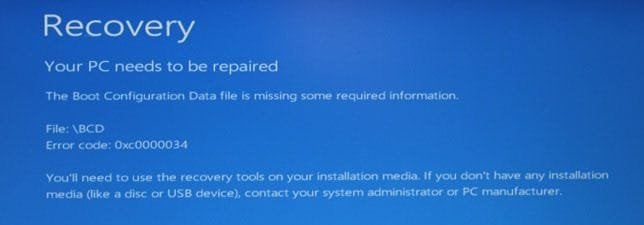
But when I turned it on, the BCD error 0xc000034 appeared (see attachment).
I googled it, and I found the solution on the Dell website: https://www.dell.com/support/kbdoc/...ng-required-information-error-code-0xc0000034
The problem is that I don't have the Windows Installation media.
Any suggestion, please?
I will be grateful for any help. I hope it can be solved by having windows run again.
Eventually, will I be able to convert the internal hard disk, in an external hard disk to connect it to my other laptop, and save all my files?
All my important files are in around 10/15 folders all on the desktop.
Thanks in advance for your answer.
I have an old Dell Insparion with Windows 7 64bit, with some important files on it.
(I have also access to the current laptop with Windows 11 from which i'm writing).
I was tring to unistall from the old Dell the "Cyberlink Software" via control panel.
When clicking on Unistall, windows correctly opened the unistall window (that one which says "praparing unistalling").
But rather then starting the unistall, around every 60 seconds, a new "prepare unistalling" window was opened.
Even by ending the task in the task manager, the system was keeping opening new ones.
At a certain moment there were around 20 of them opened.
So i switched off the computer, and then tryed again. But again the same problem occurred.
So in order to unistall Cyberlink, I installed Revo software.
I run Revo software and after clicking on Unistall, Revo first created a system image (or restore point) I can't remember how it called it.
After the restore point was created, the unistall windows ("preparing unistalling") was opened.
And again, the computer was opening new "preparing unistall" windows one after another, as before.
So I switched off the laptop again.
But when I turned it on, the BCD error 0xc000034 appeared (see attachment).
I googled it, and I found the solution on the Dell website: https://www.dell.com/support/kbdoc/...ng-required-information-error-code-0xc0000034
The problem is that I don't have the Windows Installation media.
Any suggestion, please?
I will be grateful for any help. I hope it can be solved by having windows run again.
Eventually, will I be able to convert the internal hard disk, in an external hard disk to connect it to my other laptop, and save all my files?
All my important files are in around 10/15 folders all on the desktop.
Thanks in advance for your answer.
Last edited:
My Computers
-
At a glance
windows 7 64 bit- Computer type
- Laptop
- Computer Manufacturer/Model Number
- Dell
- OS
- windows 7 64 bit
-
- Computer type
- PC/Desktop


