\EFI\BOOT\BCD Error While Booting On Windows 7 USB Installation

SweeX

New member
Local time
9:37 PM
Messages
21
Hi, i'm new here.
I am trying to install windows 7 on UEFI but i am getting an \EFI\BOOT\BCD Error while i boot to the USB, some times i boots, but it gets stuck at Starting Windows, some time instead, i get this error.
Is There A Way To Fix This?
 

My Computer

Computer type
Laptop
Computer Manufacturer/Model Number
Asus Vivobook Max
OS
Windows 10 Super Lite x64
CPU
Celeron N3350
Motherboard
X541NA
Memory
4GB
Graphics Card(s)
HD 500
Screen Resolution
1366x768
Hard Drives
500Gb HDD
Browser
Chrome
Is that the exact wording of the error message?
 

My Computers

System One System Two

  • Computer type
    PC/Desktop
    OS
    7 X64
    CPU
    i5 8400
    Motherboard
    gigabyte b365m ds3h
    Memory
    2x8gb 3200mhz
    Hard Drives
    various
    PSU
    pure power 11 400w cm
    Case
    Coolermaster
    Cooling
    cryorig m9i
  • Computer type
    PC/Desktop
    OS
    7x64
    CPU
    g5400
    Motherboard
    ga b365m ds3h
    Memory
    8gb ddr4 2400
    PSU
    xfx pro 450w
Is that the exact wording of the error message?

It is, and the error message or code or whatever is 0xc000000f if i was right. (Note: You have the profile picture like my diary)
 
Last edited:

My Computer

Computer type
Laptop
Computer Manufacturer/Model Number
Asus Vivobook Max
OS
Windows 10 Super Lite x64
CPU
Celeron N3350
Motherboard
X541NA
Memory
4GB
Graphics Card(s)
HD 500
Screen Resolution
1366x768
Hard Drives
500Gb HDD
Browser
Chrome
Welcome to the Forum.

Are you trying to install Win 8.1 64 on a Asus Vivobook Max with MB X541NA?
Is the current OS also Win 8.1 or Win 10?

For installing as UEFI:
- Boot the installation disk as UEFI, not Legacy.
- Go to install - Advanced - Delete all partitions - Create new.
It will create, at least, 3 partitions
- EFI - 100M - Fat32
- MS Reserved - 120M RAW (un formatted)
- Big NTFS
Choose the big NTFS to install on.
 

My Computers

System One System Two

  • Computer type
    PC/Desktop
    Computer Manufacturer/Model Number
    custom build
    OS
    Windows 7 HP 64
    CPU
    i5 6600K - 800MHz to 4200MHz
    Motherboard
    GA-Z170-HD3P
    Memory
    4+4G GSkill DDR4 3000
    Graphics Card(s)
    IG - Intel 530
    Monitor(s) Displays
    Samsung 226BW
    Screen Resolution
    1680x1050
    Hard Drives
    (1) -1 SM951 – 128GB M.2 AHCI PCIe SSD drive for Windows 7 and Lubuntu
    (2) -1 WD SATA 3 - 1T for Data
    (3) -1 WD SATA 3 - 1T for backup
    PSU
    Thermaltake 450W TR2 gold
    Keyboard
    Old and good Chicony mechanical keyboard
    Mouse
    Logitech mX performance - 9 buttons (had to disable some)
    Internet Speed
    500Mb/s
    Browser
    Firefox 64
    Other Info
    TinyWall firewall
  • Computer type
    Laptop
    System Manufacturer/Model Number
    Asus Q550LF
    OS
    Windows 7 Pro
    CPU
    i7-4500U 800MHz to 3.0GHz
    Motherboard
    Asus Q550LF
    Memory
    (4+4)G DDR3 1600
    Graphics Card(s)
    IG intel 4400 + NVIDIA GeForce GT 745M
    Sound Card
    Realtek
    Monitor(s) Displays
    LG Display LP156WF4-SPH1
    Screen Resolution
    1920 x 1080
    Hard Drives
    BX500 120G SSD for Windows and programs +
    1T HDD for data
    Internet Speed
    500 Mb/s
    Browser
    Firefox
    Other Info
    TinyWall firewall
Welcome to the Forum.

Are you trying to install Win 8.1 64 on a Asus Vivobook Max with MB X541NA?
Is the current OS also Win 8.1 or Win 10?

For installing as UEFI:
- Boot the installation disk as UEFI, not Legacy.
- Go to install - Advanced - Delete all partitions - Create new.
It will create, at least, 3 partitions
- EFI - 100M - Fat32
- MS Reserved - 120M RAW (un formatted)
- Big NTFS
Choose the big NTFS to install on.

sorry but my pc won't let me boot onto Windows 7 USB Installer
 

My Computer

Computer type
Laptop
Computer Manufacturer/Model Number
Asus Vivobook Max
OS
Windows 10 Super Lite x64
CPU
Celeron N3350
Motherboard
X541NA
Memory
4GB
Graphics Card(s)
HD 500
Screen Resolution
1366x768
Hard Drives
500Gb HDD
Browser
Chrome
Welcome to the Forum.

Are you trying to install Win 8.1 64 on a Asus Vivobook Max with MB X541NA?
Is the current OS also Win 8.1 or Win 10?

For installing as UEFI:
- Boot the installation disk as UEFI, not Legacy.
- Go to install - Advanced - Delete all partitions - Create new.
It will create, at least, 3 partitions
- EFI - 100M - Fat32
- MS Reserved - 120M RAW (un formatted)
- Big NTFS
Choose the big NTFS to install on.

i am dual booted with Windows 8.1 Pro x64 and Windows 10 x64 and my pc does NOT support Legacy
 

My Computer

Computer type
Laptop
Computer Manufacturer/Model Number
Asus Vivobook Max
OS
Windows 10 Super Lite x64
CPU
Celeron N3350
Motherboard
X541NA
Memory
4GB
Graphics Card(s)
HD 500
Screen Resolution
1366x768
Hard Drives
500Gb HDD
Browser
Chrome
If I understood, you have Win 8.1 and Win 10 (both EFI) and you want to install Win 7 64, correct?

Did you disabled Secure boot and Fast boot on BIOS? Win 7 isn't compatible with Secure boot.
Under Win 8.1 or Win 10, did you shrink last partition and then formatted the new partition to install Win 7?
 
Last edited:

My Computers

System One System Two

  • Computer type
    PC/Desktop
    Computer Manufacturer/Model Number
    custom build
    OS
    Windows 7 HP 64
    CPU
    i5 6600K - 800MHz to 4200MHz
    Motherboard
    GA-Z170-HD3P
    Memory
    4+4G GSkill DDR4 3000
    Graphics Card(s)
    IG - Intel 530
    Monitor(s) Displays
    Samsung 226BW
    Screen Resolution
    1680x1050
    Hard Drives
    (1) -1 SM951 – 128GB M.2 AHCI PCIe SSD drive for Windows 7 and Lubuntu
    (2) -1 WD SATA 3 - 1T for Data
    (3) -1 WD SATA 3 - 1T for backup
    PSU
    Thermaltake 450W TR2 gold
    Keyboard
    Old and good Chicony mechanical keyboard
    Mouse
    Logitech mX performance - 9 buttons (had to disable some)
    Internet Speed
    500Mb/s
    Browser
    Firefox 64
    Other Info
    TinyWall firewall
  • Computer type
    Laptop
    System Manufacturer/Model Number
    Asus Q550LF
    OS
    Windows 7 Pro
    CPU
    i7-4500U 800MHz to 3.0GHz
    Motherboard
    Asus Q550LF
    Memory
    (4+4)G DDR3 1600
    Graphics Card(s)
    IG intel 4400 + NVIDIA GeForce GT 745M
    Sound Card
    Realtek
    Monitor(s) Displays
    LG Display LP156WF4-SPH1
    Screen Resolution
    1920 x 1080
    Hard Drives
    BX500 120G SSD for Windows and programs +
    1T HDD for data
    Internet Speed
    500 Mb/s
    Browser
    Firefox
    Other Info
    TinyWall firewall
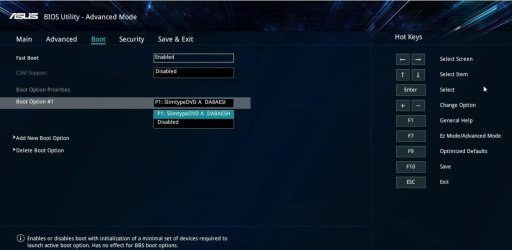
BIOS i/o security disable the sd card reader thing (it might say Lock instead of disable )


It is, and the error message or code or whatever is 0xc000000f if i was right. (Note: You have the profile picture like my diary)

Disable Fast Boot

Enable CSM


asus-x541-.jpg


With a bit of hunting around you might able able to find drivers, except perhaps for touchscreen. In some bios you can set touch to legacy ( which will probably work).

https://dlcdnets.asus.com/pub/ASUS/nb/X541UAK/0409_E11966_X441_X541_V2_A.pdf
 
Last edited:

My Computers

System One System Two

  • Computer type
    PC/Desktop
    OS
    7 X64
    CPU
    i5 8400
    Motherboard
    gigabyte b365m ds3h
    Memory
    2x8gb 3200mhz
    Hard Drives
    various
    PSU
    pure power 11 400w cm
    Case
    Coolermaster
    Cooling
    cryorig m9i
  • Computer type
    PC/Desktop
    OS
    7x64
    CPU
    g5400
    Motherboard
    ga b365m ds3h
    Memory
    8gb ddr4 2400
    PSU
    xfx pro 450w
If I understood, you have Win 8.1 and Win 10 (both EFI) and you want to install Win 7 64, correct?

Did you disabled Secure boot and Fast boot on BIOS? Win 7 isn't compatible with Secure boot.
Under Win 8.1 or Win 10, did you shrink last partition and then formatted the new partition to install Win 7?

i already did that. everything in bios is disabled
 

My Computer

Computer type
Laptop
Computer Manufacturer/Model Number
Asus Vivobook Max
OS
Windows 10 Super Lite x64
CPU
Celeron N3350
Motherboard
X541NA
Memory
4GB
Graphics Card(s)
HD 500
Screen Resolution
1366x768
Hard Drives
500Gb HDD
Browser
Chrome

My Computer

Computer type
Laptop
Computer Manufacturer/Model Number
Asus Vivobook Max
OS
Windows 10 Super Lite x64
CPU
Celeron N3350
Motherboard
X541NA
Memory
4GB
Graphics Card(s)
HD 500
Screen Resolution
1366x768
Hard Drives
500Gb HDD
Browser
Chrome
Are you sure you disabled the card reader in bios? It can cause the error message you posted.
 

My Computers

System One System Two

  • Computer type
    PC/Desktop
    OS
    7 X64
    CPU
    i5 8400
    Motherboard
    gigabyte b365m ds3h
    Memory
    2x8gb 3200mhz
    Hard Drives
    various
    PSU
    pure power 11 400w cm
    Case
    Coolermaster
    Cooling
    cryorig m9i
  • Computer type
    PC/Desktop
    OS
    7x64
    CPU
    g5400
    Motherboard
    ga b365m ds3h
    Memory
    8gb ddr4 2400
    PSU
    xfx pro 450w
Are you sure you disabled the card reader in bios? It can cause the error message you posted.

yes i did, but the error i think i fix it but now i get stuck at starting windows logo
 

My Computer

Computer type
Laptop
Computer Manufacturer/Model Number
Asus Vivobook Max
OS
Windows 10 Super Lite x64
CPU
Celeron N3350
Motherboard
X541NA
Memory
4GB
Graphics Card(s)
HD 500
Screen Resolution
1366x768
Hard Drives
500Gb HDD
Browser
Chrome
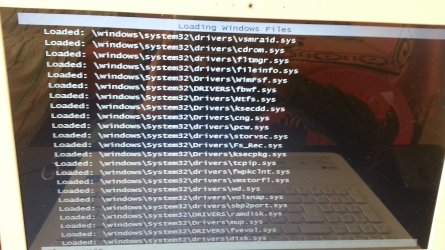
Stuck at Starting Windows logo while booting up windows 7 installation

THIS WAS FROM THIS POST HERE ---> https://www.sevenforums.com/install...while-booting-windows-7-usb-installation.html

ok so after the \EFI\BOOT\BCD Error i finally manage to fix it (maybe)

but now i just get stuck at starting windows logo.

i don't know if it's a problem or i have to wait a little bit longer, By the way here is the image:

sorry but i forgot to take a picture of booting up normally, so here is the safe mode way:

is there a fix for it?
 

Attachments

  • 20180926_144544.jpg
    20180926_144544.jpg
    1.8 MB · Views: 1

My Computer

Computer type
Laptop
Computer Manufacturer/Model Number
Asus Vivobook Max
OS
Windows 10 Super Lite x64
CPU
Celeron N3350
Motherboard
X541NA
Memory
4GB
Graphics Card(s)
HD 500
Screen Resolution
1366x768
Hard Drives
500Gb HDD
Browser
Chrome
Not an expert or techie solution here but you could try burning a dvd and installing that way instead of via usb. I have a linux distro that will only load from dvd and gives errors using usb (not the same thing I know but worth a try).
 

My Computer

Computer type
Laptop
Computer Manufacturer/Model Number
Sony Vaio VPCCW2S1E
OS
W7 HP 64 bit
CPU
Core i3 1st gen
Memory
8gb
Graphics Card(s)
Nvidia 330M
Internet Speed
8 mbps
Browser
Firefox
Hi All,
Greets,
SweeX : Sir, I hold almost the same opinion as sir SIW2 , but want to confirm/ask somethings to avoid any problems/confusions.
1. You have successfully installed Win7 64 on the same hard drive disk as with win8 & win10 ?
2. Now that you have disabled the sd card thing as said, you have only one problem that is ''it does not start fully & hangs on windows starting logo'' & no other repeating/new errors/errors code ?
3. Please boot into Win8 & Win10 and get 2-2 snaps of Disk Management windows views'. It should work for Win 8 & win 10 as well.
Disk Management - Post a Screen Capture Image
(a) Standard View
(b) From 'Menu' bar in the Disk Management window, click & navigate View > Top > List Disk & take the snap. ( Inspired by sir Megahertz07 )

Let us know.

Thanks & Regards. ...

EDIT : 4. Be very careful making changes in Bios. You can Backup Bios Setup before making any changes, in case something goes wrong!
5. Probably, you have not disabled the secure boot in Bios Setup properly & So, you are not able to enable CSM. One can check secure boot status from within the windows 8 & 10. I think you should determine the above queries before enabling CSM. May be you don't need to do that at all Or may be!
6. you can download & extract this zip file to a folder, login as admin in win8 64 & run Confirm-SecureBootUEFI64.bat from the extracted folder to know the status of Secure Boot. The file is here :

View attachment Confirm-SecureBootUEFI.zip
 
Last edited:

My Computer

Computer type
Laptop
Computer Manufacturer/Model Number
hp compaq presario c795VU notebook pc
OS
Windows 7 Ultimate x32 With Sp1 + Vista Ultimate x32 with Sp1 & Sp2 !!
CPU
Intel Mobile Core 2 Duo T5750 @ 2.00GHz Merom 65nm Technolog
Motherboard
Hewlett-Packard 30D9 (CPU)
Memory
2.00GB Dual-Channel DDR2 @ 332MHz (5-5-5-15)
Graphics Card(s)
Mobile Intel(R) 965 Express Chipset Family
Sound Card
High Definition Audio Device
Monitor(s) Displays
LP154WX4-TLCB on Mobile Intel 965 Express Chipset Family
Screen Resolution
1280x800 @ 60Hz
Hard Drives
149GB Western Digital WDC WD1600BEVS-60VAT0 ATA Device (SATA)
Keyboard
Standard 101/102-Key or Microsoft Natural PS/2 Key + HP QLB
Mouse
ALPS pointing device
Antivirus
Kaspersky AV 2017(Win 7) & AVG AntiVirus Free 2016 (VISTA)
Browser
google chrome
Not an expert or techie solution here but you could try burning a dvd and installing that way instead of via usb. I have a linux distro that will only load from dvd and gives errors using usb (not the same thing I know but worth a try).

i try it already, won't boot to the dvd
 

My Computer

Computer type
Laptop
Computer Manufacturer/Model Number
Asus Vivobook Max
OS
Windows 10 Super Lite x64
CPU
Celeron N3350
Motherboard
X541NA
Memory
4GB
Graphics Card(s)
HD 500
Screen Resolution
1366x768
Hard Drives
500Gb HDD
Browser
Chrome
Hi All,
Greets,
SweeX : Sir, I hold almost the same opinion as sir SIW2 , but want to confirm/ask somethings to avoid any problems/confusions.
1. You have successfully installed Win7 64 on the same hard drive disk as with win8 & win10 ?
2. Now that you have disabled the sd card thing as said, you have only one problem that is ''it does not start fully & hangs on windows starting logo'' & no other repeating/new errors/errors code ?
3. Please boot into Win8 & Win10 and get 2-2 snaps of Disk Management windows views'. It should work for Win 8 & win 10 as well.
Disk Management - Post a Screen Capture Image
(a) Standard View
(b) From 'Menu' bar in the Disk Management window, click & navigate View > Top > List Disk & take the snap. ( Inspired by sir Megahertz07 )

Let us know.

Thanks & Regards. ...

EDIT : 4. Be very careful making changes in Bios. You can Backup Bios Setup before making any changes, in case something goes wrong!
5. Probably, you have not disabled the secure boot in Bios Setup properly & So, you are not able to enable CSM. One can check secure boot status from within the windows 8 & 10. I think you should determine the above queries before enabling CSM. May be you don't need to do that at all Or may be!
6. you can download & extract this zip file to a folder, login as admin in win8 64 & run Confirm-SecureBootUEFI64.bat from the extracted folder to know the status of Secure Boot. The file is here :

View attachment 405519

1. Windows 8.1 Is Now Gone From My Hard Drive And Now I Only Have Windows 10, Windows 7 Still Not Installed.
2. The Sd Card Reader Is Disabled From BIOS.
3. I did NOT understand.
4. I always.
5. Secure Boot Is Disabled + I'm Keep Saying That My PC Does NOT Support CSM
6. Windows 8.1 Partition Is Gone
 

My Computer

Computer type
Laptop
Computer Manufacturer/Model Number
Asus Vivobook Max
OS
Windows 10 Super Lite x64
CPU
Celeron N3350
Motherboard
X541NA
Memory
4GB
Graphics Card(s)
HD 500
Screen Resolution
1366x768
Hard Drives
500Gb HDD
Browser
Chrome
Hi All,
SweeX : Sir, As per current status, you have corrupted & lost the windows 8 installation. Now what you have to do is :
1) Boot into windows 10. Open Disk Management functionality window & take two types of snaps. One snap of the standard/default Disk Management window view. To take the second type of view : in the Disk Management window, click View in the top menu bar, select Top & then Disk List & take the snap. Now you have to upload the two snaps & share with us. Make sure that the snaps are clear enough.
It may help here from sir gregrocker :
Disk Management - How to Post a Screenshot of | Windows 10 Tutorials

For eg.
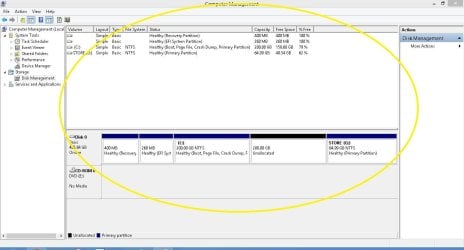
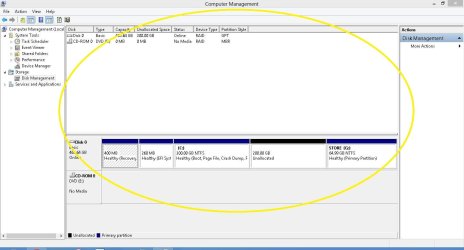
The Disk Management window's standard view is below that has to be taken snap of:

Standard  View.JPG

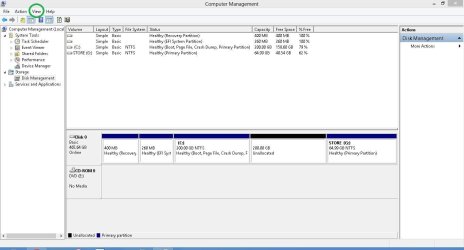
To get the other view, click View button from the standard view which is marked with green circle in the below image.

Standard  View - Copy.JPG

From View menu, select Top & then Disk List & the view is ready for the snap.
Then you will get the desired view which has to be snapped. It would be something like :

Desired View.JPG

Let us have snaps & I am checking the other things in between.

Thanks & Regards. ...
 

My Computer

Computer type
Laptop
Computer Manufacturer/Model Number
hp compaq presario c795VU notebook pc
OS
Windows 7 Ultimate x32 With Sp1 + Vista Ultimate x32 with Sp1 & Sp2 !!
CPU
Intel Mobile Core 2 Duo T5750 @ 2.00GHz Merom 65nm Technolog
Motherboard
Hewlett-Packard 30D9 (CPU)
Memory
2.00GB Dual-Channel DDR2 @ 332MHz (5-5-5-15)
Graphics Card(s)
Mobile Intel(R) 965 Express Chipset Family
Sound Card
High Definition Audio Device
Monitor(s) Displays
LP154WX4-TLCB on Mobile Intel 965 Express Chipset Family
Screen Resolution
1280x800 @ 60Hz
Hard Drives
149GB Western Digital WDC WD1600BEVS-60VAT0 ATA Device (SATA)
Keyboard
Standard 101/102-Key or Microsoft Natural PS/2 Key + HP QLB
Mouse
ALPS pointing device
Antivirus
Kaspersky AV 2017(Win 7) & AVG AntiVirus Free 2016 (VISTA)
Browser
google chrome
Hi All,
SweeX : Sir, As per current status, you have corrupted & lost the windows 8 installation. Now what you have to do is :
1) Boot into windows 10. Open Disk Management functionality window & take two types of snaps. One snap of the standard/default Disk Management window view. To take the second type of view : in the Disk Management window, click View in the top menu bar, select Top & then Disk List & take the snap. Now you have to upload the two snaps & share with us. Make sure that the snaps are clear enough.
It may help here from sir gregrocker :
Disk Management - How to Post a Screenshot of | Windows 10 Tutorials

For eg.
The Disk Management window's standard view is below that has to be taken snap of:

View attachment 405551

To get the other view, click View button from the standard view which is marked with green circle in the below image.

View attachment 405552

From View menu, select Top & then Disk List & the view is ready for the snap.
Then you will get the desired view which has to be snapped. It would be something like :

View attachment 405553

Let us have snaps & I am checking the other things in between.

Thanks & Regards. ...

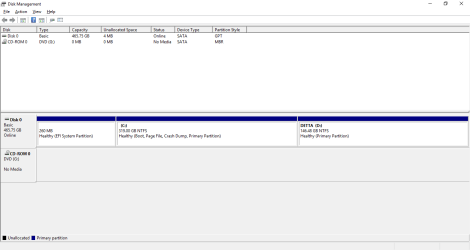
Here Are The Two Snaps:
 

Attachments

  • First Snap.png
    First Snap.png
    24 KB · Views: 1
  • Second Snap.png
    Second Snap.png
    24.3 KB · Views: 1

My Computer

Computer type
Laptop
Computer Manufacturer/Model Number
Asus Vivobook Max
OS
Windows 10 Super Lite x64
CPU
Celeron N3350
Motherboard
X541NA
Memory
4GB
Graphics Card(s)
HD 500
Screen Resolution
1366x768
Hard Drives
500Gb HDD
Browser
Chrome
Hi All,
SweeX : Sir,

TASK-1

1) What is that Detta (D:) partition ? Is that for Data purposes only ?
2) Not even residuals of windows 8! Windows 10 booting/working good & flawlessly ?
3) Where do you plan to install windows 7, Where is that partition ? I think you should shrink (c:) to make 100 GB partition for Win 7 installation. Be careful & do that. Can you do that ? Get us Disk Management window's view after doing that.

TASK-2

4) What is the win7 iso's name, version, etc. Where did you find/download that ?

TASK-3

5) Open elevated Windows PowerShell in Win10 :
Open Elevated Windows PowerShell in Windows 10 | Windows 10 Tutorials

Then type in that PowerShell Window exactly as :
Confirm-SecureBootUEFI

& Press enter.

What are the results/outcome in the PowerShell Window ?

Let us know.

Thanks & Regards. ...
 

My Computer

Computer type
Laptop
Computer Manufacturer/Model Number
hp compaq presario c795VU notebook pc
OS
Windows 7 Ultimate x32 With Sp1 + Vista Ultimate x32 with Sp1 & Sp2 !!
CPU
Intel Mobile Core 2 Duo T5750 @ 2.00GHz Merom 65nm Technolog
Motherboard
Hewlett-Packard 30D9 (CPU)
Memory
2.00GB Dual-Channel DDR2 @ 332MHz (5-5-5-15)
Graphics Card(s)
Mobile Intel(R) 965 Express Chipset Family
Sound Card
High Definition Audio Device
Monitor(s) Displays
LP154WX4-TLCB on Mobile Intel 965 Express Chipset Family
Screen Resolution
1280x800 @ 60Hz
Hard Drives
149GB Western Digital WDC WD1600BEVS-60VAT0 ATA Device (SATA)
Keyboard
Standard 101/102-Key or Microsoft Natural PS/2 Key + HP QLB
Mouse
ALPS pointing device
Antivirus
Kaspersky AV 2017(Win 7) & AVG AntiVirus Free 2016 (VISTA)
Browser
google chrome
Back
Top