BCDEDIT - How to Use

How to Use the BCDEDIT Command Line Tool

   Information
This will show you how to use BCDEDIT in the command prompt and avoid the need of third party applications like EasyBCD.
   Note
Bcdedit is a really powerful tool that Windows Vista and Windows 7 uses to manage the boot loader entries.

BCDEDIT needs a boot manager to boot your system.


A boot manager is a file that contains necessary information that instruct the system how to boot/start an operating system.
  • Windows 7 and Vista boot manager file is \bootmgr
  • Windows XP boot manager file is \ntldr
BCDEDIT can support other boot managers too, like grub for linux. You just have to place the boot file on the root of the boot manager partition. e.g. \grldr and you have a grub boot loader enabled.

Bcdedit edits a file called bcd , which is located in Windows 7's hidden partition under \boot\bcd.
In Vista, its located under C:\boot\bcd.


   Warning
You must be logged on in an administrator account to be able to do this tutorial.


To Use bcdedit:
1. Open an elevated command prompt.

2. Type bcdedit and press enter.
NOTE: By typing just bcdedit you just list your boot entries.


A boot entry consists of 4 main elements:
1. Identifier
The identifier is how the system has named the boot entry.
2. Device
The device is the drive or virtual image that the system will use to boot the boot entry.
3. Path
The path is the location on the device where the bootloader file is found.
4. Description
The description is the friendly name we give to our boot entry, e.g. "Windows 7"
You see next to the identifiers their UUIDs in {}. The UUID is the unique codename that the system gives to each boot entry and cannot be changed.

The standard identifier UUIDs are explained below:
{bootmgr} = the boot manager
{current} = the OS you selected to boot at startup.
{default} = the default OS selected to boot the PC.
{ntldr} = Windows Legacy OS Loader (for windows xp)
there are others like {memdiag} or {ramdisk} but they can't be of much use right now.
   Warning
IMPORTANT: make a backup of your bcd file first. To do that, type:

bcdedit /export C:\SAVEDBCD

This will create a file c:\savebcd which is your boot entry backup.
If you mess up, you can always undo changes by:

bcdedit /import c:\savedbcd


Now to see how we can control the above entries, here are some examples:
bcdedit /set {current} description "My edited Windows Boot Entry"
NOTE: This changes the title of the boot menu entry "{current}".

bcdedit /set {ntldr} device partition=E:
NOTE: This tells bcd that Windows XP partition is drive E:

bcdedit /set {ntldr} path \ntldr
NOTE: This tells bcd that the ntldr file which is the winxp bootloader is on root folder "\" (of drive e: as stated above)

bcdedit /displayorder {ntldr} /addfirst
NOTE: This places Windows XP as the first OS on the menu list.

bcdedit /default {ntldr}
NOTE: This places Windows XP as the default OS to boot first with.

bcdedit /displayorder {33342343-3424-2342342342-2344} /addlast
NOTE: This tells bcd that the boot entry with UUID 3334... should be the last entry on the menu.
You can copy your existing VISTA or W7 boot entry to another identical. Then you can change settings on the new entry to experiment. You will always have the first entry available, so it's safe to play with.
bcdedit /copy {current} /d "New W7 boot entry I just copied!"
this will give you a line:
NOTE: The entry was successfully copied to {4c21825f-e04b-11dd-b760-00195b61617a}. The {4c21825f-e04b-11dd-b760-00195b61617a} is the UUID of the new entry that the system just created. Yours will be different than mine! This is its identifier and you should use this to address that entry. Example:

bcdedit /set {4c21825f-e04b-11dd-b760-00195b61617a} numpoc 2
NOTE: This adds the 2 CPU Core support during boot, like you do in msconfig.

bcdedit /deletevalue {4c21825f-e04b-11dd-b760-00195b61617a} numproc
NOTE: This deletes the numproc parameter from entry {4c21825f....}

bcdedit /delete {4c21825f-e04b-11dd-b760-00195b61617a}
NOTE: This deletes the boot entry {4c21825f....} completely. In order to delete an {ntldr} entry, you must use the /f switch to force deletion: bcdedit /delete {ntldr} /f

You can always type just bcdedit to see your current settings.

What else can I do with BCDEDIT?

You can use BCDEDIT to alter any boot parameter , like you would in msconfig, only more. BCDEDIT works from booting with installation dvd too, so it can be handy for recovery purposes.
bcdedit /timeout 5
NOTE: This sets the wait-to-select-OS menu timeout at startup to 5 seconds . You will notice that I didn't give a UUID above. If you omit the UUID, it applies automatically to the relavant UUID. So: bcdedit /timeout 5 is identical to bcdedit /set {bootmgr} timeout 5
Some more advanced examples:
bcdedit /set {current} detecthal yes
bcdedit /set {current} detecthal no
NOTE: The above commands sets the detecthal to yes or no for entry {current}
To create a new boot entry to load Windows XP from a partition on your disk:
NOTE: The example below uses F: as the Windows XP partition. Replace with your xp drive letter.
bcdedit /create {ntldr} /d "Windows XP"

bcdedit /set {ntldr} device partition=F:

bcdedit /set {ntldr} path \ntldr

bcdedit /displayorder {ntldr} /addlast
   Note
Final note: BCDEDIT works from installation boot dvd too. If you mess up with a setting and you cannot boot, just boot from DVD and enter Repair Computer, then go to command prompt and there you go. You can play again with bcdedit to restore your system back.


Last edited by a moderator:
You're welcome.:D
 

My Computers

System One System Two

  • Computer type
    PC/Desktop
    OS
    7 X64
    CPU
    i5 8400
    Motherboard
    gigabyte b365m ds3h
    Memory
    2x8gb 3200mhz
    Hard Drives
    various
    PSU
    pure power 11 400w cm
    Case
    Coolermaster
    Cooling
    cryorig m9i
  • Computer type
    PC/Desktop
    OS
    7x64
    CPU
    g5400
    Motherboard
    ga b365m ds3h
    Memory
    8gb ddr4 2400
    PSU
    xfx pro 450w
Dual Boot problem

On an XP Pro machine I have installed Win7 (setup not completed) on a seperate partition. Now no boot whatever.

However I can get into a command prompt via Win7 setup DVD and wish to edit the BCD.

The tutorial above is very helpful. I have exported successfuly the current BCD (even though it obviously does not work) and understand how to edit same. However:

I don't understand how to make the edited BCD go into effect. Do the changes go into effect immediatly? Or is the identifier stuff required? I get lost there. Help would be appreciated.
 

My Computer

Computer Manufacturer/Model Number
home built
OS
XP Win7
CPU
AMD
Motherboard
Asus K8V SE
Memory
2GB
thanks for posting this..

For the record, I think this system sucks. M$ made something even harder than it used to be, and needlessly. I try to delete old entries in here, using the supplied identifier and the system says it doesn't recognize that .. stupid. Why not make us a decent gui tool to modify these entries so that we don't have to see OLD os's..

WW
 

My Computer

Computer Manufacturer/Model Number
homebrew
OS
Windows 7
CPU
E6750 Core2 Duo
Motherboard
Asus P5EVM-DO
Memory
4GB DDR2
Graphics Card(s)
EVGA 6800 GS
Sound Card
Integrated
Monitor(s) Displays
32" Sceptre
Hard Drives
60GB SSD
2 x 250GB Seagate Baracuda
PSU
Zalman 380
Case
Antec
Cooling
Air
Type msconfig in start search. Click it when it pops up. Under the Boot tab , you have the option of setting the default entry, deleting any others, and setting the time out ( length of time the boot menu is displayed).

For more options, try Easybcd 2.0 (free):

EasyBCD 2.0 Beta Builds - The NeoSmart Forums

Hope it helps
 

My Computers

System One System Two

  • Computer type
    PC/Desktop
    OS
    7 X64
    CPU
    i5 8400
    Motherboard
    gigabyte b365m ds3h
    Memory
    2x8gb 3200mhz
    Hard Drives
    various
    PSU
    pure power 11 400w cm
    Case
    Coolermaster
    Cooling
    cryorig m9i
  • Computer type
    PC/Desktop
    OS
    7x64
    CPU
    g5400
    Motherboard
    ga b365m ds3h
    Memory
    8gb ddr4 2400
    PSU
    xfx pro 450w
Please help

Hello! Please help me. I've read alot about bcd but still its too complicated so im afraid to ***** up my system.

I was installing 7, first - to give it a try to second partition. (xp on 1st). So it created a boot menu - "windows 7" and "old windows". I was satisfied with 7, formatted second partition to clear it and started install over xp into 1st.

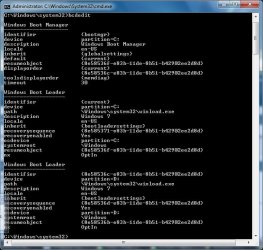
Now i have windows 7 installed in 1st partition, clear 2nd partition....and startup menu with two "windows 7", one of which doesnt exist.......how do i get rid of this menu?

I launched bcdedit and thats what i got:

attachment.php


I assume i need to launch /delete on third entry. But how do i address it? They are both windows 7. By what system understands which one i mean? This is so stupid complex. Please help.
 

Attachments

  • bcd result.jpg
    bcd result.jpg
    60.5 KB · Views: 6,092

My Computer

OS
7
Type msconfig in start search box.

Click it when it pops up.

Under the Boot tab , highlight the unwanted entry ( the one that is not default) , click Delete. Apply, OK , exit without restart.

Hope it helps
 

My Computers

System One System Two

  • Computer type
    PC/Desktop
    OS
    7 X64
    CPU
    i5 8400
    Motherboard
    gigabyte b365m ds3h
    Memory
    2x8gb 3200mhz
    Hard Drives
    various
    PSU
    pure power 11 400w cm
    Case
    Coolermaster
    Cooling
    cryorig m9i
  • Computer type
    PC/Desktop
    OS
    7x64
    CPU
    g5400
    Motherboard
    ga b365m ds3h
    Memory
    8gb ddr4 2400
    PSU
    xfx pro 450w
SIW2
Thank you! It worked, and was much easier. Wish Microsoft were making things simplier...even their support guy was not aware of this way and told me to use bcdedit.... :\
 

My Computer

OS
7
Hi kul kat,

Thanks for posting back.

Glad it worked for you:D
 

My Computers

System One System Two

  • Computer type
    PC/Desktop
    OS
    7 X64
    CPU
    i5 8400
    Motherboard
    gigabyte b365m ds3h
    Memory
    2x8gb 3200mhz
    Hard Drives
    various
    PSU
    pure power 11 400w cm
    Case
    Coolermaster
    Cooling
    cryorig m9i
  • Computer type
    PC/Desktop
    OS
    7x64
    CPU
    g5400
    Motherboard
    ga b365m ds3h
    Memory
    8gb ddr4 2400
    PSU
    xfx pro 450w
Timeout = 0 not get followed...

I changed the timeout of my bootloader by using following command

Code:
bcdedit /timeout 0

which returned: The operation completed successfully.

Just for verification I checked the timeout by executing

Code:
bcdedit /enum

and the timeout was set to 0 as expected.

Problem:
When I restarted my system by executing shutdown -r -t 0, the bootloader booted again counting down from timeout = 28

Should I do something else too?
 

My Computer

OS
Windows 7
dual boot vista32 win7x64 on same hd

Hy

Im happy to see a forum than can help , excuses for my poor english .


On same HD in diferent partitions Im using vista 32 since 2 years , but now I want to test Win7 x64.

I have installed it on a second partition on same device , the only way I can lounch it is with original dvd.

on C:/ Vista 32

on F:/ Win7 x64

Here is bcdedit verbose from Vista 32:

----------------------------------
Identificador {bootmgr}
device partition=C:
description Windows Boot Manager
locale es-ES
inherit {globalsettings}
default {current}
resumeobject {efc489c9-f5e8-11dc-bd77-e152f566c6f0}
displayorder {current}
toolsdisplayorder {memdiag}
timeout 30
resume No
Cargador de arranque de Windows
-----------------------------
Identificador {current}
device partition=C:
path \Windows\system32\winload.exe
description Microsoft Windows Vista
locale es-ES
inherit {bootloadersettings}
osdevice partition=C:
systemroot \Windows
resumeobject {efc489c9-f5e8-11dc-bd77-e152f566c6f0}
nx OptIn
pae ForceEnable


And here is bcdedit verbose from Win7 x64

----------------------------------
Identificador {bootmgr}
device partition=\Device\HarddiskVolume1
description Windows Boot Manager
locale es-ES
inherit {globalsettings}
default {current}
resumeobject {e47840a4-edac-11de-823a-960ec645fc85}
displayorder {current}
{e47840a1-edac-11de-823a-960ec645fc85}
toolsdisplayorder {memdiag}
timeout 30
Cargador de arranque de Windows
-----------------------------
Identificador {current}
device partition=C:
path \Windows\system32\winload.exe
description Windows 7
locale es-ES
inherit {bootloadersettings}
recoverysequence {e47840a6-edac-11de-823a-960ec645fc85}
recoveryenabled Yes
osdevice partition=C:
systemroot \Windows
resumeobject {e47840a4-edac-11de-823a-960ec645fc85}
nx OptIn
Cargador de arranque de Windows
-----------------------------
Identificador {e47840a1-edac-11de-823a-960ec645fc85}
device unknown
path \Windows\system32\winload.exe
description Windows 7
locale es-ES
inherit {bootloadersettings}
recoverysequence {e47840a2-edac-11de-823a-960ec645fc85}
recoveryenabled Yes
osdevice unknown
systemroot \Windows
resumeobject {e47840a0-edac-11de-823a-960ec645fc85}
nx OptIn


Looks like Windows7 is unable to make the boot folder in the apropiate partition,it is creating it on E:/ wich is a diferent hard disk .

I supose that I must copy some values form boot loader Win 7 to Win 32 Vista , but really I dont know how to start .

Any help is much apreciated to make a stable dual boot

Thanks
 

My Computer

OS
win vista32
CPU
E6850
Motherboard
Abit IP 35 pro
Memory
Corsair 2 + 2 G
Graphics Card(s)
nvidia 8800gt
Monitor(s) Displays
Eizo gd 19 + Acer 24
Hard Drives
OCZ - Vertex 120G + RAID 5.1
PSU
DUAL PSU
Cooling
water cooled

My Computers

System One System Two

  • Computer type
    PC/Desktop
    OS
    7 X64
    CPU
    i5 8400
    Motherboard
    gigabyte b365m ds3h
    Memory
    2x8gb 3200mhz
    Hard Drives
    various
    PSU
    pure power 11 400w cm
    Case
    Coolermaster
    Cooling
    cryorig m9i
  • Computer type
    PC/Desktop
    OS
    7x64
    CPU
    g5400
    Motherboard
    ga b365m ds3h
    Memory
    8gb ddr4 2400
    PSU
    xfx pro 450w
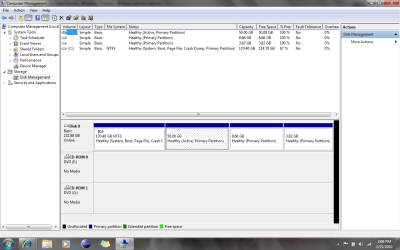
disk management vista32

disk management vista32
 

Attachments

  • diskvista32.gif
    diskvista32.gif
    36.6 KB · Views: 518

My Computer

OS
win vista32
CPU
E6850
Motherboard
Abit IP 35 pro
Memory
Corsair 2 + 2 G
Graphics Card(s)
nvidia 8800gt
Monitor(s) Displays
Eizo gd 19 + Acer 24
Hard Drives
OCZ - Vertex 120G + RAID 5.1
PSU
DUAL PSU
Cooling
water cooled
Hi all,

I am making a tool to clone hard drives. I successfully clone windows 7 but the problem is arising while booting the clone disk.

Before putting my queries about windows 7 I would like to explain some thing about other Windows OS beside Windows 7.
As we know each hard drive has its signature that is written in MBR of hard drive just before partition table. This hard disk signature is unique for each hard disk that is connected to machine. In case of Windows Vista and XP this disk signature does not make effect on booting process of OS. If OS find that there is same disk signature in more than one hard drive then it change it randomly-(no effect on booting process). If I manually change this disk signature or do it zero then Vista and XP both boot smoothly and assign a new disk signature to hard drive.

NOW move to windows 7----> I install windows 7 and let it make a small System Reserved partition of 100MB and install windows 7 in C: drive of my hard drive.
The disk signature that this hard drive has is suppose (AB BC CD DA). If I make change in to this disk signature then machine does not boot and one error message appears "Windows failed to start. A recent hardware or software change might be the cause". It means windows 7 depends on disk signature.

After some research I came to know that the disk signature is written in BCD file. this BCD file is in Boot folder of System Reserved Partition. It means this signature is configured in to BCD during installing the Windows 7.

when I clone disk0 to disk1(I clone sector by sector from low label) then this BCD file also copied to disk1 and inside this BCD file source disk signature is configured and disk1 disk signature is different from that. Due to this reason this clone disk does not boot. If I replace disk1 signature in all the places of BCD file then clone disk easily boot. It means I need to configure BCD according to destination disk(disk1) before cloning or some thing else so that the problem can be resolved.


In Windows Vista before cloning I need edit BCD by executing some commands that are- bcdedit /set {bootmgr} device boot
bcdedit /set {default} device boot
bcdedit /set {default} osdevice boot
After running these commands booting with clone disk issue has resolved.

In same way for windows 7 are there some commands or any other utility that can configure BCD?


Please suggest me some way.

Thanks
Madan
 

My Computer

OS
Windows 7 Professional
Well, I've screwed up my W7 bootloader/bcd while fooling around with different installs. turned out I had to use repair disc to get by bcd repaired, etc. Now, however, my formerly beautiful windows 7 boot screen/logo is replaced by the hum drum Vista logo, with scrolling bar...

Anyway to get back my pretty moving windows logo? I've tried the code below, and cmd tells me that operation completed successfully, however I still have the old scrolling bar logo...:(

Code:
bcdedit /set {current} locale en-US

someone somewhere said that the locale does not get correctly set in system recovery/repair disk's bootrec /rebuildbcd command, and this is supposed to fix the problem. didn't work that fancy for me.

Thanks for any help
 

My Computer

Computer Manufacturer/Model Number
HP m9350f/ HP Tx2z/ Mac Mini/ HP DL360 G5
OS
Win 7 Pro/ Win 7 Pro/ Snow Leopard/ Win Server 2008 R2
CPU
2.5GHz QC/ 2.3GHz DC/ 2.26GHz DC/ 2 x Xeon 5420 QC's
Motherboard
HP/ HP/ Apple/ HP
Memory
6GB DDR2-8/ 4GB DDR2/ 2GB DDR3-1066/ 4GB DDR2-8 FB,ECC
Graphics Card(s)
NV 9800GT/ ATI 3200 onB/ NV 9400 onB/ ATI ES1000
Sound Card
onB/ onB/ onB/ N/A
Monitor(s) Displays
47" LCD/ 12.1"/ 20" LCD/ N/A(RDP)
Hard Drives
2x WD Velociraptor 10K, 2 x 1TB in Raid 1/ 320GB 7.2k WD Scorpio BK/ 160GB 7.2k/ 4 x 36GB 15k SAS// 3 x 1.5TB in NAS
Keyboard
Dinovo Edge

My Computers

System One System Two

  • Computer type
    PC/Desktop
    OS
    7 X64
    CPU
    i5 8400
    Motherboard
    gigabyte b365m ds3h
    Memory
    2x8gb 3200mhz
    Hard Drives
    various
    PSU
    pure power 11 400w cm
    Case
    Coolermaster
    Cooling
    cryorig m9i
  • Computer type
    PC/Desktop
    OS
    7x64
    CPU
    g5400
    Motherboard
    ga b365m ds3h
    Memory
    8gb ddr4 2400
    PSU
    xfx pro 450w
solved problem

disk management vista32

solved problem

I just unpluged all my raid staff , erased Win7 partition , and reinstalled , this time Dual boot works fine , after all , I plug again my raid staff , and all is working fine without any bcdedit knowledge .

Anyway for people like me , who is making crazy with bcdedit there is a easy-solution, to make or change boot options in vista and now in Win7.

EasyBCD 2.0 BETA fully supports Win7
 

My Computer

OS
win vista32
CPU
E6850
Motherboard
Abit IP 35 pro
Memory
Corsair 2 + 2 G
Graphics Card(s)
nvidia 8800gt
Monitor(s) Displays
Eizo gd 19 + Acer 24
Hard Drives
OCZ - Vertex 120G + RAID 5.1
PSU
DUAL PSU
Cooling
water cooled
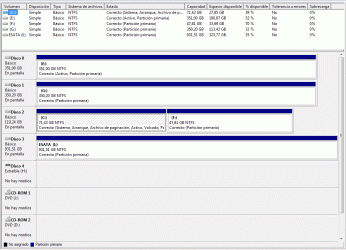
I'm sorry it took so long for me to capture a screenshot of my disk management screen, I had other matters to attend to. Anyway, here she be.
The largest partition is Windows 7, 50G is experimental OSX, then Ubu 9.10 ext4 fs + swap at the end. Also, you may notice OSX partition is active, that's b/c I am using Chameleon's GUI bootloader loaded onto OSX partition. The new flying windows existed after first install of Chameleon, but after repairing with startup CD (using DISKPART) I get the old windows (vista) boot screen w/green scrolling bar instead of pretty new Win NT 6.1 flying windows animation.
Thanks for any and all help.
SAM
diskmgmntprntscrn.png
 

My Computer

Computer Manufacturer/Model Number
HP m9350f/ HP Tx2z/ Mac Mini/ HP DL360 G5
OS
Win 7 Pro/ Win 7 Pro/ Snow Leopard/ Win Server 2008 R2
CPU
2.5GHz QC/ 2.3GHz DC/ 2.26GHz DC/ 2 x Xeon 5420 QC's
Motherboard
HP/ HP/ Apple/ HP
Memory
6GB DDR2-8/ 4GB DDR2/ 2GB DDR3-1066/ 4GB DDR2-8 FB,ECC
Graphics Card(s)
NV 9800GT/ ATI 3200 onB/ NV 9400 onB/ ATI ES1000
Sound Card
onB/ onB/ onB/ N/A
Monitor(s) Displays
47" LCD/ 12.1"/ 20" LCD/ N/A(RDP)
Hard Drives
2x WD Velociraptor 10K, 2 x 1TB in Raid 1/ 320GB 7.2k WD Scorpio BK/ 160GB 7.2k/ 4 x 36GB 15k SAS// 3 x 1.5TB in NAS
Keyboard
Dinovo Edge
did anyone get that screenshot/ can anyone help?
 

My Computer

Computer Manufacturer/Model Number
HP m9350f/ HP Tx2z/ Mac Mini/ HP DL360 G5
OS
Win 7 Pro/ Win 7 Pro/ Snow Leopard/ Win Server 2008 R2
CPU
2.5GHz QC/ 2.3GHz DC/ 2.26GHz DC/ 2 x Xeon 5420 QC's
Motherboard
HP/ HP/ Apple/ HP
Memory
6GB DDR2-8/ 4GB DDR2/ 2GB DDR3-1066/ 4GB DDR2-8 FB,ECC
Graphics Card(s)
NV 9800GT/ ATI 3200 onB/ NV 9400 onB/ ATI ES1000
Sound Card
onB/ onB/ onB/ N/A
Monitor(s) Displays
47" LCD/ 12.1"/ 20" LCD/ N/A(RDP)
Hard Drives
2x WD Velociraptor 10K, 2 x 1TB in Raid 1/ 320GB 7.2k WD Scorpio BK/ 160GB 7.2k/ 4 x 36GB 15k SAS// 3 x 1.5TB in NAS
Keyboard
Dinovo Edge
Try this from 7 elevated cmd prompt:

bcdboot c:\windows /s c:

press enter.
 

My Computers

System One System Two

  • Computer type
    PC/Desktop
    OS
    7 X64
    CPU
    i5 8400
    Motherboard
    gigabyte b365m ds3h
    Memory
    2x8gb 3200mhz
    Hard Drives
    various
    PSU
    pure power 11 400w cm
    Case
    Coolermaster
    Cooling
    cryorig m9i
  • Computer type
    PC/Desktop
    OS
    7x64
    CPU
    g5400
    Motherboard
    ga b365m ds3h
    Memory
    8gb ddr4 2400
    PSU
    xfx pro 450w
it worked! beautifully! I now have pretty flying windows back, and still using Chameleon's GUI bootloader.
Thanks so much.
 

My Computer

Computer Manufacturer/Model Number
HP m9350f/ HP Tx2z/ Mac Mini/ HP DL360 G5
OS
Win 7 Pro/ Win 7 Pro/ Snow Leopard/ Win Server 2008 R2
CPU
2.5GHz QC/ 2.3GHz DC/ 2.26GHz DC/ 2 x Xeon 5420 QC's
Motherboard
HP/ HP/ Apple/ HP
Memory
6GB DDR2-8/ 4GB DDR2/ 2GB DDR3-1066/ 4GB DDR2-8 FB,ECC
Graphics Card(s)
NV 9800GT/ ATI 3200 onB/ NV 9400 onB/ ATI ES1000
Sound Card
onB/ onB/ onB/ N/A
Monitor(s) Displays
47" LCD/ 12.1"/ 20" LCD/ N/A(RDP)
Hard Drives
2x WD Velociraptor 10K, 2 x 1TB in Raid 1/ 320GB 7.2k WD Scorpio BK/ 160GB 7.2k/ 4 x 36GB 15k SAS// 3 x 1.5TB in NAS
Keyboard
Dinovo Edge
Back
Top