Solved Best Browser to Replace Internet Explorer With?

woodbine

New member
Member
VIP
Local time
4:04 PM
Messages
178
Location
Bristol, UK
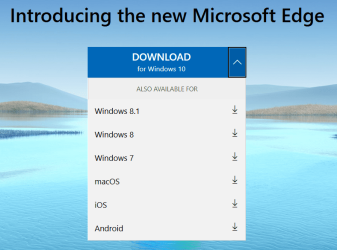
It seems it's not just Windows 7 that has had the plug pulled on it. I'm still using IE11, and finding more and more websites being problematic when using it. Youtube won't be watchable for much longer with IE.


Being lazy and no good with computers, I would like to replace it with something that appears and operates as closely to IE as is possible. I've looked at the choices and I'm bot sure which is best to go for. Edge seems good. Any recommendations appreciated.
 

My Computer

Computer type
PC/Desktop
Computer Manufacturer/Model Number
Acer Aspire Desktop M3910
OS
Windows 7 Home Premium 64 bit SP1
CPU
Intel i3 540
Memory
3GB DDR3SD
Monitor(s) Displays
LG Flatron L1960TR
Screen Resolution
1280x1024
Keyboard
Acer
Mouse
Genius
Antivirus
Avast (Free)
Browser
I E 11

My Computers

System One System Two

  • Computer type
    PC/Desktop
    Computer Manufacturer/Model Number
    custom build
    OS
    Windows 7 HP 64
    CPU
    i5 6600K - 800MHz to 4200MHz
    Motherboard
    GA-Z170-HD3P
    Memory
    4+4G GSkill DDR4 3000
    Graphics Card(s)
    IG - Intel 530
    Monitor(s) Displays
    Samsung 226BW
    Screen Resolution
    1680x1050
    Hard Drives
    (1) -1 SM951 – 128GB M.2 AHCI PCIe SSD drive for Windows 7 and Lubuntu
    (2) -1 WD SATA 3 - 1T for Data
    (3) -1 WD SATA 3 - 1T for backup
    PSU
    Thermaltake 450W TR2 gold
    Keyboard
    Old and good Chicony mechanical keyboard
    Mouse
    Logitech mX performance - 9 buttons (had to disable some)
    Internet Speed
    500Mb/s
    Browser
    Firefox 64
    Other Info
    TinyWall firewall
  • Computer type
    Laptop
    System Manufacturer/Model Number
    Asus Q550LF
    OS
    Windows 7 Pro
    CPU
    i7-4500U 800MHz to 3.0GHz
    Motherboard
    Asus Q550LF
    Memory
    (4+4)G DDR3 1600
    Graphics Card(s)
    IG intel 4400 + NVIDIA GeForce GT 745M
    Sound Card
    Realtek
    Monitor(s) Displays
    LG Display LP156WF4-SPH1
    Screen Resolution
    1920 x 1080
    Hard Drives
    BX500 120G SSD for Windows and programs +
    1T HDD for data
    Internet Speed
    500 Mb/s
    Browser
    Firefox
    Other Info
    TinyWall firewall

Attachments

  • Edge platforms.PNG
    Edge platforms.PNG
    336.1 KB · Views: 1

My Computers

System One System Two

  • Computer type
    Laptop
    Computer Manufacturer/Model Number
    Toshiba satellite C650D
    OS
    Windows 7 Home Premium x64
    CPU
    AMD V120
    Memory
    4GB
    Internet Speed
    150 Mbps
    Antivirus
    MSE
    Browser
    IE11, Edge, Firefox
    Other Info
    I also have W7 Pro on my System Two, and several W7 Hyper-V VMs. My other machines run Windows 10/11. Their specs are in my Ten Forums & Eleven Forum profiles.
  • Computer type
    Laptop
    System Manufacturer/Model Number
    Lenovo Thinkpad T430
    OS
    Windows 7 Pro x64
    CPU
    Intel i5-3320M
    Memory
    8 GB
    Hard Drives
    250GB Samsung SSD 860 EVO
    Other Info
    Antivirus: MSE
Edge will also spy everything you do but is good to know that is one more option.
 

My Computers

System One System Two

  • Computer type
    PC/Desktop
    Computer Manufacturer/Model Number
    custom build
    OS
    Windows 7 HP 64
    CPU
    i5 6600K - 800MHz to 4200MHz
    Motherboard
    GA-Z170-HD3P
    Memory
    4+4G GSkill DDR4 3000
    Graphics Card(s)
    IG - Intel 530
    Monitor(s) Displays
    Samsung 226BW
    Screen Resolution
    1680x1050
    Hard Drives
    (1) -1 SM951 – 128GB M.2 AHCI PCIe SSD drive for Windows 7 and Lubuntu
    (2) -1 WD SATA 3 - 1T for Data
    (3) -1 WD SATA 3 - 1T for backup
    PSU
    Thermaltake 450W TR2 gold
    Keyboard
    Old and good Chicony mechanical keyboard
    Mouse
    Logitech mX performance - 9 buttons (had to disable some)
    Internet Speed
    500Mb/s
    Browser
    Firefox 64
    Other Info
    TinyWall firewall
  • Computer type
    Laptop
    System Manufacturer/Model Number
    Asus Q550LF
    OS
    Windows 7 Pro
    CPU
    i7-4500U 800MHz to 3.0GHz
    Motherboard
    Asus Q550LF
    Memory
    (4+4)G DDR3 1600
    Graphics Card(s)
    IG intel 4400 + NVIDIA GeForce GT 745M
    Sound Card
    Realtek
    Monitor(s) Displays
    LG Display LP156WF4-SPH1
    Screen Resolution
    1920 x 1080
    Hard Drives
    BX500 120G SSD for Windows and programs +
    1T HDD for data
    Internet Speed
    500 Mb/s
    Browser
    Firefox
    Other Info
    TinyWall firewall
Edge will also spy everything you do but is good to know that is one more option.


I thought Google's Chrome was the worst offender in that respect :D
 

My Computers

System One System Two

  • Computer type
    Laptop
    Computer Manufacturer/Model Number
    Toshiba satellite C650D
    OS
    Windows 7 Home Premium x64
    CPU
    AMD V120
    Memory
    4GB
    Internet Speed
    150 Mbps
    Antivirus
    MSE
    Browser
    IE11, Edge, Firefox
    Other Info
    I also have W7 Pro on my System Two, and several W7 Hyper-V VMs. My other machines run Windows 10/11. Their specs are in my Ten Forums & Eleven Forum profiles.
  • Computer type
    Laptop
    System Manufacturer/Model Number
    Lenovo Thinkpad T430
    OS
    Windows 7 Pro x64
    CPU
    Intel i5-3320M
    Memory
    8 GB
    Hard Drives
    250GB Samsung SSD 860 EVO
    Other Info
    Antivirus: MSE
Another vote here for FireFox.
 

My Computer

Computer type
PC/Desktop
Computer Manufacturer/Model Number
Compaq
OS
Windows 7 Home Premium 32bit.
CPU
AMD Athlon x2 2.30 GHz
Memory
4 GB Ram
If you are after stability and security, Chrome is good option.
 

My Computer

Computer type
PC/Desktop
Computer Manufacturer/Model Number
Golden Mk. I.4
OS
Windows 10 Pro x64 ; Xubuntu x64
CPU
Intel i7 860 @ 2.80 GHz O/C'ed to 4.0GHz
Motherboard
Gigabyte P55A-UD3R Rev.1. Award BIOS F13
Memory
16GB Corsair Vengance DDR3 @ 661 MHz Dual Channel (9-9-9-24)
Graphics Card(s)
EVGA NVidia GTX 560 1024MB
Sound Card
Realtek Integrated
Monitor(s) Displays
Dual Samsung SyncMaster 2494HS
Screen Resolution
1920*1080 and 1920*1080
Hard Drives
1*Samsung 840 EVO 120GB SSD;
1*OCZ Vertex 2 60GB SSD;
2*Samsung F3 SpinPoint 1TB in RAID0;
1*Samsung F1 SpinPoint 1TB;
2*Western Digital 1TB External USB 3.0
1*Western Digital 500GB External USB 3.0
1*Seagate 500GB External USB 2.0
PSU
Thermaltake ToughPower QFan 750W
Case
Thermaltake Element S VK60001W2Z
Cooling
Corsair H60 Water Cooling, 2*230mm and 2*80mm case fans
Keyboard
Logitech G110
Mouse
Logitech MX518
Check out Brave which is "supposed" to be privacy friendly. It is Chromium based.

If you're in for a niche browser and liked what Firefox looked like years ago, then check out Pale Moon.

Now Brave uses Webextensions while Pale Moon uses XUL. Webextensions are rife with hacking potential. Any browser that is Chromium based like Chorme or Brave will use Webextensions. Same is true for Firefox now.

I run Pale Moon as my main browser and if a website or the God awful Recaptcha doesn't work I use my plain vanilla Firefox install.

In addition to a browser, You should also check out the now free program Sandboxie which will help keep malware at bay. Read about it, learn about it, love it.
 

My Computer

Computer type
PC/Desktop
OS
Windows 7 Ultimate x64
Thanks to everyone for their views and advice. Looked at the recommendations and liked Brave. However, when I looked at videos on Youtube reviewing Brave, the screen/dashboard seems to have so many things on it - and to make it all fit on everything seems very small. Are there any less cluttered browsers that would be less of a strain on my bad eyesight?
 

My Computer

Computer type
PC/Desktop
Computer Manufacturer/Model Number
Acer Aspire Desktop M3910
OS
Windows 7 Home Premium 64 bit SP1
CPU
Intel i3 540
Memory
3GB DDR3SD
Monitor(s) Displays
LG Flatron L1960TR
Screen Resolution
1280x1024
Keyboard
Acer
Mouse
Genius
Antivirus
Avast (Free)
Browser
I E 11
Just had a look at Pale Moon on some Youtube review videos. The screen seems to be very clearly laid out and uncluttered with all the necessary functions close to hand. It doesn't seem to be overburdened with unnecessary clutter. The font seems a sensible size. I also like that the layout doesn't seem a million miles away from my old IE11.

Can I ask current PM users what the pros and cons are? For something that seems quite niche, will it be a suitable everyday replacement for IE and be suitable for use as the only browser?
 

My Computer

Computer type
PC/Desktop
Computer Manufacturer/Model Number
Acer Aspire Desktop M3910
OS
Windows 7 Home Premium 64 bit SP1
CPU
Intel i3 540
Memory
3GB DDR3SD
Monitor(s) Displays
LG Flatron L1960TR
Screen Resolution
1280x1024
Keyboard
Acer
Mouse
Genius
Antivirus
Avast (Free)
Browser
I E 11
As I said already in post #8.


I run Pale Moon as my main browser and if a website or the God awful Recaptcha doesn't work I use my plain vanilla Firefox install.


Also read what I said about Sandboxie for your browser.
 

My Computer

Computer type
PC/Desktop
OS
Windows 7 Ultimate x64
Pale Moon is sometimes discriminated upon by websites that sniff the UA (User Agent). So these bastard websites are looking for Chrome or Firefox and if they don't see that they give you trouble. I avoid most of this with the UAContol add-on and make it look like my browser Pale Moon is actually the latest Firefox and Windows 10.

Pale Moon's website has a bunch of add-ons and you can add the Classic Archive add-on to get the old tried and true XUL-based add-ons that used to run in Firefox until they jumped ship and went the way of asinine Chrome. Find this add-on here: Releases . JustOff/ca-archive . GitHub

If you are really wanting to try Pale Moon, you can download it as a portable, no installation required and take it for a spin. Pale Moon for Windows downloads

I highly recommend you sign up for their forum if you have any questions, concerns or need help. That's the go to place for help with Pale Moon since they all know the inter workings of the browser.
 

My Computer

Computer type
PC/Desktop
OS
Windows 7 Ultimate x64
If you chose to roll the way I do with the UAControl add-on and make it look like Pale Moon is the latest Firefox under Win 10, then this is the UA string you want:

Code:
Mozilla/5.0 (Windows NT 10.0; WOW64; rv:72.0) Gecko/20100101 Firefox/72.0
This is for the default sites not listed option in the UAControl add-on settings.

To stay abreast of new Firefox releases go here: Directory Listing: /pub/firefox/releases/

Scroll all the way down to the last version that is not denoted with a B that is beta and you
you'll see version 73 is now out.

So just change the UA I gave above from 72 to 73.

Note, you don't use 73.2 or 73.3, etc. Just 73, or 74, or 75, etc. Whole numbers.


Code:
Mozilla/5.0 (Windows NT 10.0; WOW64; rv:73.0) Gecko/20100101 Firefox/73.0
See the difference?

Note that Pale Moon does ship with an option in the Preferences settings to use one of three different UAs. Sometimes it works, sometimes it doesn't, and sometimes some websites (not all) require or want to see a certain UA. That's why I use the UAControl add-on because I can tell one site to see this UA while another site will see another UA. And with all websites not listed they see me as using the latest Firefox with Win 10. LOL


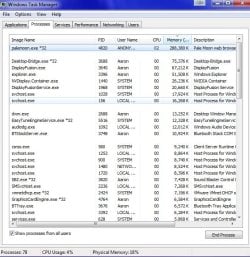
Also note that Pale Moon, unlike today's Firefox or Chrome has a very low RAM footprint unless you have a billion tabs open. Here's mine right now and no multiple processes like Chrome or Firefox.
 

Attachments

  • hfgnmgchm.jpg
    hfgnmgchm.jpg
    144.9 KB · Views: 21

My Computer

Computer type
PC/Desktop
OS
Windows 7 Ultimate x64
Thanks for your replies F22. Sounds a great browser with a few tweaks. I'm afraid some of what you wrote went over my head though. What is a string, and how would I use the code you gave? Is it something I would be able to do as someone with basic computer skills?
 

My Computer

Computer type
PC/Desktop
Computer Manufacturer/Model Number
Acer Aspire Desktop M3910
OS
Windows 7 Home Premium 64 bit SP1
CPU
Intel i3 540
Memory
3GB DDR3SD
Monitor(s) Displays
LG Flatron L1960TR
Screen Resolution
1280x1024
Keyboard
Acer
Mouse
Genius
Antivirus
Avast (Free)
Browser
I E 11
Is it something I would be able to do as someone with basic computer skills?


Yes, it's just an add-on for the browser called UAControl.

I used the word "string" to describe the User Agent (UA). See that there decribing Windows 10 and Firefox 73?

You'd use that in the UAControl add-on.
 

My Computer

Computer type
PC/Desktop
OS
Windows 7 Ultimate x64
Would I get the UAControl add-on from the Pale Moon browser itself, or from the Pale Moon website? Or do I download it from somewhere?

Should I download Pale Moon, then do the UA add on after?

Apologies for the basic questions, but computers aren't really something I know a lot about. Would have been happy in my comfort zone staying with IE, but not really an option now.
 
Last edited:

My Computer

Computer type
PC/Desktop
Computer Manufacturer/Model Number
Acer Aspire Desktop M3910
OS
Windows 7 Home Premium 64 bit SP1
CPU
Intel i3 540
Memory
3GB DDR3SD
Monitor(s) Displays
LG Flatron L1960TR
Screen Resolution
1280x1024
Keyboard
Acer
Mouse
Genius
Antivirus
Avast (Free)
Browser
I E 11
Read post #12 again. In fact, read everything I said very, very carefully.
 

My Computer

Computer type
PC/Desktop
OS
Windows 7 Ultimate x64
OK, thanks F22. I missed the vital info.

So, download Pale Moon browser, then select Classic Archive add-on and also select UAControl add-on - but change the code to the one you quoted? If I understand correctly.

I may be back with a few basic questions when I am starting the process of add-ons.
 

My Computer

Computer type
PC/Desktop
Computer Manufacturer/Model Number
Acer Aspire Desktop M3910
OS
Windows 7 Home Premium 64 bit SP1
CPU
Intel i3 540
Memory
3GB DDR3SD
Monitor(s) Displays
LG Flatron L1960TR
Screen Resolution
1280x1024
Keyboard
Acer
Mouse
Genius
Antivirus
Avast (Free)
Browser
I E 11
Check also Opera browser that have a nice add-on ad blocker call Ghostery:Ghostery Makes the Web Cleaner, Faster and Safer! I find it easy to use and quite reliable in his parameters. Got the same problems with IE11 not loading properly some sites.
 

My Computer

Computer type
PC/Desktop
Computer Manufacturer/Model Number
Custom Build
OS
Windows 7 Professional SP1 - x64 [Non-UEFI Boot]
CPU
Ivy Bridge Core i5 3570K (Delidded)
Motherboard
Asus P8Z77-V LE PLUS
Memory
G.Skill "Ares" DDR3 PC3-12800 - 1600MHz (16Gb)
Graphics Card(s)
Asus Dual-RX480-O4G
Sound Card
Creative Sound Blaster Z w/5.1 sound system
Monitor(s) Displays
Asus IPS 23"
Screen Resolution
16/9
Hard Drives
Internal:
500Go Sata 6Gb/s (x2)
500Go Sata 3Gb/s (x2)
SSD 60Go Sata 6Gb/s
PSU
In Win C 900W Series 80+ Platinum
Case
Thermaltake Chaser A71
Cooling
Custom Water Cooling Loop
Keyboard
Cooler Master QuickFire XTi
Mouse
Razer Imperator 2012 (4G)
Antivirus
MSE
Browser
IE 11.0.xxx Rtm
Other Info
"Raid0" with Intel Smart Response Technology (HDD/SSD)
Check also Opera browser that have a nice add-on ad blocker call Ghostery:Ghostery Makes the Web Cleaner, Faster and Safer! I find it easy to use and quite reliable in his parameters. Got the same problems with IE11 not loading properly some sites.


Opera is infected with the coronavirus, i.e owned by the not so trustworthy Chinese. I wouldn't touch it with a 20' poll and their so-called "VPN" is probably sniffed and it's really a proxy.
 

My Computer

Computer type
PC/Desktop
OS
Windows 7 Ultimate x64
Back
Top