Solved Best Browser to Replace Internet Explorer With?

OK, thanks F22. I missed the vital info.

So, download Pale Moon browser, then select Classic Archive add-on and also select UAControl add-on - but change the code to the one you quoted? If I understand correctly.

I may be back with a few basic questions when I am starting the process of add-ons.


Exactly.

No. That's not code, that's a user agent sting. A UA is used with browsers, etc that says this is what type of OS and browser I have.

Make sure you keep that UA updated when new Firefox releases are announced. I gave a link on the releases directory so you can see, and here on this forum it's usually announced. So like I said, the current Firefox version is 73.

Also, some websites like YouTube will need a custom UA because it will say your browser isn't supported which is absolute garbage on Google's part.

The current UA you want for YouTube in Pale Moon is:
Code:
Mozilla/5.0 (Windows NT 6.1; WOW64; rv:62.0) Gecko/20100101 Firefox/62.0 (Pale Moon)

In the UAControl add-on you can set a UA for individual websites.
 

My Computer

Computer type
PC/Desktop
OS
Windows 7 Ultimate x64
Opera is infected with the coronavirus, i.e owned by the not so trustworthy Chinese. I wouldn't touch it with a 20' poll and their so-called "VPN" is probably sniffed and it's really a proxy.


aha, made me laugh...indeed the plague is quite important now it has crossed the border. Ghostery made it somehow easier and one rule i got, is to get vaccine against pneumonia and others deseases of middle-ages that are appearing late years. Well, could be sniffed so that why they got the coronavirus? I use it without problems time to time. Of course there are plenty of browser chromium based like this one mentionned. But it is always a pain to find a good browser you feel alright with to handle.
 

My Computer

Computer type
PC/Desktop
Computer Manufacturer/Model Number
Custom Build
OS
Windows 7 Professional SP1 - x64 [Non-UEFI Boot]
CPU
Ivy Bridge Core i5 3570K (Delidded)
Motherboard
Asus P8Z77-V LE PLUS
Memory
G.Skill "Ares" DDR3 PC3-12800 - 1600MHz (16Gb)
Graphics Card(s)
Asus Dual-RX480-O4G
Sound Card
Creative Sound Blaster Z w/5.1 sound system
Monitor(s) Displays
Asus IPS 23"
Screen Resolution
16/9
Hard Drives
Internal:
500Go Sata 6Gb/s (x2)
500Go Sata 3Gb/s (x2)
SSD 60Go Sata 6Gb/s
PSU
In Win C 900W Series 80+ Platinum
Case
Thermaltake Chaser A71
Cooling
Custom Water Cooling Loop
Keyboard
Cooler Master QuickFire XTi
Mouse
Razer Imperator 2012 (4G)
Antivirus
MSE
Browser
IE 11.0.xxx Rtm
Other Info
"Raid0" with Intel Smart Response Technology (HDD/SSD)
aha, made me laugh...indeed the plague is quite important now it has crossed the border. Ghostery made it somehow easier and one rule i got, is to get vaccine against pneumonia and others deseases of middle-ages that are appearing late years. Well, could be sniffed so that why they got the coronavirus? I use it without problems time to time. Of course there are plenty of browser chromium based like this one mentionned. But it is always a pain to find a good browser you feel alright with to handle.


If your interest is in Chromium-based browsers then check out Brave.
 

My Computer

Computer type
PC/Desktop
OS
Windows 7 Ultimate x64
If your interest is in Chromium-based browsers then check out Brave.


Brave is made by the co-founder of Mozilla foundation also is creator of JavaScript and have a strong Chromium based background. The browser specs looks good and seems it got flamed by its position against Ads. Not much to parameter for the orange color User Interface and favicons seems its weakness. I will test.
 

My Computer

Computer type
PC/Desktop
Computer Manufacturer/Model Number
Custom Build
OS
Windows 7 Professional SP1 - x64 [Non-UEFI Boot]
CPU
Ivy Bridge Core i5 3570K (Delidded)
Motherboard
Asus P8Z77-V LE PLUS
Memory
G.Skill "Ares" DDR3 PC3-12800 - 1600MHz (16Gb)
Graphics Card(s)
Asus Dual-RX480-O4G
Sound Card
Creative Sound Blaster Z w/5.1 sound system
Monitor(s) Displays
Asus IPS 23"
Screen Resolution
16/9
Hard Drives
Internal:
500Go Sata 6Gb/s (x2)
500Go Sata 3Gb/s (x2)
SSD 60Go Sata 6Gb/s
PSU
In Win C 900W Series 80+ Platinum
Case
Thermaltake Chaser A71
Cooling
Custom Water Cooling Loop
Keyboard
Cooler Master QuickFire XTi
Mouse
Razer Imperator 2012 (4G)
Antivirus
MSE
Browser
IE 11.0.xxx Rtm
Other Info
"Raid0" with Intel Smart Response Technology (HDD/SSD)
Exactly.

No. That's not code, that's a user agent sting. A UA is used with browsers, etc that says this is what type of OS and browser I have.

Make sure you keep that UA updated when new Firefox releases are announced. I gave a link on the releases directory so you can see, and here on this forum it's usually announced. So like I said, the current Firefox version is 73.

Also, some websites like YouTube will need a custom UA because it will say your browser isn't supported which is absolute garbage on Google's part.

The current UA you want for YouTube in Pale Moon is:
Code:
Mozilla/5.0 (Windows NT 6.1; WOW64; rv:62.0) Gecko/20100101 Firefox/62.0 (Pale Moon)
In the UAControl add-on you can set a UA for individual websites.


Thanks Simpilot.


I'm getting a new external HD at end of week which I want to install before playing with anything. I'm a bit paranoid working on outdated and unsupported OS and browsers (currently Win7 and IE). No folders/files backed up at present so want to do that first.


When ext HD installed and all backed up, will download Pale Moon and poss be back to you with some questions about the improvements you have suggested.
 

My Computer

Computer type
PC/Desktop
Computer Manufacturer/Model Number
Acer Aspire Desktop M3910
OS
Windows 7 Home Premium 64 bit SP1
CPU
Intel i3 540
Memory
3GB DDR3SD
Monitor(s) Displays
LG Flatron L1960TR
Screen Resolution
1280x1024
Keyboard
Acer
Mouse
Genius
Antivirus
Avast (Free)
Browser
I E 11
Just keep in mind that like I already stated, Pale Moon is a niche browser and isn't Google's Chrome or Firefox and so websites may treat you differently. That's why changing the UA may help for those bastard UA sniffing websites, but not all. You will never be able to solve Google's Recaptcha with Pale Moon, and it's blatant browser discrimination. Especially since Pale Moon gets all the updates and security patches as well has defense in depth patches just like all the others.

Like now with Github. They told me they won't be supporting my browser anymore. I was using a UA that made it look like I was using Windows 10 and the latest Firefox. Yet if I make it look like I'm using the latest Chrome, no more nag screen. YouTube did the same crap and now there's this polymer thing and it's a PITA with Pale Moon.

Again, if you have any browser issues I advise you to go to the Pale Moon forums. Most of your Internet surfing with PM should be fine, but on occasion you have some idiot that coded a website like a potato and thus you may run into issues. Especially banking websites. They think they're increasing security or some damn thing, yet you hear about their database's getting jacked all the time.
 

My Computer

Computer type
PC/Desktop
OS
Windows 7 Ultimate x64
If you don't want to futz with a niche browser that is really meant for a power user/dork like me, then look into Brave. It's Chromium based and they reportedly state it's security/privacy focused, but the use of Webextension-based add-ons blow that concept right out of the water.
 

My Computer

Computer type
PC/Desktop
OS
Windows 7 Ultimate x64
If you don't want to futz with a niche browser that is really meant for a power user/dork like me, then look into Brave. It's Chromium based and they reportedly state it's security/privacy focused, but the use of Webextension-based add-ons blow that concept right out of the water.


I have to start with an apology, Simpilot. I toyed with the idea of Pale Moon and felt it was a little involved for my basic pc skills. I had a go on Waterfox, but Youtube video playback wasn't quite there plus a few other annoyances. The supplementary bookmark menu seemed to be a pain as well.


Anyway, I tried Firefox 74/Quantum. I disabled telemetry and did a few other tweaks and it seems a reasonable replacement for IE. Doesn't seem quite as quick as Waterfox, but still a lot quicker than my old IE.


So, aplogies for wasting your time and ignoring your advice, but Firefox seems the best comprimise for me. Would have been happy to stay in my comfort zone with IE, but many sights now don't display properly or warn that soon they'll stop supporting it. Will see how I get on.


Thanks for your help, and anyone else who answered this thread.
 

My Computer

Computer type
PC/Desktop
Computer Manufacturer/Model Number
Acer Aspire Desktop M3910
OS
Windows 7 Home Premium 64 bit SP1
CPU
Intel i3 540
Memory
3GB DDR3SD
Monitor(s) Displays
LG Flatron L1960TR
Screen Resolution
1280x1024
Keyboard
Acer
Mouse
Genius
Antivirus
Avast (Free)
Browser
I E 11
Really impressed with the Firefox browser. Much faster than IE. Could be faster though, as I think my pc is slowing it down. Maybe pc needs some way of being made quicker, or even a second, dedicated GPU.
 

My Computer

Computer type
PC/Desktop
Computer Manufacturer/Model Number
Acer Aspire Desktop M3910
OS
Windows 7 Home Premium 64 bit SP1
CPU
Intel i3 540
Memory
3GB DDR3SD
Monitor(s) Displays
LG Flatron L1960TR
Screen Resolution
1280x1024
Keyboard
Acer
Mouse
Genius
Antivirus
Avast (Free)
Browser
I E 11
In addition to Brave that I mentioned, I discovered another browser called UnGoogled Chromium. This is a Chrome browser with Google crap striped out. Check it out here: Downloads for ungoogled-chromium

Project page is here: GitHub - Eloston/ungoogled-chromium: Google Chromium, sans integration with Google

Really impressed with the Firefox browser. Much faster than IE. Could be faster though, as I think my pc is slowing it down. Maybe pc needs some way of being made quicker, or even a second, dedicated GPU.

If the specs for your computer here are correct, then it's probably due to that as it's really a slow machine with only an i3 CPU and not much RAM. You could probably build something a lot better for around $500/$600 using an AMD Ryzen CPU. Adding another GPU will more than likely not change anything. I think it's mostly a CPU issue.
 

My Computer

Computer type
PC/Desktop
OS
Windows 7 Ultimate x64
In addition to Brave that I mentioned, I discovered another browser called UnGoogled Chromium. This is a Chrome browser with Google crap striped out. Check it out here: Downloads for ungoogled-chromium

Project page is here: GitHub - Eloston/ungoogled-chromium: Google Chromium, sans integration with Google


If the specs for your computer here are correct, then it's probably due to that as it's really a slow machine with only an i3 CPU and not much RAM. You could probably build something a lot better for around $500/$600 using an AMD Ryzen CPU. Adding another GPU will more than likely not change anything. I think it's mostly a CPU issue.


Thanks for your reply, Simpilot. Apologies for late response, but with what's going on now, pc problems took a back seat. I will be reading responses and replying to this thread.


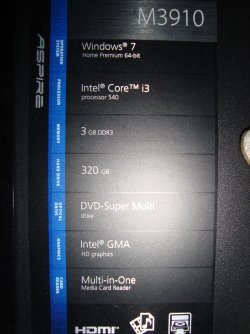
This is the actual spec of my Acer Aspire pc. About 8 years old. Wondered if there was anything I could change with pc for now to boost browsing speed - especially the loading of certain web pages?
 

Attachments

  • DSC01582.jpg
    DSC01582.jpg
    769.9 KB · Views: 0

My Computer

Computer type
PC/Desktop
Computer Manufacturer/Model Number
Acer Aspire Desktop M3910
OS
Windows 7 Home Premium 64 bit SP1
CPU
Intel i3 540
Memory
3GB DDR3SD
Monitor(s) Displays
LG Flatron L1960TR
Screen Resolution
1280x1024
Keyboard
Acer
Mouse
Genius
Antivirus
Avast (Free)
Browser
I E 11
Probably the CPU. Though, I'd think that should be sufficient. Do you have a bunch of add-ons or plug-ins installed in the browser?

Give Firefox portable and Chrome portable a try once and see if there's still a slow down. If there is, chances are it's CPU related.

Another thought. Try going into the browser settings and turning off hardware acceleration or what ever it's called. That can sometimes do bad things and I just turn it off.

Mozilla Firefox, Portable (browser) | PortableApps.com

Google Chrome Portable (web browser) | PortableApps.com
 

My Computer

Computer type
PC/Desktop
OS
Windows 7 Ultimate x64
I haven't added any add ons or plug ins. Would there be some already there from installation? I disabled things like Pocket, and haven't used Hardware Acceleration as I read it's not much use unless I have a second, dedicated graphics GPU.


Download speed was 10.55, upload speed 0.78 latency 114 (ms). Not sure if that's good or bad.


Slow page loading is worse when when have 5 or more tabs open and seems worse when some sites open, eg. Youtube. Seems to be slow sometimes, lightning others. As said before, I don't know much about PCs.
 

My Computer

Computer type
PC/Desktop
Computer Manufacturer/Model Number
Acer Aspire Desktop M3910
OS
Windows 7 Home Premium 64 bit SP1
CPU
Intel i3 540
Memory
3GB DDR3SD
Monitor(s) Displays
LG Flatron L1960TR
Screen Resolution
1280x1024
Keyboard
Acer
Mouse
Genius
Antivirus
Avast (Free)
Browser
I E 11
That seems indicative of an under powered CPU. And the reason why I say this is because you state having multiple tabs open causes a slow down and it would be the fact of multiple tabs taxing the CPU speed. Also, YouTube now renders video via HTML5 which uses the CPU for processing. So if you have a slow CPU you'll get poor performance.

I'm very familiar with type of behavior on a netbook that sports an old and slow Atom-based CPU and it's ungodly slow with modern websites that make use of a lot of java script for website content delivery. All that HTML and Java Script is processed by the CPU and so being if the CPU is slow you'll suffer from very poor and unspunky performance.


If you don't know anything about computers, then I can't really help you on upgrading the CPU to something that is fast yet compatible with your motherboard. I could suggest a CPU based on your budget and you could have a PC shop install it, but by the time you figure in the cost for all that you could just buy yourself a laptop that's a few years old that will be a lot faster than what you have now.

Another thing about your computer is that it looks like it's only a SATA II hard drive capable further stifling PC performance. I'm sure it takes a good 5-8 seconds just to launch the browser seen as how you only have SATA II speed.

It also appears your CPU is dated from 2010. That's a ten year old CPU. Almost to the date since that CPU came out in quarter 2 of 2010 according to Intel specs.

You could probably spend about $600 on an AMD Ryzen-based desktop which would be far more superior to what you have now and have a PC shop build it. I could come up with a parts list from PCpartpicker. I'm not the absolute best picking parts for someone unless it's for myself, but I can see about hunting down parts to fit your budget all the while trying to stick to good reputable name brands of PC parts that I've come to trust over the years.

The other option is to just buy a good, reputable, well reviewed Dell Latitude laptop. The Latitude model line from Dell was a model line for business use and they do have a good reputation. Only issue is that they are now outdated, but I know one of these laptops will suffice for just Internet surfing, printing and office work. I'm now typing on a Dell Latitude E6530. It's a pretty nice laptop, but the only thing I don't like about it is that the middle mouse button is at the top where my old Dell Precision M6300 middle mouse button was on the bottom and because the button is at the top I have a tendency of accidentally hitting it with my finger. That may not be true for you or others though.

This laptop is also SATA III capable and I use a SSD drive which makes it a little faster. The CPU is an i5 dual core, but like I said, it will allow you to surf the net and do office work at ease. Just don't expect to play the latest Call Of Duty Modern Warfare on it. LOL

There are many different types of Latitudes and you can look at them all on eBay and do research on them based on reviews from multiple websites. eBay will also have their own reviews sometimes.
 

My Computer

Computer type
PC/Desktop
OS
Windows 7 Ultimate x64
Firefox v56 with older comparable extensions for a 'true' classic look. IOW'yourbrowser doesn't look like Chrome-Dome' or something from M$. :sarc:.
 

My Computers

System One System Two

  • Computer type
    Laptop
    Computer Manufacturer/Model Number
    Toshiba
    OS
    Win7 x64
    CPU
    AMD
  • Computer type
    PC/Desktop
    System Manufacturer/Model Number
    AMD based MB
    OS
    Win 7 Pro x64
    CPU
    AMD FX-8350
    Motherboard
    Gigabyte GA-970A-D3P
    Memory
    16GB
    Graphics Card(s)
    nVidia GeForce 1060
    Monitor(s) Displays
    25"
    Screen Resolution
    1920x1200
    Hard Drives
    two SSD;
    two 4TB HDD
    PSU
    700watt Seasonic
    Internet Speed
    300MB up & down
    Browser
    Firefox
    Other Info
    BD Recorder
Late to this party but have fiddled recently with Brave as a Chromium-based alternative to [evil] Google Chrome. It's wicked fast but it reminds me always that Chromium-based browsers (at least that I have found) have a lousy Print capability with extra steps and no header/footer options. But I have sometimes a need for a Chromium-based browser (for a security website) and will keep Brave in the tray for that.

But I keep coming-back to Firefox time and time again and so my goto is the ESR release channel now 68.7.0esr (64-bit).

p.s. Trying to use Brave with ancestry.com was an exercise in frustration and I gave it up because of that. Kept bugging me about local storage not enabled and no amount of surfing on the issue helped me to fix it.
 

My Computer

Computer type
Laptop
Computer Manufacturer/Model Number
Dell Latitude E6540 Laptop
OS
Windows 7 Professional 64bit
CPU
Intel Core i7 4600M @ 2.90GHz
Motherboard
Dell Inc. 0CYT5F (SOCKET 0)
Memory
16.0GB Dual-Channel DDR3 @ 797MHz (11-11-11-28)
Graphics Card(s)
Intel HD Graphics 4600 (Dell) 2048MB ATI AMD Radeon HD 8790M
Sound Card
Realtek High Definition Audio
Monitor(s) Displays
HP ZR30w (2560x1600@60Hz)
Hard Drives
256GB LITEONIT LMT-256M6M-41 mm SATA (SSD)
1TB Samsung SSD 860 EVO mSATA SATA (SSD)
2TB USB 3.0 USB Device
115GB SanDisk Ultra Fit USB
Other Info
Multiple Dell E-Port Plus II Port Replicator/Docking Stations 0Y72NH USB 3.0 + 130W AC Adapters

My Computer

Computer type
PC/Desktop
Computer Manufacturer/Model Number
medionl/Aspire 6930G/acer x55a
OS
W7 home premium 32bit/W7HP 64bit/w10 tp insider ring
CPU
E5300 dual core
Motherboard
medion MS7366
Memory
3gb
Graphics Card(s)
Nvidia Geforce 7100 Nforce 630i
Monitor(s) Displays
avixc
Internet Speed
n (isp resticted to 72)
Antivirus
mse/pands
Browser
palemoon
Other Info
Belkin Fd7050 n USB using Railink RT2870 drivers, more upto date

My Computer

Computer type
Laptop
Computer Manufacturer/Model Number
Dell Latitude E6540 Laptop
OS
Windows 7 Professional 64bit
CPU
Intel Core i7 4600M @ 2.90GHz
Motherboard
Dell Inc. 0CYT5F (SOCKET 0)
Memory
16.0GB Dual-Channel DDR3 @ 797MHz (11-11-11-28)
Graphics Card(s)
Intel HD Graphics 4600 (Dell) 2048MB ATI AMD Radeon HD 8790M
Sound Card
Realtek High Definition Audio
Monitor(s) Displays
HP ZR30w (2560x1600@60Hz)
Hard Drives
256GB LITEONIT LMT-256M6M-41 mm SATA (SSD)
1TB Samsung SSD 860 EVO mSATA SATA (SSD)
2TB USB 3.0 USB Device
115GB SanDisk Ultra Fit USB
Other Info
Multiple Dell E-Port Plus II Port Replicator/Docking Stations 0Y72NH USB 3.0 + 130W AC Adapters
Back
Top