What's the best browser to use with W7?

Jumplists are kind of neat, but that doesn't mean I can flip3d between mozilla tabs does it?


Not yet AFAIK, ;) although as Windows 7 is still at the pre-release stage you have to expect Microsoft's own apps to be ahead with support for the new features of the OS at this stage. I think that by the actual release in that apps such as Firefox will be fully compliant
 

My Computers My Computers

  • At a glance

    Windows 11 Pro x64 [Latest Release and Releas...Ryzen 9 5950X, 3.8 - 5.2 MHz64GB [2 x 32GB] DDR4 3200MHz4GB NVIDIA GEFORCE GTX 1650 Ti
    Computer type
    PC/Desktop
    Computer Manufacturer/Model Number
    ChillBlast - Custom to my design
    OS
    Windows 11 Pro x64 [Latest Release and Release Preview]
    CPU
    Ryzen 9 5950X, 3.8 - 5.2 MHz
    Motherboard
    Asus Prime X570-Pro
    Memory
    64GB [2 x 32GB] DDR4 3200MHz
    Graphics Card(s)
    4GB NVIDIA GEFORCE GTX 1650 Ti
    Sound Card
    On-board SPDIF to 5.1 System + HDMI [5.1 system]
    Monitor(s) Displays
    32" UHD 32 Bit HDR Monitor + 43" UHD 4K 32Bit HDR TV
    Screen Resolution
    2 x 3840 x 2160 @60Hz
    Hard Drives
    1TB M2 SSD OS, 500GB Fast Access SSD, 2 x 8TB Data + Various Externals from 1TB to 4TB, 10TB NAS
    PSU
    NZXT C750 80 PLUS Gold 750W Modular PSU
    Case
    Workstation Case [Matt Black]
    Cooling
    NZXT Kraken X63 280mm CPU Cooler +2x Quiet Case fans
    Keyboard
    Logitech Wireless MX Keys & K400 + others
    Mouse
    Logitech Wireless MX Master 3S
    Internet Speed
    920 MB Down 50 MB Up
    Antivirus
    BitDefender Total Security Pro
    Browser
    Chrome (always run latest Non-Beta)
    Other Info
    Also run ...
    Laptop - Quad 8GB - Windows 10 Pro x64
    Nexus 7 Android tablet x2
    Samsung 10.2" tablet
    Blackview TAB 8 4G Android Tablet c/w Keyboard
    Wacom Intuos Pro Medium Pen Pad
    Wacom Intuos Pro Small Pen Pad
    Wacom Expresskeys Remote
    Loopdeck+ Graphics Controller
    Shuttle Pro v2 Control
  • At a glance

    Windows 11 Pro x64 Latest RPIntel I7 10750H 5.0GHz32GB [2x16GB] DDR4 2933 MHznVidia GTX1650Ti 4 GB GDDR6
    Computer type
    Laptop
    System Manufacturer/Model Number
    Dell XPS 17 10750H
    OS
    Windows 11 Pro x64 Latest RP
    CPU
    Intel I7 10750H 5.0GHz
    Motherboard
    Dell XPS
    Memory
    32GB [2x16GB] DDR4 2933 MHz
    Graphics Card(s)
    nVidia GTX1650Ti 4 GB GDDR6
    Sound Card
    Stock [Realtek] 4 Speaker
    Monitor(s) Displays
    17" IPS UHD+ Infinity Edge Touchscreen
    Screen Resolution
    3840 x 2400
    Hard Drives
    2TB M2 NVMe, 4TB External + various 500GB & 1TB External NVMe (also have access to spinner HDD from
    PSU
    Stock
    Case
    Stock XPS Aluminium & Carbon Fibre
    Cooling
    Stock - Active Fan Control
    Keyboard
    Backlit + Various Logitech
    Mouse
    Stock Track Pad + Logitech MX Trackball
    Internet Speed
    72 MB Down 18MB Up
    Browser
    Chrome
    Other Info
    Also run ...
    Laptop - Quad 8GB - Windows 10 Pro x64
    Nexus 7 Android tablet x2
    10.2" tablet
    Sony Z3 Android Smartphone
    Wacom Intuos Pro Medium Pen Pad
    Wacom Intuos Pro Small Pen Pad
    Wacom Expresskeys Remote
    Loopdeck+ Graphics Controller
    Shuttle Pro v2 Control Pad
    10TB NAS
All I do to navigate between tabs is Ctrl Tab.

I noticed if I have 2 tabs open in SRWare Iron, Ctrl+Tab will take me to the first tab but not back to the 2nd tab. I tried adding shift but that didn't work, is there a way to do that?
 

My Computer My Computer

At a glance

Windows 7 Ultimate 64-bit
Computer type
PC/Desktop
OS
Windows 7 Ultimate 64-bit
FireFox 4 is best till now....
 

My Computer My Computer

At a glance

Windows 7 Home Premium 64bitIntel Core i34 GBATI Mobility Radeon 512 MB
Computer Manufacturer/Model Number
Dell Inspiron 15R
OS
Windows 7 Home Premium 64bit
CPU
Intel Core i3
Memory
4 GB
Graphics Card(s)
ATI Mobility Radeon 512 MB
Monitor(s) Displays
1366x768 HD WLED
Hard Drives
320 GB
IE9: Great overall browser. Put any website in it, and it will crunch it out correctly. (compatibility mode) Even ones from the late 90's. Secure and very fast.

Firefox: Very customisable, very secure, lacks in resource efficiency and speed compared to others.

Chrome: Flat out fast, very secure, but little of anything else beyond that... I have several problems with compatibility sometimes. HOWEVER, it has a wonderful feature of having flash player and pdf reader built in! That means you don't need to have a separate plug in on your computer or worry about updates!

Opera: Probably my favorite. Great features! You can sync it across all of your electronics, integrate your mail boxes into it. Incredibly secure (Hackers use it) Fastest software acceleration out of all browsers, but lacks hardware acceleration. Very fast. Also, very customizable.

Bottom line:
All of the browsers are just about equal nowadays in terms of speed, especially on an OS like W7. All of them will work very, very well. However, you will have to try each and see what your personal perference is. For example, I don't like how FF renders big pages like BBC News, or how Chrome doesn't let you "open" a download, you can only save it on your computer, and then open it. Opera has several issues with compatibility. I even see that Amamzon.com doesn't look the same as the other browsers when you using it.

Right now, I am totally loving IE9. It seems to have the best of all worlds thus far. It has tracking protection, a form of NoScript that I personally love, called "ActiveX Filtering" built in.

Hope that helps...
 

My Computer My Computer

At a glance

Windows 8 ProCore 2 Duo P8600 2.4 ghz4GB DDR2ATI Radeon 4570 512MB
Computer Manufacturer/Model Number
Dell Studiio 1555
OS
Windows 8 Pro
CPU
Core 2 Duo P8600 2.4 ghz
Memory
4GB DDR2
Graphics Card(s)
ATI Radeon 4570 512MB
Sound Card
IDT High Definition
Monitor(s) Displays
15.6"
Screen Resolution
1920x1080
Hard Drives
250GB 7200 RPM SATA
Opera hands down! Best there.
 

My Computer My Computer

At a glance

Windows 8.1 ProCore i5 44404GB Corsair Vengeance DDR3Sapphire Ati Radeon R7 240
Computer type
PC/Desktop
Computer Manufacturer/Model Number
Self Hand Build
OS
Windows 8.1 Pro
CPU
Core i5 4440
Motherboard
Gigabyte GA H97M-DS3P
Memory
4GB Corsair Vengeance DDR3
Graphics Card(s)
Sapphire Ati Radeon R7 240
Sound Card
ASUS Xonar DX - Fiio E10 - Audio Technica M50
Monitor(s) Displays
Panasonic L42ET60D & Dell 2240L (Dual Display)
Screen Resolution
1920X1080
Hard Drives
Samsung 850 Pro 128 GB
1 TB WD Green.
3 TB WD Green
1 TB WD External
PSU
Corsair VS350
Case
Corsair Carbide 400R
Cooling
Stock
Keyboard
Logitech
Mouse
Logitech Optical/MX518.
Internet Speed
60 KBps (Things are different in India LOL)
Antivirus
AVIRA Free Edition
Browser
Waterfox
Other Info
Previous set-up:
E6300>E2140 @3.6 Ghz>Q6600 @ 3.8 Ghz with Thermaltake Ultima 90.
Nvidia 8600GT>8800 GT>ATI 4850>ATI 3450>ATI 5770>ATI 3100>ATI R7 240.
Intel DG965WH>ASUS P5B>ABIT IP35-E>Gigabyte G31-S2L> Gigabyte GA78LMT-USB3>Gigabyte H97M-DS3P.
Corsair Value Select 2GB>Crucial Ballistix 2GB>GSkill 2GB>Corsair Vengeance 4GB.
Matrix Server Chassis (with 12 Glacialtech Fans)>Coolermaster Elit
Opera hands down! Best there.

I'm with you on that one :)
I do tend to flick to firefox (4.0) here and there.

Although i must say, the final release of IE9 is better than i expected :thumbsup:

Regards,
JDobbsy1987
 

My Computer My Computer

At a glance

Windows 8.1 Pro x64Intel Core i5-2500K @ 3.30GHz - S11558GB Corsair DDR3 XMS3, PC3-12800NVIDIA GeForce GTX 650
Computer type
PC/Desktop
Computer Manufacturer/Model Number
Self Built
OS
Windows 8.1 Pro x64
CPU
Intel Core i5-2500K @ 3.30GHz - S1155
Motherboard
Asus P8P67 LE Rev3, Intel P67, S115
Memory
8GB Corsair DDR3 XMS3, PC3-12800
Graphics Card(s)
NVIDIA GeForce GTX 650
Sound Card
On-Board
Monitor(s) Displays
3 x 24" {Extended Display}
Screen Resolution
1920 x 1080
Hard Drives
300GB Seagate Barracuda 7200
PSU
550W Coolermaster GX550
Case
Silverstone Precision PS04B
Cooling
Stock
Keyboard
Logitech K120
Mouse
World of Warcraft Cataclysm MMO Gaming Mouse
Internet Speed
80 MB
Antivirus
MSE / Windows Defender
Browser
Chrome
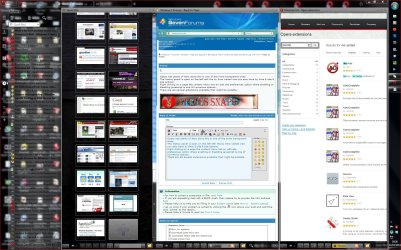
Opera has plenty of Aero skins this is one of the more transparent ones.
The history panel is open on the left with the by time visited view you also have by time & site & site options.
Right clicking on a page the context menu has an edit site preferences option where enabling or disabling javascript is one of numerous options.
There are also several extensions available that might be suitable.
 

Attachments

  • cap lat.JPG
    cap lat.JPG
    357.2 KB · Views: 57

My Computer My Computer

At a glance

Windows 7 Ultimate 64 bitIntel Core i7 4770K overclocked to 4.7GHz Qua...16GB Team Group Vulcan Gold 2133MHzATI Radeon HD 7880 Series Display adapter
Computer type
PC/Desktop
Computer Manufacturer/Model Number
self build
OS
Windows 7 Ultimate 64 bit
CPU
Intel Core i7 4770K overclocked to 4.7GHz Quad Core Haswell
Motherboard
Asus Z87 Pro (Socket 1150) ATX Motherboard
Memory
16GB Team Group Vulcan Gold 2133MHz
Graphics Card(s)
ATI Radeon HD 7880 Series Display adapter
Monitor(s) Displays
NEC LCD2690WUXi2
Screen Resolution
26" 1920 x 1200
Hard Drives
Samsung 500GB SSD 840 EVO SATA 6Gb/s
Samsung 250GB SSD 840 EVO SATA 6Gb/s
PSU
Corsair AX760 Platinum
Case
Cooler Master HAF X Gaming Tower
Cooling
XSPC RayStorm 750 RS360 Water cooling
Mouse
Razer Death Adder left handed
Internet Speed
126Mb download 11.5Mb up
Antivirus
Avast free
Browser
Opera
Other Info
Main Browser is Opera
Favorite software Adobe Lightroom & Photoshop
best plugins Nik software
Firewall : Private firewall 7
Opera has plenty of Aero skins this is one of the more transparent ones.
The history panel is open on the left with the by time visited view you also have by time & site & site options.
Right clicking on a page the context menu has an edit site preferences option where enabling or disabling javascript is one of numerous options.
There are also several extensions available that might be suitable.

Hi,

If you don't mind me asking...

How have you split the web pages into 3 sections?
Also what is the name of that theme?

Regards,
JDobbsy1987
 

My Computer My Computer

At a glance

Windows 8.1 Pro x64Intel Core i5-2500K @ 3.30GHz - S11558GB Corsair DDR3 XMS3, PC3-12800NVIDIA GeForce GTX 650
Computer type
PC/Desktop
Computer Manufacturer/Model Number
Self Built
OS
Windows 8.1 Pro x64
CPU
Intel Core i5-2500K @ 3.30GHz - S1155
Motherboard
Asus P8P67 LE Rev3, Intel P67, S115
Memory
8GB Corsair DDR3 XMS3, PC3-12800
Graphics Card(s)
NVIDIA GeForce GTX 650
Sound Card
On-Board
Monitor(s) Displays
3 x 24" {Extended Display}
Screen Resolution
1920 x 1080
Hard Drives
300GB Seagate Barracuda 7200
PSU
550W Coolermaster GX550
Case
Silverstone Precision PS04B
Cooling
Stock
Keyboard
Logitech K120
Mouse
World of Warcraft Cataclysm MMO Gaming Mouse
Internet Speed
80 MB
Antivirus
MSE / Windows Defender
Browser
Chrome
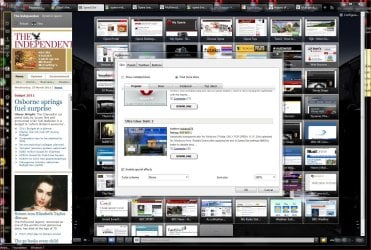
Way back when the world was young & Opera was just a toddler instead of tabs it used a Multiple document interface to open windows inside the main window , you can still use the MDI today by right clicking on a blank part of the tab bar then Arrange & choose from the Cascade, tile vertically & tile horizontally options. Each sub window can have a different zoom level etc....
the skin is Ultra Glass static 2 :)

edit The Independent news is not a tab, its a panel you can drag any tab onto the panels bar & have it as a panel
 

Attachments

  • skin.JPG
    skin.JPG
    279.1 KB · Views: 15

My Computer My Computer

At a glance

Windows 7 Ultimate 64 bitIntel Core i7 4770K overclocked to 4.7GHz Qua...16GB Team Group Vulcan Gold 2133MHzATI Radeon HD 7880 Series Display adapter
Computer type
PC/Desktop
Computer Manufacturer/Model Number
self build
OS
Windows 7 Ultimate 64 bit
CPU
Intel Core i7 4770K overclocked to 4.7GHz Quad Core Haswell
Motherboard
Asus Z87 Pro (Socket 1150) ATX Motherboard
Memory
16GB Team Group Vulcan Gold 2133MHz
Graphics Card(s)
ATI Radeon HD 7880 Series Display adapter
Monitor(s) Displays
NEC LCD2690WUXi2
Screen Resolution
26" 1920 x 1200
Hard Drives
Samsung 500GB SSD 840 EVO SATA 6Gb/s
Samsung 250GB SSD 840 EVO SATA 6Gb/s
PSU
Corsair AX760 Platinum
Case
Cooler Master HAF X Gaming Tower
Cooling
XSPC RayStorm 750 RS360 Water cooling
Mouse
Razer Death Adder left handed
Internet Speed
126Mb download 11.5Mb up
Antivirus
Avast free
Browser
Opera
Other Info
Main Browser is Opera
Favorite software Adobe Lightroom & Photoshop
best plugins Nik software
Firewall : Private firewall 7
Thank you very much for the info

Regards,
JDobbsy1987
 

My Computer My Computer

At a glance

Windows 8.1 Pro x64Intel Core i5-2500K @ 3.30GHz - S11558GB Corsair DDR3 XMS3, PC3-12800NVIDIA GeForce GTX 650
Computer type
PC/Desktop
Computer Manufacturer/Model Number
Self Built
OS
Windows 8.1 Pro x64
CPU
Intel Core i5-2500K @ 3.30GHz - S1155
Motherboard
Asus P8P67 LE Rev3, Intel P67, S115
Memory
8GB Corsair DDR3 XMS3, PC3-12800
Graphics Card(s)
NVIDIA GeForce GTX 650
Sound Card
On-Board
Monitor(s) Displays
3 x 24" {Extended Display}
Screen Resolution
1920 x 1080
Hard Drives
300GB Seagate Barracuda 7200
PSU
550W Coolermaster GX550
Case
Silverstone Precision PS04B
Cooling
Stock
Keyboard
Logitech K120
Mouse
World of Warcraft Cataclysm MMO Gaming Mouse
Internet Speed
80 MB
Antivirus
MSE / Windows Defender
Browser
Chrome
So you use mozilla and noscript but you are just theorizing a way I could accomplish the same with IE? Why am I not comforted in that...

It's not a theory, it works.

Set your internet zone to a more restrictive level, customize it. Then put trusted sites into your trusted zone which allows scrips and anyone of 50 other options to run or not run. This functionality is (and always has been) built in.

It's just not quite as flexible as some of the FF plugins because there are only three zones to play with so you can't set exact settings per website. Just a general trust, no trust and REALLY no trust settings. All websites default to "Internet" zone settings unless you put them in "Trusted" or "Untrusted" lists. (Generally though "Internet" should be considered "Untrusted" as far as it goes with scripting and most other things disabled)
 
Last edited:

My Computer My Computer

At a glance

Windows 7 x64 Ultimatei7 96012 Gig Corsair DominatorNvidia 480
Computer Manufacturer/Model Number
Scratch built
OS
Windows 7 x64 Ultimate
CPU
i7 960
Motherboard
Asus P6X58D
Memory
12 Gig Corsair Dominator
Graphics Card(s)
Nvidia 480
Sound Card
Maudio Delta 44 + breakout box
Monitor(s) Displays
Dell UltraSharp U2410 24in and Samsung 21 dual monitors
Screen Resolution
1920x1200 and 1280x1024
Hard Drives
Primary: Intel X-25M G2 160G SSD
Secondary: Segate baracuda 1.0 TB
HDs in AHCI mode.
PSU
Corasair TX850
Case
Cooler Master HAF
Cooling
Corsair H50
Keyboard
Logitech G15 + N52 game pad
Mouse
Logitech MX518
Internet Speed
15kbs down 4.5kbps up
Other Info
WEI 7.6
CPU & RAM 7.6
Graphics 7.9
Hard disk 7.7
Chrome ATM between the latest browsers: Internet Explorer 9 and Firefox 4.

Firefox 3.x is my all time favorite, guess I'll just wait till they fix up Firefox 4 or release Firefox 5.

:p
 

My Computer My Computer

At a glance

Windows 7 ProfessionalIntel Core i7-2670QMSamsung 8GBNVIDIA GT 555M
OS
Windows 7 Professional
CPU
Intel Core i7-2670QM
Memory
Samsung 8GB
Graphics Card(s)
NVIDIA GT 555M
Hard Drives
Intel 525 120GB | HGST Travelstar 1TB
Mouse
CM Storm Xornet | Microsoft Sculpt Comfort
Internet Speed
25 Mbps | 600 Kbps
Other Info
Centrino 6205 | Seagate Backup Plus 1TB
to me is IE9
 

My Computer My Computer

At a glance

Windows 7 Ultimate x64DualCore Intel Core i3 530, 2933 MHz (22 x 133)6 GB DDR3Nvidia GT430 1GB DDR3
Computer Manufacturer/Model Number
H55M-D2H
OS
Windows 7 Ultimate x64
CPU
DualCore Intel Core i3 530, 2933 MHz (22 x 133)
Memory
6 GB DDR3
Graphics Card(s)
Nvidia GT430 1GB DDR3
Sound Card
Intel HDMI @ Intel Ibex Peak PCH - High Definition Audio Con
Monitor(s) Displays
CMC 22 W
Screen Resolution
1152 X 864
Hard Drives
Drive #1 - 500 GB
Drive #2 - 1 TB
Keyboard
Microsoft Wired Keyboard 600
Mouse
Microsoft Basic Optical Mouse
Internet Speed
20 mb download 1MB upload
Other Info
Microsoft® LifeCam HD-3000
I personally find myself jumping between Firefox, Opera and Comodo Dragon. All three are great browsers.
 

My Computer My Computer

At a glance

Windows 7 Home Premium 64bit
OS
Windows 7 Home Premium 64bit
Motherboard
Mommy
My choice would be Internet Explorer 9

Add-ons:
Advanced IE History Bar - Click Here
Quick History For Google And IE - Click Here


These are both useful, I prefer the Advanced IE History Bar myself.
 

My Computer My Computer

At a glance

Windows 7 Home Premium 64-bitIntel® Core™ i7 990X Processor Extreme Editio...6GB [2GB X3] DDR3-1600 - Corsair(x2) ATI Radeon HD 5770 - 1GB - Core: 875MHz ...
Computer Manufacturer/Model Number
American Megatrends, Inc.
OS
Windows 7 Home Premium 64-bit
CPU
Intel® Core™ i7 990X Processor Extreme Edition (6x 3.46GHz)
Motherboard
[SLI] ASUS Sabertooth X58
Memory
6GB [2GB X3] DDR3-1600 - Corsair
Graphics Card(s)
(x2) ATI Radeon HD 5770 - 1GB - Core: 875MHz CrossFire Mode
Sound Card
Creative Labs Sound Blaster X-Fi Xtreme Audio
Monitor(s) Displays
Sceptre 24" LCD
Screen Resolution
1920x1080
Hard Drives
1 TB HARD DRIVE -- 64M Cache, 7200 RPM, 6.0Gb/s
PSU
750 Watt -- Thermaltake TR2 TRX-750M
Case
Thermaltake V9 BlacX Edition Gaming Case - Black
Cooling
Asetek 550LC Liquid Cooling System (Intel) Standard 120mm
Yep, with your system specs, IE 9 is the best way to go. It's pretty, rather reliable, and uber fast. I believe IE 9 still holds the rank of the best browser compared to chrome, firefox, safari, and opera. My reference is Tom's Hardware Guide's review of the browsers.
 

My Computer My Computer

At a glance

Windows 7 Ultimate x64AMD Athlon 240 II @ 2.8-4.004 ghzSuperTalent 4gb DDR3ATI Radeon 3000HD
Computer Manufacturer/Model Number
ASUS
OS
Windows 7 Ultimate x64
CPU
AMD Athlon 240 II @ 2.8-4.004 ghz
Motherboard
M4A78LT-M LE
Memory
SuperTalent 4gb DDR3
Graphics Card(s)
ATI Radeon 3000HD
Screen Resolution
1440*900
Case
Re-modded Dell Dimension 4550
Cooling
Vantec 92mm Tornado x2
Other Info
It looks pretty.
Internet Explorer 9 (32bit) rocks for me :cool:
 

My Computer My Computer

At a glance

Windows 7 Home Premium 64bit SP1AMD Athlon™ Neo MV-40 Processor Technology 1....4 GBATI Radeon HD3200
Computer type
PC/Desktop
Computer Manufacturer/Model Number
Micro Stars Int. / U230 Light-087US
OS
Windows 7 Home Premium 64bit SP1
CPU
AMD Athlon™ Neo MV-40 Processor Technology 1.60 GHz
Motherboard
AMD RS-880MN+SB710
Memory
4 GB
Graphics Card(s)
ATI Radeon HD3200
Monitor(s) Displays
LCD 11.6" HD
Screen Resolution
1366 x 768
Hard Drives
250GB SATA
Internet Speed
Gigabit LAN 10/100/1000
Other Info
3.3 lbs (with 4hour 6 cell battery)
1.3 MP Webcam
USB2.0 X 3
HDMI out
Over the years I have used most browsers out there. Firefox has interesting ad-ons that can quickly turn the browser into 'bloatware'; Chrome is clean and fast, with possibly the most unattractive GUI I have seen and it collects pop-unders like nobody's business; Opera comes really close to my ideal, but it is not terribly fast and IE8 is well, IE8. However, I have found my ideal browser in IE9, clean, fast and secure. I have always wanted to like an IE browser for it's integration with the OS and now I finally can.
 

My Computer My Computer

At a glance

Windows 7 Home Premium 64bitIntel i5 - 760 (Quad)G.SKILL F3-10666CL9D-8GBRL Ripjaws (4x4Gb)Gigabyte HD 4670
Computer Manufacturer/Model Number
self built
OS
Windows 7 Home Premium 64bit
CPU
Intel i5 - 760 (Quad)
Motherboard
Intel DP55KG Extreme Series
Memory
G.SKILL F3-10666CL9D-8GBRL Ripjaws (4x4Gb)
Graphics Card(s)
Gigabyte HD 4670
Sound Card
Creative Audigy 2 ZS
Monitor(s) Displays
Acer X223W
Screen Resolution
1680 x 1050
Hard Drives
1x Kingston 128G SSD (Boot Drive)
2x Western Digital Black 1Tb
1x Samsung 2Tb
1x Western Digital VelociRaptor 150G
1x Hitachi Deskstar 3TB
PSU
Seasonic S12D750 750W
Case
Fractal Design Define R3 Black
Cooling
Stock Intel i5 cooler over 4x120mm Fans and 1x140mm Fan
Keyboard
MS Razor
Mouse
MS Wireless Laser Mouse 7000
Internet Speed
25Mbps Down, 950Kbps Up
Other Info
All the hardware works perfectly with Win7. Index of 6.7 with Gigabyte HD 4670 graphics.
I used Firefox for a good few years but got fed up with my favorite addons not being updated very quickly. I then spent a year using Opera until the speed dial feature was changed to my disliking. Next I looked at Google Chrome and didn't like the privacy element, especially the connection to Google servers at every keystroke. Google Chrome also installs an updater which loads at every Windows start - no thanks.

I then came across SRWare Iron (based on Chromium source code) which has all the benefits of Google Chrome, without the points mentioned. Iron is compatible with most Google Chrome addons and overall is a nice balance of the things I like in a browser.

When IE9 was released I decided to give it a whirl, and although it is much improved it just doesn't tick enough of the boxes for me. So I'll be sticking with Iron for the foreseeable future...
 

My Computer My Computer

At a glance

Windows 7
Computer type
PC/Desktop
OS
Windows 7
Anything of a privacy concern can be turned off in Google Chrome now.

Unlike SRWare Iron, Google Chrome has a flash and PDF plug-in built in and you can clear Flash Local Shared Objects using the Google Chrome interface.
 

My Computer My Computer

At a glance

Arch Linux 64-bit
OS
Arch Linux 64-bit
Back
Top